
# Integrate Shopify Review apps

### Recommended Shopify Product Review apps

These are the review apps currently available on [Shopify Apps ](https://apps.shopify.com/)that work natively with Minimog theme and will require no extra code:

* [Growave](https://foxecom.com/pages/partners/growave-loyalty-wishlist?utm_source=minimog+help+center\&utm_medium=article\&utm_campaign=review+apps) - get a **60-day free trial** and a lifetime discount of **20%**
* [Judge.me](https://foxecom.com/pages/partners/judgeme-product-reviews?utm_source=minimog+help+center\&utm_medium=article\&utm_campaign=review+apps) - get **45 days of free trial**
* [Ali Reviews](https://apps.shopify.com/ali-reviews)&#x20;
* [Loox](https://foxecom.com/pages/partners/loox-product-reviews-photos?utm_source=minimog+help+center\&utm_medium=article\&utm_campaign=review+apps) - get **30 days of free trial**&#x20;
* [LAI Product Reviews](https://foxecom.com/pages/partners/lai-ali-reviews-product-reviews?utm_source=minimog+help+center\&utm_medium=article\&utm_campaign=review+apps) - Get a **discount of 30% on all Paid Plans**&#x20;
* [Stamped Product Reviews & UGC](https://apps.shopify.com/product-reviews-addon)&#x20;
* [Yotpo Product Reviews & UGC](https://apps.shopify.com/yotpo-social-reviews)
* [Automizely Product Review App](https://foxecom.com/pages/partners/automizely-product-reviews?utm_source=minimog+help+center\&utm_medium=article\&utm_campaign=review+apps) - get a discount of **10% for** 12 months
* [Ryviu: Product Reviews & QA](https://foxecom.com/pages/partners/ryviu-product-reviews-qa?utm_source=minimog+help+center\&utm_medium=article\&utm_campaign=review+apps) - get a discount of **30% for 3 months**&#x20;

### How to enable the Product Review app on the theme
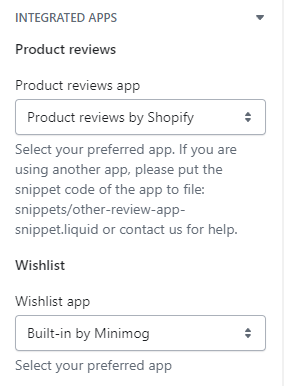
Step 1: Go to **Theme settings** > **Integrated apps** > **Product reviews app** and choose the app as preferred.

<figure><img src="/files/z3o6wBTKhODZpoIuqmBd" alt=""><figcaption></figcaption></figure>

Step 2: Choose where to display your Review Widget and Preview Badge (product page, collection page).

* **Review widget** is the core widget, which collects and shows the product reviews on your product pages. On your product page, add **Product reviews** section or in **Product information tabs** section > add **Product reviews** block to display this widget.
* **Rating/Badge** shows the number of your product reviews and the aggregate rating of your products.&#x20;
  * Go to **Theme settings** > **Product card** > Tick in the **show reviews badge** box to display it on your **Collection page and product listing**.
  * Go to **Product information** section > **Product rating** to display it under the product title on the **Product page**.

<figure><img src="/files/SX65AqudlKxDPLIUfi25" alt=""><figcaption><p><a href="https://apps.shopify.com/xflow?utm_source=foxecom&#x26;utm_medium=help_center_minimog&#x26;utm_campaign=banner">Install XFlow Back In Stock Automation FREE</a></p></figcaption></figure>


---

# Agent Instructions: Querying This Documentation

If you need additional information that is not directly available in this page, you can query the documentation dynamically by asking a question.

Perform an HTTP GET request on the current page URL with the `ask` query parameter:

```
GET https://docs.foxecom.com/minimog-theme/getting-started/integrate-shopify-review-apps.md?ask=<question>
```

The question should be specific, self-contained, and written in natural language.
The response will contain a direct answer to the question and relevant excerpts and sources from the documentation.

Use this mechanism when the answer is not explicitly present in the current page, you need clarification or additional context, or you want to retrieve related documentation sections.
