# Does Zest support Section groups?

{% hint style="info" %}
✨ The **Section groups** feature **is supported in Zest theme** **version 4.0.0 and above**. ✨\
View [Changelog](https://help.foxecom.com/changelog/zest?utm_source=foxecom\&utm_medium=help_center_zest_does_zest_support_section_groups\&utm_campaign=anchor_text\&utm_term=changelog).
{% endhint %}

## What are section groups?

Section groups let you group certain sections together in a theme.&#x20;

This allows you as a merchant to add, remove, and reorder sections directly in the theme editor.

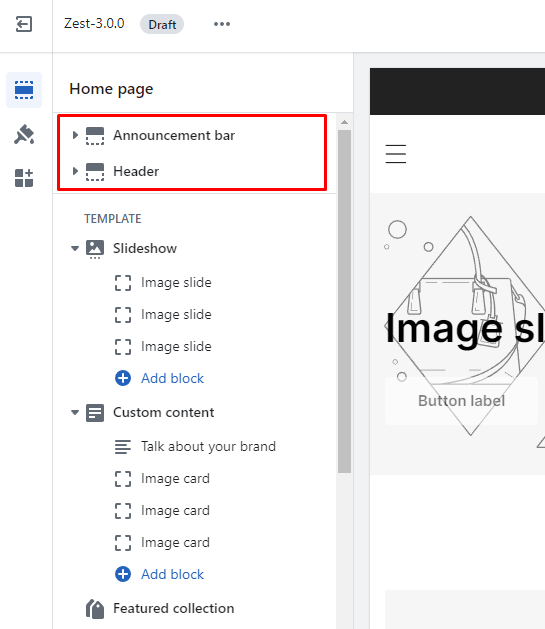
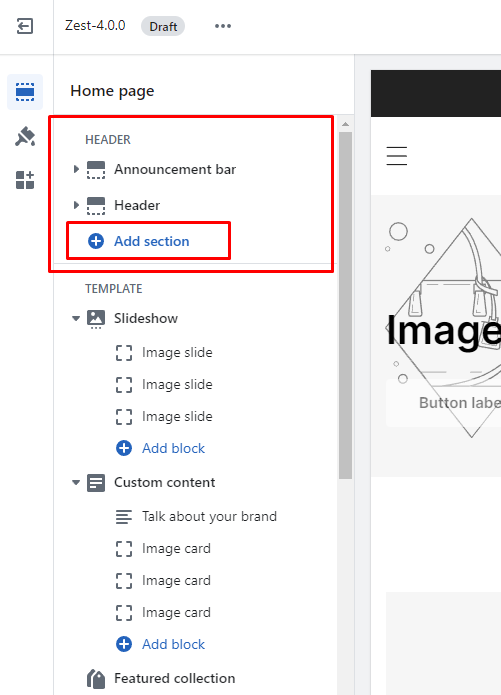
At FoxEcom, we've made an update so Zest **supports section groups in the Header and Footer** section of the theme.&#x20;

Hence, in Zest, sections can be added in the header and footer.

{% tabs %}
{% tab title="Before Zest 4.4.0 " %}

<figure><img src="/files/uVxtMeBcZ2Y6Or3GKFyn" alt=""><figcaption></figcaption></figure>
{% endtab %}

{% tab title="After Zest 4.0.0" %}

<figure><img src="/files/8kbKUFw8DELFHXhCxBDF" alt=""><figcaption></figcaption></figure>
{% endtab %}
{% endtabs %}

## Why use section groups

Section groups come with some major benefits for theme developers and merchants.

* Merchants gain the flexibility to add sections everywhere, have more control over the look of the theme, and have better customization abilities.
* Apps can integrate with Zest theme layouts seamlessly without modifying the theme code of the header and footer.
* Theme developers can build more customizable themes.

{% hint style="info" %}
You can read more about Sections Groups in [this Shopify blog article](https://www.shopify.com/partners/blog/section-groups).
{% endhint %}


---

# Agent Instructions: Querying This Documentation

If you need additional information that is not directly available in this page, you can query the documentation dynamically by asking a question.

Perform an HTTP GET request on the current page URL with the `ask` query parameter:

```
GET https://docs.foxecom.com/zest-theme/faqs/shopify-functions/does-zest-support-section-groups.md?ask=<question>
```

The question should be specific, self-contained, and written in natural language.
The response will contain a direct answer to the question and relevant excerpts and sources from the documentation.

Use this mechanism when the answer is not explicitly present in the current page, you need clarification or additional context, or you want to retrieve related documentation sections.