# Breadcrumbs

{% embed url="<https://youtu.be/TM0L8nJPk0s/>" %}

Breadcrumb is a type of secondary navigation scheme that reveals the customers’ location on the website.

**Breadcrumbs can improve how a user and Google navigate a website**, especially if your website has many products or pages.

Furthermore, breadcrumbs have been proven to **decrease bounce rates**, keeping users on a website longer.

Lastly, the best benefit of breadcrumbs is SEO-boosting. Google bots use breadcrumbs to categorize and contextualize content in search results more efficiently.

## How to configure the Breadcrumbs

{% hint style="success" %}
Steps

1. In the theme editor (**Customize**), open the template selector
2. Select the product template you want to add breadcrumbs to.
3. Locate the **Breadcrumbs** section.
   {% endhint %}

* **Text alignment**: Set how the breadcrumbs are aligned: Left/Center/Right.
* Remove, hide, or reorder the section if you want

{% hint style="info" %}
By default, breadcrumbs display the name of the collection that comes first in alphabetical order (if that product is included in multiple collections).
{% endhint %}

## How to creat custom breadcrumbs for individual products

In Sleek, you can set a custom product breadcrumbs for each of your products using metafields.

**Steps:**

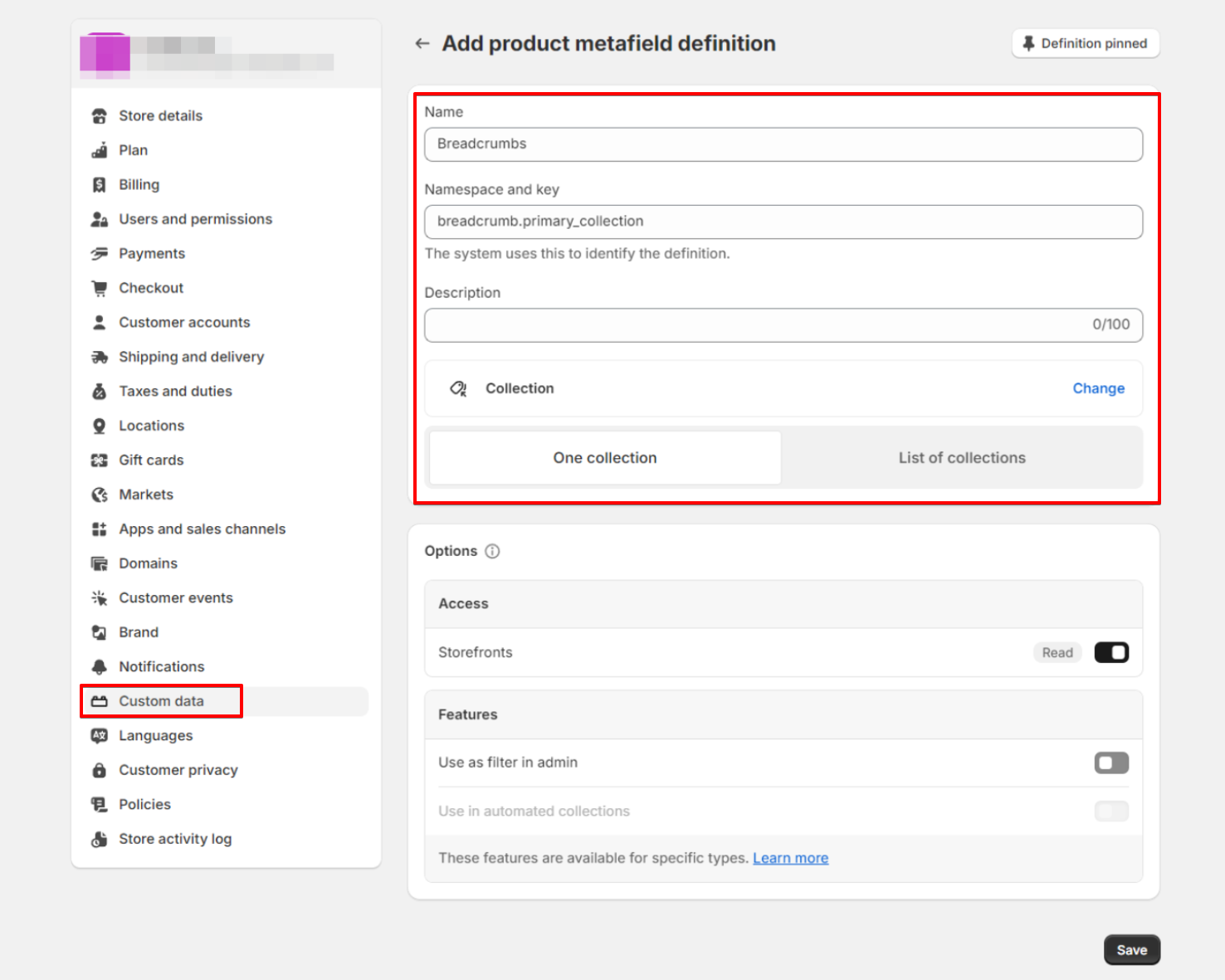
#### **1. Define a Product Metafield in Shopify admin > Settings > Custom data.**

* Click the button **Add definition** to create a new product definition.
* Use any **Name** you want, and insert the **Namespace and key** as '**breadcrumb.primary\_collection**'.
* Select the metafield type as **Collection.**
* Click **Save**.

<figure><img src="https://3064615700-files.gitbook.io/~/files/v0/b/gitbook-x-prod.appspot.com/o/spaces%2F3yE7VVjvl0MgK6awOPKB%2Fuploads%2FKqA8NTS6S2ScHVtrRY3F%2Fimage.png?alt=media&#x26;token=7a6d48f3-557d-4423-af5e-9a99c81f9412" alt=""><figcaption></figcaption></figure>

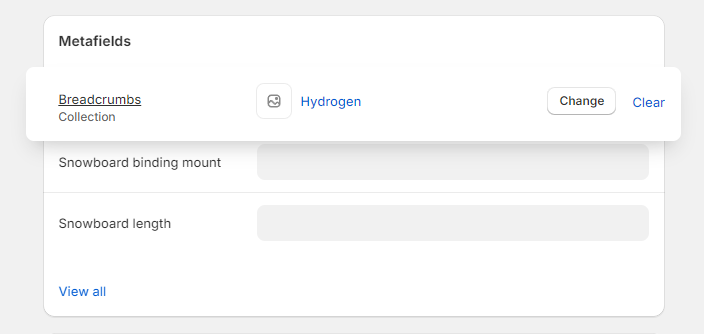
#### **2. In the Product setup, select a collection from a list to display a custom product breadcrumb.**

* From **Shopify admin** > **Products**, select a product you want to add custom breadcrumbs.
* In the **Metafields** section, select a collection from your collection list.
* Click **Save**.

<figure><img src="https://3064615700-files.gitbook.io/~/files/v0/b/gitbook-x-prod.appspot.com/o/spaces%2F3yE7VVjvl0MgK6awOPKB%2Fuploads%2F440y8yqQ2cU2sgiAKyNg%2Fimage.png?alt=media&#x26;token=fcc68d76-4688-4b14-9399-8d99cfa9f29c" alt=""><figcaption></figcaption></figure>

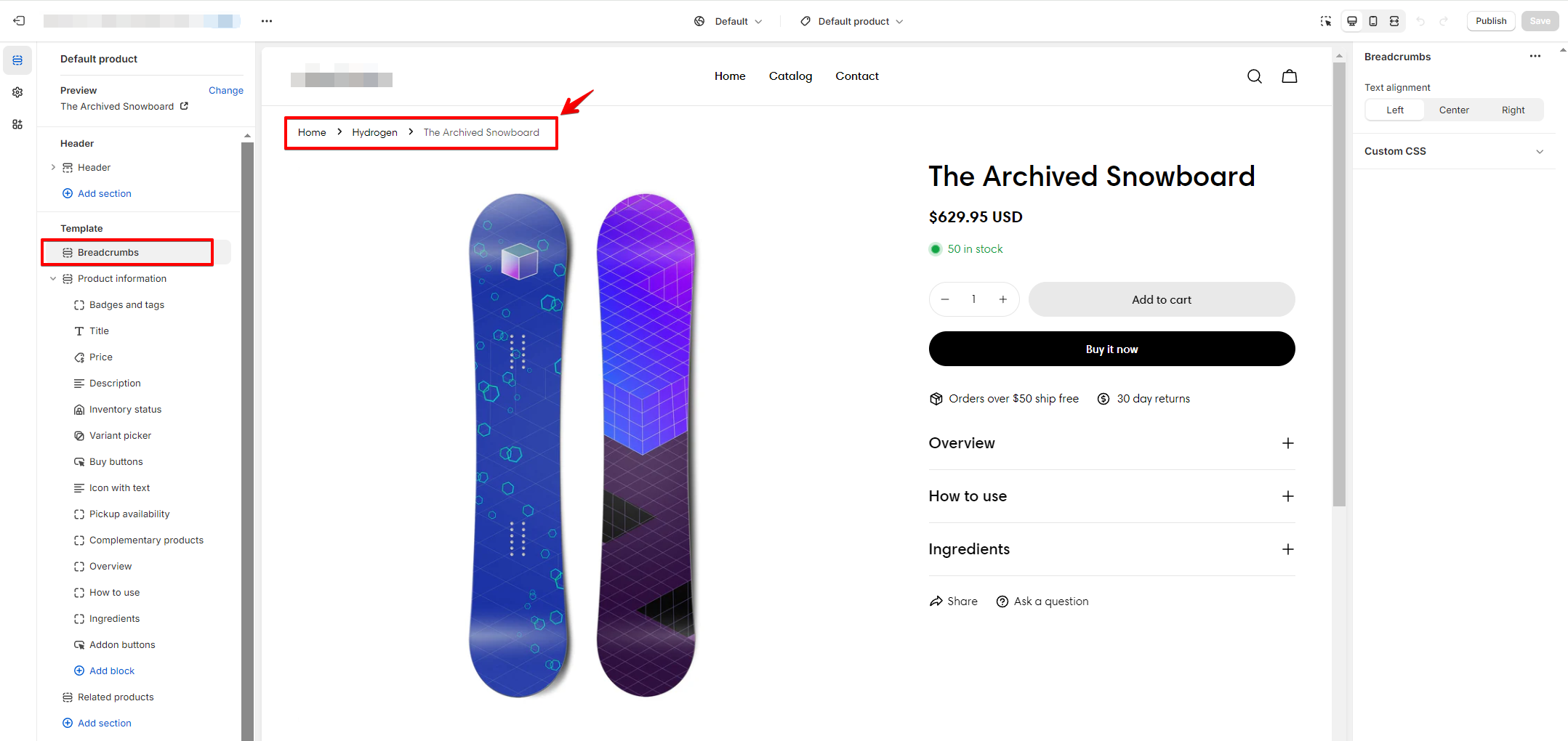
#### **3. Enable the breadcrumbs on your theme editor.**

Make sure the **Breadcrumbs** section is added to your product template and the dynamic data source is linked.

<figure><img src="https://3064615700-files.gitbook.io/~/files/v0/b/gitbook-x-prod.appspot.com/o/spaces%2F3yE7VVjvl0MgK6awOPKB%2Fuploads%2FfbLZMbRZPqPf5ez9RfTI%2Fimage.png?alt=media&#x26;token=7b5840a6-2bfa-4ebf-b806-a7cf8d22dda1" alt=""><figcaption></figcaption></figure>