# Add custom badges to products

{% embed url="<https://youtu.be/4A2WN9Uvzs0>" %}

Product badges are helpful in drawing the attention of visitors to specific characteristics of the products.

## Add product tags for your custom badges

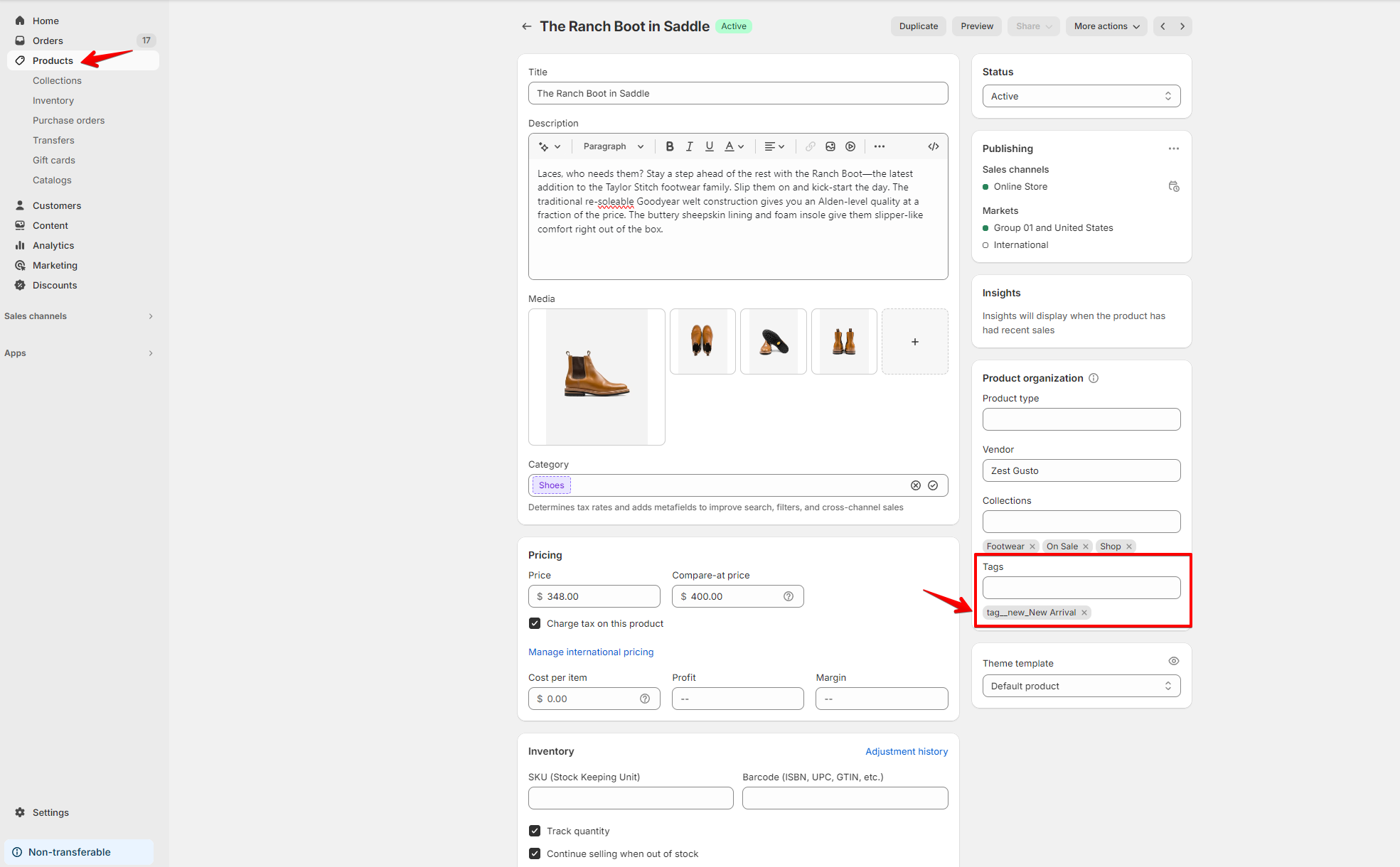
To set up the custom badges in Sleek, simply add the supported product tags you want to display to your product:

```
tag__hot_[DISPLAY TEXT]
```

```
tag__new_[DISPLAY TEXT]
```

```
tag__sale_[DISPLAY TEXT]
```

<figure><img src="https://3064615700-files.gitbook.io/~/files/v0/b/gitbook-x-prod.appspot.com/o/spaces%2F3yE7VVjvl0MgK6awOPKB%2Fuploads%2F8p09KGbmd5qe05gCTl3K%2Fimage.png?alt=media&#x26;token=3cf68b89-e6c4-4324-b088-c9e4a036e6e3" alt=""><figcaption></figcaption></figure>

## Add the custom badges to the product page

{% hint style="success" %}
Steps:

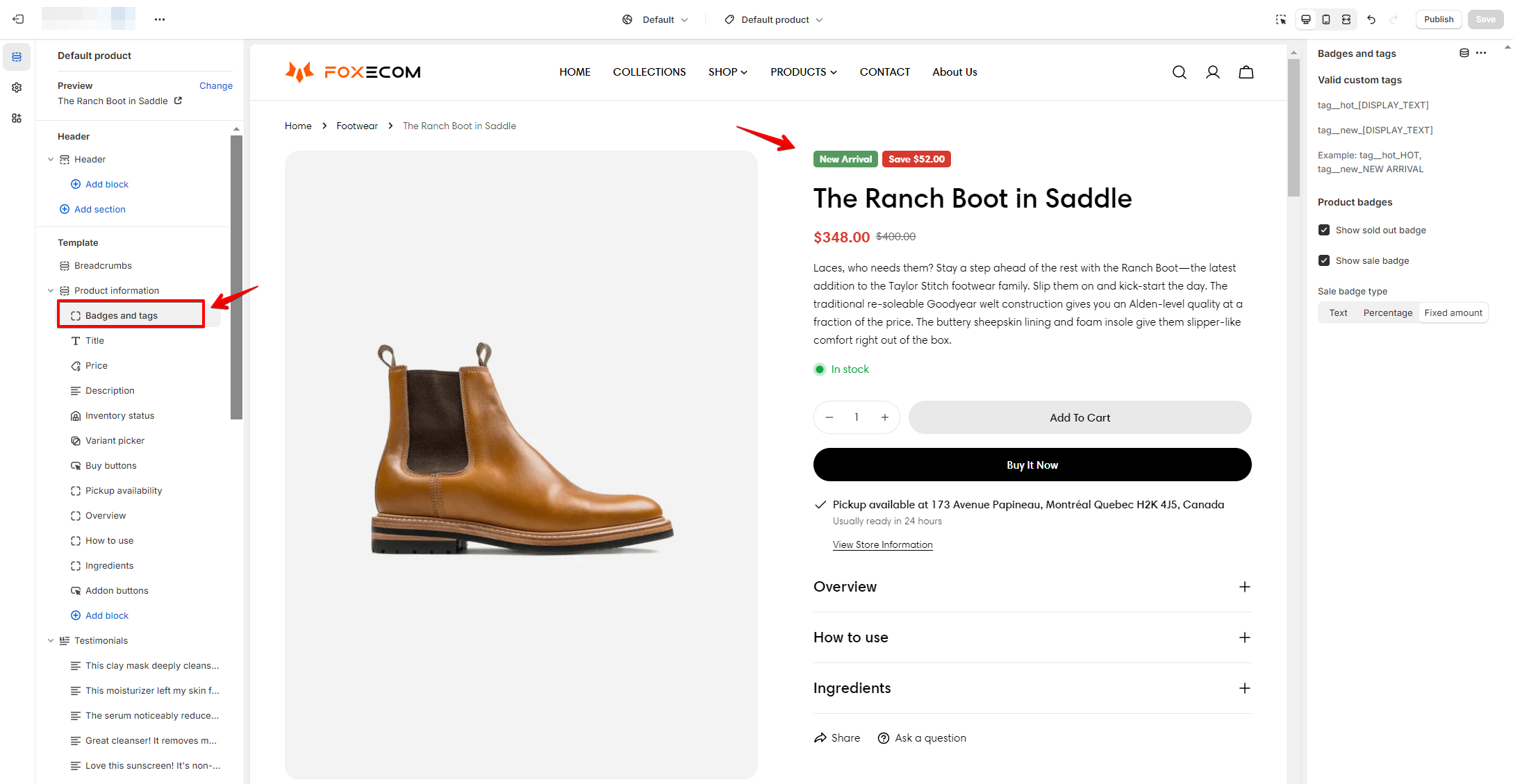
1. In the theme editor (**Customize**), go to product page.
2. Under the **Product information** section, add block **Badges and Tags**.
3. Drag to reorder the block if you want.
4. Click **Save.**
   {% endhint %}

<figure><img src="https://3064615700-files.gitbook.io/~/files/v0/b/gitbook-x-prod.appspot.com/o/spaces%2F3yE7VVjvl0MgK6awOPKB%2Fuploads%2FmNsMDUFh0XHGkFE7NsrU%2Fimage.png?alt=media&#x26;token=16d5019e-a0ce-477d-aab3-79737bf9174c" alt=""><figcaption></figcaption></figure>

{% hint style="info" %}
The custom badges will be automatically display on your product card (product listing) when the supported product tags are added.
{% endhint %}

{% hint style="success" %}
Change the badges colors in Theme settings > [colors](https://docs.foxecom.com/sleek-theme/theme-settings/colors "mention")
{% endhint %}

***

<figure><img src="https://3064615700-files.gitbook.io/~/files/v0/b/gitbook-x-prod.appspot.com/o/spaces%2F3yE7VVjvl0MgK6awOPKB%2Fuploads%2FCUsSjb0C17R7p2e4MiL1%2Flivechat883x471%20(1).png?alt=media&#x26;token=1ad5a821-413a-4e9b-a7f5-850fc173bcd3" alt=""><figcaption><p><a href="https://apps.shopify.com/xflow?utm_source=foxecom&#x26;utm_medium=help_center_sleek&#x26;utm_campaign=banner">Install XFlow Back In Stock Automation FREE</a></p></figcaption></figure>