# Tabs

<div data-full-width="true"><figure><img src="https://1749964694-files.gitbook.io/~/files/v0/b/gitbook-x-prod.appspot.com/o/spaces%2FfgpgvtRaQLc36GYyIktZ%2Fuploads%2FETk3RTZrTHUxALnqCtTH%2FFoxEcom%20changelog%20%20%201250%20x%20200.png?alt=media&#x26;token=a72791be-b9fe-4806-8a28-f1592e470b10" alt=""><figcaption><p><a href="https://foxecom.com/pages/affiliate?utm_source=foxecom&#x26;utm_medium=help_center_foxify_tabs&#x26;utm_campaign=anchor-text&#x26;utm_term=explore_foxecom_affiliate_program_perks_now">Explore FoxEcom Affiliate program perks now</a> <span data-gb-custom-inline data-tag="emoji" data-code="2728">✨</span></p></figcaption></figure></div>

<figure><img src="https://lh7-us.googleusercontent.com/O8Fxm8zfH5-NKHPmflhLm1M1ercPnAZYpW36n_DFQNcpe1doiGdCza40Q5nSu22dkMZpdeUJgLkvm_wrLw1nRm0UfFVn1fNiuRXhRDGext0h3etSJ7C-c0ZNnP1l4H1VE_qfX8qaOC_b8Gx7jkP_tf8" alt=""><figcaption></figcaption></figure>

<figure><img src="https://1749964694-files.gitbook.io/~/files/v0/b/gitbook-x-prod.appspot.com/o/spaces%2FfgpgvtRaQLc36GYyIktZ%2Fuploads%2FUKVKbpXdZPQYxI432on2%2F666666666666666.gif?alt=media&#x26;token=91d4f24b-d468-4a6c-b7e0-4fd6651da3ed" alt=""><figcaption></figcaption></figure>

**Tabs** provide an easy-to-understand way to organize content, especially when dealing with large amounts of information or multiple categories.

Moreover, it allows users to easily navigate between different sections, helps you reduce page length, and ensures mobile-friendliness for visitors.

## Customize a Tabs section

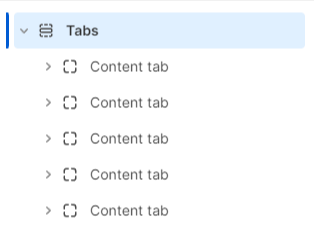
The **Tabs** section allows you to add a maximum of 5 **Content tab** blocks.

<figure><img src="https://1749964694-files.gitbook.io/~/files/v0/b/gitbook-x-prod.appspot.com/o/spaces%2FfgpgvtRaQLc36GYyIktZ%2Fuploads%2FAGpxkfhuaCp4X5kmWwhF%2Fimage.png?alt=media&#x26;token=c7bf6423-e51e-436d-9ee8-fdeb31d11199" alt=""><figcaption></figcaption></figure>

### Content tab

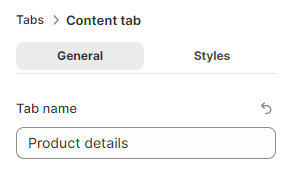
Give the **Content tab** block a concise and clear **Tab name**. e.g. Product details

<figure><img src="https://1749964694-files.gitbook.io/~/files/v0/b/gitbook-x-prod.appspot.com/o/spaces%2FfgpgvtRaQLc36GYyIktZ%2Fuploads%2FNx4VHEaXOvSQpYB67ade%2Fimage.png?alt=media&#x26;token=f5a4fece-7a1d-44eb-9667-bf8304d72a0b" alt=""><figcaption></figcaption></figure>

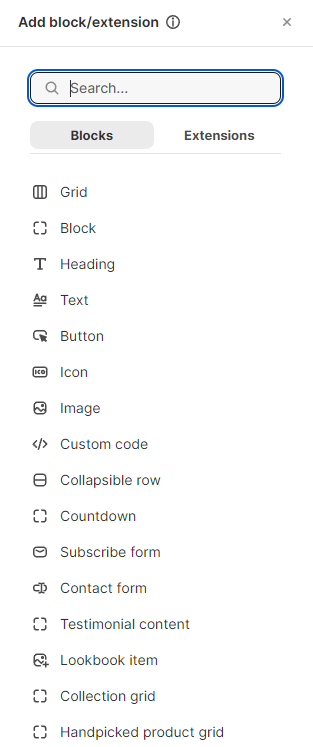
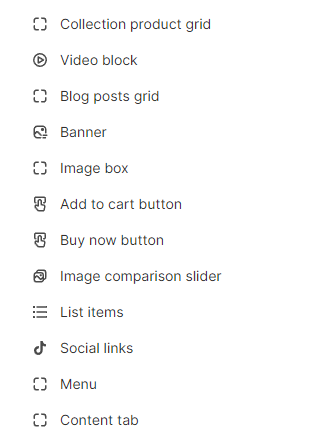
Especially, users can add any child block to the **Content tab** block such as Grid - Columns, Block, etc, and build a tab content without limitation.

<div data-full-width="true"><figure><img src="https://1749964694-files.gitbook.io/~/files/v0/b/gitbook-x-prod.appspot.com/o/spaces%2FfgpgvtRaQLc36GYyIktZ%2Fuploads%2FoiENqmGca9dieBav66nY%2Fimage.png?alt=media&#x26;token=c25732ad-7c72-4d4e-ac61-c07fc5cf75ca" alt=""><figcaption></figcaption></figure> <figure><img src="https://1749964694-files.gitbook.io/~/files/v0/b/gitbook-x-prod.appspot.com/o/spaces%2FfgpgvtRaQLc36GYyIktZ%2Fuploads%2FUJofigscS95RCSHFkKFQ%2Fscrnli_5_9_2024_3-30-19%20PM.png?alt=media&#x26;token=147000e6-f9b2-48c5-ac53-dcaa0c78b2d7" alt=""><figcaption></figcaption></figure></div>

### Create a Content tab

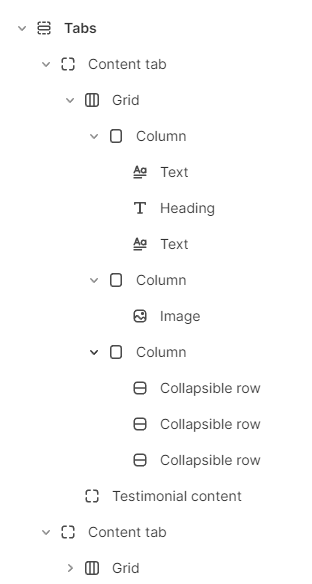
Here is a typical example of the **Content tab** block with limitles possibility:

This **Content tab** block below contains 2 main child blocks: **Grid** and **Testimonial content.**

* First, in the **Grid** block, you can add as many as **Columns** you want to display with different content inside such as Text, Heading, Image, or even Collapsible row, etc.
* Second, you will see a big **Testimonial content** block at the bottom of the tab. You can also replace this block with other types of block or even add more.

<figure><img src="https://1749964694-files.gitbook.io/~/files/v0/b/gitbook-x-prod.appspot.com/o/spaces%2FfgpgvtRaQLc36GYyIktZ%2Fuploads%2FwMMmxja8IA3uzN4H45F2%2Fimage.png?alt=media&#x26;token=9dd4e664-bb99-4552-a26f-d04c34c4ce41" alt=""><figcaption></figcaption></figure>

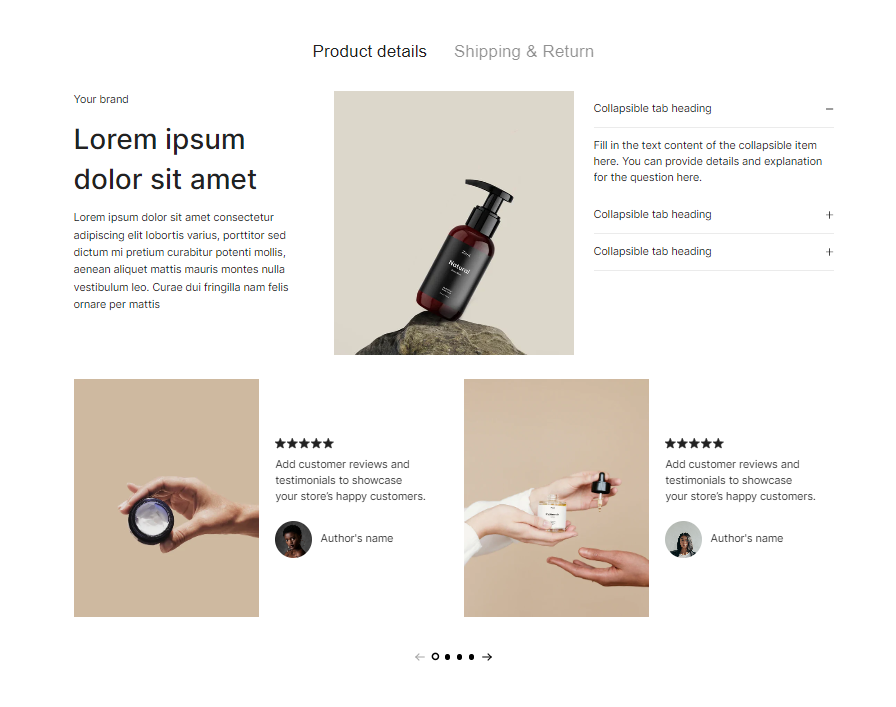
This is the result of the example above:&#x20;

<figure><img src="https://1749964694-files.gitbook.io/~/files/v0/b/gitbook-x-prod.appspot.com/o/spaces%2FfgpgvtRaQLc36GYyIktZ%2Fuploads%2FaC8TPPHP7zVSCk9p3pUE%2Fimage.png?alt=media&#x26;token=52aff097-1ca9-4239-8a80-343e500053d9" alt=""><figcaption></figcaption></figure>