# Buy Now button

<div data-full-width="true"><figure><img src="https://1749964694-files.gitbook.io/~/files/v0/b/gitbook-x-prod.appspot.com/o/spaces%2FfgpgvtRaQLc36GYyIktZ%2Fuploads%2FETk3RTZrTHUxALnqCtTH%2FFoxEcom%20changelog%20%20%201250%20x%20200.png?alt=media&#x26;token=a72791be-b9fe-4806-8a28-f1592e470b10" alt=""><figcaption><p><a href="https://foxecom.com/pages/affiliate?utm_source=foxecom&#x26;utm_medium=help_center_foxify_buy_now_button&#x26;utm_campaign=anchor-text&#x26;utm_term=explore_foxecom_affiliate_program_perks_now">Explore FoxEcom Affiliate program perks now</a> <span data-gb-custom-inline data-tag="emoji" data-code="2728">✨</span></p></figcaption></figure></div>

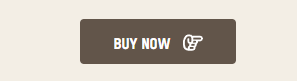
The Buy Now button helps you create shortcuts for customers to buy your products. It can show off product pictures, descriptions, and prices, all while letting customers purchase products without leaving the website.

In the Foxiy, you can add a **Buy Now button** in specific sections and place it on any page, not restricted to only the Product page. This enhancement aims to improve the overall customer experience and speed up the sales cycle.

<figure><img src="https://1749964694-files.gitbook.io/~/files/v0/b/gitbook-x-prod.appspot.com/o/spaces%2FfgpgvtRaQLc36GYyIktZ%2Fuploads%2FzIvgQmYB28JAx9djHaCH%2F4444444444.gif?alt=media&#x26;token=1507274f-aeb6-4b60-8240-4e57419ee937" alt=""><figcaption></figcaption></figure>

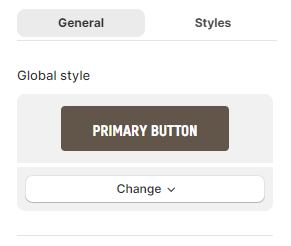
Choose the pre-defined style for the **Buy Now button** in the **Global style** field, with 4 default preset buttons:

* Primary button
* Outline button
* White button
* Link button

<figure><img src="https://1749964694-files.gitbook.io/~/files/v0/b/gitbook-x-prod.appspot.com/o/spaces%2FfgpgvtRaQLc36GYyIktZ%2Fuploads%2F1PWQmgpuAmj2C61C6hNW%2Fimage.png?alt=media&#x26;token=2be33bc9-6fbe-4c61-b3d2-bc302386fa91" alt=""><figcaption></figcaption></figure>

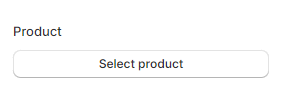
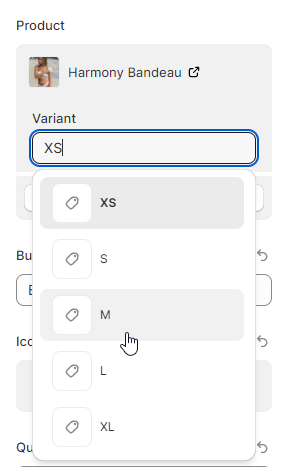
Select the product you want for the **Buy Now button.**&#x20;

* You can choose/ search for a specific product variant by typing in the **Variant** field.

<figure><img src="https://1749964694-files.gitbook.io/~/files/v0/b/gitbook-x-prod.appspot.com/o/spaces%2FfgpgvtRaQLc36GYyIktZ%2Fuploads%2FzQ9k4w3qDeqb2zeUcwIa%2Fimage.png?alt=media&#x26;token=098e0af5-2a0a-46d9-9007-caea00c978dd" alt=""><figcaption></figcaption></figure>

<figure><img src="https://1749964694-files.gitbook.io/~/files/v0/b/gitbook-x-prod.appspot.com/o/spaces%2FfgpgvtRaQLc36GYyIktZ%2Fuploads%2FVyBj0Tj6infN7lPIpc32%2F2024-05-10%2011_30_58-cong%20nguyen%20training%20%C2%B7%20Foxify%20Page%20Builder%20%C2%B7%20Shopify.png?alt=media&#x26;token=a6098c6a-4846-4610-8b27-d5a9f567bdf8" alt=""><figcaption></figcaption></figure>

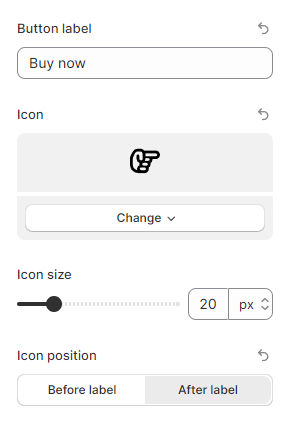
Add the suitable text into the **Button label** field, select an attractive **Icon**, and change the **Icon size** to draw the customer's attention.

Moreover, you can swap the position between the **Icon** and **Button label** by changing the **Icon position** to the **Before label** or **After label**.

<figure><img src="https://1749964694-files.gitbook.io/~/files/v0/b/gitbook-x-prod.appspot.com/o/spaces%2FfgpgvtRaQLc36GYyIktZ%2Fuploads%2FXK2x4eCpp4JJRGtelNoN%2Fimage.png?alt=media&#x26;token=706d2fff-7554-4d6e-988c-9dacae88e87c" alt=""><figcaption></figcaption></figure>

<figure><img src="https://1749964694-files.gitbook.io/~/files/v0/b/gitbook-x-prod.appspot.com/o/spaces%2FfgpgvtRaQLc36GYyIktZ%2Fuploads%2Fk8nys2Yhjtj5YVjtsMxp%2Fimage.png?alt=media&#x26;token=9095b91b-b29a-46e9-9755-1cb6ac5846b3" alt=""><figcaption></figcaption></figure>

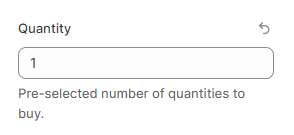
Insert the pre-selected number of quantities to purchase when customers click the **Buy now button** in the **Quantity** field.

<figure><img src="https://1749964694-files.gitbook.io/~/files/v0/b/gitbook-x-prod.appspot.com/o/spaces%2FfgpgvtRaQLc36GYyIktZ%2Fuploads%2Fb6sujVvZhZZ6b29s0Kpo%2Fimage.png?alt=media&#x26;token=6d1610a5-dd88-4047-915f-901c7c4c6664" alt=""><figcaption></figcaption></figure>

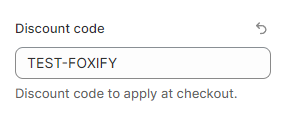
Input the suitable discount to apply at checkout in the **Discount code** field.

<figure><img src="https://1749964694-files.gitbook.io/~/files/v0/b/gitbook-x-prod.appspot.com/o/spaces%2FfgpgvtRaQLc36GYyIktZ%2Fuploads%2FoEqT9y3fUnaiAUf0uch6%2Fimage.png?alt=media&#x26;token=b987ec35-90a6-4407-8a27-838f7fa48c19" alt=""><figcaption></figcaption></figure>

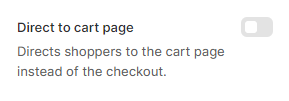
You can decide which page you want to direct customers to (Cart page or Checkout page).&#x20;

By enabling the **Direct to Cart page** toggle, you can immediately direct shoppers to the Cart page instead of the checkout page.
<figure><img src="https://1749964694-files.gitbook.io/~/files/v0/b/gitbook-x-prod.appspot.com/o/spaces%2FfgpgvtRaQLc36GYyIktZ%2Fuploads%2FmaONQwpAmfcFeLkmXySQ%2Fimage.png?alt=media&#x26;token=8121ebd7-d854-4283-a075-cc15713c027c" alt=""><figcaption></figcaption></figure>