# Multicolumn

<div data-full-width="true"><figure><img src="https://1749964694-files.gitbook.io/~/files/v0/b/gitbook-x-prod.appspot.com/o/spaces%2FfgpgvtRaQLc36GYyIktZ%2Fuploads%2FETk3RTZrTHUxALnqCtTH%2FFoxEcom%20changelog%20%20%201250%20x%20200.png?alt=media&#x26;token=a72791be-b9fe-4806-8a28-f1592e470b10" alt=""><figcaption><p><a href="https://foxecom.com/pages/affiliate?utm_source=foxecom&#x26;utm_medium=help_center_foxify_multicolumn&#x26;utm_campaign=anchor-text&#x26;utm_term=explore_foxecom_affiliate_program_perks_now">Explore FoxEcom Affiliate program perks now</a> <span data-gb-custom-inline data-tag="emoji" data-code="2728">✨</span></p></figcaption></figure></div>

<figure><img src="https://1749964694-files.gitbook.io/~/files/v0/b/gitbook-x-prod.appspot.com/o/spaces%2FfgpgvtRaQLc36GYyIktZ%2Fuploads%2FhhPHTJ0JwOPa2YrJhB3D%2Fimage.png?alt=media&#x26;token=9d03f924-ef91-410c-b480-b9d28110e345" alt=""><figcaption></figcaption></figure>

You can utilize a multicolumn section to showcase your store's services and other details.

## Customize a multicolumn section header

First, you need to add a multicolumn section to your page. Choose a preset that best fits your needs.

<figure><img src="https://1749964694-files.gitbook.io/~/files/v0/b/gitbook-x-prod.appspot.com/o/spaces%2FfgpgvtRaQLc36GYyIktZ%2Fuploads%2FFowWjdPhI57BNBTxsubr%2Fezgif.com-gif-maker%20(3).gif?alt=media&#x26;token=6ccb2b81-a08d-4806-8215-d85fb740b634" alt=""><figcaption></figcaption></figure>

In your section header block, you can easily add, remove, or reorder child blocks.

* Child block can be a heading, sub-heading, or rich text.

<figure><img src="https://1749964694-files.gitbook.io/~/files/v0/b/gitbook-x-prod.appspot.com/o/spaces%2FfgpgvtRaQLc36GYyIktZ%2Fuploads%2FspSMo8vbOAJmw2ieGSGL%2Fezgif.com-gif-maker%20(2).gif?alt=media&#x26;token=2d35886b-9ab3-4ec5-b531-cf3033aba938" alt=""><figcaption></figcaption></figure>

## Customize your multicolumn grid

### Grid settings

#### Layout settings

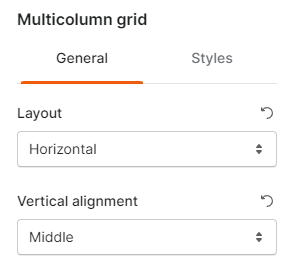
<figure><img src="https://1749964694-files.gitbook.io/~/files/v0/b/gitbook-x-prod.appspot.com/o/spaces%2FfgpgvtRaQLc36GYyIktZ%2Fuploads%2FoTscl5KvTA4tIeSiCElW%2Fimage.png?alt=media&#x26;token=d42d3730-1721-4435-9e1e-62a84b12ecfb" alt="Multicolumn grid layout settings"><figcaption></figcaption></figure>

Here you can set your column layout for column elements and image /icon for vertical alignment.&#x20;

* Vertical alignment settings work with horizontal layout only.

<figure><img src="https://1749964694-files.gitbook.io/~/files/v0/b/gitbook-x-prod.appspot.com/o/spaces%2FfgpgvtRaQLc36GYyIktZ%2Fuploads%2Fz8xVMNeT4BU2vwtl2CLP%2Fezgif.com-gif-maker%20(4).gif?alt=media&#x26;token=d75018ec-3285-4b91-85ff-17a926d481e2" alt=""><figcaption></figcaption></figure>

{% tabs %}
{% tab title="Vertical layout" %}

<figure><img src="https://1749964694-files.gitbook.io/~/files/v0/b/gitbook-x-prod.appspot.com/o/spaces%2FfgpgvtRaQLc36GYyIktZ%2Fuploads%2FUQJNPnsjqMVrwIg0e8ax%2Fimage.png?alt=media&#x26;token=f298fdd6-3c5d-4e48-82ea-2450ca6a06cd" alt="multicolumn grid vertical layout"><figcaption></figcaption></figure>
{% endtab %}

{% tab title="Horizontal layout" %}

<figure><img src="https://1749964694-files.gitbook.io/~/files/v0/b/gitbook-x-prod.appspot.com/o/spaces%2FfgpgvtRaQLc36GYyIktZ%2Fuploads%2FtLNFmw2Gtsp7GSAT1Xkr%2Fimage.png?alt=media&#x26;token=b43ef822-7b44-44cf-a145-fd8a09576175" alt="multicolumn grid horizontal layout"><figcaption></figcaption></figure>
{% endtab %}
{% endtabs %}

#### Desktop layout

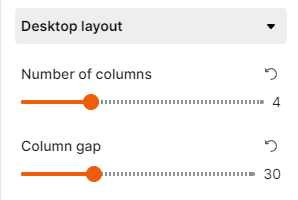
Select your number of columns between 1 and 12 and the column gap by tweaking the toggles.

<figure><img src="https://1749964694-files.gitbook.io/~/files/v0/b/gitbook-x-prod.appspot.com/o/spaces%2FfgpgvtRaQLc36GYyIktZ%2Fuploads%2F0h4LgtadRzJ1CO2qN0uc%2Fimage.png?alt=media&#x26;token=ef56753c-de09-4e19-862b-6362b210a8a9" alt=""><figcaption></figcaption></figure>

#### Mobile layout

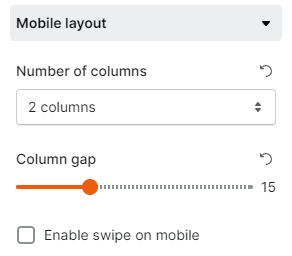
Similar to desktop layout, mobile layout lets you set your number of columns shown on mobile view (1 column/2 columns) and the column gap.

<figure><img src="https://1749964694-files.gitbook.io/~/files/v0/b/gitbook-x-prod.appspot.com/o/spaces%2FfgpgvtRaQLc36GYyIktZ%2Fuploads%2Fn34kXJKrIwc7gg7pc42R%2Fimage.png?alt=media&#x26;token=88b00b80-4fc5-4f3d-b656-323dfb92659c" alt=""><figcaption></figcaption></figure>

Check **Enable swipe on mobile** to display the blog posts grid in horizontal order with a slider on mobile view.

<figure><img src="https://1749964694-files.gitbook.io/~/files/v0/b/gitbook-x-prod.appspot.com/o/spaces%2FfgpgvtRaQLc36GYyIktZ%2Fuploads%2FFr9s8cAms1ieJm0UeYtk%2Fezgif.com-gif-maker%20(5).gif?alt=media&#x26;token=36653ff2-6982-461d-a5f5-bcd25d54e1e6" alt=""><figcaption></figcaption></figure>

## Customize your column

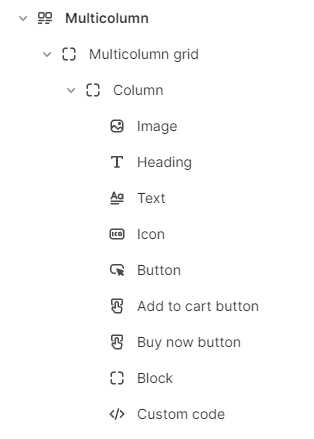
You can add and edit a maximum of **nine** child blocks to each column in the multicolumn section, namely:

* Image
* Icon
* Heading
* Text
* Button
* Add to cart button
* Buy now button
* Block
* Custom code

<figure><img src="https://1749964694-files.gitbook.io/~/files/v0/b/gitbook-x-prod.appspot.com/o/spaces%2FfgpgvtRaQLc36GYyIktZ%2Fuploads%2Fk4XTlfloT0IHbXPYO2pc%2Fimage.png?alt=media&#x26;token=33f9b07a-bd67-4bfc-a027-4b9bf1f7ecef" alt=""><figcaption></figcaption></figure>