# Track page performance with analytics
See how your Foxify pages are actually performing — views, conversions, and where visitors are dropping off — for any date range, so you know what to double down on or fix.
Analytics is automatically active for your Foxify pages on paid plans — no setup needed. By using it, you agree to Foxify's [Privacy Policy](https://docs.foxecom.com/company/privacy-policy).
## When to use this
Best fits for:
* You want to know which Foxify pages are actually driving views, add-to-carts, and sales
* You're testing different page designs and want data to back your decision
* You need to see performance by device or country to spot where to improve
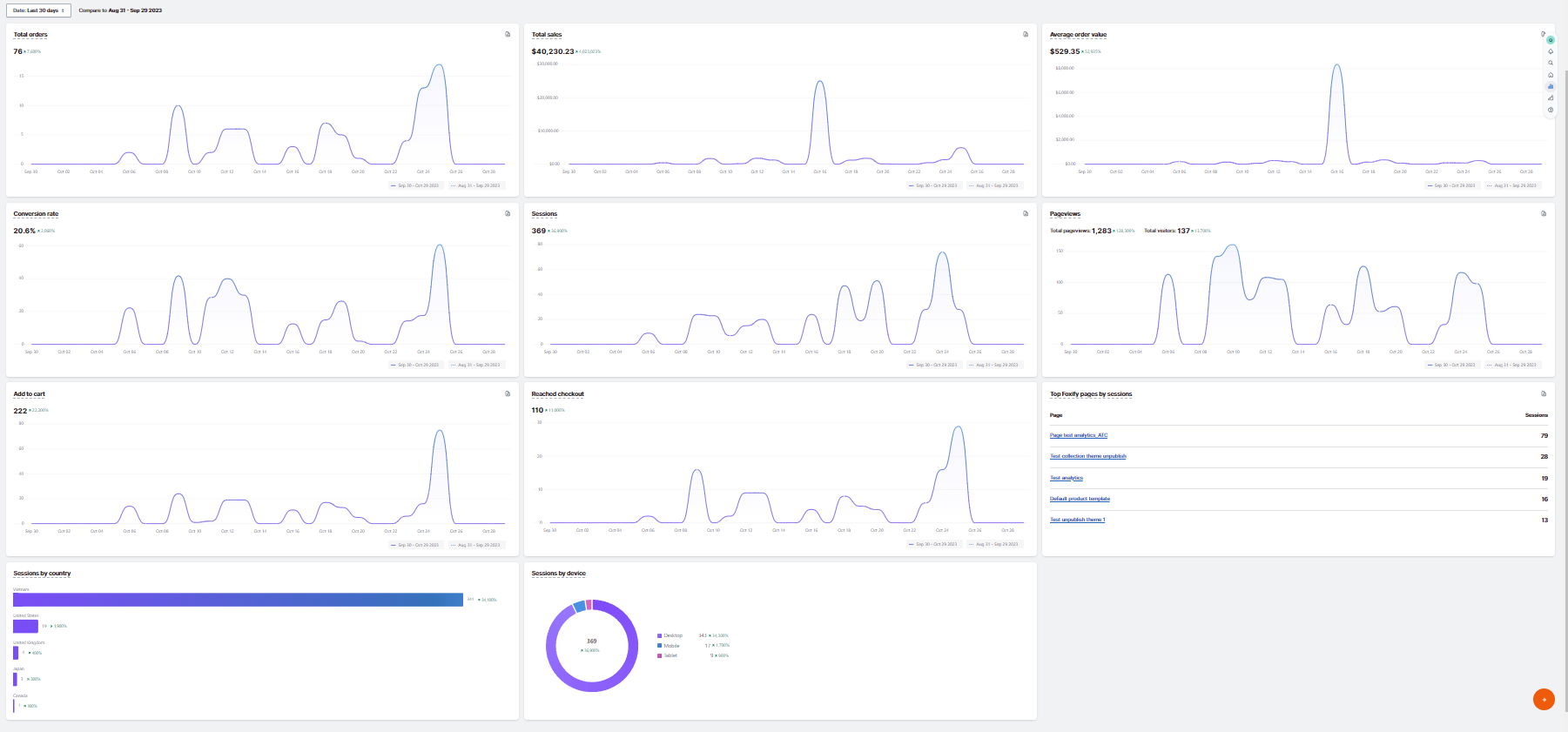
## Understanding your Analytics dashboard
### Review your key metrics
| Metric | Description |
| -------------------------------- | ----------------------------------------------------------------------------------------------------------------------------------------------------------- |
| **Page views** | Number of views on the Foxify page |
| **Visitors** | Number of visitors on the Foxify page |
| **Sessions** | Number of sessions on the Foxify page |
| **Clicks** | Number of times the shoppers click on any CTA or link on the Foxify page |
| **Add to cart** | Number of sessions in which shoppers added one or more items to their shopping carts on the Foxify page |
| **Reached checkout** | Number of sessions in which shoppers added one or more items to their shopping carts on the Foxify page, proceeded to the checkout, and performed an action |
| **Total sales** | Sales amount attributed to the Foxify page |
| **Total orders** | Number of orders attributed to the Foxify page |
| **Average order value (AOV)** | Total sales divided by total orders from Foxify pages |
| **Conversion rate** | Percentage of sessions that led to an order |
| **Sessions by devices** | Sessions split by device type — mobile, desktop, tablet |
| **Sessions by countries** | Sessions split by visitor country |
| **Top Foxify pages by sessions** | Which Foxify pages visitors started their sessions on, based on the URL viewed |
Total sales and orders only count purchases made through a Foxify Add to cart button. If your theme or a third-party app handles add-to-cart on that page instead, those sales won't be tracked here.
## Check how far back you can view reports
Your date range is limited by your plan's report history:
| Plan | Report history |
| -------------- | -------------- |
| **Free** | Not available |
| **Starter** | 90 days |
| **Growth** | 120 days |
| **Enterprise** | Unlimited |
Need to look further back? Upgrading your plan extends how much report history you can access.
## Understand how sessions and visitors are counted
* Sessions and visitors are based on cookies — one cookie identifies the visitor's device, another tracks the length of the session.
* A session ends after 30 minutes of no activity, or at midnight UTC — whichever comes first.
* Since the same visitor can have multiple sessions, sessions is usually higher than visitors.
*Example:* A shopper browses for 20 minutes, leaves, then returns 2 hours later for 10 minutes — that's 2 sessions, 1 visitor. If they browse for 5 minutes, leave, and return 10 minutes later, that's 1 session, 1 visitor (still within the 30-minute window).
## FAQs
#### Do I need to activate Analytics?
No — Analytics is automatically active for all your published Foxify pages on paid plans. There's no setup step.
#### Is Analytics available on the Free plan?
Analytics is included automatically with paid plans. Upgrade your plan to access it.
#### Does this track my whole store, or just my Foxify pages?
Just your Foxify pages — every metric here is scoped to "the Foxify page." For store-wide analytics across your whole theme, use Shopify's built-in analytics.
#### Why might my Foxify numbers not match Shopify's own analytics?
Small differences are expected — Foxify tracks only Foxify pages (not your whole store), and uses its own session definition (30-minute inactivity window, resetting at midnight UTC), which may not exactly match how Shopify defines a session.
#### Why isn't a sale showing up in Total sales?
Foxify only tracks sales made through a Foxify Add to cart button. If the sale went through your theme's or a third-party app's add-to-cart flow, it won't appear here.
## Related articles
Create a page
Pricing plans