# Create a Product page

{% tabs %}
{% tab title="Create a Product page" %}
{% embed url="<https://youtu.be/adwFGirGQ3A/>" %}
{% endtab %}

{% tab title="FoxStudio - Build for success - Beauty store" %}
{% embed url="<https://youtu.be/Ng_Iv67v2RM>" %}

{% content-ref url="/pages/BaW4i1kAMvYbV2dJxYZH" %}
[FoxStudio 🔥](/foxify-app/foxstudio/overview.md)
{% endcontent-ref %}
{% endtab %}

{% tab title="FoxStudio - Build for success - Electronics" %}
{% embed url="<https://www.youtube.com/watch?v=te5ack537vE>" %}

{% content-ref url="/pages/BaW4i1kAMvYbV2dJxYZH" %}
[FoxStudio 🔥](/foxify-app/foxstudio/overview.md)
{% endcontent-ref %}
{% endtab %}
{% endtabs %}

{% hint style="info" %}
Explore the potential of Foxify to create stunning and high-converting product pages:

* Build for success series - [Product page](/foxify-app/build-for-success-series/product-page.md)
* Working with elements - [Product details](/foxify-app/foxstudio/add-and-edit-elements/product-details.md)
  {% endhint %}

Setting up your eCommerce product pages for success is crucial for your site to flourish.&#x20;

A well-optimized product page will load quickly, be easy to navigate, and include all the important information potential customers need about the product. :fire:

In this article, you will learn how to create a Product page template with Foxify.

{% embed url="<https://youtu.be/04T6saGBZ7w>" %}

## Create a product page&#x20;

{% stepper %}
{% step %}

### Select the page type

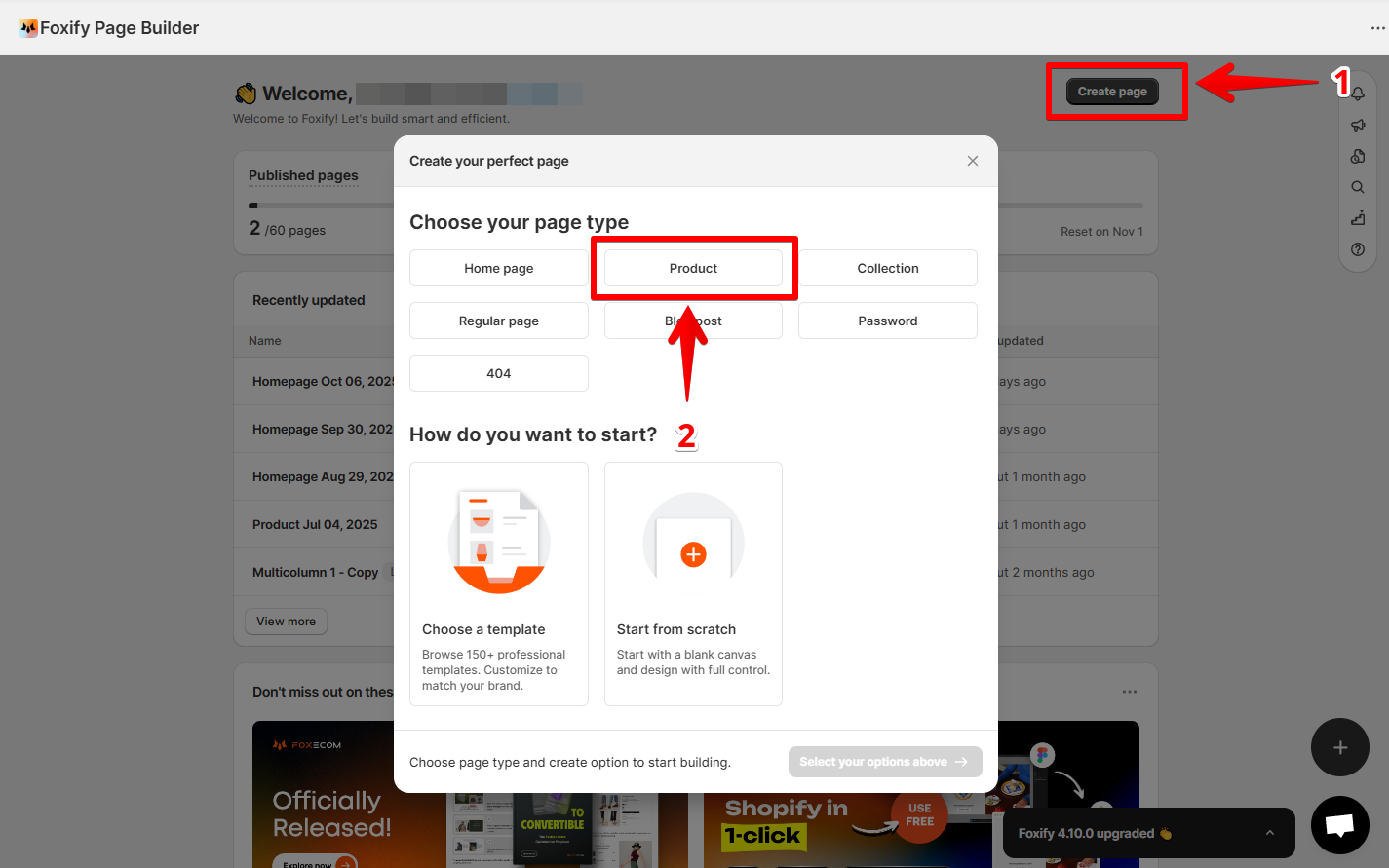
From the Foxify dashboard, click **Create page** and choose the **type of page** as **Product**.

<figure><img src="/files/r7RE4gRBQv4FFNXxpYoL" alt=""><figcaption></figcaption></figure>
{% endstep %}

{% step %}

### Select how you want to start

Foxify offers three flexible ways to build:

* **Start from template** → Choose from professional, ready-made layouts. Learn more: [Templates](/foxify-app/page-management/templates.md)
* **Create with AI** → Describe your vision and let AI design your page. Learn more: [AI Layout Generator ✨](/foxify-app/page-management/ai-layout-generator.md)
* **Build from scratch** → Start with a blank canvas and customize every detail.
  {% endstep %}
  {% endstepper %}

## Assign a product page to products

{% embed url="<https://youtu.be/04T6saGBZ7w>" %}

{% hint style="success" %}
Easily select products to apply to your saved product page.

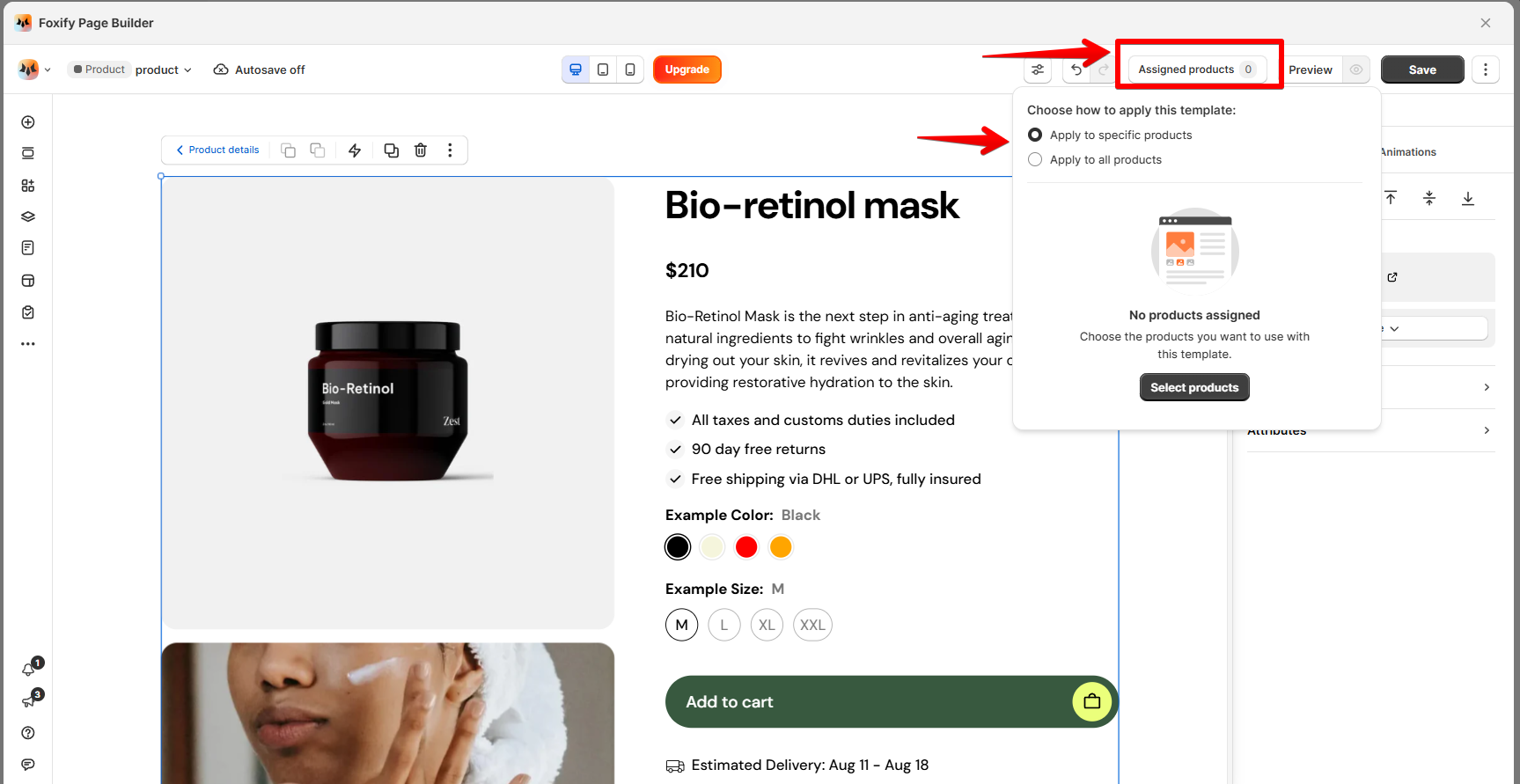
1. In the Page editor > Top bar, select **Assigned products.**
2. In the **Template assignment** pop-up, you can:

* Apply the template to specific products
* Apply the template to all products (a.k.a default product template).
  {% endhint %}

<figure><img src="/files/MdGp8OXStJmiXOwH2ZVm" alt=""><figcaption></figcaption></figure>

{% hint style="info" %}
The **Default product template** is available on higher plans.

See [Pricing plans](/foxify-app/getting-started/account-and-billing/pricing-plans.md#pricing-plan-details)
{% endhint %}

## Publish a product page

{% hint style="success" %}
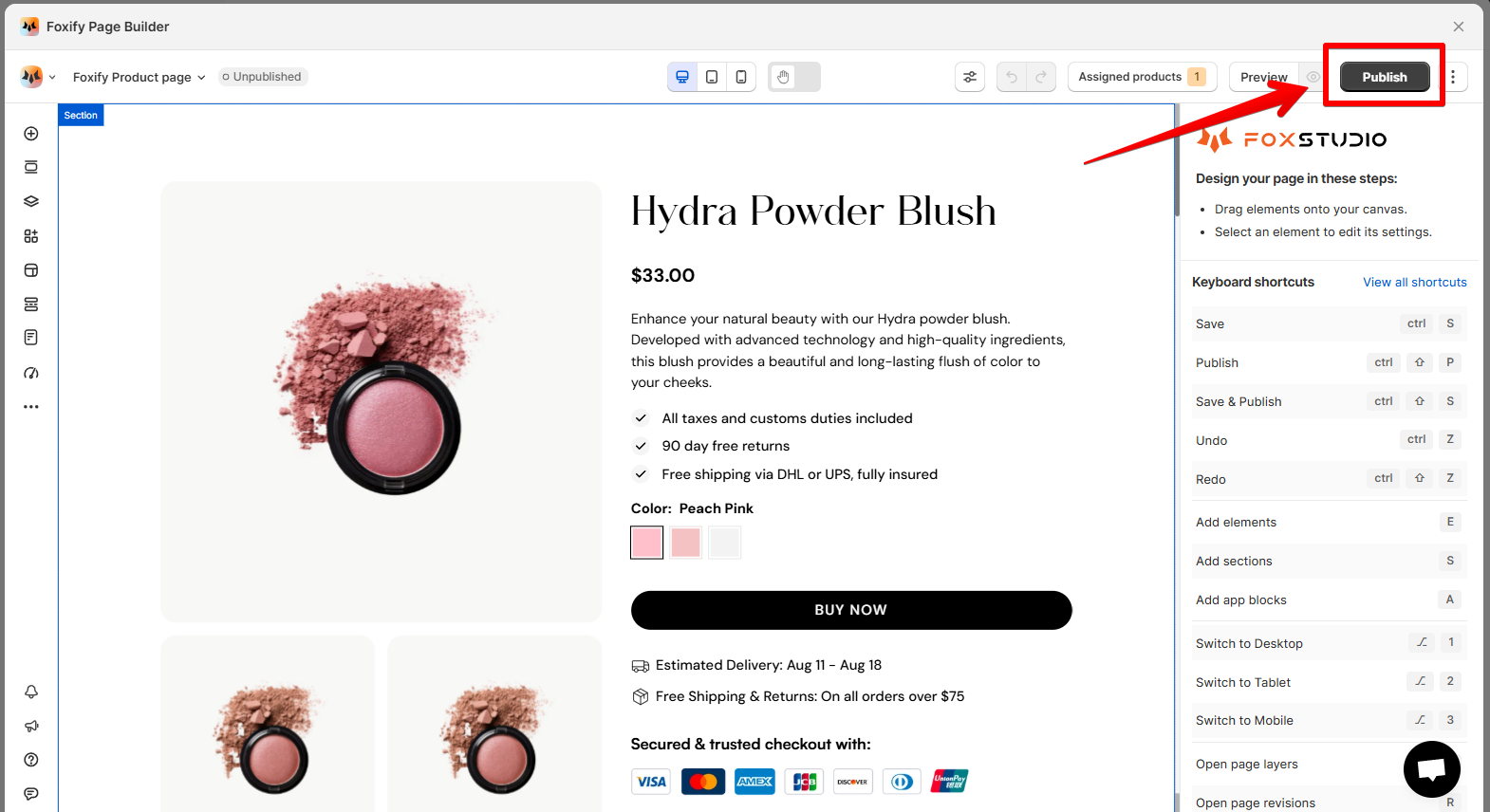
Once you finish designing, click **Publish** to push your new product template live.
{% endhint %}

<figure><img src="/files/XDKEJuJOkNa6OgUeYitc" alt=""><figcaption></figcaption></figure>

{% hint style="warning" %}
You need to enable [Foxify Theme Helper](https://docs.foxecom.com/foxify-app/page-management/page-creation/pages/AvmYf8LEitQtqS447K36#1.-enable-foxify-app-embed) in your Theme App embeds so Foxify can work with your Shopify theme.&#x20;
{% endhint %}

{% hint style="info" %}
:star: Want to publish your page to a **draft theme** instead of live?&#x20;

See [Pick a theme to work with Foxify](/foxify-app/faqs-and-troubleshooting/faqs/pick-a-theme-to-work-with-foxify.md)
{% endhint %}

## Unpublish a product page

{% hint style="success" %}
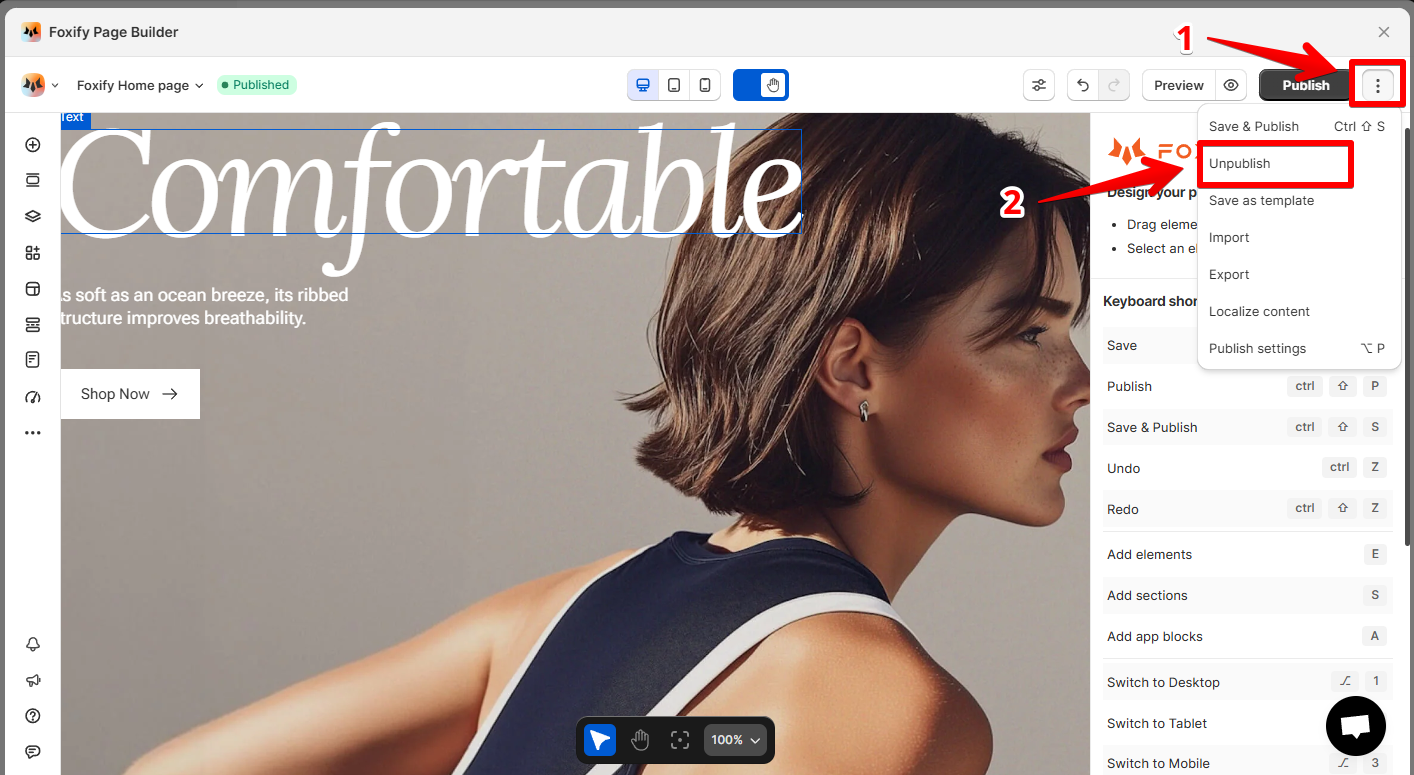
Inside the page editor, hit **Unpublish** in the top-right corner.
{% endhint %}

<figure><img src="/files/x1VnyH0wFIQRFITdz00M" alt=""><figcaption></figcaption></figure>

## Related resources

{% content-ref url="/pages/AiJK0iogoxPhXvLRawec" %}
[Editor tools](/foxify-app/foxstudio/editor-tools.md)
{% endcontent-ref %}

{% content-ref url="/pages/EoAjx1OsF8aYZu7jQtB0" %}
[Product details](/foxify-app/foxstudio/add-and-edit-elements/product-details.md)
{% endcontent-ref %}

{% content-ref url="/pages/zGKXrLTwU1k2VuhiwKd3" %}
[Build for Success series 🔥](/foxify-app/build-for-success-series/overview.md)
{% endcontent-ref %}

<div data-full-width="false"><figure><img src="/files/kcilvHtHzK8t5VOGf1nR" alt=""><figcaption><p>Foxify AI turns a prompt into a well-structured page layout in seconds. <a href="https://admin.shopify.com/apps/foxify-builder?utm_source=foxecom&#x26;utm_medium=help_center_foxify_create_a_product_page&#x26;utm_campaign=anchor-text&#x26;utm_term=try_foxify_ai"><mark style="color:orange;">Try Foxify AI</mark></a> ✨</p></figcaption></figure></div>


---

# Agent Instructions: Querying This Documentation

If you need additional information that is not directly available in this page, you can query the documentation dynamically by asking a question.

Perform an HTTP GET request on the current page URL with the `ask` query parameter:

```
GET https://docs.foxecom.com/foxify-app/page-management/page-creation/create-a-product-page.md?ask=<question>
```

The question should be specific, self-contained, and written in natural language.
The response will contain a direct answer to the question and relevant excerpts and sources from the documentation.

Use this mechanism when the answer is not explicitly present in the current page, you need clarification or additional context, or you want to retrieve related documentation sections.