# Create a Blog post

{% tabs %}
{% tab title="FoxStudio 🔥 " %}
{% embed url="<https://youtu.be/X0Jotbm6eXk>" %}

{% content-ref url="../../foxstudio" %}
[foxstudio](https://docs.foxecom.com/foxify-app/foxstudio)
{% endcontent-ref %}
{% endtab %}

{% tab title="Legacy editor" %}
{% embed url="<https://www.youtube.com/watch?v=mzsVzj6DtT8>" %}
This tutorial applies to the Legacy editor
{% endembed %}

{% content-ref url="../../legacy-editor" %}
[legacy-editor](https://docs.foxecom.com/foxify-app/legacy-editor)
{% endcontent-ref %}
{% endtab %}
{% endtabs %}

Blog posts let you provide insight into your store or products. You might want to share the story behind your store, give some context about your products, or introduce the people who work behind the scenes.

In this article, you will learn how to create a blog post page with Foxify.&#x20;

## Create a blog post page&#x20;

{% stepper %}
{% step %}

### Select the page type

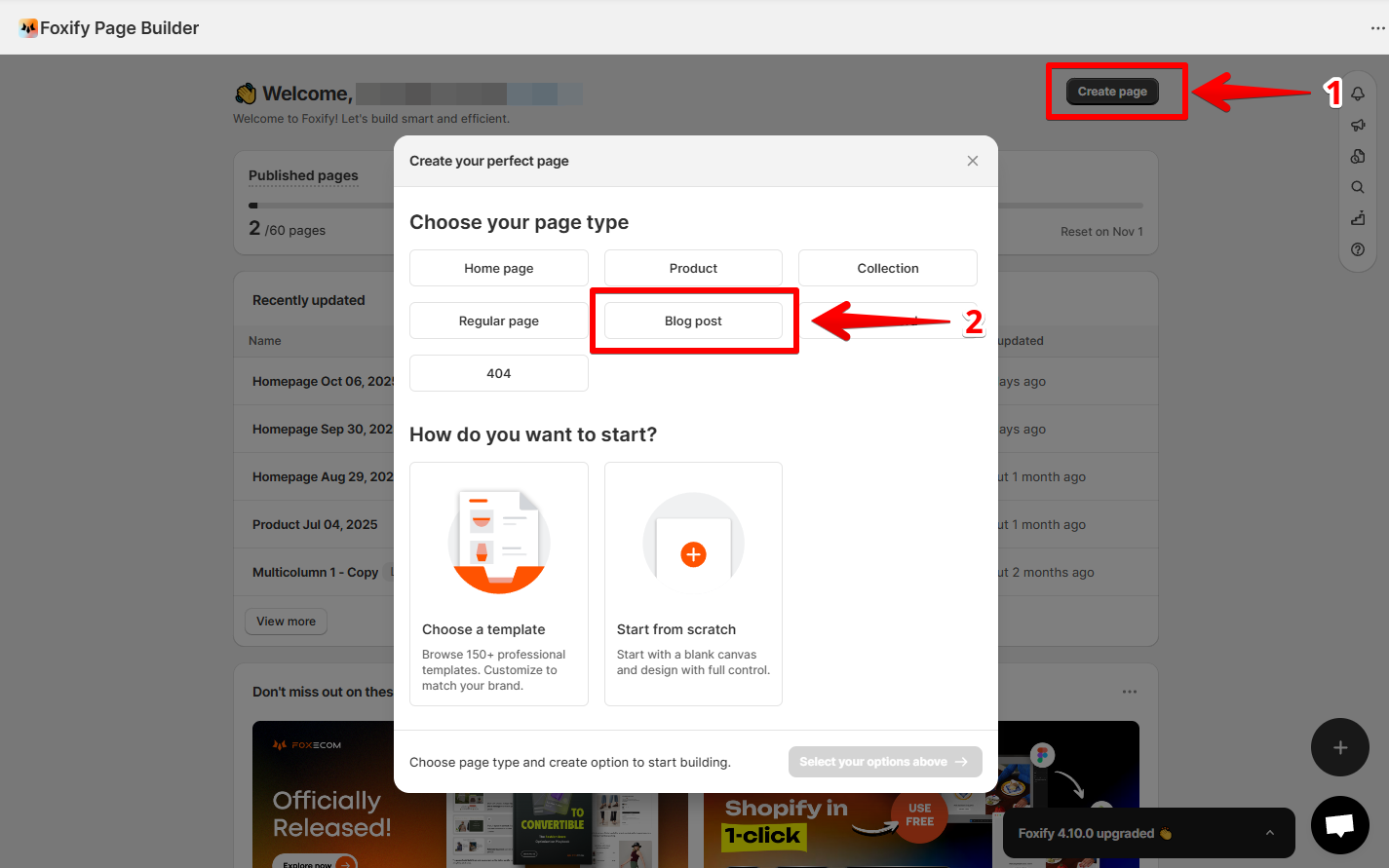
From the Foxify dashboard, click **Create page** and choose the **type of page** as **Blog post**.

<figure><img src="https://1749964694-files.gitbook.io/~/files/v0/b/gitbook-x-prod.appspot.com/o/spaces%2FfgpgvtRaQLc36GYyIktZ%2Fuploads%2F75H7U2wdGdiK68a1fBEi%2Fimage.png?alt=media&#x26;token=10e1a0a0-8c9c-406a-9671-814e47377efc" alt=""><figcaption></figcaption></figure>
{% endstep %}

{% step %}

### Select how you want to start

Foxify offers three flexible ways to build:

* **Start from template** → Choose from professional, ready-made layouts. Learn more: [templates](https://docs.foxecom.com/foxify-app/page-management/templates "mention")
* **Create with AI** → Describe your vision and let AI design your page. Learn more: [ai-layout-generator](https://docs.foxecom.com/foxify-app/page-management/ai-layout-generator "mention")
* **Build from scratch** → Start with a blank canvas and customize every detail.
  {% endstep %}
  {% endstepper %}

## Publish a blog post

When you're done customizing your blog post, hit **Publish** to show your newly created blog post template in your live store. It will override your current content.&#x20;

{% hint style="warning" %}
You need to enable [**Foxify Theme Helper**](https://docs.foxecom.com/foxify-app/getting-started/setup-and-quick-start/how-to-install-foxify#1.-enable-foxify-app-embed) in your Theme App embeds so Foxify can work well with your Shopify theme.&#x20;
{% endhint %}

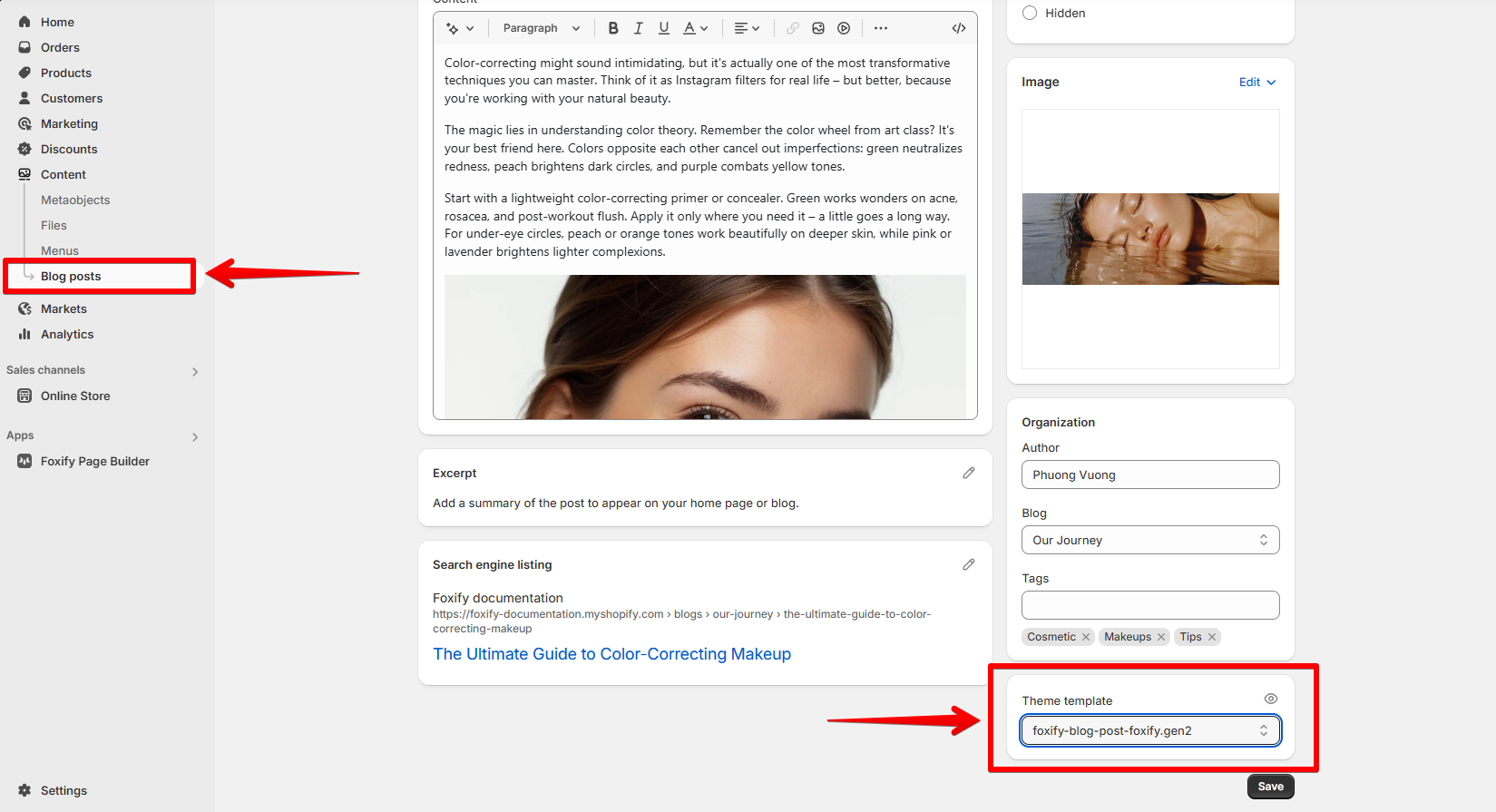
Change the template of the blog post on the storefront anytime by assigning a different template in Shopify admin > **Content** > **Blog posts**.

<figure><img src="https://1749964694-files.gitbook.io/~/files/v0/b/gitbook-x-prod.appspot.com/o/spaces%2FfgpgvtRaQLc36GYyIktZ%2Fuploads%2FyaqtvPQgmhIzd6MSIRQU%2Fimage.png?alt=media&#x26;token=fe91d790-0bd6-4397-a841-fce1e4712c08" alt=""><figcaption></figcaption></figure>

{% hint style="success" %}
Use **Blog post elements** to auto-populate template content based on the blog post assigned to the template.

Learn more:

[blog-posts-elements](https://docs.foxecom.com/foxify-app/foxstudio/add-and-edit-elements/blog-posts-elements "mention")
{% endhint %}

{% hint style="info" %}
If you **unpublish** a Foxify-created blog post template:

* All blog posts assigned to that template will **revert to your Shopify theme's default blog post layout**.
* The content itself remains unchanged — only the design template is affected.
  {% endhint %}

## Pro tip

{% hint style="success" %}
:star: You might also like\
[build-for-success-series](https://docs.foxecom.com/foxify-app/build-for-success-series "mention")
{% endhint %}

<div data-full-width="false"><figure><img src="https://1749964694-files.gitbook.io/~/files/v0/b/gitbook-x-prod.appspot.com/o/spaces%2FfgpgvtRaQLc36GYyIktZ%2Fuploads%2FEj8YgLWvHPzkL3z1Emhb%2FBANNER%201%2C%202%20%20%20%20%20%20%20%20%20%20%20%20%20%20800x400%20(2)%20(1).png?alt=media&#x26;token=7e11de75-84e5-4576-902e-8c435aff2578" alt=""><figcaption><p>Foxify AI turns a prompt into a well-structured page layout in seconds. <a href="https://admin.shopify.com/apps/foxify-builder?utm_source=foxecom&#x26;utm_medium=help_center_foxify_create_a_blog_post&#x26;utm_campaign=anchor-text&#x26;utm_term=try_foxify_ai"><mark style="color:orange;">Try Foxify AI</mark></a> ✨</p></figcaption></figure></div>