# Create a Landing page

With Foxify, you can create any regular page or landing page.&#x20;

Landing pages function as standalone pages within your store. Therefore, they can be used for multiple functions, such as About Us, Contact, Sales pages, etc.

{% tabs %}
{% tab title="Create a About us page" %}
{% embed url="<https://youtu.be/Q1k68Bl6TZ4>" %}
{% endtab %}

{% tab title="Create a Landing page for Beauty store" %}
{% embed url="<https://youtu.be/0SmjaYunUkQ>" %}
{% endtab %}
{% endtabs %}

## Create a regular page&#x20;

{% stepper %}
{% step %}

### Select the page type

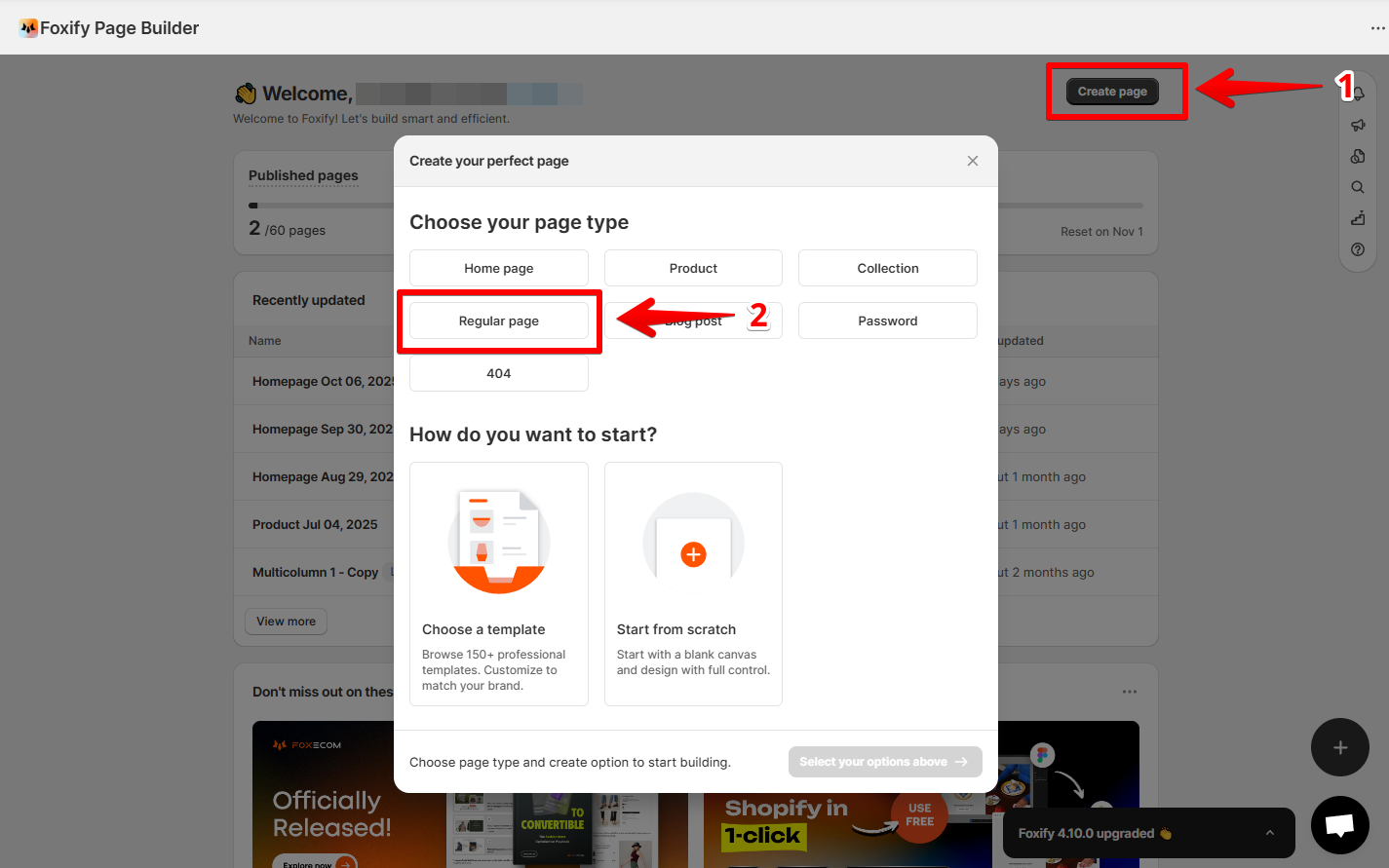
From the Foxify dashboard, click **Create page** and choose the **type of page** as **Regular page**.

<figure><img src="https://1749964694-files.gitbook.io/~/files/v0/b/gitbook-x-prod.appspot.com/o/spaces%2FfgpgvtRaQLc36GYyIktZ%2Fuploads%2FpyyxEQ8N0YaKE1zUZhOd%2Fimage.png?alt=media&#x26;token=ba852aa9-92c2-41a3-a2c7-0fe8852bbe75" alt=""><figcaption></figcaption></figure>
{% endstep %}

{% step %}

### Select how you want to start

Foxify offers three flexible ways to build:

* **Start from template** → Choose from professional, ready-made layouts. Learn more: [templates](https://docs.foxecom.com/foxify-app/page-management/templates "mention")
* **Create with AI** → Describe your vision and let AI design your page. Learn more: [ai-layout-generator](https://docs.foxecom.com/foxify-app/page-management/ai-layout-generator "mention")
* **Build from scratch** → Start with a blank canvas and customize every detail.
  {% endstep %}
  {% endstepper %}

## Publish a regular page

{% hint style="success" %}
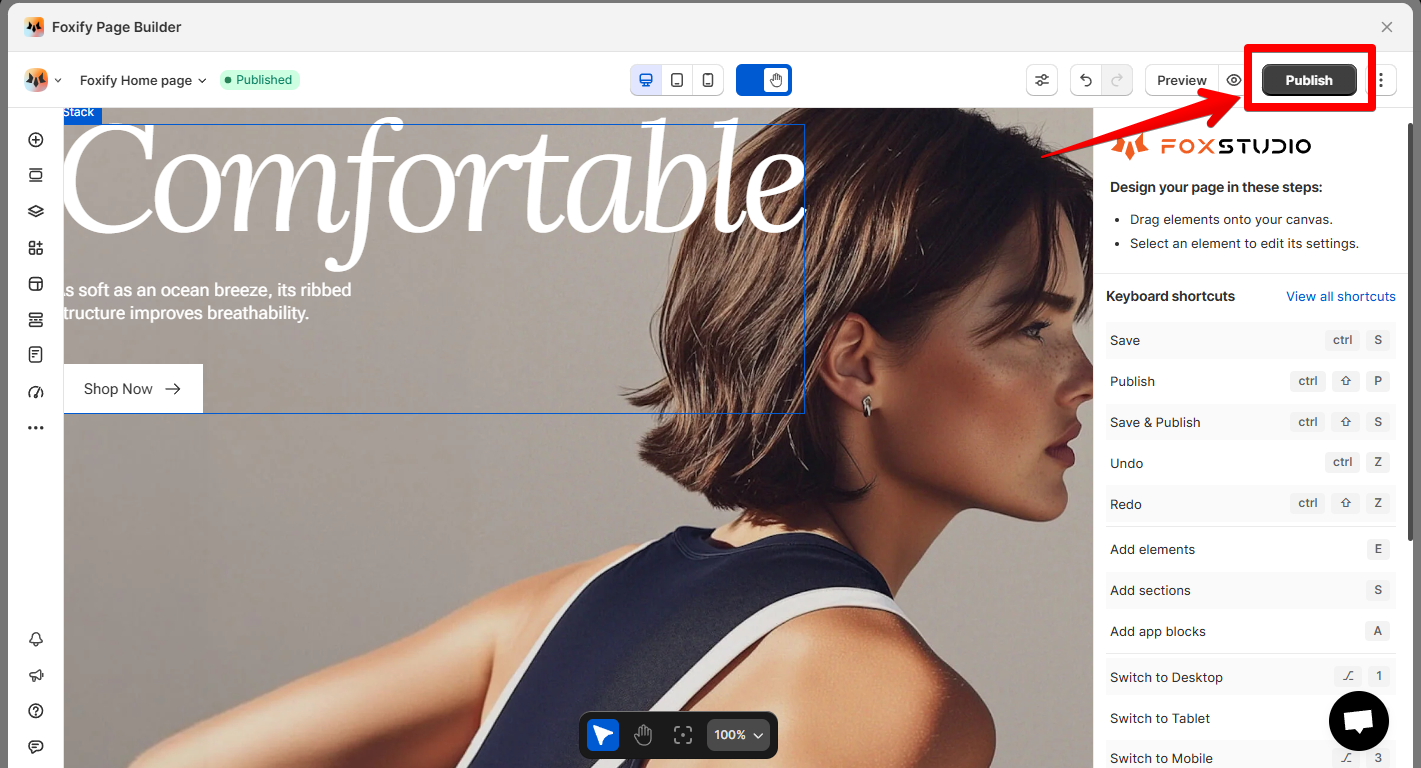
Once you finish designing, click **Publish** to push your new landing live.
{% endhint %}

<figure><img src="https://1749964694-files.gitbook.io/~/files/v0/b/gitbook-x-prod.appspot.com/o/spaces%2FfgpgvtRaQLc36GYyIktZ%2Fuploads%2FLKF70J4HHmuDxtc6OIh8%2Fimage.png?alt=media&#x26;token=5e4a54b8-23bc-47ec-8f43-5a68014ad289" alt=""><figcaption></figcaption></figure>

{% hint style="warning" %}
You need to enable [Foxify Theme Helper](https://docs.foxecom.com/foxify-app/getting-started/setup-and-quick-start/how-to-install-foxify#1.-enable-foxify-app-embed) in your Theme App embeds so Foxify can work with your Shopify theme.&#x20;
{% endhint %}

{% hint style="info" %}
:star: Want to publish your page to a **draft theme** instead of live?&#x20;

See [pick-a-theme-to-work-with-foxify](https://docs.foxecom.com/foxify-app/faqs-and-troubleshooting/faqs/pick-a-theme-to-work-with-foxify "mention")
{% endhint %}

## Unpublish a regular page

{% hint style="success" %}
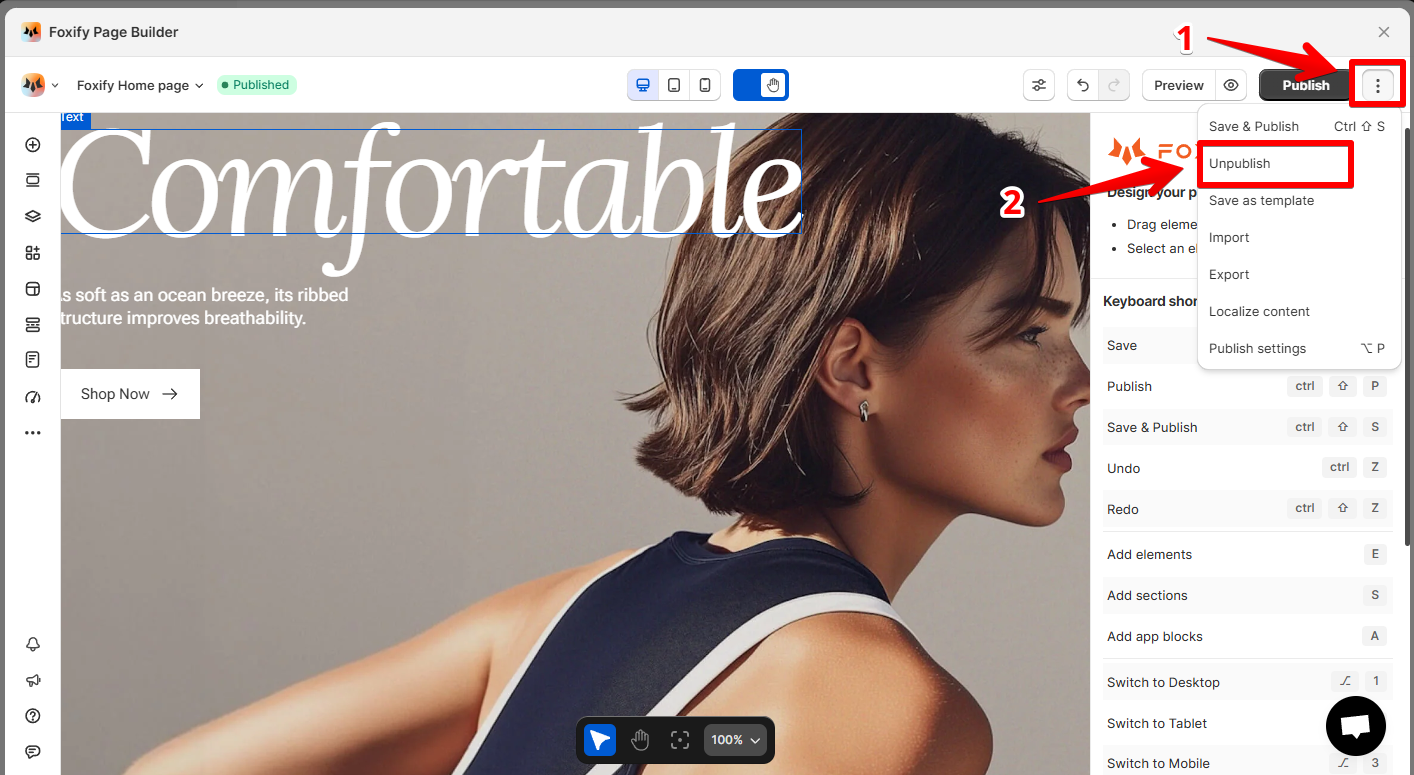
Inside the page editor, hit **Unpublish** in the top-right corner.
{% endhint %}

<figure><img src="https://1749964694-files.gitbook.io/~/files/v0/b/gitbook-x-prod.appspot.com/o/spaces%2FfgpgvtRaQLc36GYyIktZ%2Fuploads%2F32mDkSh4CDCStvgelknV%2Fimage.png?alt=media&#x26;token=65d300c3-6019-4543-a596-e91d01b2ba28" alt=""><figcaption></figcaption></figure>

## Pro tip

{% hint style="info" %}
:star: You might also like\
[build-for-success-series](https://docs.foxecom.com/foxify-app/build-for-success-series "mention")\
[landing-page](https://docs.foxecom.com/foxify-app/build-for-success-series/landing-page "mention")
{% endhint %}

<div data-full-width="false"><figure><img src="https://1749964694-files.gitbook.io/~/files/v0/b/gitbook-x-prod.appspot.com/o/spaces%2FfgpgvtRaQLc36GYyIktZ%2Fuploads%2FEj8YgLWvHPzkL3z1Emhb%2FBANNER%201%2C%202%20%20%20%20%20%20%20%20%20%20%20%20%20%20800x400%20(2)%20(1).png?alt=media&#x26;token=7e11de75-84e5-4576-902e-8c435aff2578" alt=""><figcaption><p>Foxify AI turns a prompt into a well-structured page layout in seconds. <a href="https://admin.shopify.com/apps/foxify-builder?utm_source=foxecom&#x26;utm_medium=help_center_foxify_create_a_landing_page&#x26;utm_campaign=anchor-text&#x26;utm_term=try_foxify_ai"><mark style="color:orange;">Try Foxify AI</mark></a> ✨</p></figcaption></figure></div>


---

# Agent Instructions: Querying This Documentation

If you need additional information that is not directly available in this page, you can query the documentation dynamically by asking a question.

Perform an HTTP GET request on the current page URL with the `ask` query parameter:

```
GET https://docs.foxecom.com/foxify-app/page-management/page-creation/create-a-landing-page.md?ask=<question>
```

The question should be specific, self-contained, and written in natural language.
The response will contain a direct answer to the question and relevant excerpts and sources from the documentation.

Use this mechanism when the answer is not explicitly present in the current page, you need clarification or additional context, or you want to retrieve related documentation sections.