Foxify App
Foxify App
Page Management

App extensions

3 min read

An introduction to Foxify App extensions

Understanding that not all merchants are technical, and even if they are, they shouldn't concern themselves with code, Foxify's App extensions aim to remove the challenge of integrating new apps by introducing a streamlined process.

This lets you install 3rd-party apps and get things to run perfectly in just a few clicks, avoiding any potential integration bugs and keeping your storefront untouched.

App extensions listing

The feature provides extensions from both Foxify and other 3rd-party applications (updated regularly) for a wide range of categories.

Install an app extension

Follow the steps below to install an app extension in Foxify.

Make sure you install the app to your Shopify store first before activating it as an extension in Foxify.

Steps:

  1. From your Foxify dashboard, go to App extensions.
  2. Select an app you want from the list.
  3. Click Install extension.
  4. Click Settings to update the extension settings if required.
  5. In your Page editor, add the corresponding app widgets.

How to add an app extension in FoxStudio

Once you have installed the app extension you want to use in Foxify, you can add the app widget to your FoxStudio editor.

Steps:

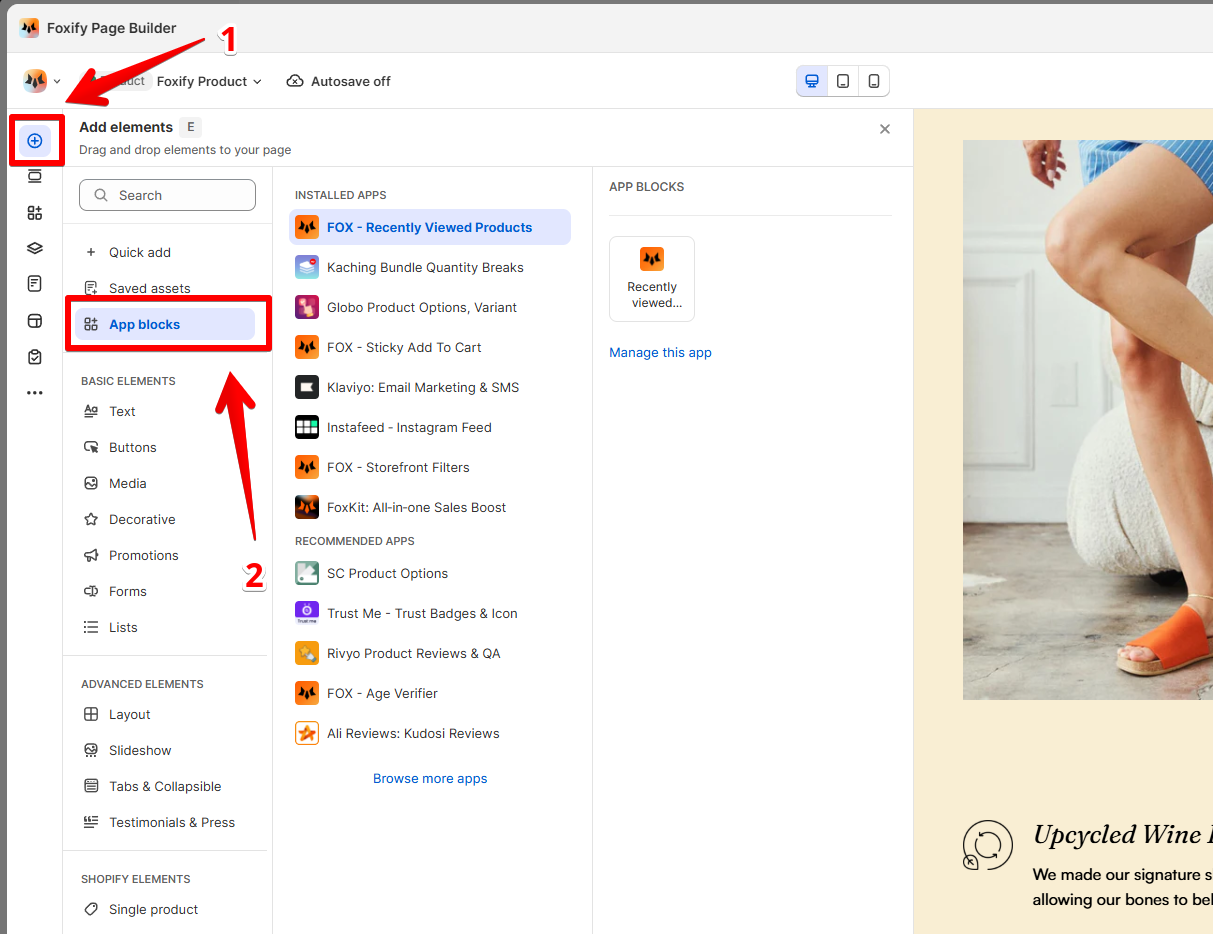
  1. In the FoxStudio editor, select Add elements (E), then click App blocks.
  2. In the Installed apps list, select the app and drag the app block to your page.
image

Select Browse more apps to discover and install new app extensions for your pages.

Explore extensions by FoxEcom partners 🔥

Shopify Apps Integrations
Last updated