# Create a Home page

The Home page is the digital front door of your online store. It sets the tone for your brand, guides visitors through their shopping journey, and builds trust. A well-designed Home page can increase engagement, reduce bounce rates, and boost conversions.

With Foxify, you can design your Home page from scratch, use pre-made templates, or let AI build it for you — all without coding.

{% tabs %}
{% tab title="Create a Home page for Sport store" %}
{% embed url="<https://youtu.be/_4_91ikUC-g>" %}
{% endtab %}

{% tab title="Create a Home page for Electronics store" %}
{% embed url="<https://www.youtube.com/watch?v=TSAdhI9n-lI>" %}
{% endtab %}
{% endtabs %}

In this article, you will learn how to create a Home page with Foxify.

## Create a home page&#x20;

{% stepper %}
{% step %}

### Select the page type

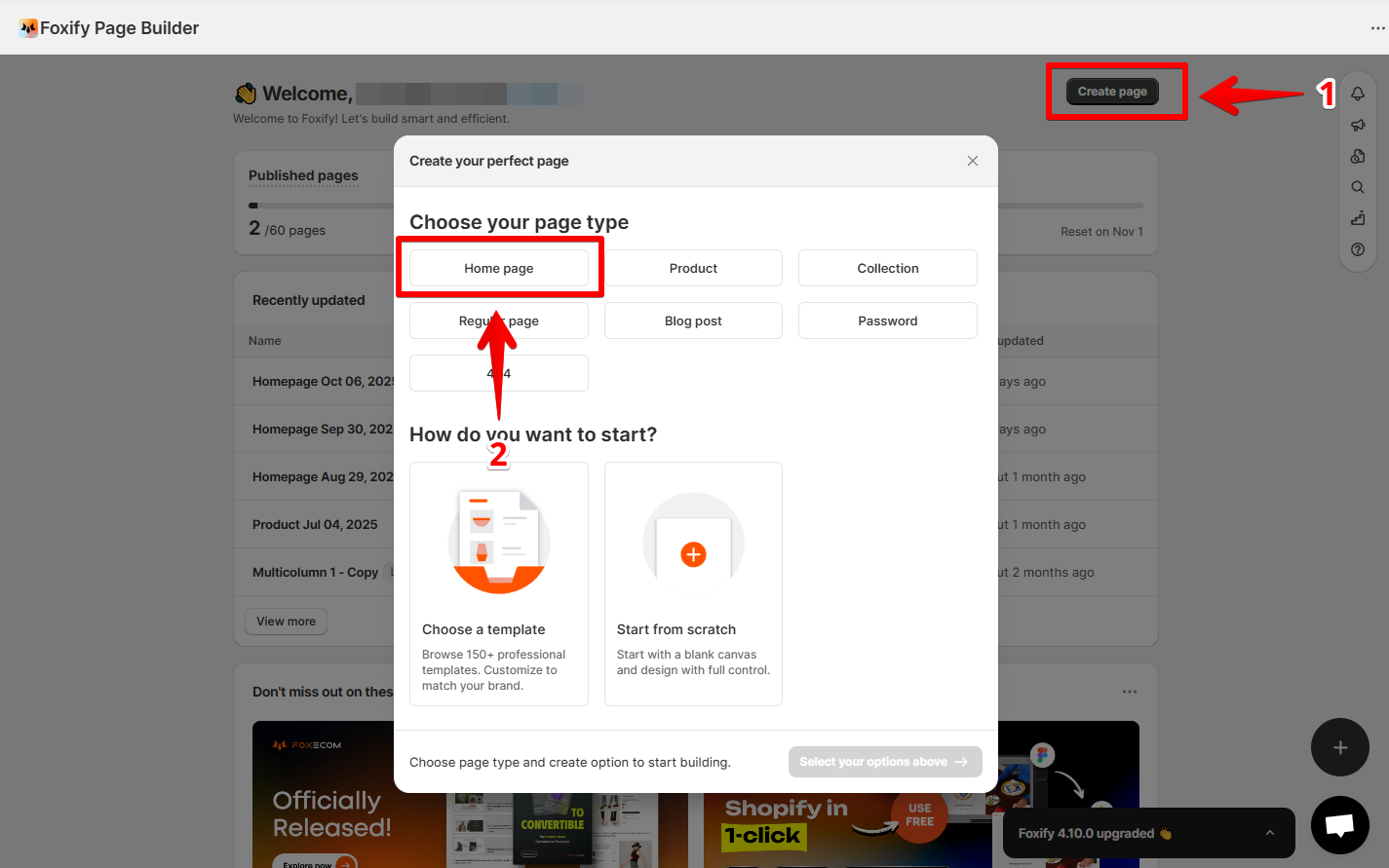
From the Foxify dashboard, click **Create page** and choose the **type of page** as **Home page**.

<figure><img src="https://1749964694-files.gitbook.io/~/files/v0/b/gitbook-x-prod.appspot.com/o/spaces%2FfgpgvtRaQLc36GYyIktZ%2Fuploads%2Fi4hSCQb6McVHf6hT9Mcc%2Fimage.png?alt=media&#x26;token=37b5f9aa-aaa5-405a-badc-0d84e9530265" alt=""><figcaption></figcaption></figure>
{% endstep %}

{% step %}

### Select how you want to start

Foxify offers three flexible ways to build:

* **Start from template** → Choose from professional, ready-made layouts. Learn more: [templates](https://docs.foxecom.com/foxify-app/page-management/templates "mention")
* **Create with AI** → Describe your vision and let AI design your page. Learn more: [ai-layout-generator](https://docs.foxecom.com/foxify-app/page-management/ai-layout-generator "mention")&#x20;
* **Build from scratch** → Start with a blank canvas and customize every detail.
  {% endstep %}
  {% endstepper %}

## Publish a home page

{% hint style="success" %}
Once you finish designing:

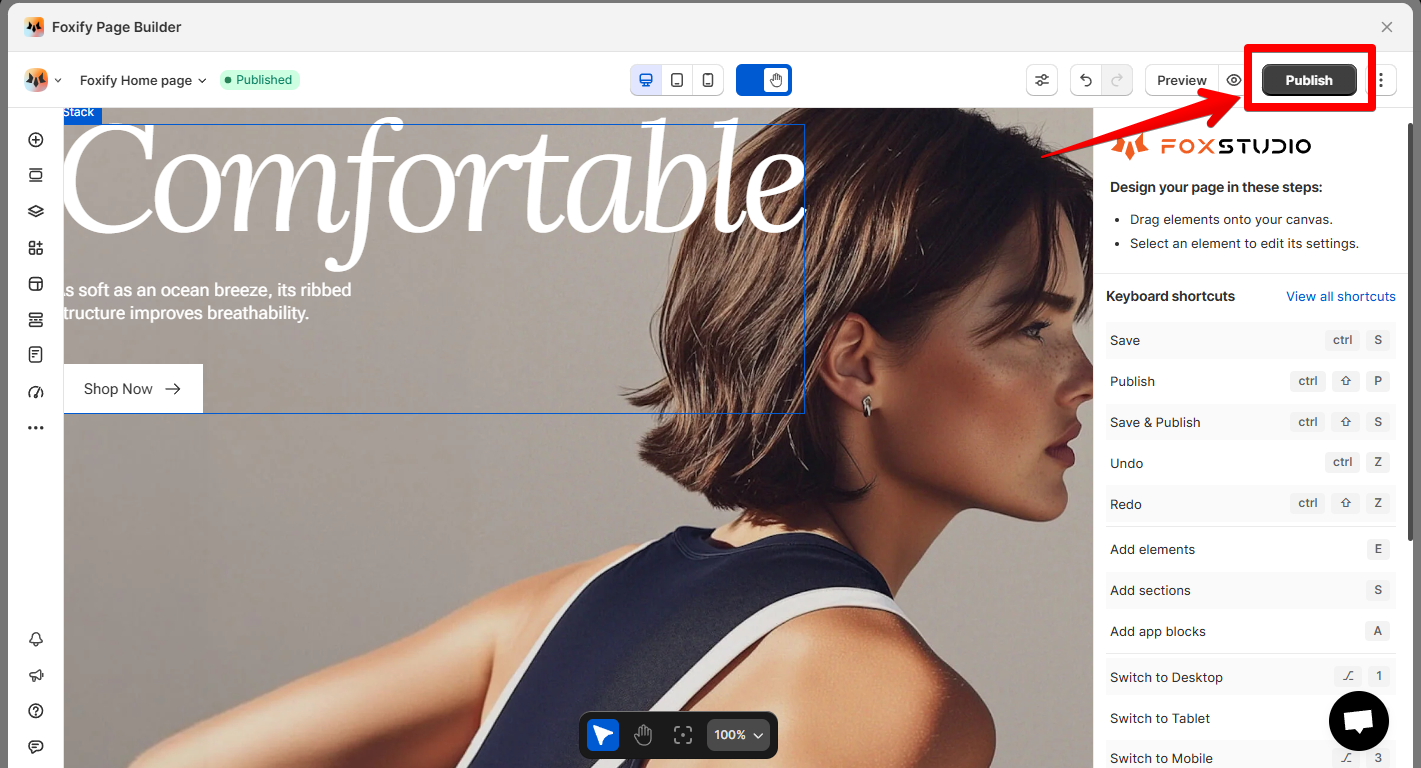
1. Click **Publish** to push your Home page live.
2. Publishing will replace your current Home page content in Shopify.
   {% endhint %}

<figure><img src="https://1749964694-files.gitbook.io/~/files/v0/b/gitbook-x-prod.appspot.com/o/spaces%2FfgpgvtRaQLc36GYyIktZ%2Fuploads%2FLKF70J4HHmuDxtc6OIh8%2Fimage.png?alt=media&#x26;token=5e4a54b8-23bc-47ec-8f43-5a68014ad289" alt=""><figcaption></figcaption></figure>

{% hint style="warning" %}
You need to enable [Foxify Theme Helper](https://docs.foxecom.com/foxify-app/getting-started/setup-and-quick-start/how-to-install-foxify#1.-enable-foxify-app-embed) in your Theme App embeds so Foxify can work with your Shopify theme.&#x20;
{% endhint %}

{% hint style="info" %}
:star: Want to publish your page to a **draft theme** instead of live?&#x20;

See [pick-a-theme-to-work-with-foxify](https://docs.foxecom.com/foxify-app/faqs-and-troubleshooting/faqs/pick-a-theme-to-work-with-foxify "mention")
{% endhint %}

## Unpublish a home page

{% hint style="success" %}
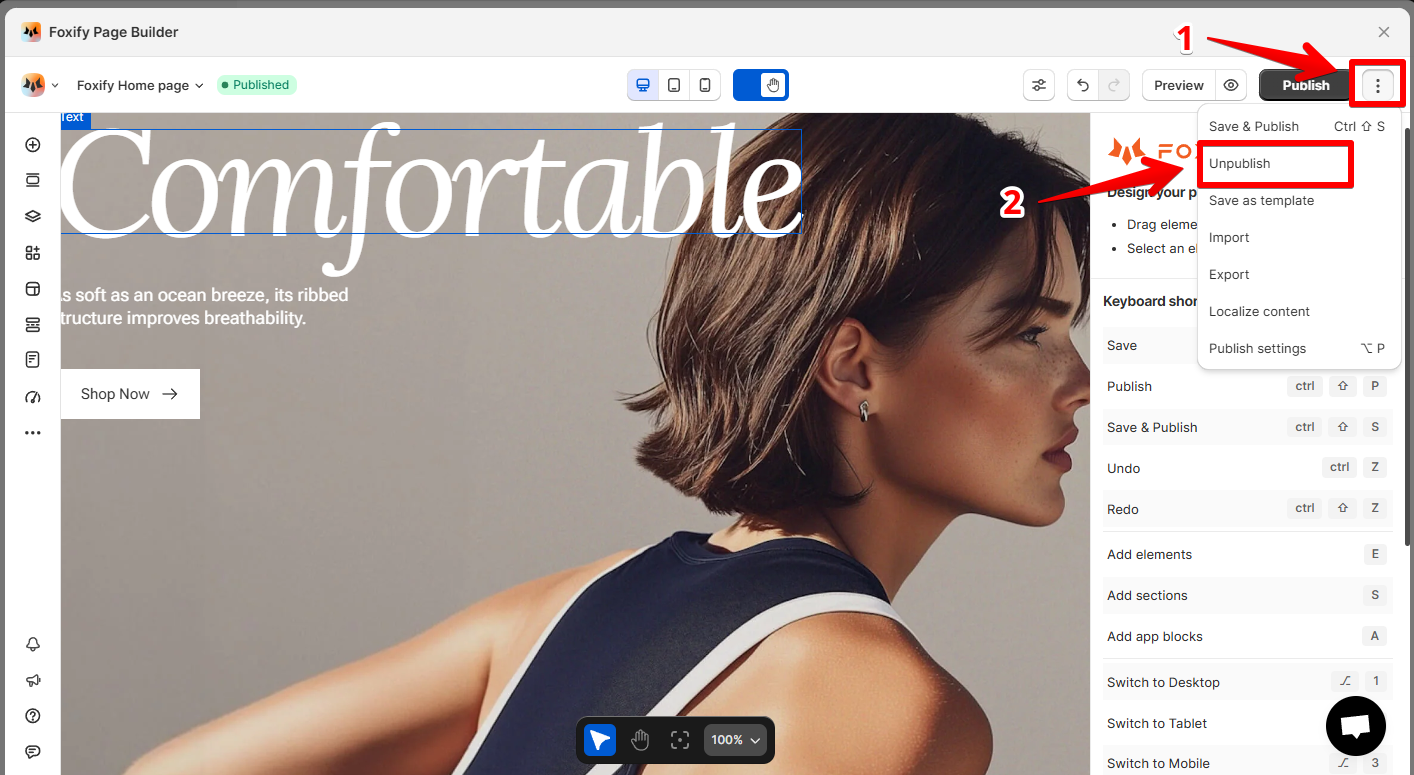
Inside the page editor, hit **Unpublish** in the top-right corner.
{% endhint %}

<figure><img src="https://1749964694-files.gitbook.io/~/files/v0/b/gitbook-x-prod.appspot.com/o/spaces%2FfgpgvtRaQLc36GYyIktZ%2Fuploads%2F32mDkSh4CDCStvgelknV%2Fimage.png?alt=media&#x26;token=65d300c3-6019-4543-a596-e91d01b2ba28" alt=""><figcaption></figcaption></figure>

## Pro tip

{% hint style="info" %}
:star: You might also like

[build-for-success-series](https://docs.foxecom.com/foxify-app/build-for-success-series "mention")
{% endhint %}

<div data-full-width="false"><figure><img src="https://1749964694-files.gitbook.io/~/files/v0/b/gitbook-x-prod.appspot.com/o/spaces%2FfgpgvtRaQLc36GYyIktZ%2Fuploads%2FEj8YgLWvHPzkL3z1Emhb%2FBANNER%201%2C%202%20%20%20%20%20%20%20%20%20%20%20%20%20%20800x400%20(2)%20(1).png?alt=media&#x26;token=7e11de75-84e5-4576-902e-8c435aff2578" alt=""><figcaption><p>Foxify AI turns a prompt into a well-structured page layout in seconds. <a href="https://admin.shopify.com/apps/foxify-builder?utm_source=foxecom&#x26;utm_medium=help_center_foxify_create_a_home_page&#x26;utm_campaign=anchor-text&#x26;utm_term=try_foxify_ai"><mark style="color:orange;">Try Foxify AI</mark></a> ✨</p></figcaption></figure></div>