# FoxKit All-in-one Upsell Cross-sell

{% embed url="<https://youtu.be/QP50HOH9PkI/>" %}

## What is FoxKit AIO Upsell Cross-sell?

FoxKit offers upsells & cross-sells for Shopify stores, transforming store browsers into buyers & loyal customers.

<figure><img src="https://1749964694-files.gitbook.io/~/files/v0/b/gitbook-x-prod.appspot.com/o/spaces%2FfgpgvtRaQLc36GYyIktZ%2Fuploads%2FqRfMJkajFsoxqavqgeJs%2FFoxKit%20-%20Inblog%20Banner%202%20(1).jpg?alt=media&#x26;token=32c00fd5-feb9-42c5-bf7d-61641ea9d183" alt=""><figcaption><p><a href="https://foxecom.com/products/foxkit-shopify-app?utm_source=foxecom&#x26;utm_medium=help_center_foxify_foxkit_all_in_one&#x26;utm_campaign=anchor-text&#x26;utm_term=try_foxkit_free_now">Try FoxKit free now</a></p></figcaption></figure>

**What you can do with FoxKit:**

* **Popular Upsell features**: Bundles, Discounts, & In-cart Offer to boost AOV
* **Effective Cross-sells**: Free ship goal, Countdown, Lucky wheel, Back in Stock
* **Extra tools to boost Sales**: Size chart, Pre-order, Recent Sales Pop-up, etc.
* **Insightful Analytics** of conversion performance, from impressions to sales & AOV

{% hint style="success" %}
[Install FoxKit app now](https://apps.shopify.com/foxkit?utm_source=FoxEcom\&utm_medium=help_center_foxify_foxkit_all_in_one\&utm_campaign=anchor_text\&utm_term=install_foxkit_app_now) for 20% OFF for 1 year with code **AFRIENDOFFOX** 🎁
{% endhint %}

## How to use FoxKit with Foxify Smart Page Builder

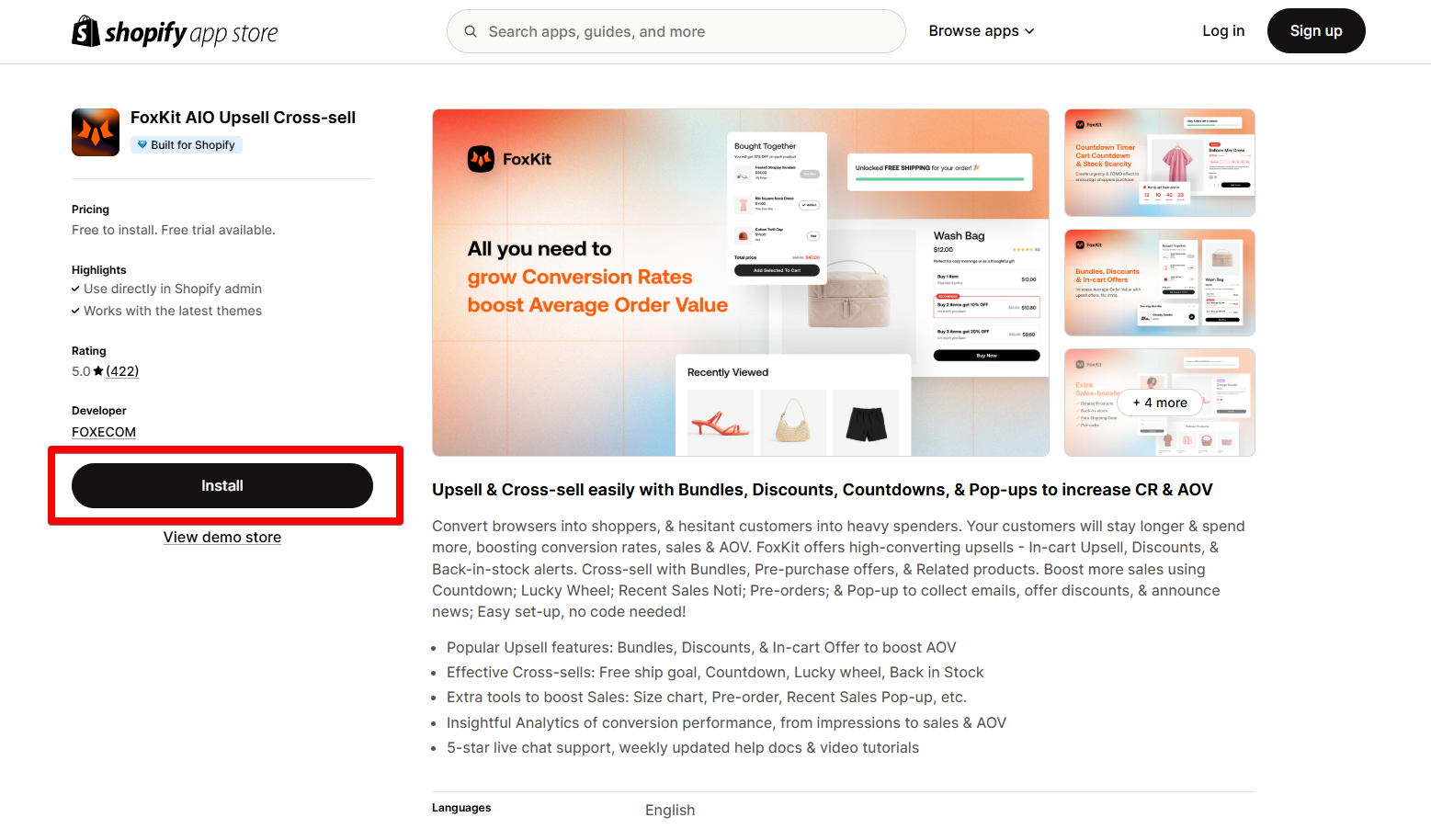
### Install FoxKit AIO Upsell Cross-sell from the Shopify App Store&#x20;

<figure><img src="https://1749964694-files.gitbook.io/~/files/v0/b/gitbook-x-prod.appspot.com/o/spaces%2FfgpgvtRaQLc36GYyIktZ%2Fuploads%2FyeNIFXWDTsr21FwoGQyi%2Fimage.png?alt=media&#x26;token=ea63984c-7774-465f-bb08-7d068211283c" alt=""><figcaption></figcaption></figure>

{% hint style="info" %}
Before using the app widget in Foxify, you have to install it in your Shopify store and configure the app settings. If you’re new to this app, check its documentation to understand how it works.
{% endhint %}

{% embed url="<https://docs.foxecom.com/foxkit-app>" %}

{% hint style="success" %}
Steps:

1. Log in to the Shopify App Store.
2. Find the [FoxKit app](https://apps.shopify.com/foxkit) and click **Install**.
3. In your Shopify admin, to authorize the use of the app, click **Install.**

After the app is installed, you can view and use it from the **Apps** page in your Shopify admin.
{% endhint %}

### Set up FoxKit AIO Upsell Cross-sell with Foxify&#x20;

FoxKit has been integrated as a built-in extension in Foxify Smart Pagebuilder, so all you need to do is:

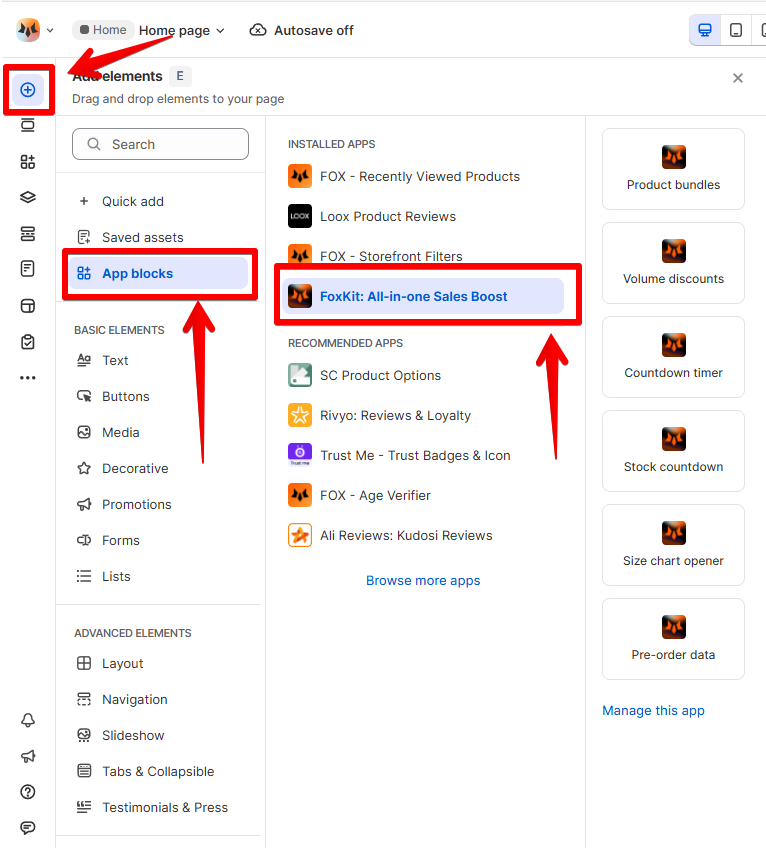
1. In your **Foxify dashboard**, select **App Extensions.**
2. Look for **FoxKit** and Choose **Install extension.**

{% hint style="info" %}
Once you see a green checkmark next to **FoxKit**, it means the app has been activated and is now ready to be featured.
{% endhint %}

<figure><img src="https://1749964694-files.gitbook.io/~/files/v0/b/gitbook-x-prod.appspot.com/o/spaces%2FfgpgvtRaQLc36GYyIktZ%2Fuploads%2FLhoGUF43agCseL1iwavb%2Fimage.png?alt=media&#x26;token=4a385a79-096e-4c3a-945c-610cb29b0e43" alt=""><figcaption></figcaption></figure>

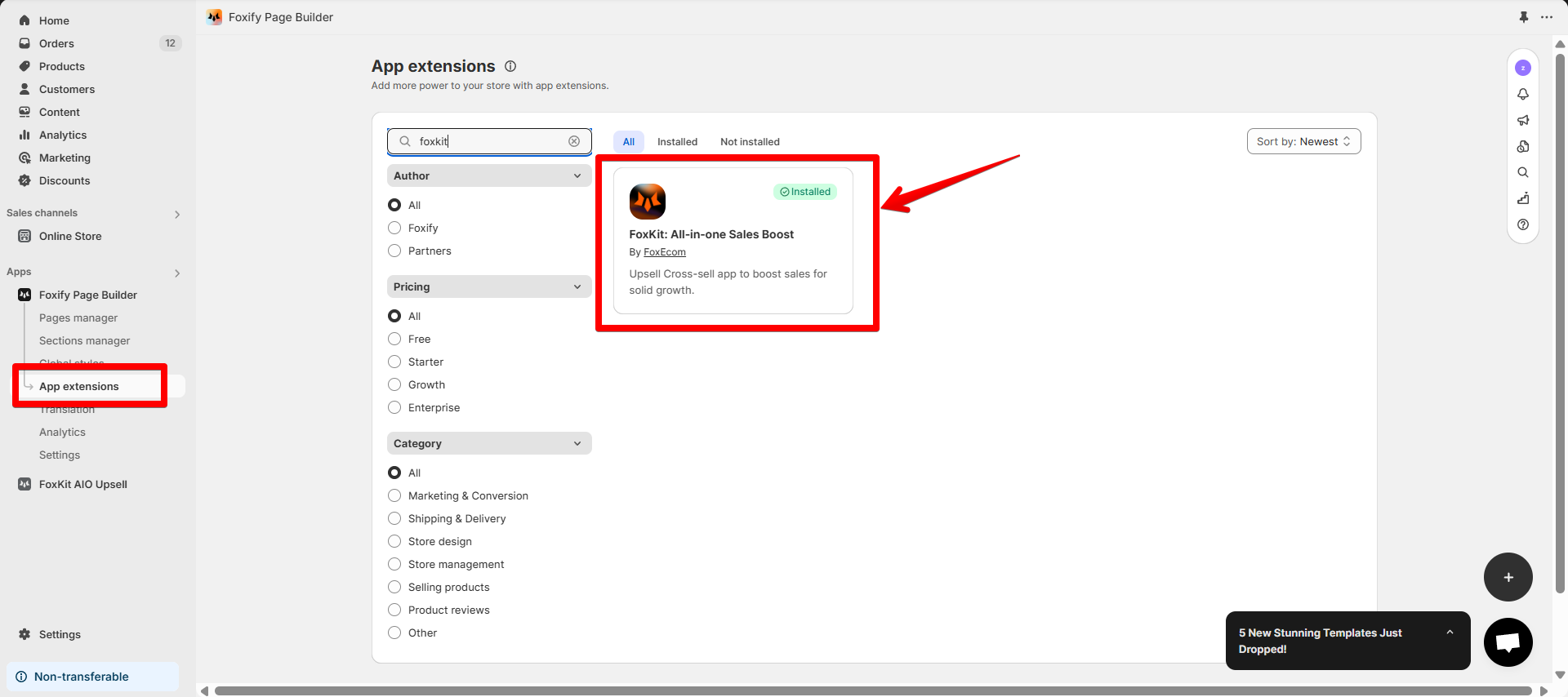
3. In **Pages manager**, open the page you want to add FoxKit features to. Select **Add element > App blocks.**

Select FoxKit from the **Installed apps** list, and drag the app widget you want to feature on your page.

{% hint style="info" %}
Available FoxKit feature blocks include:

* [Product bundles](https://docs.foxecom.com/foxkit-app/cross-sells/product-bundles)
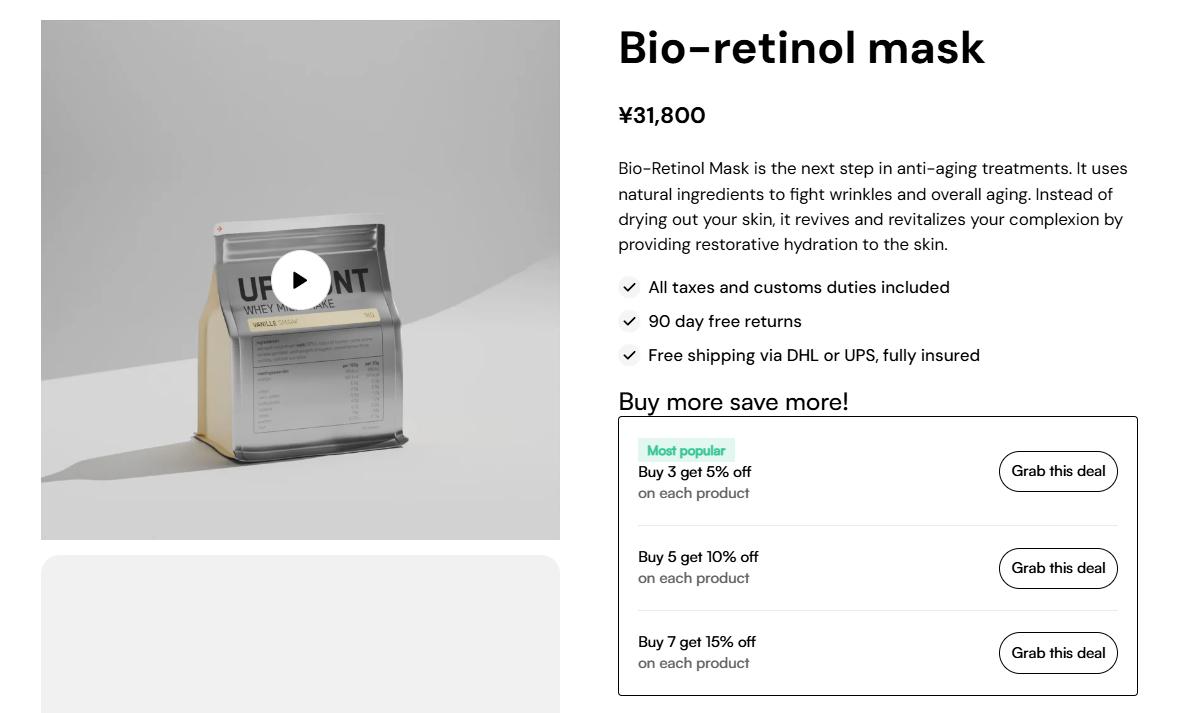
* [Volume discounts](https://docs.foxecom.com/foxkit-app/upsells/volume-discounts)
* [Countdown timer](https://docs.foxecom.com/foxkit-app/sales-boosting/countdown-timer)
* [Stock countdown ](https://docs.foxecom.com/foxkit-app/sales-boosting/stock-scarcity)
* [Size chart opener](https://docs.foxecom.com/foxkit-app/sales-boosting/size-chart)
* [Pre-order data](https://docs.foxecom.com/foxkit-app/sales-boosting/pre-orders)&#x20;
  {% endhint %}

<figure><img src="https://1749964694-files.gitbook.io/~/files/v0/b/gitbook-x-prod.appspot.com/o/spaces%2FfgpgvtRaQLc36GYyIktZ%2Fuploads%2FmYMJIwmP93DwYxnfZPZe%2Fimage.png?alt=media&#x26;token=fe41782c-f043-4019-b33a-2c0fd569a623" alt=""><figcaption></figcaption></figure>

4. Adjust the element's sizing if needed.
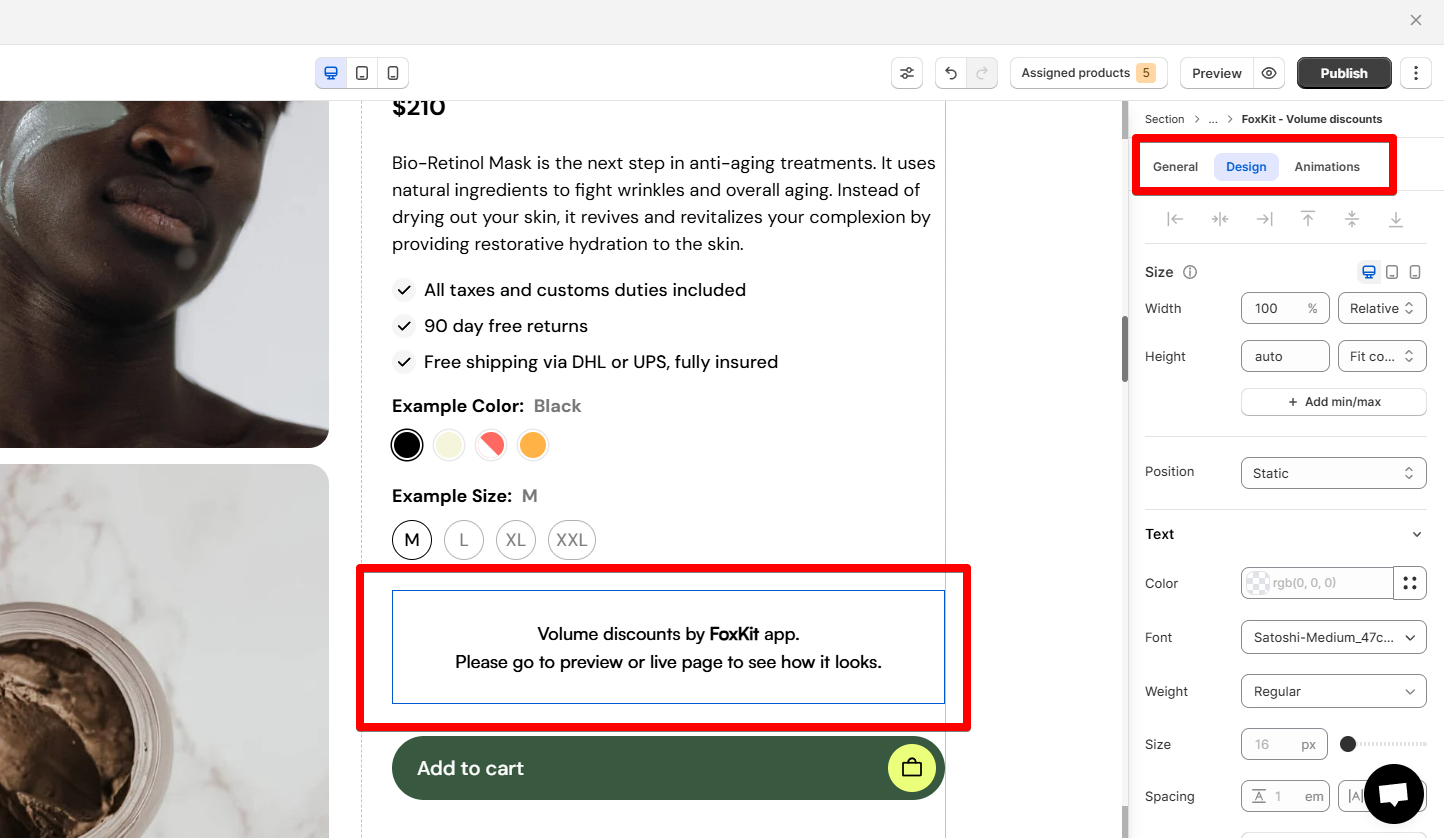
<figure><img src="https://1749964694-files.gitbook.io/~/files/v0/b/gitbook-x-prod.appspot.com/o/spaces%2FfgpgvtRaQLc36GYyIktZ%2Fuploads%2FKEA1F5Iqse9Qt5LmZ4CF%2Fimage.png?alt=media&#x26;token=287c8813-114f-439d-a2b3-0a3f2784dd54" alt=""><figcaption><p>An example of using <a href="https://docs.foxecom.com/foxkit-app/upsells/volume-discounts">FoxKit's Volume discounts</a> in Foxify page</p></figcaption></figure>

5\. **Save** the changes and go to the preview page or live page to see the app widget.
<figure><img src="https://1749964694-files.gitbook.io/~/files/v0/b/gitbook-x-prod.appspot.com/o/spaces%2FfgpgvtRaQLc36GYyIktZ%2Fuploads%2FgHdqdFj8ygGZHV8ko9DG%2Fimage.png?alt=media&#x26;token=7d509723-4b18-4b2b-bc07-ea89c7dc8dfe" alt=""><figcaption></figcaption></figure>

<figure><img src="https://1749964694-files.gitbook.io/~/files/v0/b/gitbook-x-prod.appspot.com/o/spaces%2FfgpgvtRaQLc36GYyIktZ%2Fuploads%2Fu6oqi1DFmOTPfGiFCRx7%2FSleek%20-%20In-blog%20banner%201.jpg?alt=media&#x26;token=9df3ad8e-fe87-44c5-aced-86331e3bead0" alt=""><figcaption><p><a href="https://themes.shopify.com/themes/sleek/presets/sleek?utm_source=foxecom&#x26;utm_medium=help_center_foxify_foxkit_all-in-one&#x26;utm_campaign=anchor-text&#x26;utm_term=try-sleek_free_now">Try Sleek free now</a></p></figcaption></figure>