# Understanding workflow triggers
_yKyvQrec.jpg)
## What are triggers
Triggers define **when a workflow starts**.
A trigger listens for a specific event. When the trigger occurs, the workflow is automatically executed, and relevant data is passed to subsequent workflow steps.
Every workflow can have only 1 trigger. Without a trigger, a workflow cannot run.
## Types of triggers
| Event | Event type | When it fires | Data available |
| ------------------ | ------------------------ | --------------------------------- | ------------------------------------------------------------------------------------------------------------------------------------------ |
| Product restock | **`product.restocked`** | Inventory changes from 0 to > 0 | `Product/variant ID`
`Inventory level`
`Subscriber list`
`Campaign ID`
`Restock timestamp`
`Location/warehouse` |
| Customer signed up | **`customer.signed_up`** | Customer submits "Notify Me" form | `Email`
`Product/variant ID`
`Timestamp`
`Source`
`Consent` |
_F6giJN1W.jpg)
Starts when a product that was out of stock becomes available again.
*Example:*
**Trigger:** Product restock
→ **Action:** Send back-in-stock email
✨ Explore more pre-built workflow templates: [Get started with workflow templates library](https://docs.foxecom.com/xflow-app/workflows/get-started-with-workflow-templates-library)
_jvSRM7pc.jpg)
Starts when a customer signs up to be notified about a product in Notify me form
*Example:*
**Trigger:** New customer sign up
→ **Action:** Send welcome email
✨ Explore more pre-built workflow templates: [Get started with workflow templates library](https://docs.foxecom.com/xflow-app/workflows/get-started-with-workflow-templates-library)
Learn more: [Available triggers, actions, and conditions](https://docs.foxecom.com/xflow-app/workflows/available-triggers-actions-and-conditions)
## How triggers work
Triggers work automatically. Once set up, no manual action is needed for the workflow to run.
An event happens in the system (for example, a product comes back in stock).
The trigger listens for that event.
When the event occurs, the trigger automatically activates the workflow.
Event data is passed to the next steps in the workflow.
Want a full picture? Learn more about how workflows work: [How workflows work](https://docs.foxecom.com/xflow-app/workflows/how-workflows-work)
## Common workflow triggers use cases
| Trigger | Common use cases |
| ------------------ | -------------------------------------------------------------------------------------------------------------------------------------------------------------------------------------------------------------------------------------------------------------------------------------------------- |
| Product restock | • Send a notification to all waitlist subscribers once the subscribed product is back in stock
• Alert the internal team about high-demand restock
• Create a limited-time discount for waitlist customers
• Implement VIP early access (send to VIPs first, then general waitlist) |
| Customer signed up | • Send an immediate confirmation email
• Thank the customer for signing up
• Set expectations about notification timing
• Offer signup incentive (e.g., discount for waitlist) |
## Examples of workflow triggers
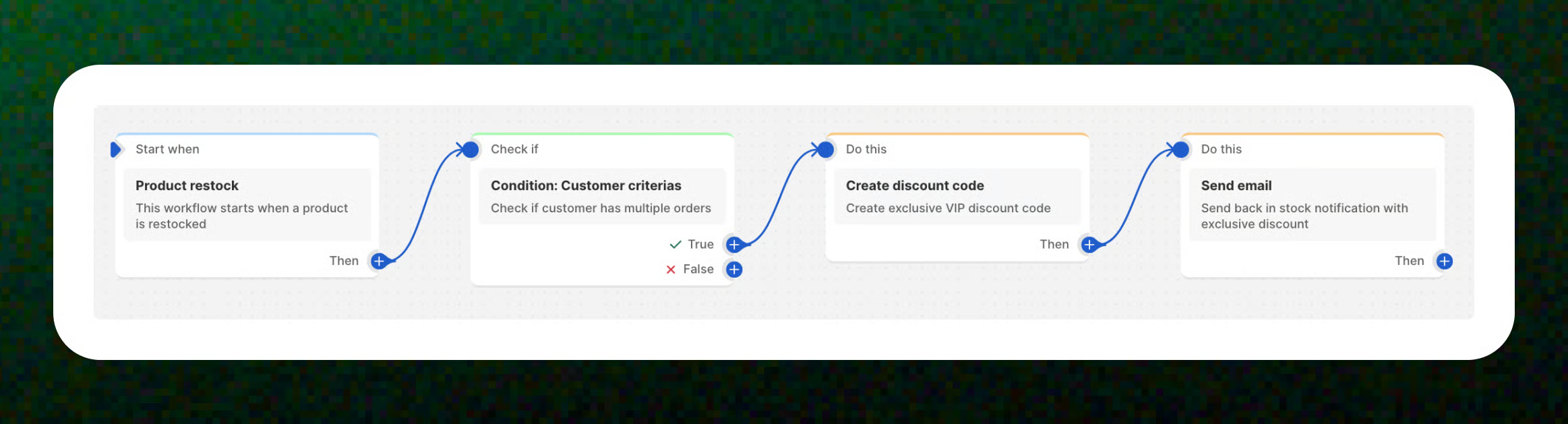
**Trigger:** Product restock
→ **Condition:** Customer criteria: Order count. **Order count > Greater than 0**
→ **Action:** Create discount code
→ **Action:** Send email
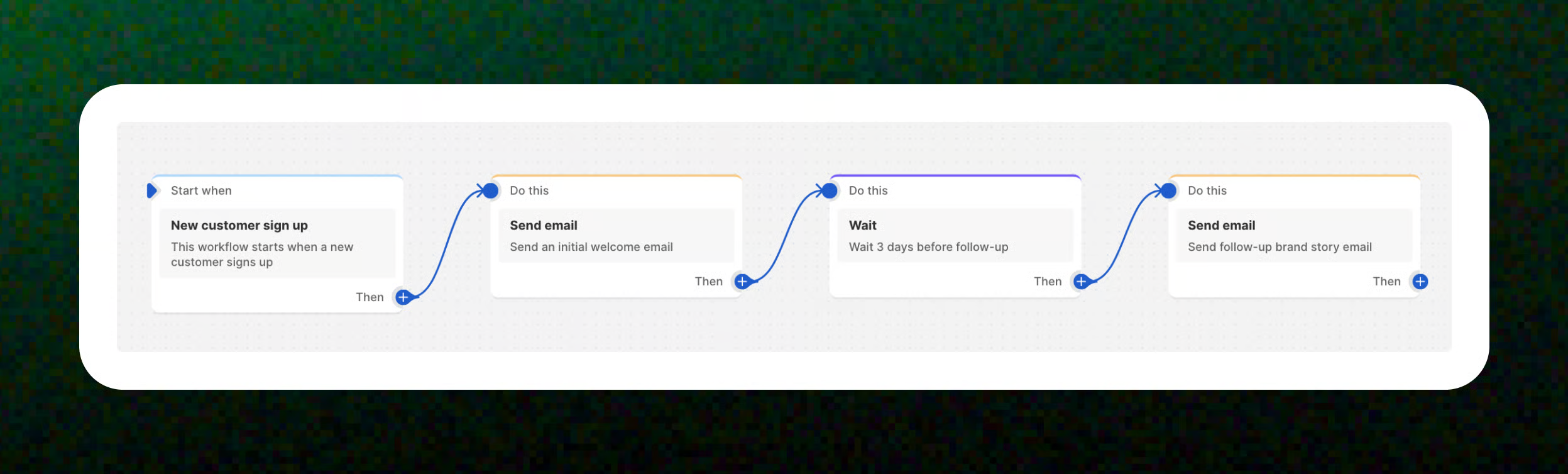
**Trigger:** New customer signs up
→ **Action:** Send an initial **welcome email** to the new customer.
→ **Action:** Wait 3 days
→ **Action:** Send a **follow-up brand story email**.
## Related articles
Available triggers, actions, and conditions
Create a workflow