# Get started with workflow templates library
<figure><img src="/files/r0xdiMl0tveNfS0WQAaq" alt=""><figcaption></figcaption></figure>

The **Workflow template library** helps you quickly create automation workflows without building everything from scratch.

These templates are designed to help you launch common automation flows faster while still allowing full customization later.

{% hint style="info" %}

## Before you begin

* To quickly create a campaign and workflow, see: [Quick start guide](/xflow-app/getting-started/quick-start-guide.md)
* If you’re new to workflows and want to understand how they work, start here: [How workflows work](/xflow-app/workflows/how-workflows-work.md)
  {% endhint %}

## How to access the workflow templates library

{% stepper %}
{% step %}

### Go to the workflow template library

{% hint style="success" %}
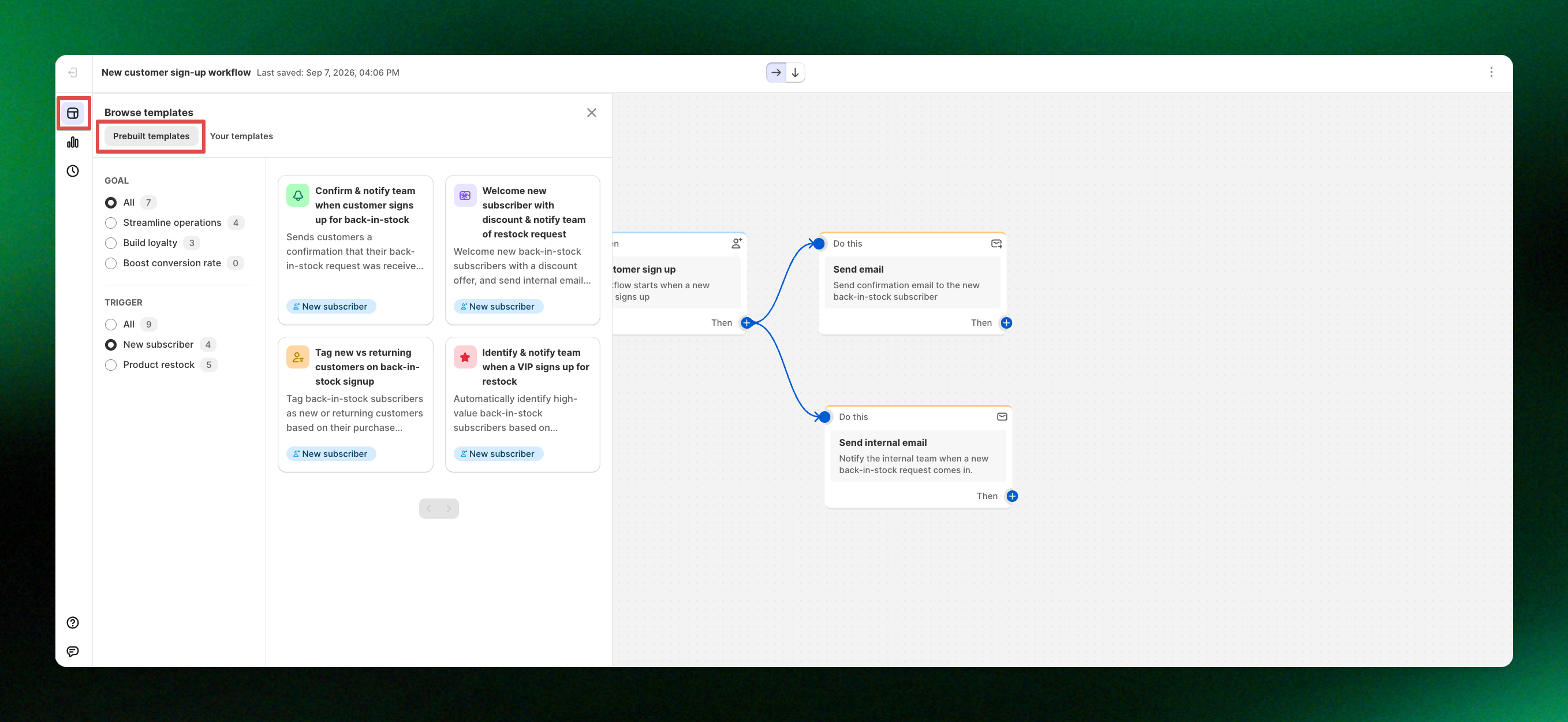
From **XFlow dashboard**, select **Workflows > Browse templates** to open the Workflow template library.
{% endhint %}

<figure><img src="/files/BaVtrdi0aHSwdHnKkuUg" alt=""><figcaption></figcaption></figure>
{% endstep %}

{% step %}

### Pick the workflow template

{% hint style="success" %}
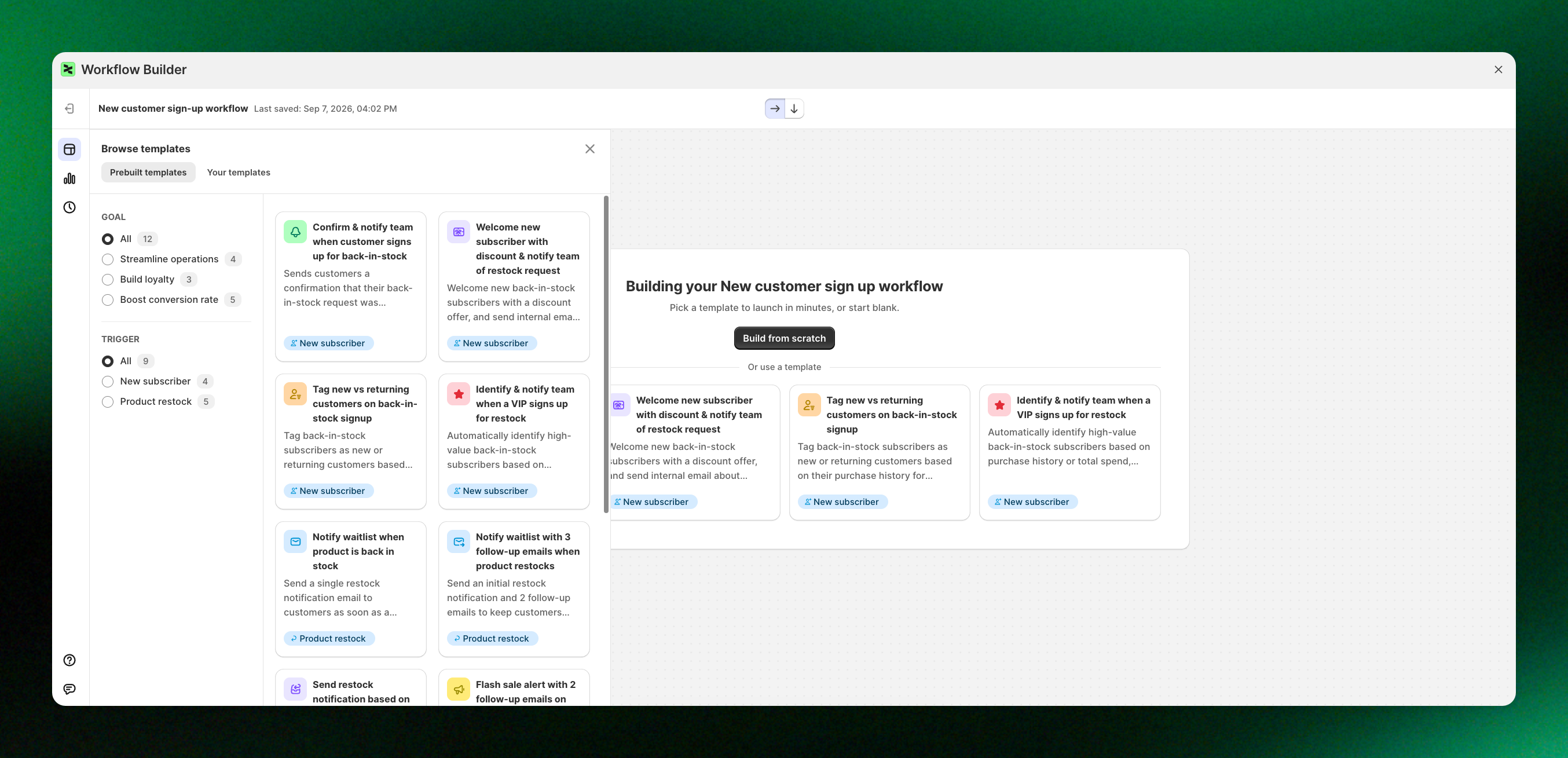
Browse the available templates and choose the one that best fits your automation needs.

Click **Open template list** to explore all available templates.
{% endhint %}

Each template provides a ready-made workflow structure that you can easily customize.
<figure><img src="/files/KbxIEpWJphAuqPJc6INT" alt=""><figcaption></figcaption></figure>
{% endstep %}

{% step %}

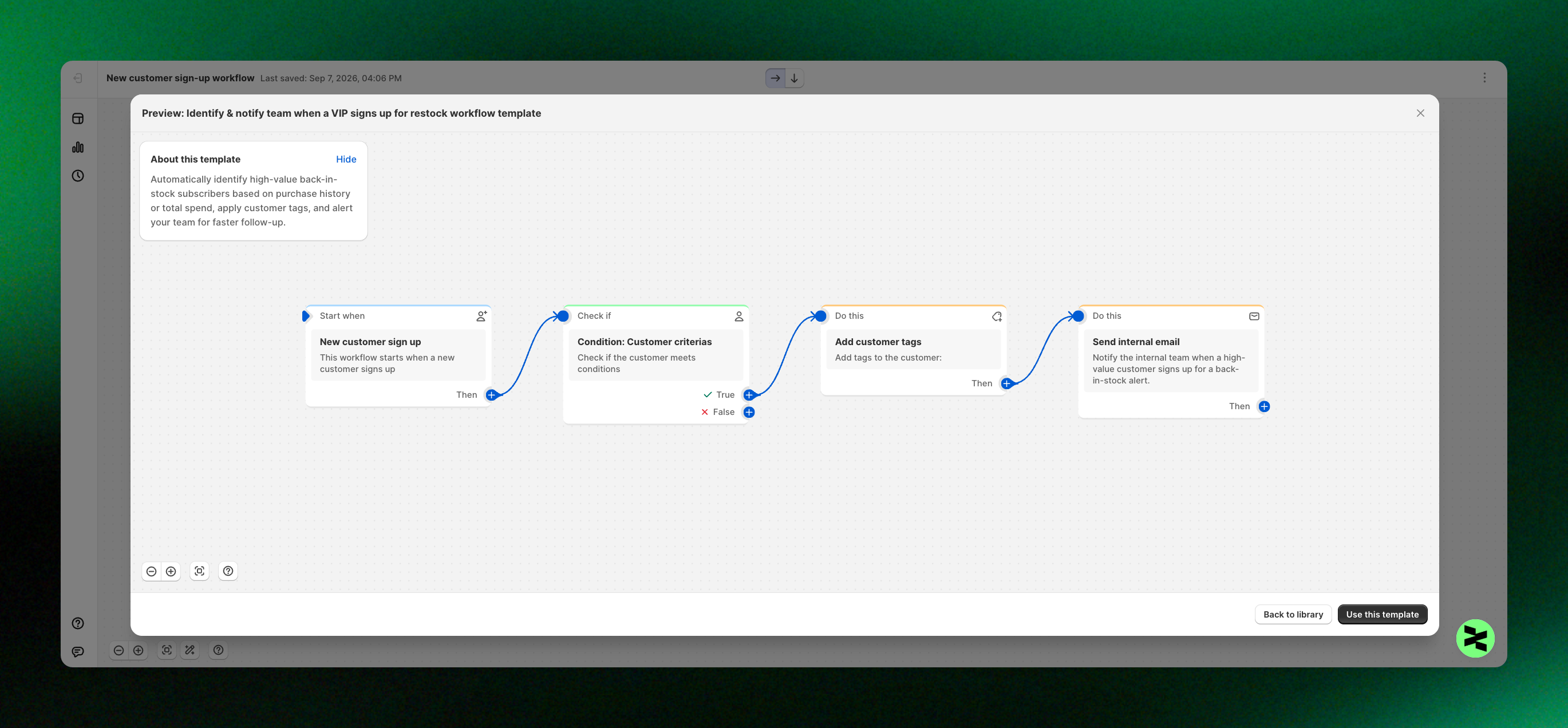
### Use a pre-built workflow template

{% hint style="success" %}
Click **Use this template** to use the workflow without building it from scratch!
{% endhint %}

<figure><img src="/files/oW21pe4UGpb24U0HheZP" alt=""><figcaption></figcaption></figure>
{% endstep %}
{% endstepper %}

{% hint style="info" %}
Some workflow templates (e.g.: Welcome email series for new subscribers) in the library include prebuilt email templates.

When you select a welcome email workflow template and click **Use this template**, XFlow automatically adds the email templates used in that workflow.

![](/files/5yTJk2fECtPMvq0kxmDA)
{% endhint %}

## Get started faster with ready-to-use workflows

Workflow templates let you launch automation faster by starting with proven structures rather than building workflows from scratch.

{% hint style="info" %}
💡 **Have a new idea for a workflow template?**

We’d love to hear it! Share your suggestion with us here: <a href="https://go.foxify.io/form-fr" class="button secondary">Request a template</a>
{% endhint %}

<table data-view="cards"><thead><tr><th></th><th></th><th data-hidden data-card-cover data-type="image">Cover image</th><th data-hidden data-card-target data-type="content-ref"></th></tr></thead><tbody><tr><td><strong>Welcome new subscribers with a discount email</strong></td><td>Send a welcome email with a discount to new form subscribers.</td><td></td><td><a href="/pages/vATIrx7RI3D573UirJ11">/pages/vATIrx7RI3D573UirJ11</a></td></tr><tr><td><strong>Send a back in stock notification</strong></td><td>Send automated back-in-stock emails when products are restocked.</td><td></td><td><a href="/pages/f5mQgk6ctiLJyk7W0j7s">/pages/f5mQgk6ctiLJyk7W0j7s</a></td></tr><tr><td><strong>Welcome email series for new subscribers</strong></td><td>Welcome new subscribers with a simple, automated email series.</td><td></td><td><a href="/pages/rFMRRDLINkiF0EgoIWCT">/pages/rFMRRDLINkiF0EgoIWCT</a></td></tr><tr><td><strong>Tag VIP customers based on purchase history</strong></td><td>Automatically identify loyal customers and assign them a VIP tag.</td><td></td><td><a href="/pages/ALE6eBIumWIBehtkRo8f">/pages/ALE6eBIumWIBehtkRo8f</a></td></tr><tr><td><strong>Win-back campaign for inactive subscribers</strong></td><td>Target inactive subscribers with an automated follow-up.</td><td></td><td><a href="/pages/oJYfJhOLgbnuEpAG4lSl">/pages/oJYfJhOLgbnuEpAG4lSl</a></td></tr><tr><td><strong>Tag engaged customers after email click</strong></td><td>Track customer engagement from email clicks.</td><td></td><td><a href="/pages/LBpTqikCCoBPShNk8Q7M">/pages/LBpTqikCCoBPShNk8Q7M</a></td></tr><tr><td><strong>Back in stock with exclusive discount for loyal customers</strong></td><td>Notify loyal customers of restocks with exclusive discounts.</td><td></td><td><a href="/pages/v9pNYVmfVgBix9r5GExK">/pages/v9pNYVmfVgBix9r5GExK</a></td></tr><tr><td><strong>New subscriber tagging and welcome</strong></td><td>Start engaging new subscribers.</td><td></td><td><a href="/pages/hBXpQDypu3FnK3dCamzr">/pages/hBXpQDypu3FnK3dCamzr</a></td></tr><tr><td><strong>Internal notification for high-value new subscribers</strong></td><td>Get notified when customers with high order value sign up.</td><td></td><td><a href="/pages/7fA6w4cHzeMgsOyNyTEp">/pages/7fA6w4cHzeMgsOyNyTEp</a></td></tr><tr><td><strong>VIP welcome with exclusive discount code</strong></td><td>Welcome returning customers with a VIP discount.</td><td></td><td><a href="/pages/v3f3JRprYGe2PaW7Bj3S">/pages/v3f3JRprYGe2PaW7Bj3S</a></td></tr><tr><td><strong>Urgency back in stock notification</strong></td><td>Send urgency reminders to customers who haven’t purchased yet.</td><td></td><td><a href="/pages/gbiTBLuYHpgXOX5GDeiN">/pages/gbiTBLuYHpgXOX5GDeiN</a></td></tr><tr><td><strong>Loyalty program enrollment</strong></td><td>Turn returning customers into loyalty members.</td><td></td><td><a href="/pages/sd8tskwuezIBR3OUSls1">/pages/sd8tskwuezIBR3OUSls1</a></td></tr><tr><td><strong>Back in stock with tiered response</strong></td><td>Automatically tailor back-in-stock emails for VIP and non-VIP customers.</td><td></td><td><a href="/pages/7hOZMFoB1g6oUmlKsnJl">/pages/7hOZMFoB1g6oUmlKsnJl</a></td></tr><tr><td><strong>Double opt-in confirmation workflow</strong></td><td>Send an opt-in email to ensure subscribers truly want to hear from you.</td><td></td><td><a href="/pages/JoGp3bWZQHqQA26e0Dmw">/pages/JoGp3bWZQHqQA26e0Dmw</a></td></tr><tr><td><strong>Flash sale notification for back in stock</strong></td><td>Turn restocks into quick sales with flash sale emails.</td><td></td><td><a href="/pages/HyaYMdRzP1Izj99P1Idd">/pages/HyaYMdRzP1Izj99P1Idd</a></td></tr><tr><td><strong>First-time buyer special discount</strong></td><td>Reward new customers with a first-order discount.</td><td></td><td><a href="/pages/MffA5jpsEnRH2uA28X6G">/pages/MffA5jpsEnRH2uA28X6G</a></td></tr></tbody></table>

## Related articles

{% content-ref url="/pages/G8EzNAjsFvzoOwBlg2ZD" %}
[Campaigns](/xflow-app/campaigns/overview.md)
{% endcontent-ref %}

{% content-ref url="/pages/bM5fPNbEmCRIJ60OltFF" %}
[Email templates](/xflow-app/email-templates/overview.md)
{% endcontent-ref %}

{% content-ref url="/pages/xa7meJEaLhnWD4ufvp9v" %}
[Workflows: FAQs](/xflow-app/workflows/workflows-faqs.md)
{% endcontent-ref %}

***

#### 📩 **Need help?**

We’re here to make your XFlow experience smooth and successful.\
Our support team is always ready to assist you—no matter how big or small your question is.

<a href="https://admin.shopify.com/apps/xflow?chat=true&#x26;utm_source=foxecom&#x26;utm_medium=help_center_xflow_get_started_with_workflow_templates_library&#x26;utm_campaign=cta_button&#x26;utm_term=chat_now" class="button primary" data-icon="comment-lines">Chat now</a> <a href="mailto:contact@help.xflow.so" class="button secondary" data-icon="envelopes">Message us</a>


---

# Agent Instructions: Querying This Documentation

If you need additional information that is not directly available in this page, you can query the documentation dynamically by asking a question.

Perform an HTTP GET request on the current page URL with the `ask` query parameter:

```
GET https://docs.foxecom.com/xflow-app/workflows/get-started-with-workflow-templates-library.md?ask=<question>
```

The question should be specific, self-contained, and written in natural language.
The response will contain a direct answer to the question and relevant excerpts and sources from the documentation.

Use this mechanism when the answer is not explicitly present in the current page, you need clarification or additional context, or you want to retrieve related documentation sections.