# Setup SMS sender IDs
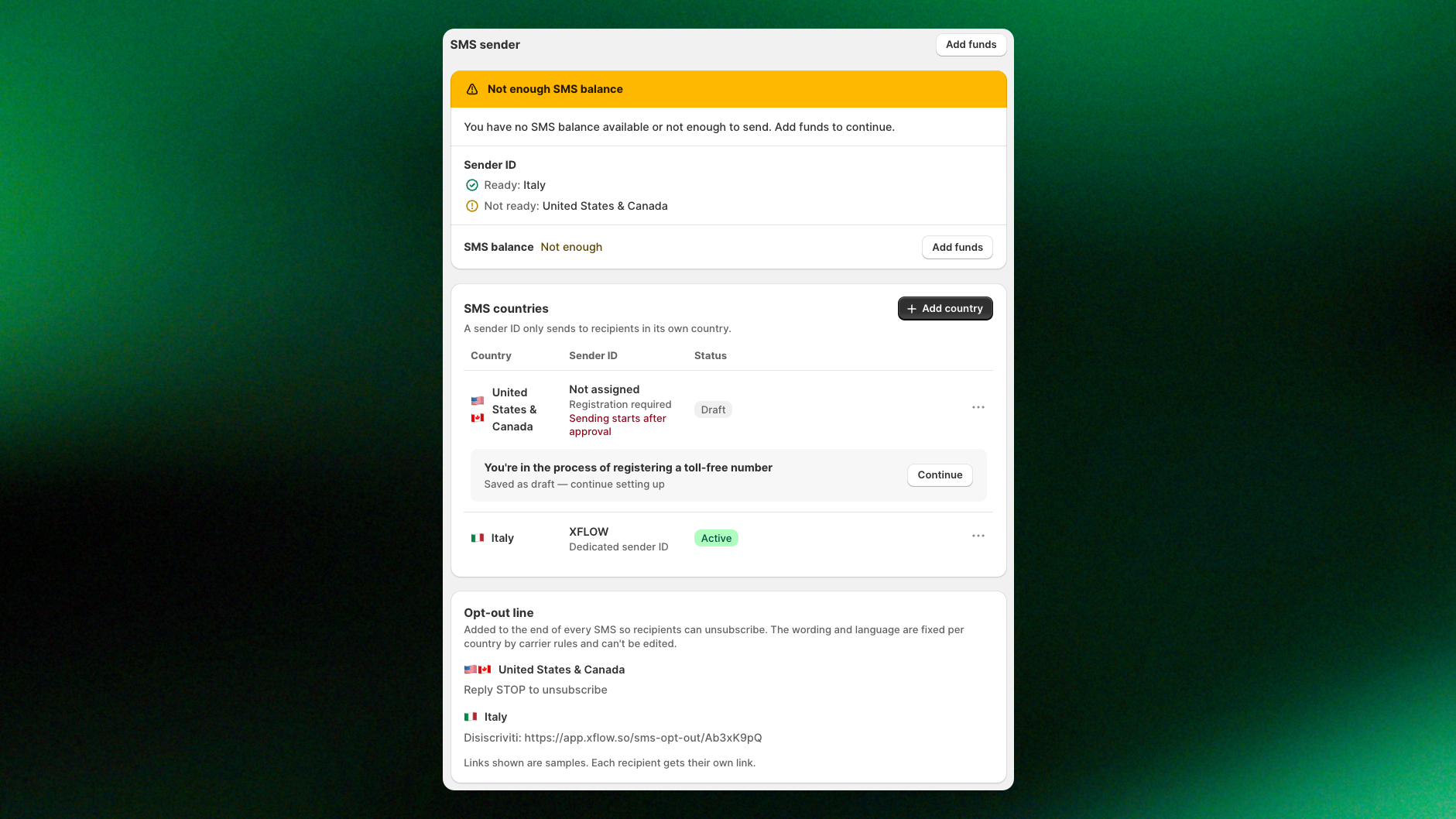
Manage your SMS sender IDs to control which countries can receive your SMS notifications. Each sender ID can only send messages to recipients in its assigned country.
***
## What is a sender IDs
A sender ID is what your customers see as the sender of your SMS. Depending on the country, it's either a **toll-free phone number** (US and Canada) or a **sender name** of up to 11 characters, like your brand name (other countries).
Each sender ID can only send SMS to recipients in its assigned country. Depending on the country, you may be able to start sending immediately or need carrier approval first.
XFlow only sends SMS to customers in countries with an **active sender ID**. If a country doesn't have an active sender ID, SMS notifications for that country are skipped, and customers continue to the next workflow step.
## How to set up SMS sender IDs by country
1. In the XFlow dashboard, go to **Settings > SMS**.
2. Under **SMS countries**, click **+ Add country**.
3. Select the country where you want to send SMS notifications.
4. Follow the setup instructions for that country to register or activate your sender ID.
5. The country appears in your **SMS countries** table. Group 2 countries are **Active** right away. All others show **Draft** until you finish their setup.
*Different countries have different sender ID requirements. Some can be activated immediately, while others require carrier registration and approval before sending.*
Countries are divided into 4 groups based on their registration requirements:
| Group | Countries | Setup requirements |
| -------------------------- | --------------------------------------------------------------------------------------- | ----------------------------------------------------------------------------------------------------------------------------- |
| **Instant sender name** | 🇮🇹 Italy
🇳🇱 Netherlands
🇵🇹 Portugal
🇫🇷 France
🇩🇪 Germany | Enter your own sender name and activate it immediately. |
| **Shared sender name** | 🇬🇧 United Kingdom
🇩🇰 Denmark | Use the shared RESTOCK sender ID or request your own sender name, which requires approval (normally takes 3 days to 1 month). |
| **Registered sender name** | 🇸🇪 Sweden | Register your own sender name and wait for carrier approval (normally takes 3 days to 1 month). |
| **Toll-free number** | 🇺🇸 United States
🇨🇦 Canada | Register your business and SMS campaign, then wait for toll-free number verification. |
Follow the setup instructions below for your country group to activate your sender ID:

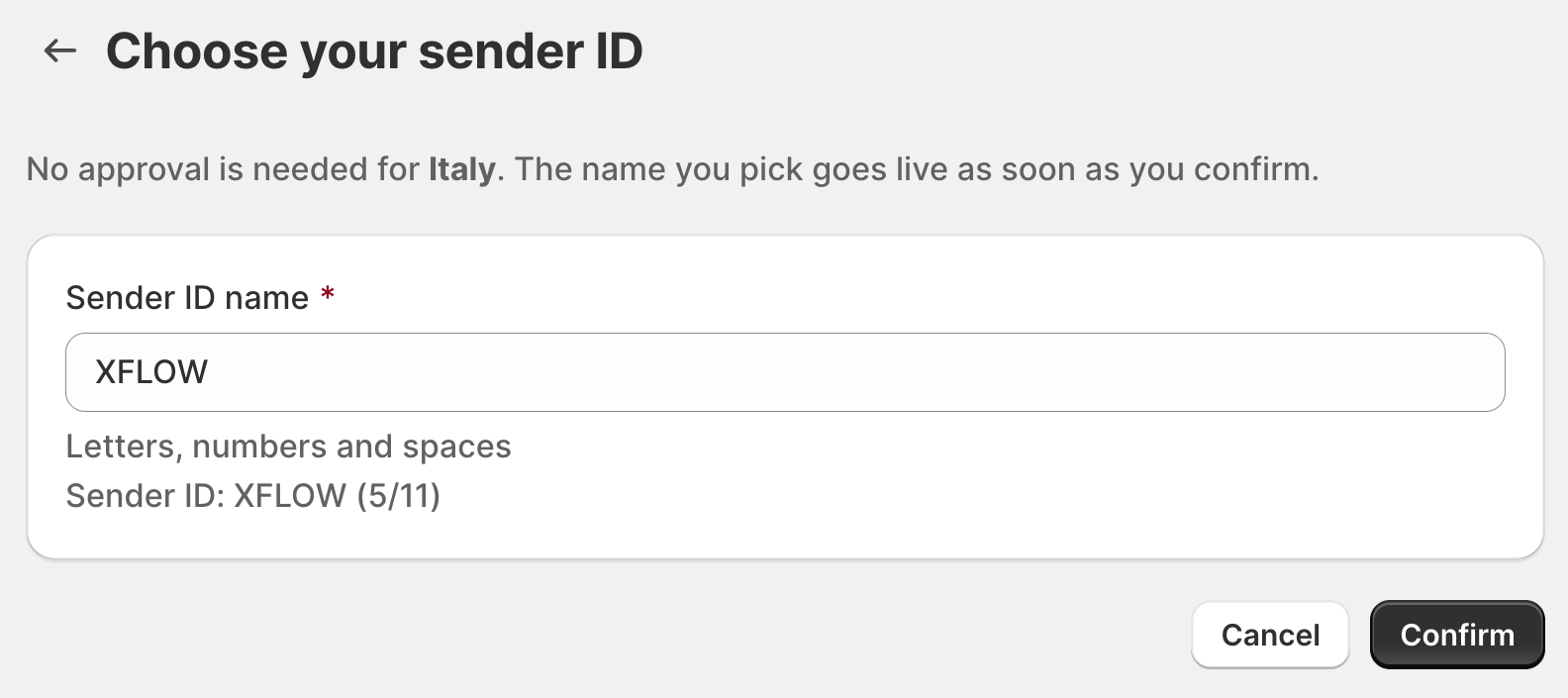
**Countries:** 🇮🇹 Italy, 🇳🇱 Netherlands, 🇵🇹 Portugal, 🇫🇷 France, 🇩🇪 Germany
| **Sender ID** | **Registration** | **Fee** | **Ready to send** |
| -------------------- | ---------------- | ------- | :---------------- |
| Your own sender name | Not needed | Free | Instantly |
**Set it up:**
1. On your country's row, click **Continue registration**.
2. Enter your **Sender ID name** (up to 11 characters, including letters, numbers, and spaces).
3. Click **Confirm**. Your sender ID becomes **Active** immediately.
**What customers see:** Your SMS messages appear under your sender name (e.g., XFLOW) instead of a phone number.
**Tip:** Use your brand or store name so customers can easily recognize your messages.
**Change your sender name:** Click **Edit**, enter a new sender name, and click **Save**. The change takes effect immediately.

**Countries:** 🇬🇧 United Kingdom, 🇩🇰 Denmark
| **Sender ID** | **Registration** | **Fee** | **Ready to send** |
| ------------------------------- | ---------------- | ------- | :--------------------------------- |
| Shared name **RESTOCK** | Not needed | Free | Instantly |
| Your own sender name (optional) | Required | Free | After approval, 3–20 business days |
You have 2 options:
**Option A: Use the shared RESTOCK sender ID**
No setup is required. Your country becomes **Active** as soon as you add it, and you can start sending SMS notifications immediately using **RESTOCK** as the sender name.
**Option B: Request your own sender name**
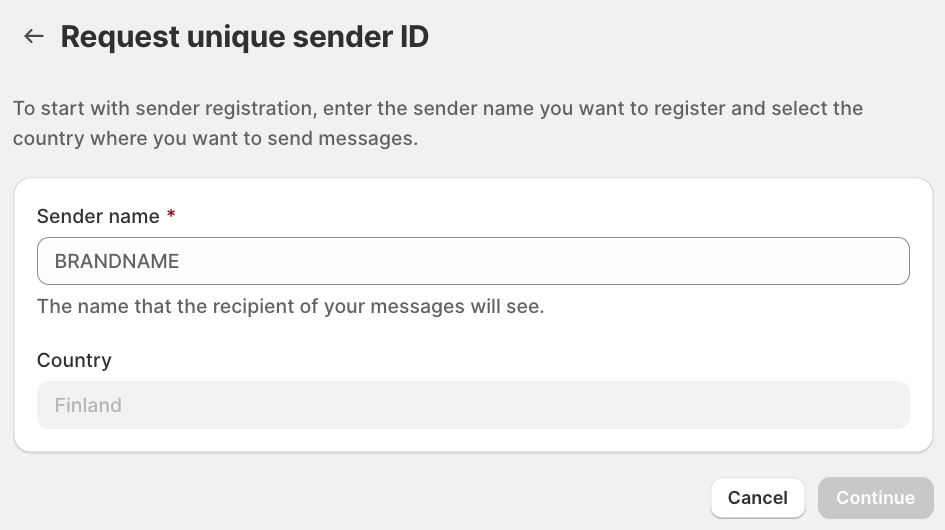
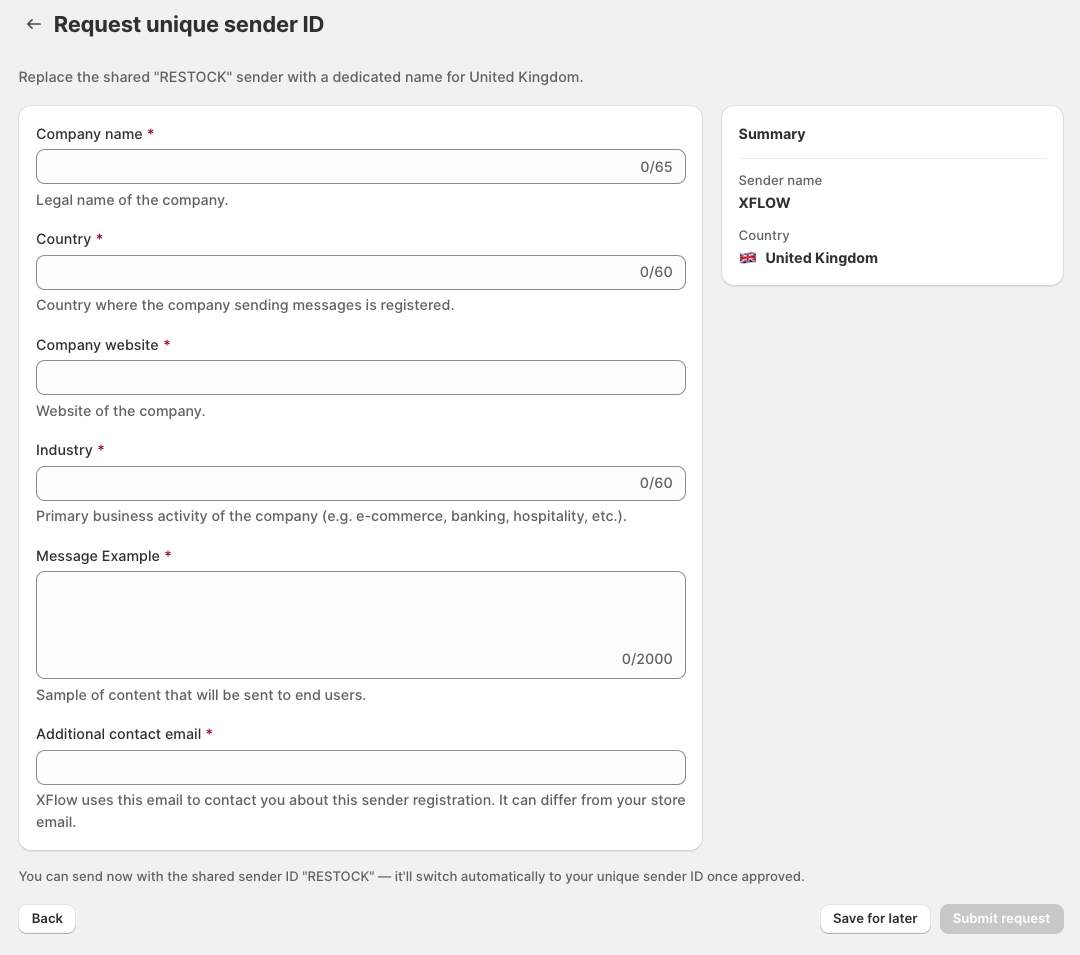
Register your own sender name so customers see your brand name instead of RESTOCK:
1. On your country's row, click **Request unique sender ID**.
2. Enter your **Sender name** and verify the selected country.
3. Click **Continue** and provide your business details:
* **Company name:** Your company's legal registered name.
* **Country:** The country where your company is legally registered.
* **Company website:** Your official business website.
* **Industry:** Your primary business activity, such as e-commerce, retail, or fashion.
* **Message Example:** A sample SMS that customers will receive, such as: "Good news! Your favorite item is back in stock. Shop now: \[product link]"
* **Additional contact email:** The email address XFlow can use to contact you about your Sender ID registration.
4. Click **Submit request** for approval.
Not ready to finish? Click **Save for later**. A reminder card helps you pick up where you left off.
You never stop sending in these countries. While your own name is in **Draft**, **Pending approval** or **Rejected**, your SMS keep going out as RESTOCK. Once approved, your name replaces RESTOCK automatically.
**How long does approval take?**
| Country | Review time |
| ------------------- | --------------- |
| 🇬🇧 United Kingdom | 3 business days |
| 🇩🇰 Denmark | 6 business days |
These are estimated review times. Actual approval may vary.
Once your Sender ID is approved, XFlow automatically uses your registered brand name for SMS notifications in the selected country.
*For UK registration requirements and restrictions, check out the* [*SMS Guidelines*](https://www.infobip.com/docs/essentials/europe-registration/united-kingdom-sender-registration-guidelines)
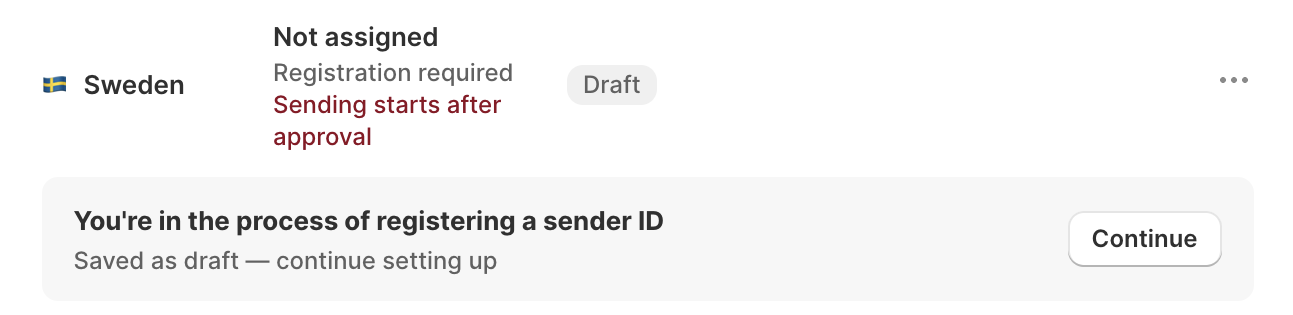
**Countries:** 🇸🇪 Sweden
| **Sender ID** | **Registration** | **Fee** | **Ready to send** |
| -------------------- | ---------------- | ------- | :------------------------------------ |
| Your own sender name | Required | Free | After approval, about 3 business days |
Sweden requires you to register your own sender ID before sending SMS. Your messages can only be sent once your registration is approved.
**Set it up:**
1. On your country's row, click **Continue registration**.
2. Enter your **Sender ID name** (up to 11 characters). Check the country and click **Continue**.
3. Fill in your business details:
* **Company name:** Legal name of your business.
* **Country:** Where your company is registered.
* **Company website:** Your business website.
* **Industry:** Your primary business activity.
* **Message Example:** A sample SMS you'll send to customers.
* **URL in SMS:** Website link included in your messages.
* **Additional contact email:** Email for registration updates.
4. Review the **Summary** and click **Submit request**.
Your sender ID will become **Active** once approved, usually within about 3 business days.
**Not ready to finish?** Click **Save for later**. Your registration will be saved as a draft, so you can continue where you left off.
**What customers see:** Your SMS messages appear under your registered sender name (e.g., XFLOW) instead of a phone number.
**Tip:** Use your brand or store name so customers can easily recognize your messages.
Customers in Sweden won't receive any SMS until your sender ID is **Active**. Submit your registration early to avoid delays.

**Countries:** 🇺🇸 United States, 🇨🇦 Canada
| **Sender ID** | **Registration** | **Fee** | **Ready to send** |
| ----------------------------------------- | ------------------------------- | ------- | :------------------------ |
| A toll-free number assigned to your store | Required (carrier verification) | Free | After approval, 3–8 weeks |
US and Canadian carriers require businesses to verify their toll-free numbers before sending SMS. XFlow automatically assigns a dedicated toll-free number to your store, but you must complete carrier verification before sending.
**Set it up in 2 parts:**
1. **Brand:** Enter your business details, including legal company name, business address, tax ID, and contact information.
2. **Campaign:** Describe the messages you'll send, how customers opt in, and provide a sample SMS. Click **Submit for approval**.
**Not ready to finish?** Click **Save for later** at any step. Your progress will be saved, and you can continue later. We'll email you updates throughout the review process.
**What customers see:** Your SMS messages appear from your store's dedicated toll-free number instead of a brand name.
**Tip:** Make sure your business information is accurate and your opt-in process is clearly explained to avoid delays or rejection.
Customers in the US and Canada won't receive SMS until your toll-free number is **Active**. Verification can take 3–8 weeks, so submit your request early.
*See* [*Country guide: United States & Canada for detailed instructions*](https://docs.foxecom.com/xflow-app/sms-settings/register-a-toll-free-number-for-sms-in-the-us-and-canada)*, field examples, opt-in requirements, and how to fix a rejected application.*
## Check your sender ID status
Each country in the **SMS countries** table shows its current registration status. Check this status to see whether you can send SMS and what to do next.
| **Status** | What it means | Can you send SMS? | What to do |
| -------------------- | -------------------------------------------------------------------- | ------------------------------------------ | :----------------------------------------------- |
| **Draft** | Registration started but not submitted | Group 2: Yes, as RESTOCK.
Others: No | Click **Continue registration** to finish |
| **Pending approval** | Submitted and under review | Group 2: Yes, as RESTOCK.
Others: No | Click **View status** to review your submission |
| **Active** | Your sender ID is ready to use | Yes | No action needed |
| **Rejected** | Registration was not approved. The reason appears on the country row | Group 2: Yes, as RESTOCK.
Others: No | Fix the issues, then click **Edit and resubmit** |
Above the **SMS countries** table, a status card shows whether your store is ready to send SMS:
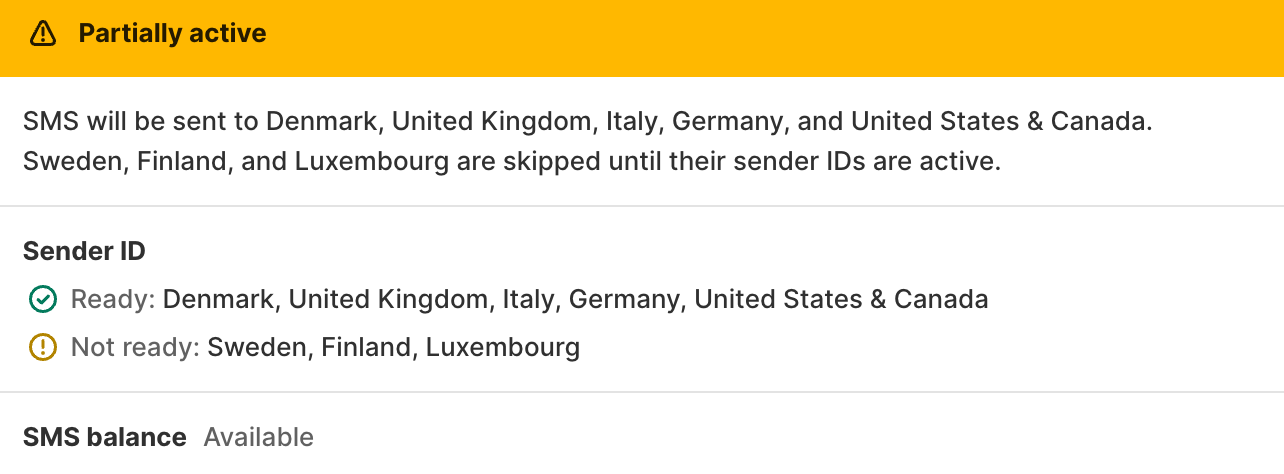
| Status card | What it means |
| -------------------------------------- | ----------------------------------------------------------------------------------------------------------------------------------------- |
| **Ready to send** | All selected countries have Active sender IDs, and your SMS balance is sufficient. |
| **Partially active** | Some countries have Active sender IDs. SMS to other countries will be skipped until their sender IDs become Active. |
| **No country has an active sender ID** | No SMS will be sent until at least one country has an Active sender ID. |
| **Not enough SMS balance** | No SMS will be sent until you add funds to your SMS balance. [*Learn more how to add funds*](https://docs.foxecom.com/xflow-app/sms-settings/sms-rates-and-add-funds-to-sms-balance) |
## Related articles
SMS rates & Add funds to SMS balance
How SMS segments work for SMS alerts
Use the Send SMS action in a workflow
Register a toll-free number for SMS in the US and Canada