# Translate "Notify me" widget content
XFlow lets you translate the Notify Me widget content into multiple languages, enabling a localized experience for customers in different regions.
This helps improve clarity, trust, and conversion for international visitors.
Available languages in XFlow are based on the **published languages in your Shopify store**.
👉 Learn how to [manage languages in Shopify](https://help.shopify.com/manual/international/localization-and-translation#managing-languages)
## What you can translate
You can customize content for each language, including form labels, button text, and messages shown to customers.
_cBtQswYn.jpg)
## How to translate Notify me content
**Steps:**
1. Go to the **"Notify me" widget settings**.
2. Select **Translate content**.
3. Select the language you want to edit.
4. Enter your translated content for each field.
5. Save your changes.
## How translations work
* XFlow automatically displays the correct language based on your store’s active language
* If a translation is missing, the default language will be used.
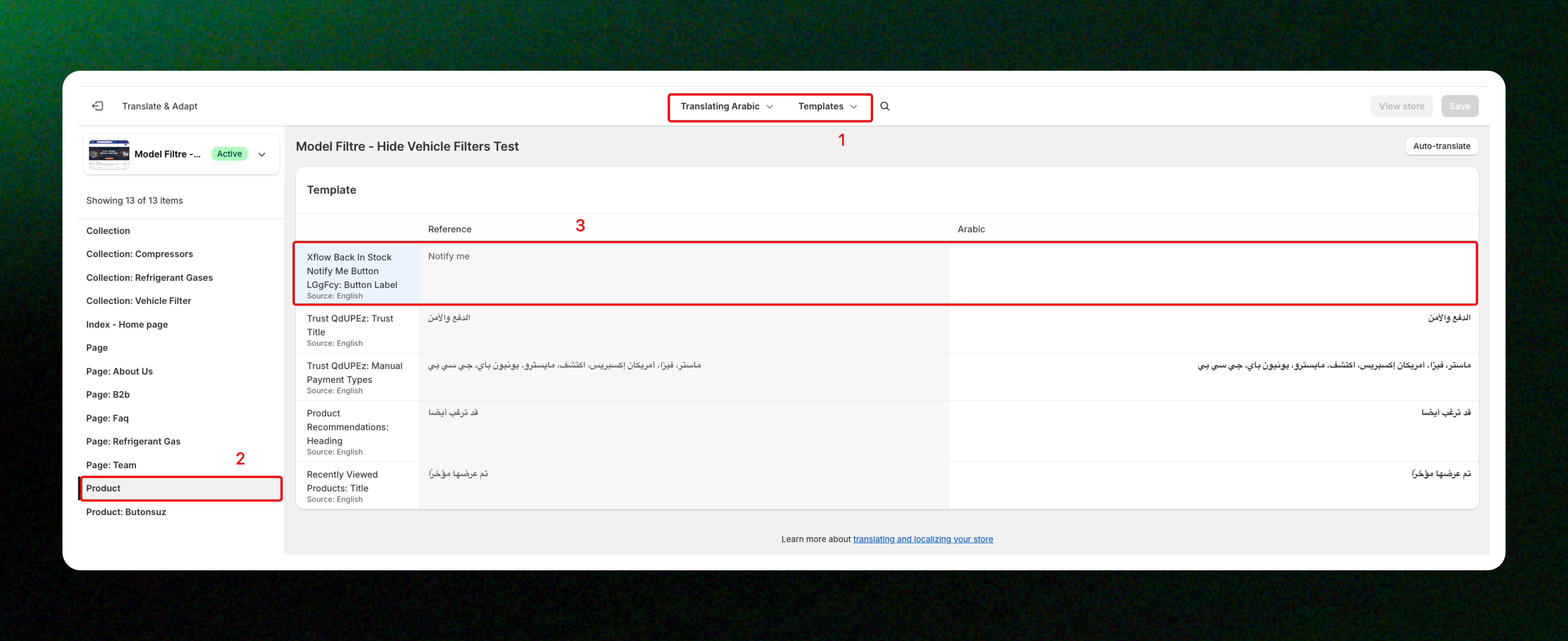
## Translate content for the XFlow: Notify me button block in your theme
_EPhaM22l.jpg)
If you're using the **XFlow: Notify me button block** in your Shopify theme, you can translate the button label using [**Shopify Translate & Adapt app**](https://apps.shopify.com/translate-and-adapt).
**Steps**
1. Navigate to [**Shopify Translate & Adapt app**](https://apps.shopify.com/translate-and-adapt).
2. Select the language you want to translate.
3. Go to **Templates** → **Products**.
4. Find the **XFlow Back in Stock Notify Me Button** content and enter your translated button label.
5. Save your changes.
Translations in **Shopify Translate & Adapt app** only apply if you've entered custom content for the button label.
If you're using the **Global** label, the translation configured in **XFlow** will be used automatically.
## Related articles
Customize "Notify me" form and messages
"Notify me" widget: FAQs