# Manage notification rules and subscriber data
Use Notification rules to control *when* subscribers receive alerts and *how* they’re saved in Shopify. These rules help you avoid sending the wrong alert to the wrong customer—and keep your data clean.
## Access notification rules settings
1. From the XFlow dashboard, go to **Settings**.
2. Select the **Location-based rules** tab.
3. Enable **location-based notifications** to send alerts **only when the product is restocked at the location customers subscribed to**.
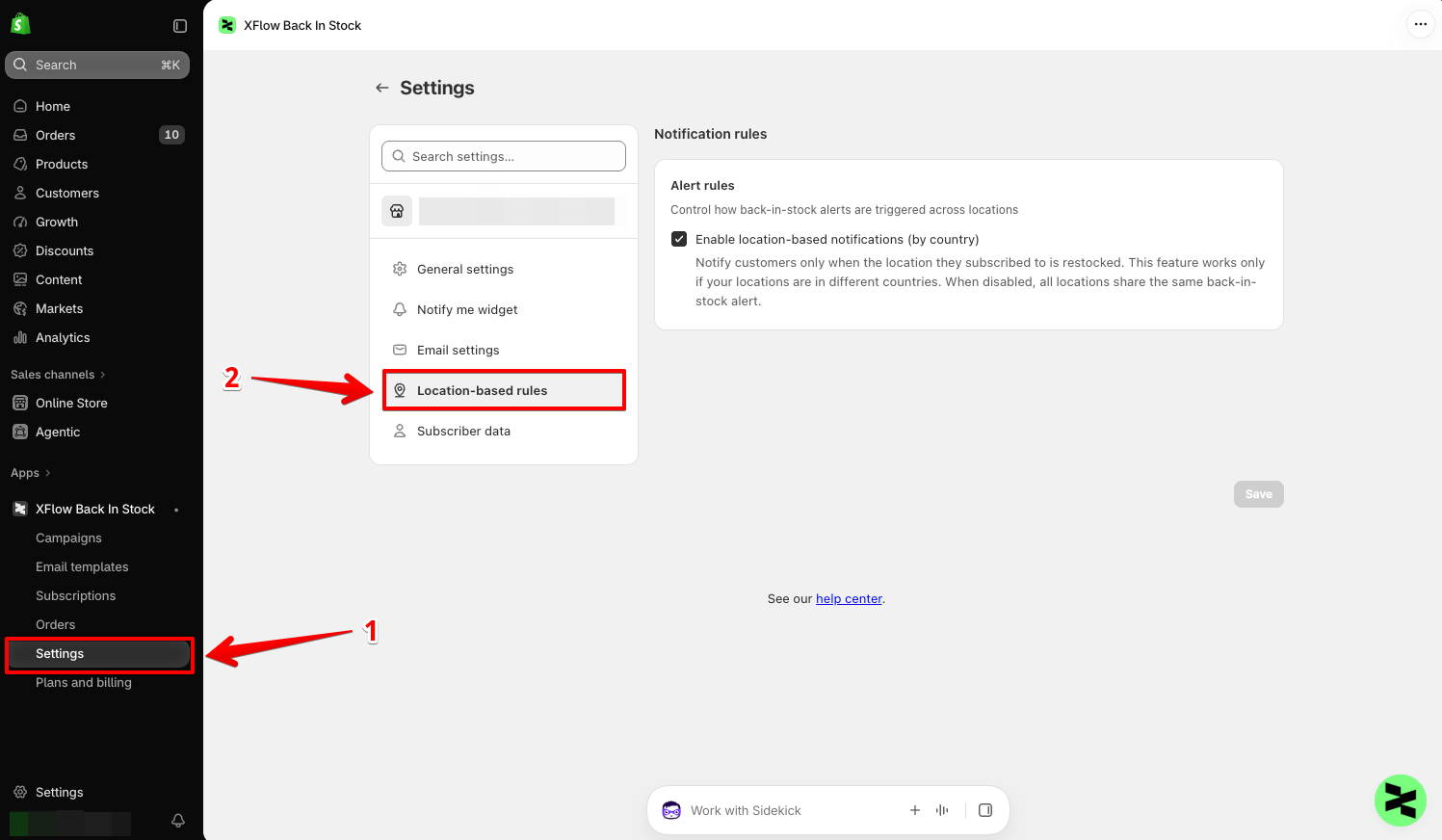
Turn on **Enable location-based notifications (by country)** if you want customers to receive a back-in-stock alert only when the location they subscribed to is restocked.
#### When this setting is enabled:
* XFlow tracks the location associated with the customer’s subscription.
* The customer is notified only when that location is restocked.
* Restocks from locations in other countries will not trigger the alert for that customer.
#### When this setting is turned off:
* All locations share the same back-in-stock alert.
* A restock at any location can trigger the notification.
If you have inventory locations in the **United States** and **Canada**, and a customer subscribes while shopping from the Canada location:
* If the Canada location is restocked, XFlow sends the back-in-stock alert.
* If only the US location is restocked, XFlow does not notify that customer while location-based notifications are enabled.
Location-based notifications work only when your inventory locations are in different countries.
#### Tips:
* Useful when you manage **multiple warehouses in different countries**.
* Keep this **off** if all locations ship globally or you don’t manage inventory by country. In that case, all locations share the same back-in-stock alert.
## Configure subscriber data
1. From the XFlow dashboard, go to **Settings**.
2. Select the **Subscriber data** tab
3. Enable **Create Shopify customer** to automatically create a **Shopify customer profile** for each subscriber. [*Learn more about Customers*](https://help.shopify.com/manual/customers)
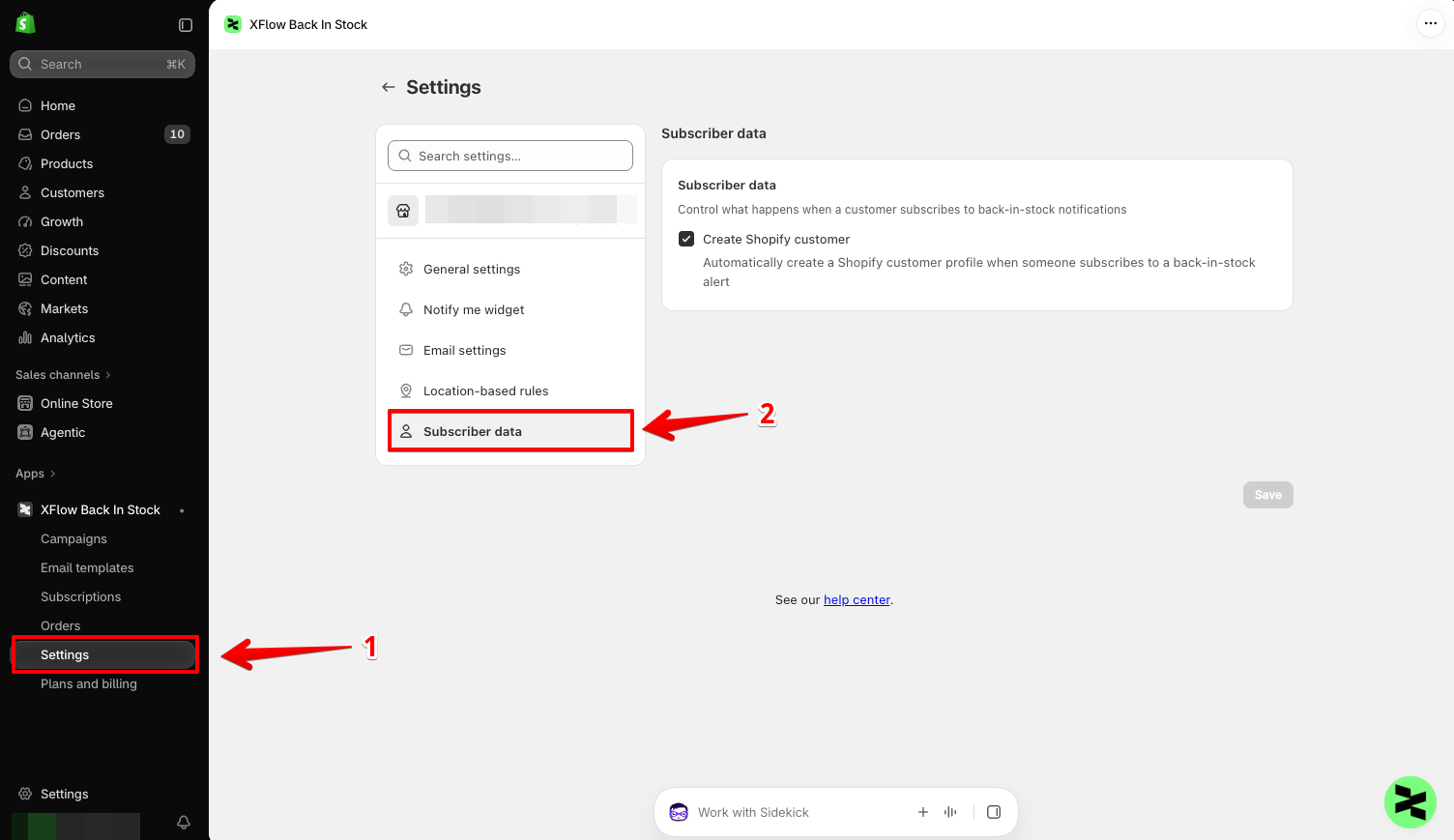
Turn on **Create Shopify customer** to automatically create a Shopify customer profile when someone subscribes to a back-in-stock alert.
#### When enabled:
* XFlow creates a Shopify customer profile using the subscriber information collected from the back-in-stock form.
* Subscriber information becomes available in your Shopify customer list.
#### When disabled:
* XFlow still saves the back-in-stock subscription.
* No new Shopify customer profile is created from that subscription.
For **Trigger Shopify Flow** to work properly, **Create Shopify customer** must be enabled.
[*Learn more: Use XFlow with Shopify Flow*](https://docs.foxecom.com/xflow-app/workflows/use-xflow-with-shopify-flow)
#### Best for:
* Stores planning follow-up campaigns
* Merchants who want subscriber data inside Shopify.
### Recommended setups
| | |
| ----------------------------- | ------------------------------------------------------------------------------------------- |
| **Single-country store** → | ✅ Location-based notifications: **Off**
✅ Create Shopify customer: **Optional** |
| **Multi-country inventory** → | ✅ Location-based notifications: **On**
✅ Create Shopify customer: **On** (recommended) |