# Global restock campaign
Turn on automated back-in-stock emails for every out-of-stock product in your store — without setting up each product individually. XFlow handles the subscriber list, sends notification emails when products restock, and tracks conversions for you.
This guide covers the Global restock campaign, which applies the same workflow to **all out-of-stock products** at once.
If you need different settings for specific products or collections, set up an [Advanced restock campaign](https://docs.foxecom.com/xflow-app/getting-started/quick-start-guide/advanced-restock-campaign) instead.
**Before you begin:**
* XFlow is installed and active on your store. See [Enable XFlow on your storefront](https://docs.foxecom.com/xflow-app/getting-started/quick-start-guide/enable-xflow-on-your-storefront)
* You have at least one out-of-stock product
## How to activate the Global restock campaign
Go to **XFlow > Email templates**, open each template, and click **Edit** to customize.
XFlow includes three ready-to-use email templates:
* **You're on the list** — sent right after a customer subscribes
* **First restock notification** — sent when the product comes back in stock
* **Second restock notification** — follow-up if the customer hasn't purchased yet
Each template includes product details and a direct link to the product page.
Before going live, update these in each template:
* Header — your logo and store name
* Footer — social links, store name, store address
* Email configs — subject line and preview text
[Learn more about Email templates](https://docs.foxecom.com/xflow-app/email-templates/overview)
1. Go to **Campaigns > Global campaigns** and review the **General settings** to make sure everything is configured correctly.
2. Open **Manage workflows** and review each workflow to confirm the actions and settings match your needs.
XFlow includes two ready-to-use workflows:
* **New subscriber:** Runs when a customer subscribes to a back-in-stock alert. It can send a confirmation email and notify your internal team.
* **Restock notification:** Runs when a subscribed product is back in stock. It sends the first notification, waits 3 days, then sends a follow-up if the customer hasn’t purchased.
You can use the default setup or extend it with additional triggers, conditions, and actions.
[*Learn more about Workflows*](https://docs.foxecom.com/xflow-app/workflows/manage-workflows/overview)
1. Go to **XFlow > Campaigns**.
2. Open **Global campaign**.
3. Change **Status** to **Active**.
4. Click **Save**.
This campaign applies to all out-of-stock products store-wide. To exclude specific products, click **Select** next to **Excluded products** before activating.
[*Learn more about Campaigns*](https://docs.foxecom.com/xflow-app/campaigns/overview)
1. Go to an out-of-stock product page on your storefront.
2. Click **Notify Me** and subscribe with a test email.
3. In Shopify admin, manually restock that product (increase inventory by 1).
4. Check your test email inbox — the notification email should arrive within a few minutes.
5. Go to **XFlow > Subscriptions** to confirm the subscription status shows **Delivered**.
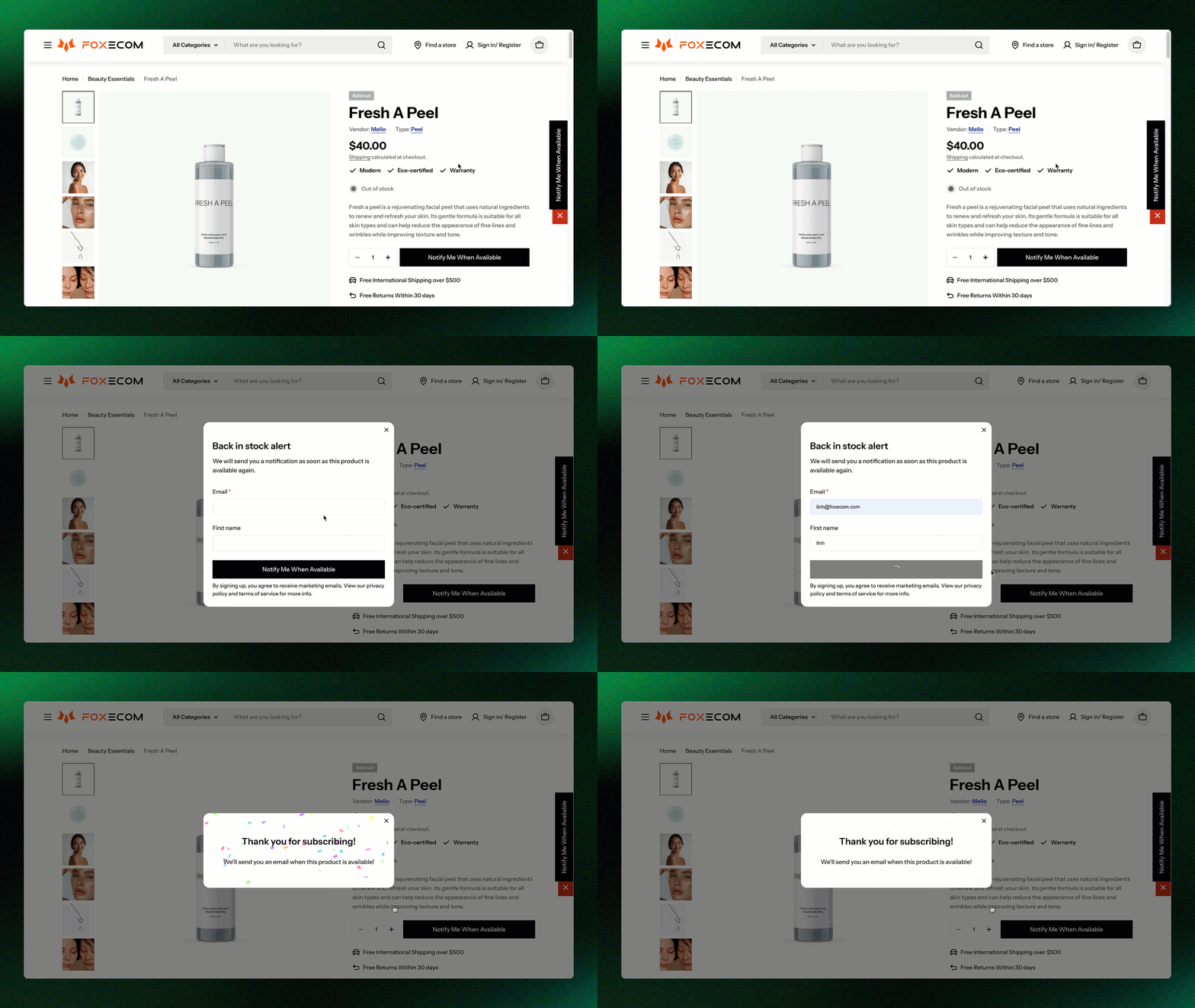Want to customize the Notify Me form? *Check out* [*Notify Me widget settings*](https://docs.foxecom.com/xflow-app/notify-me-widget/customize-notify-me-form-and-messages).
*Learn more:* [*Test an email campaign*](https://docs.foxecom.com/xflow-app/campaigns/test-an-email-campaign)
## FAQs
XFlow Helper may not be enabled in your theme. Go to your theme editor and make sure the toggle is on and saved. [*Learn more*](https://docs.foxecom.com/xflow-app/getting-started/quick-start-guide/enable-xflow-on-your-storefront)
All out-of-stock products in your store (inventory \= 0), except any you've added to the Excluded products list in the campaign settings.
Set up an [Advanced restock campaign](https://docs.foxecom.com/xflow-app/getting-started/quick-start-guide/advanced-restock-campaign) instead — it lets you target specific products or collections.
## Related articles
Advanced restock campaign
What is XFLow
Key concept overviews
Create a workflow