# Manage email templates

## Activate email template

{% hint style="success" %}

1. Go to **XFlow > Email templates**
2. Open the template
3. Select **Activate**
4. Confirm the action.
   {% endhint %}

<figure><img src="/files/Zihg14xbVVMNLhtkK7fx" alt=""><figcaption></figcaption></figure>

## Deactivate email template

{% hint style="success" %}

1. Go to **XFlow > Email templates**
2. Open the template
3. Select **Deactivate**
4. Confirm the action.
   {% endhint %}

<figure><img src="/files/gMTaEwzoIfkBLzZ8W3B9" alt=""><figcaption></figcaption></figure>

## Delete email template

Select the email templates you no longer want to use by ticking the checkboxes, then click **Delete**.

{% hint style="danger" %}
You can only delete templates that have been **deactivated**. Make sure to **deactivate an email template before deleting** it. This action cannot be undone, so please consider it carefully before deleting.
{% endhint %}

<figure><img src="/files/kseMvMqN8HxxKnmOzTKm" alt=""><figcaption></figcaption></figure>

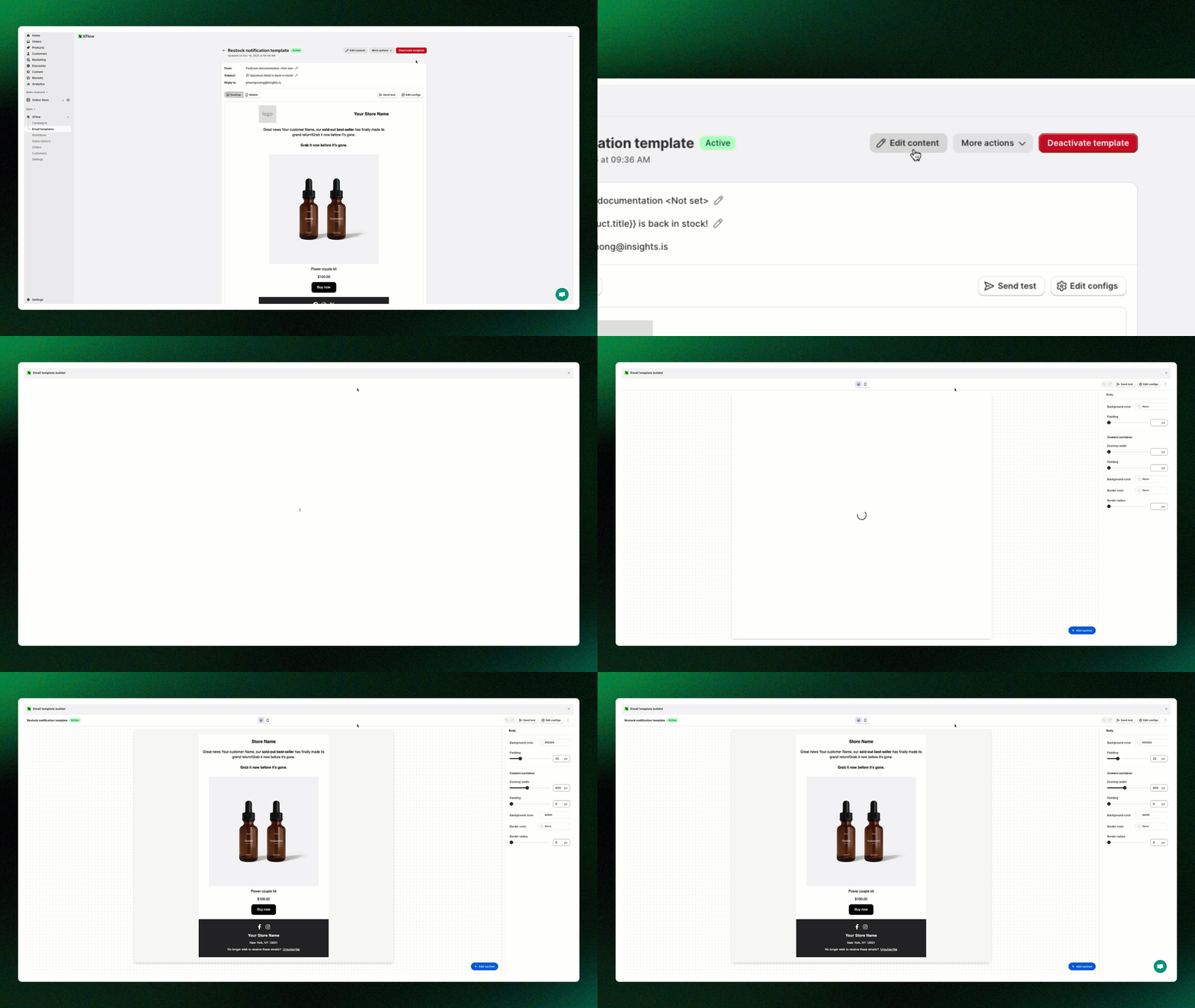
## Edit content

{% hint style="success" %}
Click **Edit content** to open the email template editor.
{% endhint %}

<figure><img src="/files/9Pb8Ju5SSZsDvGqigDOh" alt=""><figcaption></figcaption></figure>

## More actions

{% hint style="success" %}

* **Edit configs:** Modify the email’s settings, such as subject line, sender information, and reply-to address. *Learn more:* [Control how your email is presented with email configs](/xflow-app/email-templates/control-how-your-email-is-presented-with-email-configs.md)
* **Duplicate:** Create a copy of the existing email template for quick editing or reuse.
  {% endhint %}

<figure><img src="/files/iPqWbOnQ2sLoSlpR6izm" alt=""><figcaption></figcaption></figure>

## Related articles

{% content-ref url="/pages/tEG7HvAAm4FAYdcLDJSn" %}
[Explore pre-built email templates](/xflow-app/email-templates/explore-pre-built-email-templates.md)
{% endcontent-ref %}

{% content-ref url="/pages/nXwNg4IKnFUKyqmD5GJb" %}
[Create an email template](/xflow-app/email-templates/create-an-email-template.md)
{% endcontent-ref %}

{% content-ref url="/pages/zEXuoV3arc2WNCI1i5wq" %}
[Design your email templates](/xflow-app/email-templates/design-your-email-templates.md)
{% endcontent-ref %}

{% content-ref url="/pages/27ltXN2pm7mhbqMs6IcG" %}
[Understanding personalization variables in email templates](/xflow-app/email-templates/understanding-personalization-variables-in-email-templates.md)
{% endcontent-ref %}

{% content-ref url="/pages/9TMXBePs6zA8bV4oj3K6" %}
[Preview and test your email](/xflow-app/email-templates/preview-and-test-your-email.md)
{% endcontent-ref %}

{% content-ref url="/pages/7mi2grXoNsptsyKEmoV6" %}
[Use email templates in campaigns and workflows](/xflow-app/email-templates/use-email-templates-in-campaigns-and-workflows.md)
{% endcontent-ref %}

{% content-ref url="/pages/Rey69myeVHiNlaksnEsa" %}
[Email templates: FAQs](/xflow-app/email-templates/email-templates-faqs.md)
{% endcontent-ref %}

***

#### 📩 **Need help?**

We’re here to make your XFlow experience smooth and successful.\
Our support team is always ready to assist you—no matter how big or small your question is.

<a href="https://admin.shopify.com/apps/xflow?chat=true&#x26;utm_source=foxecom&#x26;utm_medium=help_center_xflow_manage_email_templates&#x26;utm_campaign=cta_button&#x26;utm_term=chat_now" class="button primary" data-icon="comment-lines">Chat now</a> <a href="mailto:contact@help.xflow.so" class="button secondary" data-icon="envelopes">Message us</a>


---

# Agent Instructions: Querying This Documentation

If you need additional information that is not directly available in this page, you can query the documentation dynamically by asking a question.

Perform an HTTP GET request on the current page URL with the `ask` query parameter:

```
GET https://docs.foxecom.com/xflow-app/email-templates/manage-email-templates.md?ask=<question>
```

The question should be specific, self-contained, and written in natural language.
The response will contain a direct answer to the question and relevant excerpts and sources from the documentation.

Use this mechanism when the answer is not explicitly present in the current page, you need clarification or additional context, or you want to retrieve related documentation sections.
