# Understanding Shopify's app approval & usage limit
When you install XFlow or subscribe to a paid plan, Shopify may ask you to approve both a **recurring subscription** and **usage charges**.
These approvals are part of **Shopify's billing system** and are required before the app can begin charging your Shopify account.
*Learn more about* [*Shopify app charges*](https://help.shopify.com/en/manual/your-account/manage-billing/billing-charges/types-of-charges/third-party-charges/app-charges)
***
## What you'll see during approval
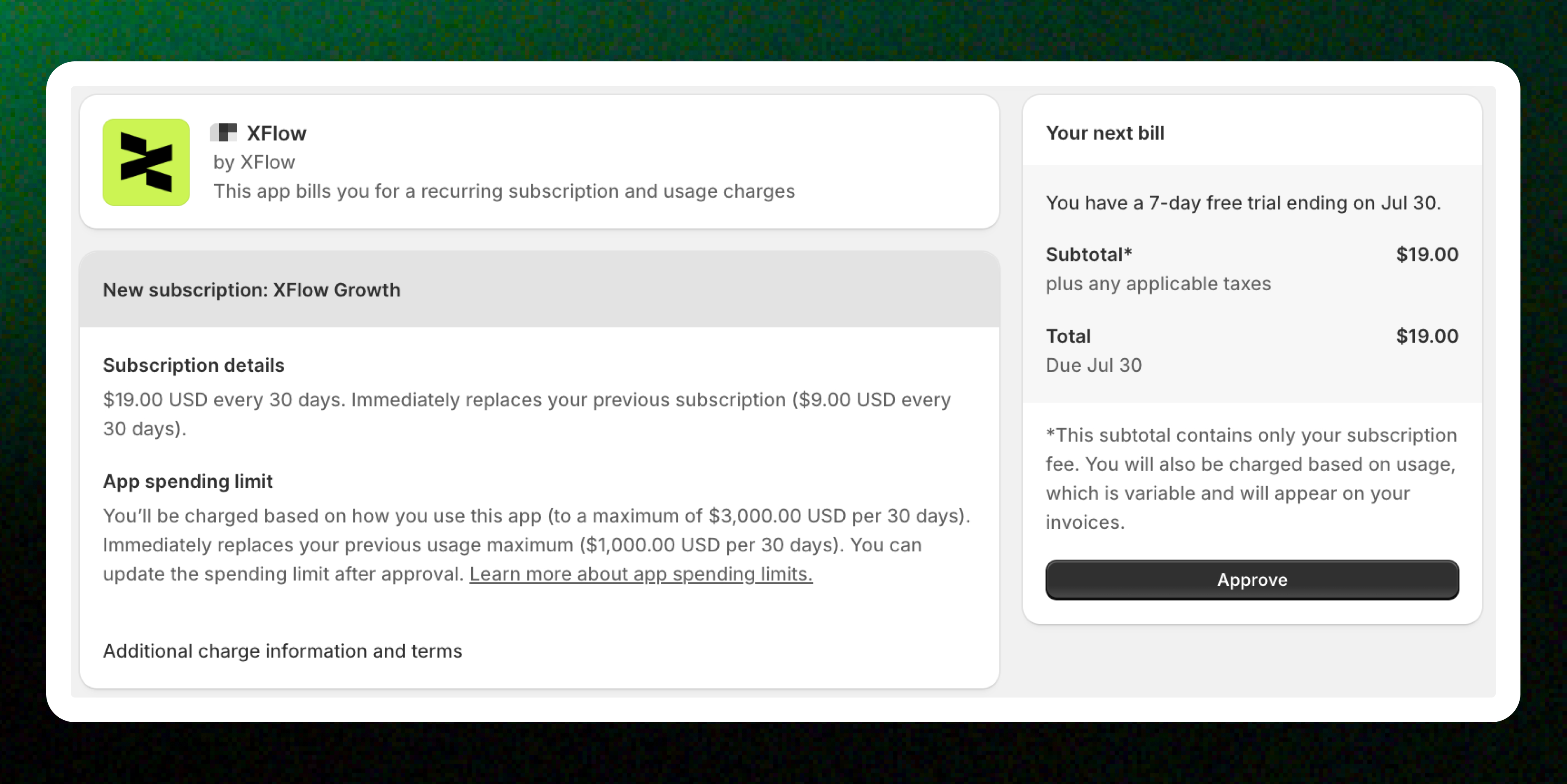
When approving your subscription, Shopify displays two types of charges:
### Subscription
This is your recurring app subscription — the fixed subscription fee you'll pay each billing cycle.
Your subscription charge is processed through Shopify Billing and is automatically added to your Shopify invoice.
Changing to a different plan requires approving a new subscription charge in Shopify. The new subscription replaces your previous one.
### App spending limit
Apps with usage-based billing can set an app spending limit.
The spending limit is the **maximum amount** Shopify allows the app to charge for usage during a billing cycle. It helps prevent usage charges from exceeding the approved amount.
Once the approved limit is reached, Shopify won't allow additional usage charges until:
* The next billing cycle begins, or
* The merchant approves a higher spending limit.
*You can update your app spending limit at any time by following Shopify's guide:* [*Set new app spending limits for usage charges.*](https://help.shopify.com/en/manual/apps/managing-apps#increase-app-spending-limits)
The app spending limit is not an upfront charge. It is only the maximum amount Shopify authorizes for usage-based billing. Your actual charges depend on your app usage during the billing period.
## How fees appear on your Shopify invoice
All XFlow charges are processed through **Shopify Billing**. XFlow never charges your payment method directly.
When XFlow recovers an order, the recovered revenue is added to your billable recovered revenue for the current billing period.
If your billable recovered revenue exceeds the amount included in your plan, Shopify calculates usage charges based on the additional billable amount.
Your subscription fee and any usage charges are added to your Shopify invoice. Usage charges include a description of the billable period or usage.
Shopify will never charge more than your approved **App spending limit**. If the limit is reached, no additional usage charges are created until the next billing cycle or until you approve a higher limit.
## FAQs
**Why was I charged even though I didn’t use XFlow?**
If your free trial has ended and you haven’t cancelled your subscription, Shopify automatically starts the recurring subscription for the plan you selected when approving the app charges.
The monthly subscription fee applies whether or not you actively use XFlow during the billing period. This is standard for apps billed through Shopify.
To avoid future charges, cancel your subscription or uninstall XFlow before the next billing cycle.
**Where can I view my XFlow charges?**
You can review your XFlow subscription, usage fees, and billing history in: **Shopify Admin → Settings → Billing**
**Will uninstalling XFlow stop all future charges?**
Uninstalling XFlow stops future monthly subscription fees and usage fees.
However, charges generated before the app was uninstalled may still appear on your next Shopify invoice.
***
## Related articles
Plans & Pricing
How XFlow tracks and attributes recovered revenue
How usage fees are calculated