# Plans & Pricing
This article explains XFlow’s plans, the usage included in each plan, and how monthly subscription fee and usage fees are calculated. It also helps you compare plans and choose the best option for your store.
Starting **August 6, 2026**, XFlow will transition from a fully free model to tiered pricing for new users.
***
## Available plans
XFlow currently offers four standard plans: 1 Free plan and 3 paid plans. A Custom plan is also available for Shopify Plus and high-volume stores.
All paid plans include a **7-day free trial**, giving you access to every feature included in your selected plan from the first day of the trial.
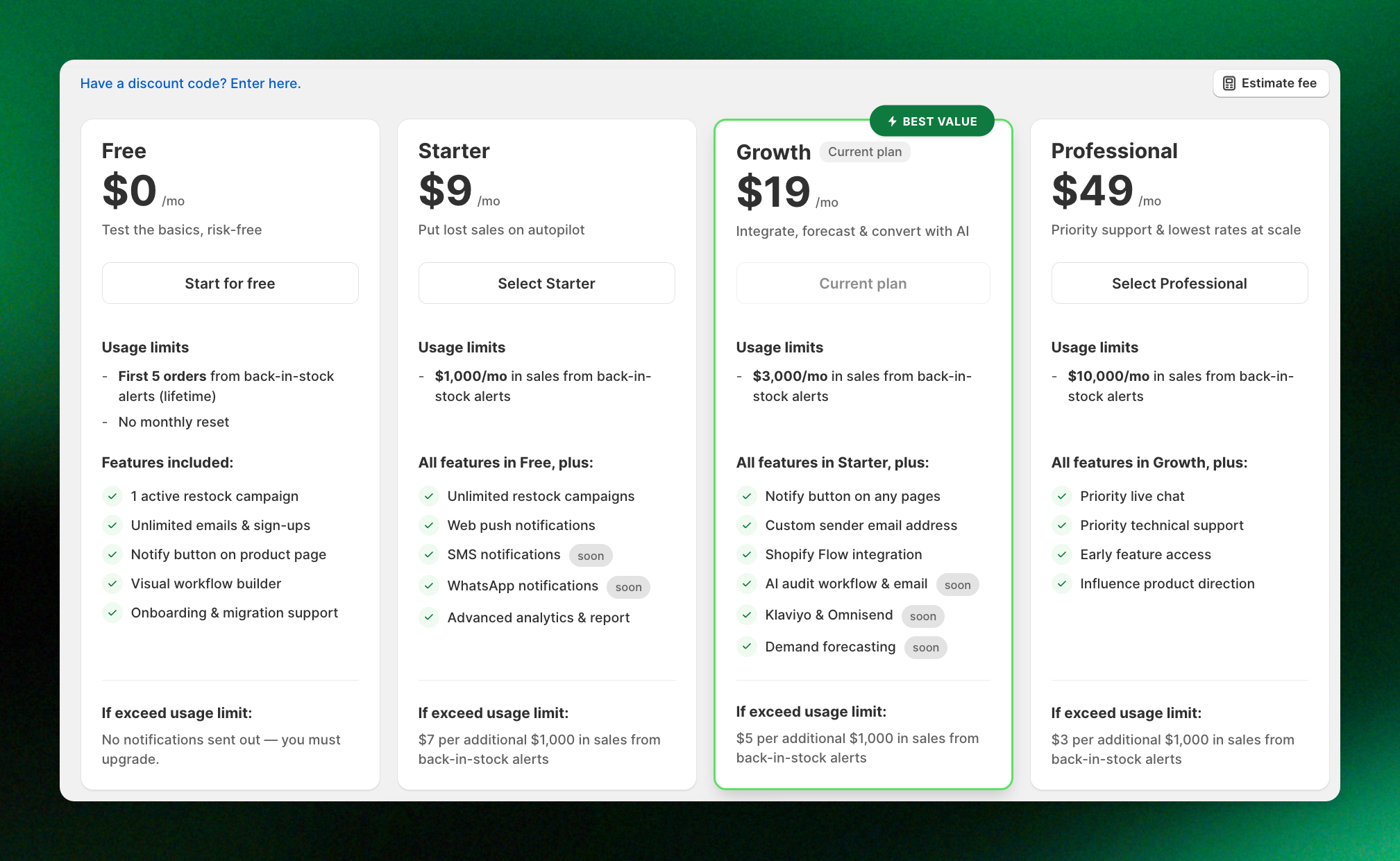
### Free plan
The Free plan has no monthly subscription fee.
It includes the first **5 attributed orders processed through XFlow**. Once your store reaches this limit:
* Workflows assigned to active campaigns are automatically paused.
* No further notifications are sent. **Upgrade to a paid plan to resume sending.**
* The Notify Me button remains active.
* New subscribers continue to be collected and are stored as **Pending.**
There is no usage fee on the Free plan.
### Paid plans
| Plan | Monthly fee | Included usage | **If exceed usage limit** |
| ------- | ----------- | -------------------------------------- | :------------------------------------------------------------------ |
| Free | $0/month | First 5 orders processed through XFlow | No additional fee. Notifications pause. Upgrade required to resume. |
| Starter | $9/month | Up to $1,000 in recovered revenue | $7 per additional $1,000 |
| Growth | $19/month | Up to $3,000 in recovered revenue | $5 per additional $1,000 |
| Pro | $49/month | Up to $10,000 in recovered revenue | $3 per additional $1,000 |
The included recovered revenue is the amount XFlow can attribute to your campaigns and workflows each month before a usage fee applies.
### Custom plan for high-volume stores
A Custom plan may be more suitable when:
* XFlow recovers more than $15,000 in revenue for your store each month.
* Your store is on Shopify Plus.
* Your business needs higher usage limits or a plan tailored to its scale.
[Contact us](https://apps.shopify.com/xflow?utm_source=foxecom\&utm_medium=help_center_xflow_plans_pricing\&utm_campaign=cta_button\&utm_term=View_plans_pricing_in_your_XFlow_dashboard) to customize a plan.
## How XFlow pricing works
XFlow uses a combination of a **monthly subscription fee (recurring fee)** and a **revenue-based usage fee**. This means your cost grows only when XFlow helps your store recover more revenue.
Your XFlow bill includes:
* **A monthly subscription fee** for access to the features included in your selected plan
* **A usage fee** when the revenue recovered through XFlow exceeds the amount included in your plan.
The usage fee is based only on revenue attributed to XFlow — not your store’s total revenue.
### How is your monthly bill calculated
Your monthly bill is calculated as:
**Monthly bill \= Monthly subscription fee + Usage fee**
**Usage fee \= Number of additional $1,000 amounts × Your plan’s rate**
*If your revenue goes over the included limit, the extra amount is rounded up to the next $1,000. Even if you exceed the limit by just $1, you will be charged one usage fee at your plan’s rate.*
For example, on the Growth plan:
The Growth plan has a **$19 monthly subscription fee** and includes up to **$3,000 in recovered revenue**. A **$5 usage fee** applies for every additional $1,000, or part of $1,000.
| Recovered revenue | Monthly subscription fee | Usage fee | Monthly total |
| ----------------- | ------------------------ | --------- | ------------- |
| $3,000 | $19 | $0 | $19 |
| $3,001 | $19 | $5 | $24 |
| $4,001 | $19 | $5 + $5 | $29 |
### **Track your usage with the Usage tracker**
Go to the **XFlow Dashboard** and open the **Usage Tracker** to monitor recovered revenue, usage fees, and plan usage. The tracker updates automatically whenever your recovered revenue changes or you switch plans.
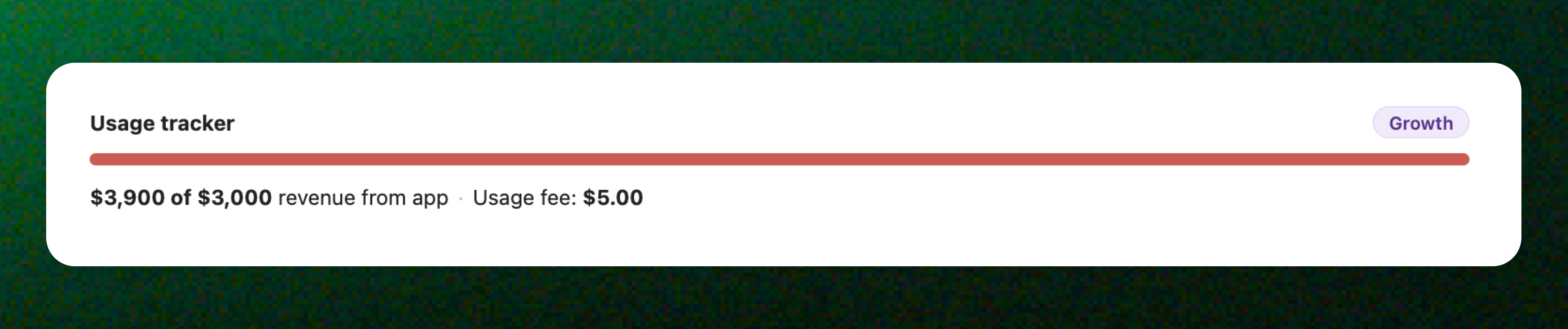
With the Usage tracker, you can:
* Track your recovered revenue.
* View any usage fees incurred.
* Monitor your progress toward your plan's allowance.
* Decide whether your current plan still fits your business.
## Find your best-fit plan with the fee calculator
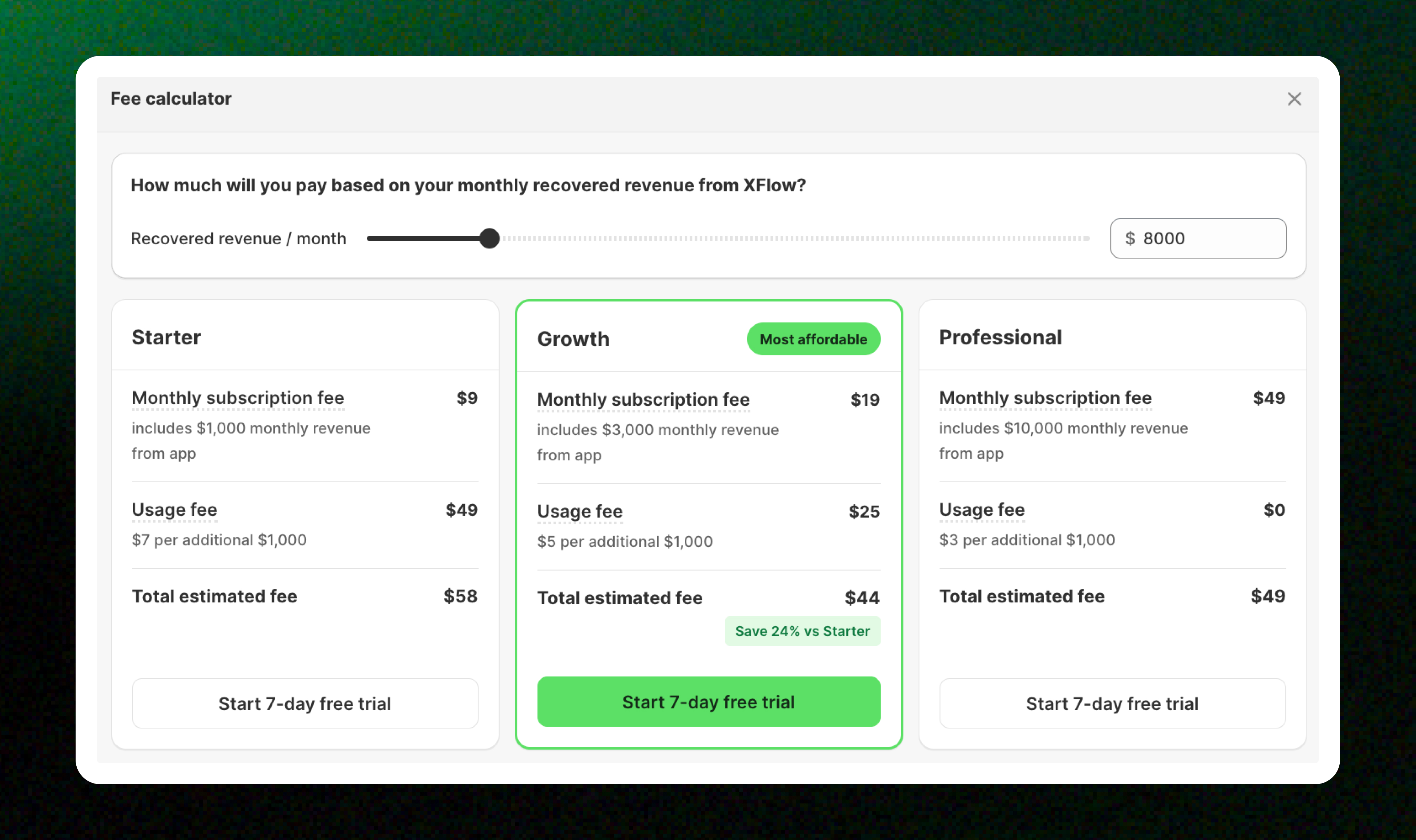
Go to **Plans & Pricing > Estimate fee** to compare plans based on your expected monthly recovered revenue. Enter your estimated monthly recovered revenue, or adjust the slider to view:
* The monthly subscription fee for each plan
* Any applicable usage fees
* The estimated monthly total
* The most cost-effective plan for your store
The fee calculator helps you estimate your monthly cost, but the plan with the lowest estimated total is not always the best plan for your store.
To choose the right plan, consider both the features included in each plan and your expected monthly recovered revenue.
Start by reviewing the plan comparison and identifying the features required for your campaigns and workflows.
Remove any plans that do not include the features or limits your store needs. Then compare the estimated cost of the remaining plans.
Compare the full estimated monthly total, not only the monthly subscription fee.
The estimated monthly total includes:
**Monthly subscription fee + Estimated usage fee**
A plan with a lower monthly subscription fee may become more expensive when your recovered revenue exceeds its included allowance.
Recovered revenue may change from month to month. Use the calculator more than once to estimate your cost based on:
* A lower-revenue month
* Your average month
* A high-revenue month
This helps you understand whether a plan remains cost-effective as your usage changes.
When your estimated recovered revenue is close to or above a plan’s included allowance, compare its monthly total with the next plan.
For example, if XFlow recovers **$4,500** in one month:
Although Starter has the lowest monthly subscription fee, Growth has the lowest estimated total at this usage level.
When two plans have a similar estimated cost, consider:
* The features available on each plan
* Your expected recovered revenue over the next few months
* Whether you are likely to exceed the included allowance regularly
* Whether upgrading could reduce future usage fees
Choose the plan that supports both your current requirements and your expected growth.
## FAQs
**Which plan is right for my store?** The best plan depends on how much revenue you expect XFlow to recover each month. Use the **Estimate fee calculator** to compare plans and see which one offers the lowest estimated monthly cost.
**If XFlow recovers a lot of revenue during my free trial, will I be charged?** No. During the 7-day free trial, you can recover any amount of revenue without being charged a monthly subscription fee or a usage fee. However, your Usage tracker will continue recording attributed revenue during the trial. When the free trial ends, the tracker will not reset. Usage fees will only apply once your total attributed revenue exceeds your paid plan’s included usage allowance.
**Does recovered revenue during the free trial count toward my plan’s usage allowance?** Recovered revenue is still tracked in your Usage tracker during the free trial, but you will not be charged any usage fees while the trial is active. Once the free trial ends, your charges will be calculated based on the plan you selected. If your total attributed revenue exceeds that plan’s included usage allowance, the applicable usage fee will be charged. *During the free trial, XFlow generates **$1,300** in attributed revenue. When the trial ends, the Usage tracker does not reset. If your attributed revenue later increases to **$2,001** on the Starter plan, a **$7 usage fee** will apply.*
**I’m on the Free plan and hit 5 orders — what happens now?** Once you hit 5 attributed orders, workflows assigned to active campaigns are automatically paused — no more notifications will be sent. However, your Notify Me button stays active and new subscribers continue to be collected and stored as **Pending**.
**What happens if I recover $0 this month? Do I still pay the base fee?** Yes, the base fee, or subscription fee, is always charged regardless of how much revenue you recover. It’s a flat monthly recurring charge. The usage fee is $0 if you don’t exceed your plan’s free threshold. *On Starter ($9/month): If you recover $800 — under the $1,000 threshold — you pay just $9 that month.*
**How is the usage fee calculated? What exactly do I get charged?** Your plan includes a free recovered revenue threshold each month. You’re only charged an additional fee when your store’s recovered revenue from XFlow exceeds that limit — billed per $1,000 increment above the threshold. *Example: On Growth ($19/month), if your store recovers $4,500 this month — $3,000 is covered by the plan. The remaining $1,500 rounds up to 2 blocks × $5 \= $10 usage fee. Total: $29.*
***
## Related articles
How XFlow tracks and attributes recovered revenue
How usage fees are calculated
How to change your plan