# Manage your data
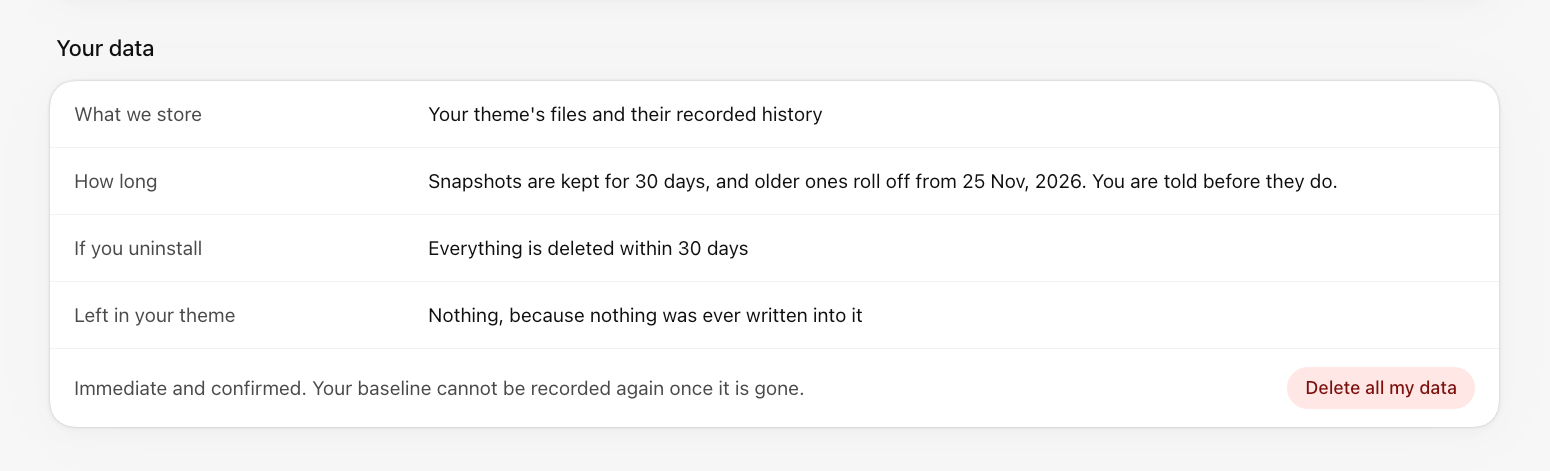
Check which theme Snapty records, what it keeps about your store and for how long. You can also delete everything Snapty holds in one step.
## Which theme Snapty records
Snapty records your **live theme** only — the one your customers are looking at. Under **What is being recorded** in **Settings**, you see your theme with its **Role** (**Published**) and its **Recording** status.
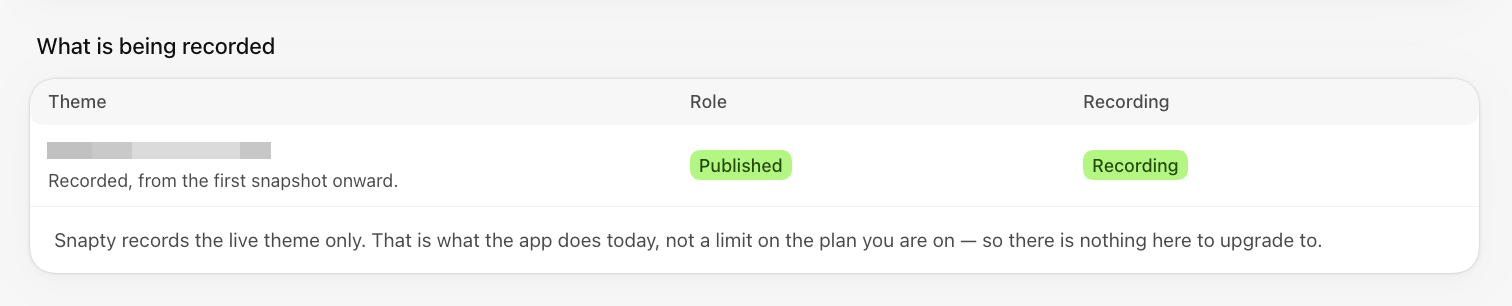
Copies in your theme library and development themes aren't recorded. This isn't a limit of the plan you're on, so there's nothing to upgrade to.
Shopify sends no notification when a theme file is edited, so Snapty has to read your theme and compare it to find changes. It spends that work on the theme your customers are looking at.
## What Snapty stores
| What | Where |
| ---------------------------------------------------------- | ------------------------------------------------------------------------------------- |
| Your theme's files, as recorded | Object storage. An identical file is stored only once |
| The list of files in each recording, and when it was taken | Snapty's database |
| Code Vault snippets | Snapty's database, and a storage slot Shopify keeps for the Snapty app embeds to read |
| Your shop's name, plan, timezone and contact email | Snapty's database |
Snapty doesn't request access to your products, orders, or customer data.
## How long it's kept
How long snapshots are kept depends on your plan:
| Plan | Snapshots kept | Snapshots kept forever |
| ----------- | -------------- | ---------------------- |
| **Free** | 30 days | Up to 3 |
| **Starter** | 90 days | Up to 10 |
| **Pro** | 1 year | Up to 50 |
Snapshots are automatically removed when their retention period ends. You can **pin important snapshots** to keep them permanently, up to your plan's limit.
You can check when your snapshots will expire under **Settings → How long**.
Your baseline and every snapshot taken before Snapty writes are kept forever, on every plan.
## If you uninstall
Everything Snapty holds for your store is deleted within 30 days. Nothing is left in your theme, because nothing was ever written into it — Vault code is delivered by an app embed, and the embed goes when the app does.
## Delete all your data
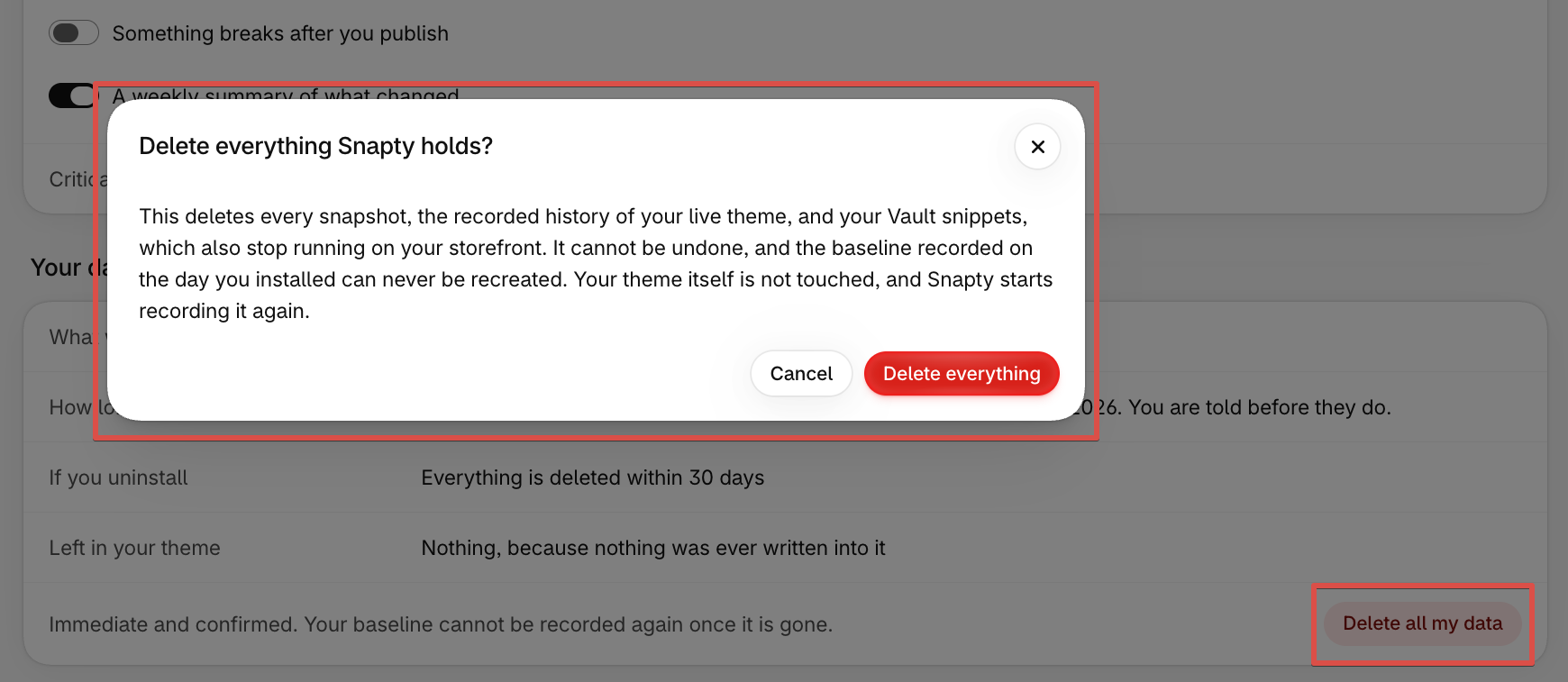
**Delete all my data** deletes everything Snapty holds immediately, after you confirm.
Deleting can't be undone, and your baseline can't be recorded again once it's gone.
### What's deleted, and what isn't
**Deleted:**
* Every snapshot, the recorded history of your live theme, and the activity log
* Your baseline — the one recorded on the day you installed can never be recreated
* Your Vault snippets, which also stop running on your storefront
**Not affected:** your theme itself. Snapty starts recording it again, and the next baseline records your theme as it is on that day, not as it was when you installed.
### Delete your data
1. Click **Settings** in the left nav of the Snapty app.
2. Under **Your data**, click **Delete all my data**.
3. Click **Delete everything** in the **Delete everything Snapty holds?** message.
To keep your data, click **Cancel** instead.
## FAQs
No. It deletes what Snapty holds — recordings and snippets. Your theme is untouched. Snippets stop being delivered, because there's nothing left to deliver.
Everything is deleted within 30 days. Nothing is left in your theme.
## Related articles
Settings overview
Manage email notifications