# Buttons

Buttons are crucial for navigation, calls to action, and customer engagement. Customizing their appearance allows you to make them stand out or blend seamlessly with your site's design.

## How to access Button settings

{% hint style="success" %}
Steps:

1. In the theme editor (**Customize**), click **Theme settings**.
2. Locate **Buttons**.
3. Enter the tags you want to show as badges.
4. Click **Save**.
   {% endhint %}

## Buttons settings options

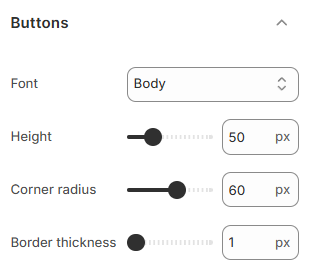
<figure><img src="/files/sg0pfuUm5qtHIV8FvqZe" alt=""><figcaption></figcaption></figure>

### Font

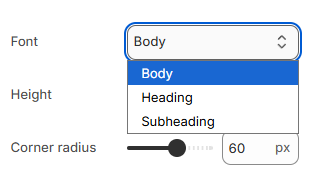
Choose a font for your button text. Options include **Body**, **Heading**, and **Subheading**, letting you match your buttons to the rest of your store’s text style.
<figure><img src="/files/C6j1wHu9aUnnysazpMoQ" alt=""><figcaption></figcaption></figure>

### Height

Set the height of your buttons from 40px to 80px.&#x20;

Larger buttons stand out more, while smaller ones fit into compact designs.

### Corner radius

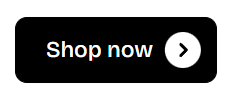
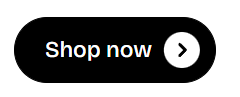
Adjust the roundness of your button corners from 0px (sharp) to 60px (rounded).&#x20;

Rounded corners give a modern look, while sharp corners keep things more traditional.
<div><figure><img src="/files/UUTnRr7bOBqQG0iMWOP6" alt=""><figcaption></figcaption></figure> <figure><img src="/files/5CSwz6RLtU8JIwMvUwi0" alt=""><figcaption></figcaption></figure> <figure><img src="/files/WmoikObrvg7ggnQArIrK" alt=""><figcaption></figcaption></figure></div>

### Border thickness

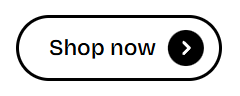
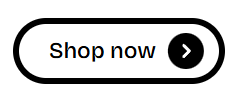
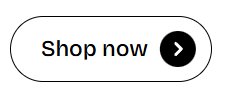
Set the border thickness between 1px and 4px.&#x20;

Thicker borders make buttons more prominent, while thinner borders create a subtle, clean appearance.
<div><figure><img src="/files/CC1uAK36bVwKnYKtNCYL" alt=""><figcaption></figcaption></figure> <figure><img src="/files/GbTghxajVEqaO5j6Jr0R" alt=""><figcaption></figcaption></figure> <figure><img src="/files/uWTzX1YnwKud4K6o1Xdf" alt=""><figcaption></figcaption></figure></div>


---

# Agent Instructions: Querying This Documentation

If you need additional information that is not directly available in this page, you can query the documentation dynamically by asking a question.

Perform an HTTP GET request on the current page URL with the `ask` query parameter:

```
GET https://docs.foxecom.com/pebble-theme/theme-settings/buttons.md?ask=<question>
```

The question should be specific, self-contained, and written in natural language.
The response will contain a direct answer to the question and relevant excerpts and sources from the documentation.

Use this mechanism when the answer is not explicitly present in the current page, you need clarification or additional context, or you want to retrieve related documentation sections.