# Scrolling cards

{% tabs %}
{% tab title="GIF" %}

<figure><img src="https://1172126658-files.gitbook.io/~/files/v0/b/gitbook-x-prod.appspot.com/o/spaces%2FgoStNEbk9Q25TX38NhdE%2Fuploads%2FAXGp3AAcQgs5NEp3rM69%2Fscrollingcards.gif?alt=media&#x26;token=a1fd9c26-031a-4a40-8b4e-ab99ea7964a9" alt=""><figcaption></figcaption></figure>
{% endtab %}

{% tab title="Image" %}

<figure><img src="https://1172126658-files.gitbook.io/~/files/v0/b/gitbook-x-prod.appspot.com/o/spaces%2FgoStNEbk9Q25TX38NhdE%2Fuploads%2FeCudp9ZOohywQlXLHLsX%2FFox-BG%20Light%20-%202025-11-25T110437.153.jpg?alt=media&#x26;token=9f86c973-8af0-4a62-a575-e5a3f3eb5a4d" alt=""><figcaption></figcaption></figure>
{% endtab %}
{% endtabs %}

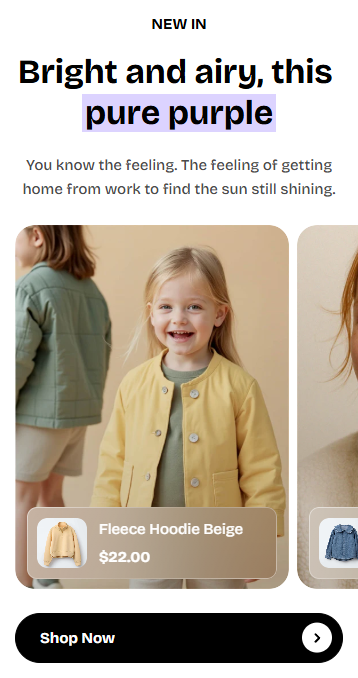
The **Scrolling cards** section is a dynamic, editorial-style layout that pairs **scroll-animated headings** with **zigzag cards** to create a high-impact storytelling moment. As shoppers scroll, the content stays fixed while cards move vertically—perfect for campaigns, brand storytelling, or highlighting product features in an engaging way.

## How to add a Scrolling cards section to your Shopify store

{% hint style="success" %}

1. In the theme editor **(Customize)**, click **Add section.**
2. Select **Scrolling cards** section.
3. Make necessary changes.
4. **Save.**
   {% endhint %}

## How to edit the section Scrolling cards

The Scrolling cards section includes 2 static blocks:

* [Scrolling cards](https://docs.foxecom.com/pebble-theme/theme-sections/scrolling-cards)
* [Headings](#headings)

{% tabs %}
{% tab title="Scrolling cards" %}
Holds all the cards that will scroll in zig-zag form. On mobile, the cards are displayed in a carousel.
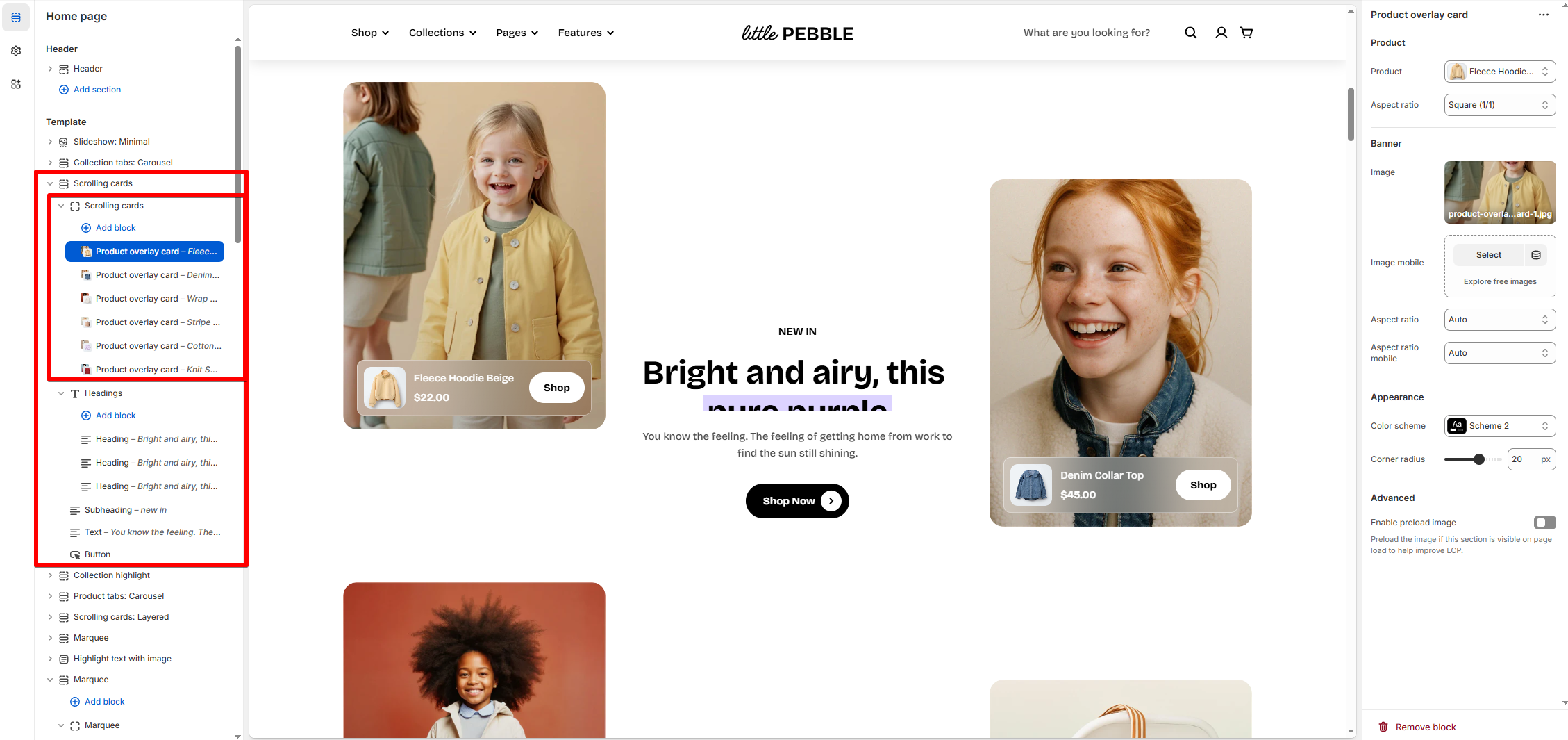
<div><figure><img src="https://1172126658-files.gitbook.io/~/files/v0/b/gitbook-x-prod.appspot.com/o/spaces%2FgoStNEbk9Q25TX38NhdE%2Fuploads%2FfbNDtl99vYkIN9lh2yUO%2Fimage.png?alt=media&#x26;token=f3bfe302-0c19-4121-9856-65dfb6337f04" alt=""><figcaption></figcaption></figure> <figure><img src="https://1172126658-files.gitbook.io/~/files/v0/b/gitbook-x-prod.appspot.com/o/spaces%2FgoStNEbk9Q25TX38NhdE%2Fuploads%2FVgf817irHDpxVbsZebJs%2Fimage.png?alt=media&#x26;token=e390008f-937b-4352-9774-a39919ee2262" alt=""><figcaption></figcaption></figure></div>

**Features:**

* Supports multiple [Product overlay card blocks](https://docs.foxecom.com/pebble-theme/theme-blocks/product#product-overlay-card)
* Mobile swipe support
* Auto zigzag pattern for alternating cards
* Cards align left/right based on position
  {% endtab %}

{% tab title="Scrolling headings" %}
The animated heading area scrolls vertically.

<figure><img src="https://1172126658-files.gitbook.io/~/files/v0/b/gitbook-x-prod.appspot.com/o/spaces%2FgoStNEbk9Q25TX38NhdE%2Fuploads%2FwQY088whycWGZXqakeGG%2Fimage.png?alt=media&#x26;token=e05e62eb-2ee4-447b-956a-bf5968241e25" alt=""><figcaption></figcaption></figure>

**Features:**

* Looping or stacked heading lines (e.g., Heading 1 → Heading 2)
* Smooth scroll-mask animation
* Height automatically adjusts to typography size

{% hint style="info" %}
Besides headings, you can also include a descriptive text, a subheading, and a button.
{% endhint %}
{% endtab %}
{% endtabs %}