# Highlight text with image
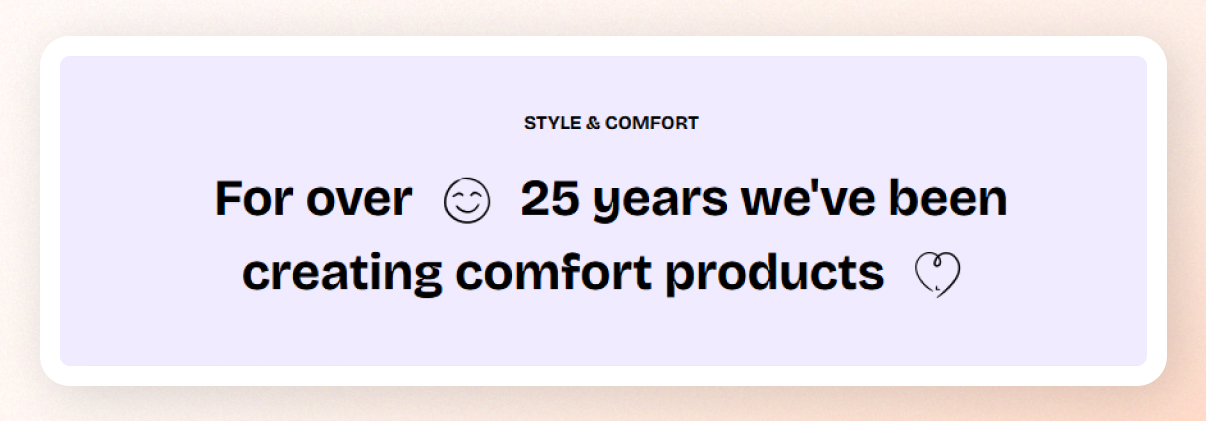
**Highlight text with image** is a storytelling-focused section designed to showcase short messages paired with small inline images. It’s perfect for creating expressive headlines, visual statements, or strong brand moments across landing pages.
## How to add a Highlight text with image section to your Shopify store
1. In the theme editor **(Customize)**, click **Add section.**
2. Select **Highlight text with image** section.
3. Make necessary changes.
4. **Save.**
## How to edit the section Highlight text with image
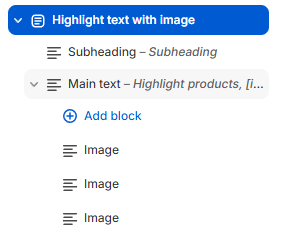 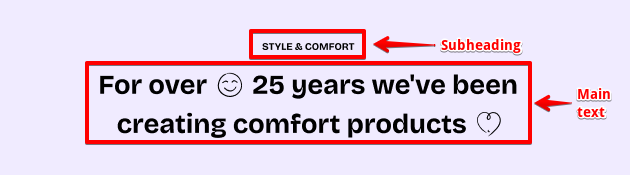
The section preset comes with 2 **static blocks**:
* A **subheading**. Learn more: [Basic](https://docs.foxecom.com/pebble-theme/theme-blocks/basic#text)
* A **main highlight text area**:
* Highlight images have already been added inside the main text block.
* **Heading**: Write the main message.
Use shortcodes like **\[img1]**, **\[img2]**, **\[img3]** to place images inline. Each shortcode corresponds to an “Image” nested block inside this block.
*Example:*
```
Sustainability done right [img1] crafted with care [img2]
```
* **Typography preset**: Controls the text style.
* Options:
* **H1 – H6** (theme typography presets). Learn more: [Text presets](https://docs.foxecom.com/pebble-theme/theme-settings/typography#text-presets).
* **Custom** — allows full manual control.
This block supports **inline image** blocks nested inside the text.\
Each image block maps to a shortcode in the text, e.g.:
* `[img1]` → first image block
* `[img2]` → second image block
* `[img3]` → third image block
You can reorder the blocks to change the mapping order.
Each block includes settings:
| Setting | Description |
| --- | --- |
| **Image** | Upload the inline image that appears within the text |
| **Link** | Make the image clickable (optional) |
| **Aspect ratio** | Choose how the image is displayed or cropped |
| **Image width** | Control image width on desktop |