# Product

The **Lookbook card** block allows you to display a collection of products within a styled card. You can feature images along with a list of products, to create a dynamic and engaging shopping experience for your customers.
#### ⚙️ **Block settings**
| Setting | Description |
| --- | --- |
| **Image** | Upload the image you want to display on the Lookbook card. |
| **Image (Mobile)** | Upload a separate image for mobile users to ensure a responsive, optimized experience. |
| **Image ratio** | Choose the aspect ratio of the image. |
| **Product list** | Select up to **3** products you want to display in the Lookbook card. |
| **Heading** | Add a heading for the Lookbook card. |
| **Heading preset** | Choose a heading style for your Lookbook card.
*Learn more:* [Text presets](https://docs.foxecom.com/pebble-theme/theme-settings/typography#text-presets) |
| **Color scheme** | Choose the color scheme for the Lookbook card.
*Learn more:* [Colors](https://docs.foxecom.com/pebble-theme/theme-settings/colors) |
| **Border radius** | Set the border radius (rounded corners) for the card. Default is 20px, but you can adjust it as needed. |
The **Product card** block allows you to showcase individual products. It's ideal for displaying featured items, bestsellers, or any product you'd like to highlight on your store.
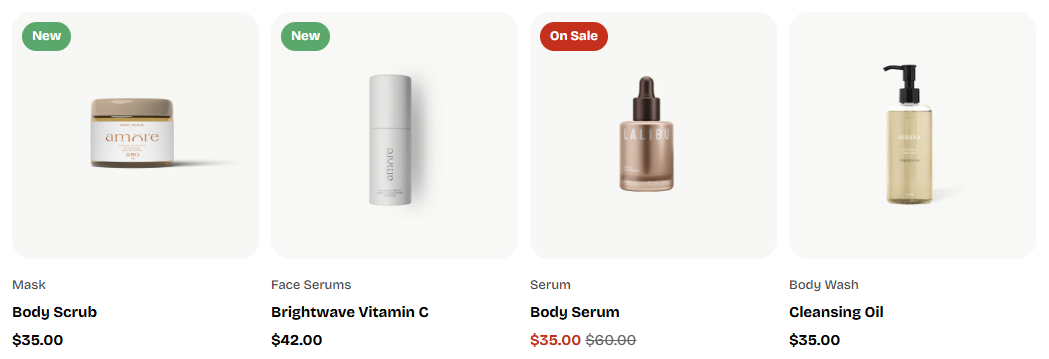
The **Product card** block allows you to showcase individual products with a clean and structured layout. It's ideal for displaying featured items, bestsellers, or any product you'd like to highlight on your store.
#### ⚙️ **Block settings**
| Setting | Description |
| --- | --- |
| **Product** | Select the product you want to feature in the card. This will display the product's image, title, and price. |
📌 **In the Product card's content**
You can enhance your Product card by adding additional text blocks. Here are some ideal use cases:
* **Showcasing product details**: Use text blocks to highlight product features, specifications, or other important information.
* **Displaying dynamic content**: Connect to dynamic content that can change based on the product.
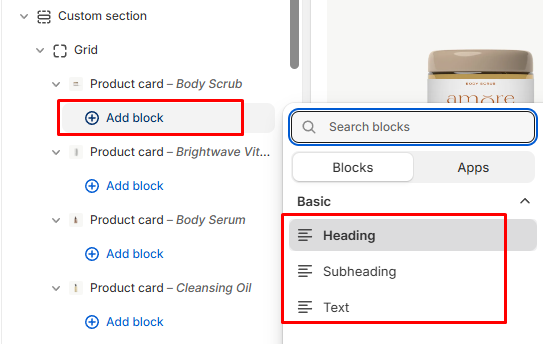
✅ To add more content:
1. In the Product card's block, click **Add block**.
2. You can then choose from various content types such as **Heading**, **Subheading**, or **Text**.
Customize the function on the product cards across your store in **Theme settings** > [Product cards](https://docs.foxecom.com/pebble-theme/theme-settings/product-cards).
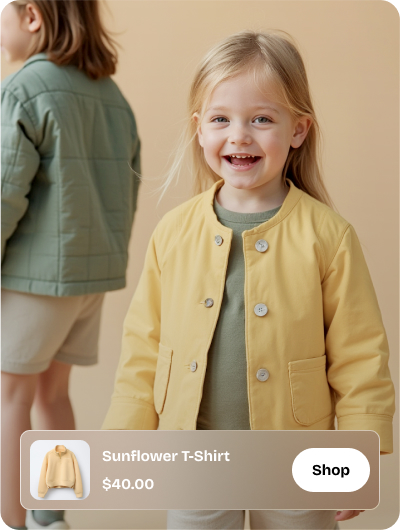
The **Product overlay card** block is designed to showcase a product with an overlay that contains essential details.
#### ⚙️ **Block settings**
| Setting | Description |
| --- | --- |
| **Product** | Select the product you want to feature in the overlay card. This will display the product's image, title, and price. |
| **Image** | Upload the default image for the product card. |
| **Image (Mobile)** | Upload a separate image optimized for mobile views. |
| **Color scheme** | Choose a color scheme to style the card.
*Learn more:* [Colors](https://docs.foxecom.com/pebble-theme/theme-settings/colors) |
| **Border radius** | Adjust the border radius of the card for rounded corners. |