# Custom

<table data-view="cards"><thead><tr><th align="center"></th><th data-hidden data-card-cover data-type="image">Cover image</th><th data-hidden data-card-target data-type="content-ref"></th></tr></thead><tbody><tr><td align="center"><strong>Custom liquid</strong></td><td><a href="/files/zbZC6AoFlp9S5rdYW8Kg">/files/zbZC6AoFlp9S5rdYW8Kg</a></td><td><a href="/pages/Sg9VwOrEhpNFJak9NKbQ#custom-liquid">/pages/Sg9VwOrEhpNFJak9NKbQ#custom-liquid</a></td></tr></tbody></table>

## Custom liquid

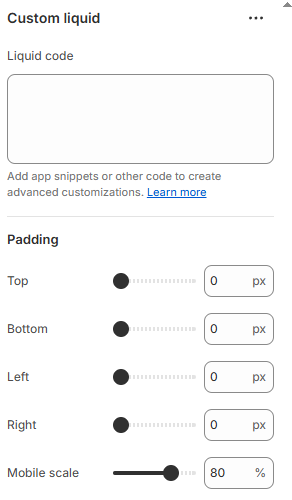
The **Custom liquid** block allows you to insert custom Liquid code directly into your store's theme. This can be used to display dynamic content, custom elements, or integrations with other apps. It offers flexibility for developers and advanced users who want to extend their Shopify store with custom logic and design elements.

{% hint style="warning" %}

* While this block is highly functional, the visual design of the custom Liquid content will depend on the code you implement. Make sure to include appropriate CSS to style the embedded content.
* If your Liquid content includes images or third-party elements, ensure they’re responsive. You can add custom styles to ensure that your content looks great across different devices.
* Custom liquid implementations can become complex. If you're uncertain about how to structure your code, consult the official [Shopify Liquid documentation](https://shopify.dev/docs/api/liquid) or work with a certified Shopify expert to ensure optimal implementation.
  {% endhint %}

<figure><img src="/files/v83nmhM538Gv7AY5uNrQ" alt=""><figcaption></figcaption></figure>


---

# Agent Instructions: Querying This Documentation

If you need additional information that is not directly available in this page, you can query the documentation dynamically by asking a question.

Perform an HTTP GET request on the current page URL with the `ask` query parameter:

```
GET https://docs.foxecom.com/pebble-theme/theme-blocks/custom.md?ask=<question>
```

The question should be specific, self-contained, and written in natural language.
The response will contain a direct answer to the question and relevant excerpts and sources from the documentation.

Use this mechanism when the answer is not explicitly present in the current page, you need clarification or additional context, or you want to retrieve related documentation sections.
