# Animations
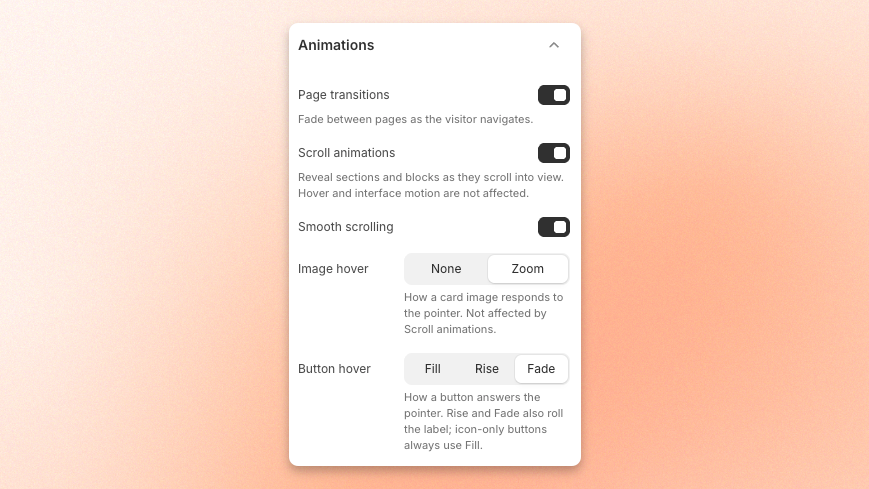
Motion sets the pace of your store. Use this setting to decide how much motion your store has: sections that reveal as shoppers scroll, a fade between pages, and the way images and buttons react to a cursor.
Every setting here is global, so you change the feel of the whole theme without editing sections one by one.
Shoppers who turn on **Reduce Motion** in their device or browser accessibility settings never see these animations, whatever you choose here. Your store still works normally for them — content appears without the motion.
Learn more: [Reduce motion on Apple devices](https://support.apple.com/en-vn/111781)
## Page transitions
Controls what happens between one page and the next. With it on, the page fades out and the new one fades in instead of switching instantly. With it off, navigation is a hard cut.
## Scroll animations
The master switch for scroll animations. With it on, sections and blocks can animate into view as shoppers scroll — fade in, slide up, and the other effects each block offers. With it off, everything simply appears.
Turning this off disables animations everywhere, regardless of what individual sections and blocks are set to.
## Smooth scrolling
Changes how the page responds to a scroll. With it on, the page eases into motion and glides to a stop rather than tracking the wheel or finger exactly. With it off, scrolling is direct — the page moves as much as the input says, and stops when the input stops.
## Image hover
How a card image reacts when the cursor moves over it.
| Option | What it does |
| -------- | ------------------------------------------------------------------------------------------------------- |
| **Zoom** | The image scales up slightly inside its frame, so the picture grows while the card stays the same size. |
| **None** | The image stays still. The card is still clickable — it just does not move. |
## Button hover
How every button in the theme reacts to a cursor. All three swap the button to its hover colors; the difference is how the change arrives.
| Option | What it does |
| -------- | ----------------------------------------------------------------------------------------------------------- |
| **Fade** | The button's colors cross-fade into the hover colors. |
| **Fill** | The hover color sweeps across the button from one edge, filling it like a wipe rather than fading in place. |
| **Rise** | The hover color rises up from the bottom of the button to cover it. |
Hover effects need a cursor, so shoppers on phones and tablets never see them. Nothing is lost — buttons still work normally on tap.