# Custom section
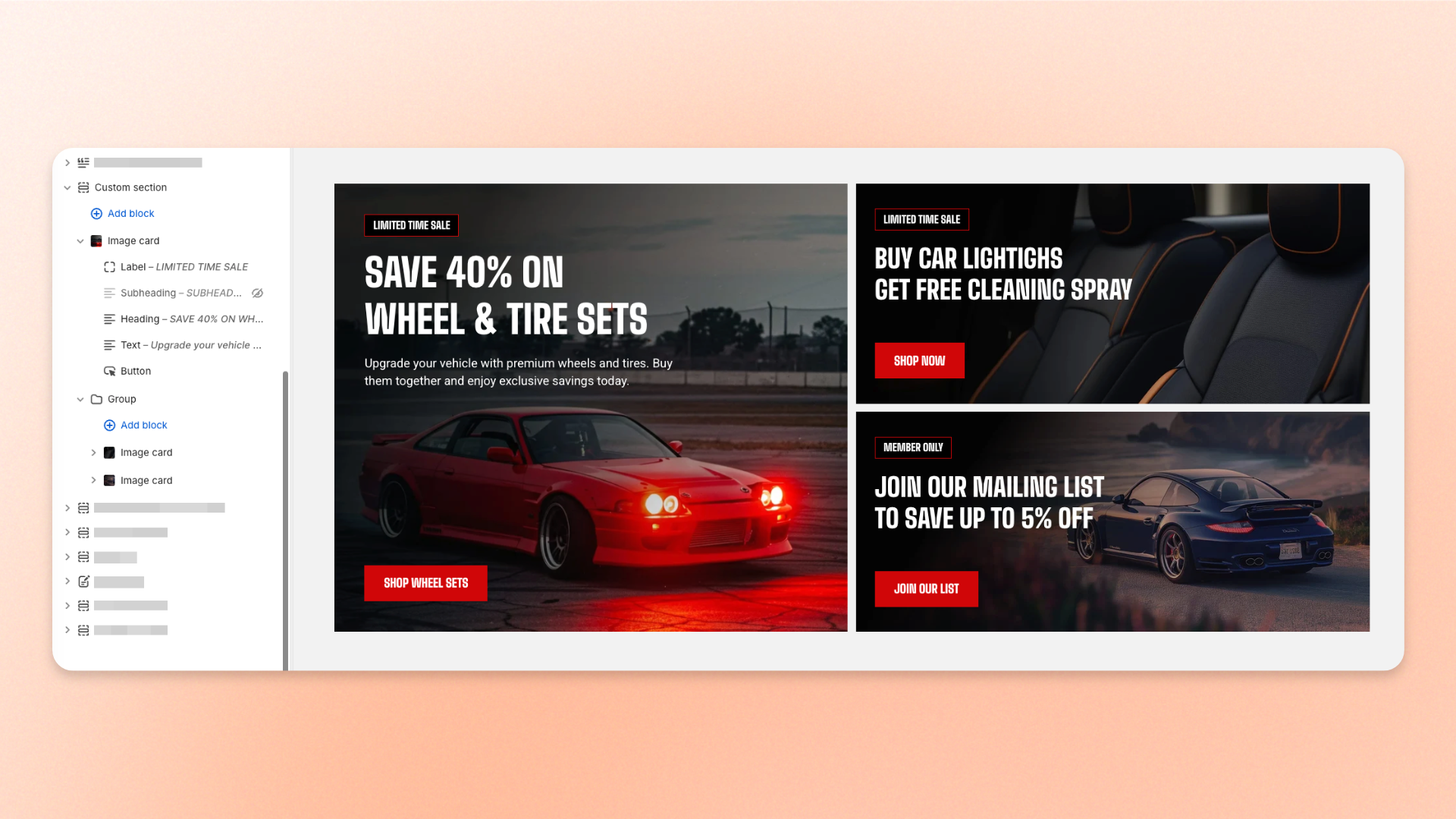
The **Custom section** is a flexible, build-your-own section that starts with a blank layout. Add blocks from the theme library, arrange them vertically or horizontally, and control their alignment, spacing, colors, borders, and responsive behavior.
Use this section when you need a layout that isn't covered by a ready-made section, such as custom content rows, promotional areas, mixed media layouts, or other one-off designs.
The Custom section also supports specialized layouts such as **Marquee**, **Shoppable media gallery**, and **Discount code**.
## How to customize the Custom section
1. In the theme editor (**Edit theme**), open the page where you want to display the section.
2. Click **Add section** and select **Custom section**.
3. Choose the section **Container** and **Direction**.
4. Configure the alignment, gaps, and mobile layout.
5. Customize the section appearance and spacing.
6. Click **Add block** and add the content you want.
7. Add, remove, or reorder blocks to build your layout.
8. Customize each block as needed.
9. Click **Save**.
## Section settings
### Layout
Controls the width, direction, alignment, and spacing of the blocks inside the section.
| Setting | Description | Options |
| ---------------------- | ------------------------------------------------------------------------------------- | ------------------------------------------------------------------------------------------------------------------------------------------- |
| **Container** | Controls the width of the section content. | **Full:** Uses the available page width.
**Fixed:** Keeps the content within the theme's fixed container width. |
| **Direction** | Controls whether blocks are arranged vertically or horizontally. | **Vertical** or **Horizontal**. |
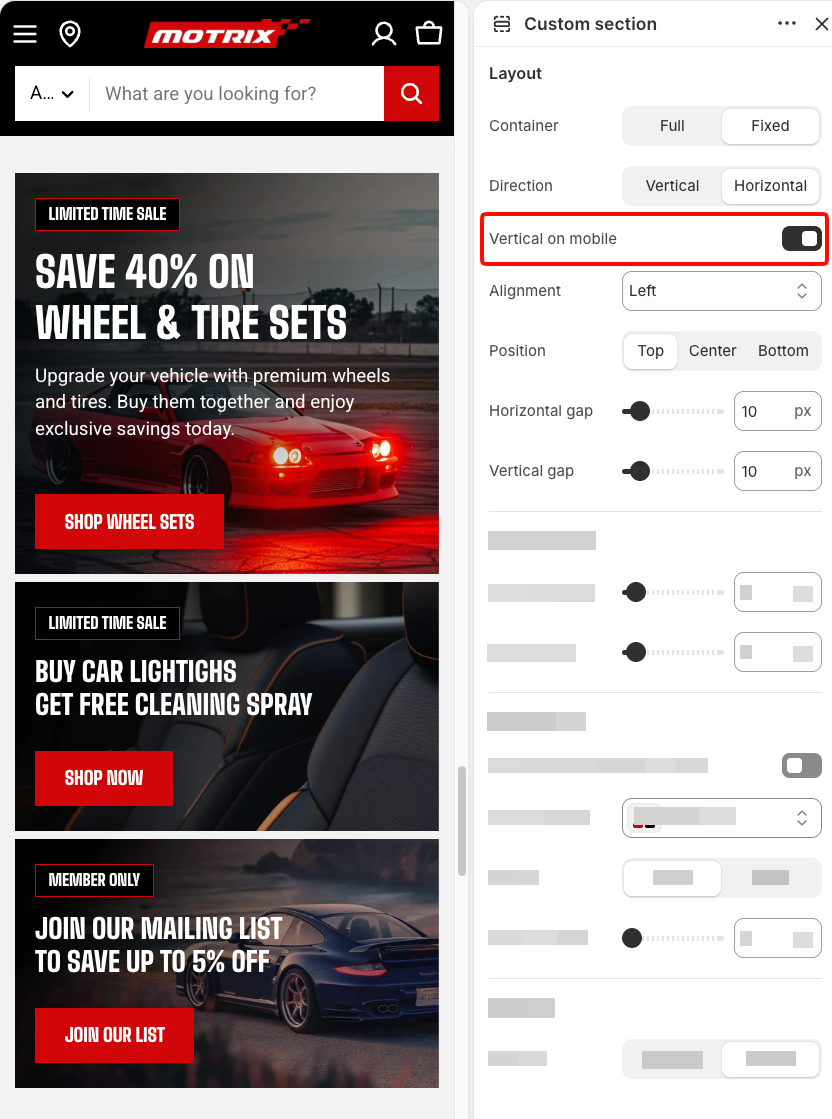
| **Vertical on mobile** | Stacks a horizontal layout vertically on mobile devices. | **On** or **Off**.
*Available when* ***Direction*** *is set to* ***Horizontal***. |
| **Alignment** | Controls how blocks are aligned within the section. | **Vertical direction:** **Left, Center,** or **Right**.
**Horizontal direction:** **Left, Center, Right,** or **Space between**. |
| **Position** | Controls the vertical alignment of blocks with different heights in a horizontal row. | **Top, Center,** or **Bottom**.
*Available when* ***Direction*** *is set to* ***Horizontal***. |
| **Horizontal gap** | Controls the horizontal space between blocks. | **0–100px.** |
| **Vertical gap** | Controls the vertical space between blocks. | **0–100px.** |
Vertical on mobile
When **Direction** is set to **Horizontal**, use **Space between** to push the first and last blocks toward opposite edges. This works well for layouts such as a logo on one side and a button on the other.
### Mobile layout
Controls the spacing between blocks on mobile devices.
| Setting | Description | Options |
| ------------------ | ------------------------------------------------------- | ------------ |
| **Horizontal gap** | Controls the horizontal space between blocks on mobile. | **0–100px.** |
| **Vertical gap** | Controls the vertical space between blocks on mobile. | **0–100px.** |
### Appearance
Controls the section color scheme, border, and corners.
| Setting | Description | Options |
| --------------------------------- | ---------------------------------------------------------------------------------------------------- | --------------------------------------------------------------------------------------- |
| **Use color scheme in container** | Applies the color scheme and border to the content container instead of the full section background. | **On** or **Off**.
*Available when* ***Container*** *is set to* ***Fixed***. |
| **Color scheme** | Applies a theme color scheme to the section or content container. | Select an available color scheme. |
| **Border** | Controls whether the section or content container has an outline. | **None** or **Solid**. |
| **Border width** | Controls the border thickness. | **0–10px.**
*Available when* ***Border*** *is set to* ***Solid***. |
| **Border opacity** | Controls the opacity of the border. | **0–100%.**
*Available when* ***Border*** *is set to* ***Solid***. |
| **Corner radius** | Controls how rounded the section or container corners appear. | **0–32px.** |
### Padding
Controls the spacing around the section separately for desktop and mobile.
| Setting | Description | Options |
| ----------- | ------------------------------------------------------------------------- | ---------------------------------------------------------------------------------------------------------------------------------------------- |
| **Devices** | Selects which device-specific padding values you are editing. | **Desktop** or **Mobile**. |
| **Top** | Controls the space above the section content. | **0–100px**. |
| **Bottom** | Controls the space below the section content. | **0–100px**. |
| **Left** | Controls the space between the content and the left edge of the section. | **0–100px**.
*Available when* ***Container*** *is set to* ***Full***, *or when* ***Use color scheme in container*** *is turned on*. |
| **Right** | Controls the space between the content and the right edge of the section. | **0–100px**.
*Available when* ***Container*** *is set to* ***Full***, *or when* ***Use color scheme in container*** *is turned on*. |
## Blocks
The **Custom section** supports blocks from the theme library and compatible app blocks, so you can combine different types of content in one layout.
See [**Theme blocks**](https://docs.foxecom.com/motrix-theme/theme-blocks/overview) for the full list of available blocks and their settings.
The Custom section also includes three specialized blocks:
* [**Marquee**](https://docs.foxecom.com/motrix-theme/theme-blocks/marquee) — Creates an endlessly scrolling strip for content such as text, images, or buttons.
* [**Shoppable media gallery**](#shoppable-media-gallery) — Displays shoppable image and video tiles connected to products.
* [**Discount code**](#discount-code) — Displays promotional content with a discount code customers can copy.
The **Marquee** option in the section picker is a preconfigured Custom section with a full-width horizontal layout and scrolling content, giving you a quick starting point for an announcement or promotional strip.
### Shoppable media gallery
The **Shoppable media gallery** displays a collection of shoppable image and video tiles.
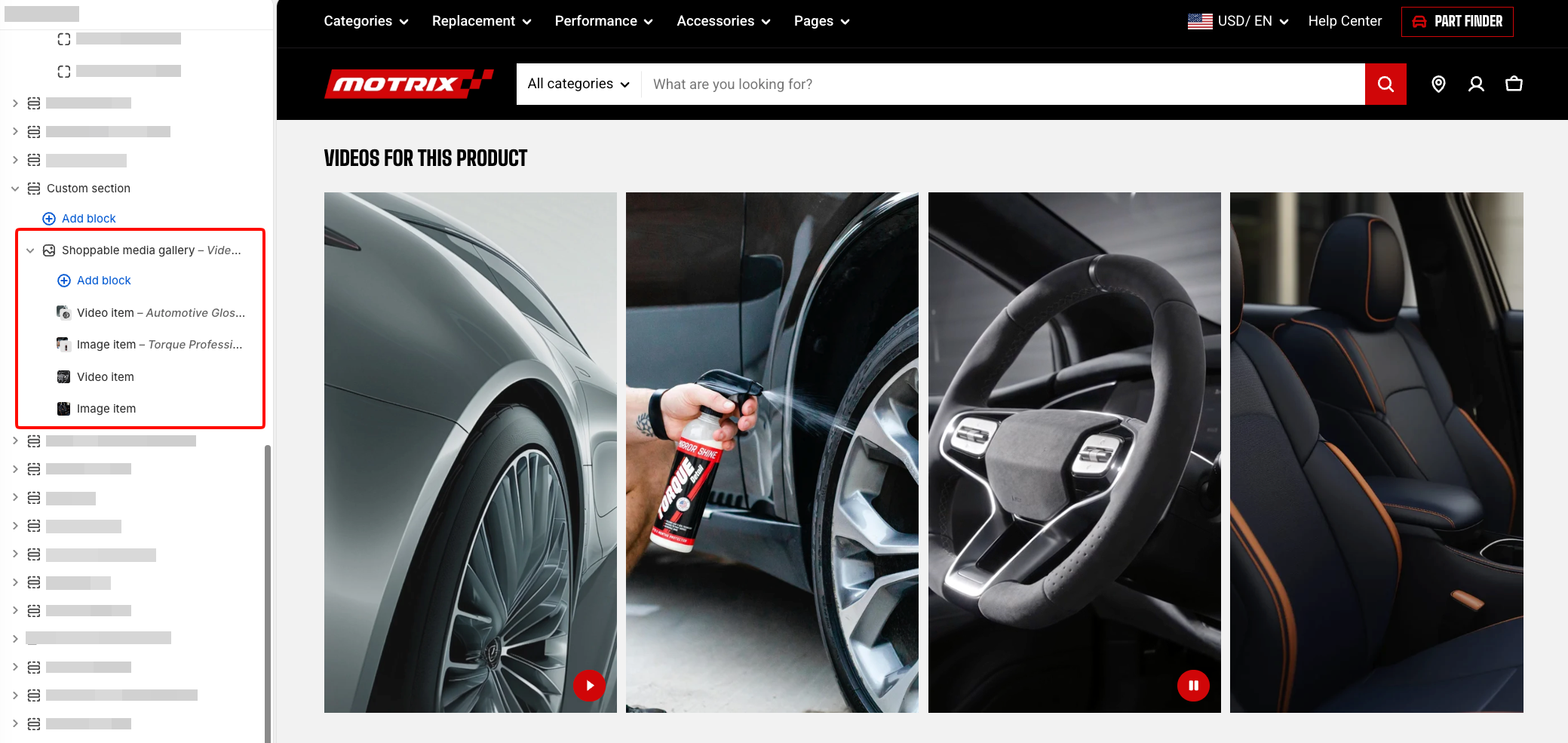
It uses two repeatable item blocks:
* **Image item** — Displays a shoppable image that can be connected to a product.
* **Video item** — Displays a shoppable video that can be connected to a product.
You can add, remove, and reorder these items to control which media appears in the gallery and the order in which it is shown.
#### Shoppable media gallery - Layout
| Setting | Description | Options |
| ------------------ | ---------------------------------------------------------------------------- | ---------------------------------------------- |
| **Heading** | Sets the heading displayed above the gallery. | Enter custom text or connect a dynamic source. |
| **Heading preset** | Controls the heading style. | Select an available heading preset. |
| **Columns** | Controls the number of media items displayed across a row on larger screens. | **2–6 columns.** |
| **Horizontal gap** | Controls the horizontal space between media items. | **0–100px**. |
#### Shoppable media gallery - Mobile layout
Controls how gallery items are displayed on mobile devices.
| Setting | Description | Options |
| -------------------------- | -------------------------------------------------------------------------- | ----------------------------------------------------------------------------------------------------- |
| **Enable swipe on mobile** | Lets customers swipe horizontally through gallery items on mobile. | **On** or **Off**. |
| **Custom column width** | Lets you set a custom width for each item in the mobile swipe layout. | **On** or **Off**.
*Available when* ***Enable swipe on mobile*** *is turned on*. |
| **Custom width** | Controls the width of each gallery item in the mobile swipe layout. | **20–90%.**
*Available when* ***Custom column width*** *is turned on*. |
| **Mobile columns** | Controls how many gallery items are displayed across the screen on mobile. | **1 column** or **2 columns**.
*Available when* ***Custom column width*** *is turned off*. |
| **Horizontal gap** | Controls the horizontal space between gallery items on mobile. | **0–100px.** |
| **Vertical gap** | Controls the vertical space between rows on mobile. | **0–100px.** |
#### Shoppable media gallery - Media
| Setting | Description | Options |
| ----------------------- | ---------------------------------------------------------------------- | ------------------------------------------------------------------------------------------------------------------------------------------------------- |
| **Aspect ratio** | Controls the shape of the gallery media. | **Auto:** Uses the image's original proportions.
**Square (1/1), Portrait (4/5), Portrait (9/16), Portrait (3/4),** or **Landscape (16/9)**. |
| **Play video on hover** | Plays Video items when customers hover over them on supported devices. | **On** or **Off**. |
#### Shoppable media gallery - Appearance
| Setting | Description | Options |
| ----------------- | ------------------------------------------------------ | --------------------------------- |
| **Color scheme** | Applies a theme color scheme to the gallery. | Select an available color scheme. |
| **Corner radius** | Controls how rounded the gallery media corners appear. | **0–32px.** |
#### Shoppable media gallery - Animation
| Setting | Description | Options |
| -------------- | ------------------------------------------------------- | -------------------------------------------------------------------------------- |
| **Type** | Controls the entrance animation applied to the gallery. | **None, Fade in, Fade up, Fade down, Slide in (left),** or **Slide in (right)**. |
| **Delay (ms)** | Delays the start of the gallery animation. | **0–2000ms.**
*Available when* ***Type*** *is not set to* ***None***. |
#### Shoppable media gallery - Padding
| Setting | Description | Options |
| ----------- | ------------------------------------------------------------- | -------------------------- |
| **Devices** | Selects which device-specific padding values you are editing. | **Desktop** or **Mobile**. |
| **Top** | Controls the space above the gallery content. | **0–100px.** |
| **Bottom** | Controls the space below the gallery content. | **0–100px.** |
#### Image item
An **Image item** displays a shoppable image and can be connected to a product.
| Setting | Description | Options |
| ------------------------ | --------------------------------------------------------------------------------------------- | ------------------------------------------------------ |
| **Product** | Selects the product associated with the item. | Select a product |
| **Show sale badge** | Displays a sale badge for the associated product when applicable. | **On** or **Off**. |
| **Image** | Selects the image displayed for the item. | Select an image. |
| **Image mobile** | Selects a separate image for mobile devices. | Select an image, or leave blank to use the main image. |
| **Enable preload image** | Loads the image earlier when the gallery is visible on initial page load to help improve LCP. | **On** or **Off**. |
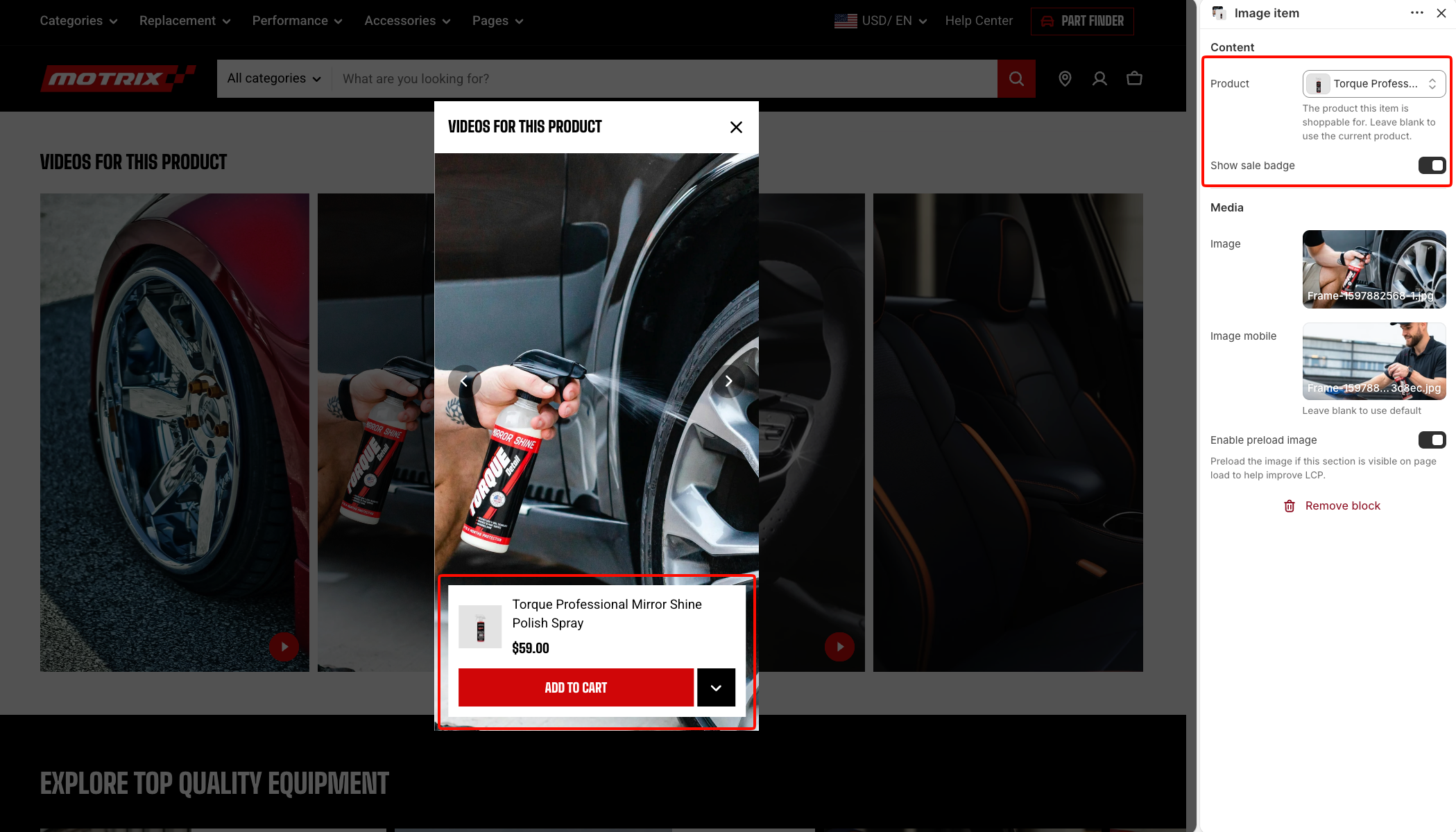
Use **Enable preload image** only when the Shoppable media gallery is visible when the page first loads. Avoid enabling it when the gallery appears farther down the page.
#### Video item
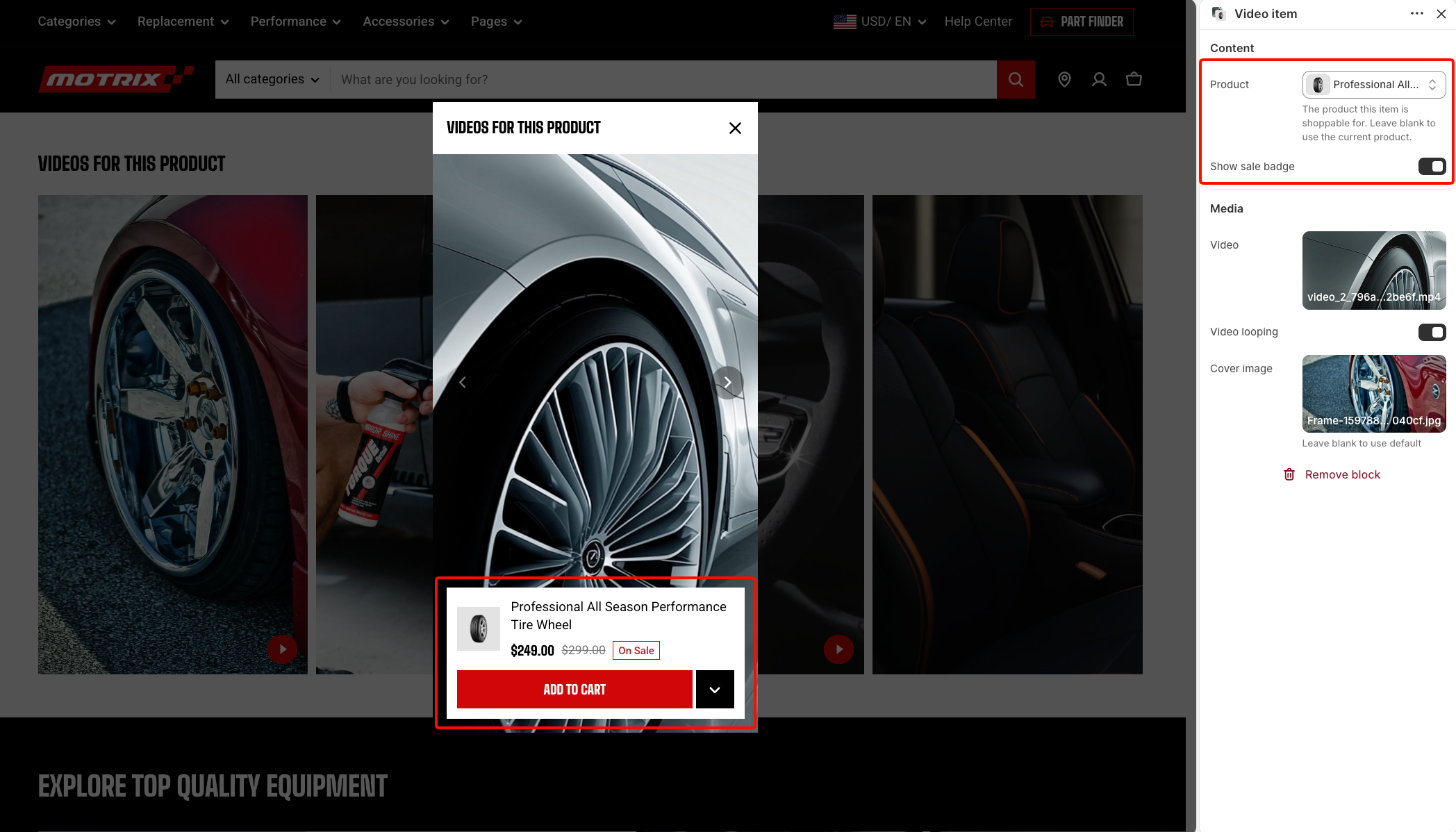
A **Video item** displays a shoppable video and can be connected to a product.
| Setting | Description | Options |
| ------------------- | ----------------------------------------------------------------- | --------------------------------------------------- |
| **Product** | Selects the product associated with the item. | Select a product |
| **Show sale badge** | Displays a sale badge for the associated product when applicable. | **On** or **Off**. |
| **Video** | Selects the video displayed for the item. | Select a video. |
| **Video looping** | Restarts the video automatically after it finishes. | **On** or **Off**. |
| **Cover image** | Selects the image displayed before the video plays. | Select an image, or leave blank to use the default. |
### Discount code
The **Discount code** block displays promotional content together with a discount code customers can copy.
Use it for campaign offers, seasonal promotions, subscriber discounts, or other codes you want to make easy for customers to use.

#### Discount code - Layout
| Setting | Description | Options |
| ----------------------- | -------------------------------------------------- | ------------------------------------------------------------------------------------------ |
| **Width** | Controls the width of the block on larger screens. | **Fit, Fill,** or **Custom**. |
| **Custom width** | Sets a custom width for the block. | Set a custom percentage.
*Available when* ***Width*** *is set to* ***Custom***. |
| **Width mobile** | Controls the width of the block on mobile devices. | **Fit, Fill,** or **Custom**. |
| **Custom width mobile** | Sets a custom block width on mobile devices. | Set a custom percentage.
*Available when* ***Width*** *is set to* ***Custom***. |
#### Discount code - Content
| Setting | Description | Options |
| -------------------- | ------------------------------------------------------------ | -------------------------------------------------------------------------------------------------------------------------------------------------------------------------------------------------------------- |
| **Heading** | Sets the promotional heading. | Enter custom text or connect a dynamic source. |
| **Preset** | Controls the heading style. | **Heading 1–6,** or **Custom**. |
| **Font** | Selects the theme font used for the heading. | **Body** or **Heading**.
*Available when* ***Preset*** *is set to* ***Custom***. |
| **Font weight** | Controls the thickness of the heading text. | **Inherit, Light, Regular, Medium, Semi bold, Bold, Extra bold,** or **Black**.
*Available when* ***Preset*** *is set to* ***Custom***. |
| **Font size** | Controls the heading size on larger screens. | **10–100px.**
*Available when* ***Preset*** *is set to* ***Custom***. |
| **Font size mobile** | Controls the heading size on mobile devices. | **10–60px.**
*Available when* ***Preset*** *is set to* ***Custom***. |
| **Line height** | Controls the vertical spacing between lines of heading text. | **Tight, Normal,** or **Loose**.
*Available when* ***Preset*** *is set to* ***Custom***. |
| **Text transform** | Controls the capitalization of the heading. | **Inherit:** Follows the theme setting.
**As typed:** Keeps the original casing.
**Title Case, UPPER CASE, or lower case**.
*Available when **Preset** is set to **Custom**.* |
| **Icon** | Selects the icon displayed with the heading. | Select an available icon. |
| **Text** | Adds supporting promotional content. | Enter custom text or connect a dynamic source. |
| **Discount code** | Sets the discount code displayed for customers to copy. | Enter custom text or connect a dynamic source. |
| Setting | Description | Options |
| ----------------- | --------------------------------------------------------------- | -------------------------------------------------- |
| **Color scheme** | Applies a theme color scheme to the block. | Select an available color scheme. |
| **Color** | Sets a custom accent color. | Select a color, or leave blank to use the default. |
| **Code text** | Controls the light or dark treatment of the discount code text. | **Auto, Light,** or **Dark**. |
| **Corner radius** | Controls how rounded the block corners appear. | **0–32px.** |
#### Discount code - Animation
| Setting | Description | Options |
| -------------- | ----------------------------------------------------- | -------------------------------------------------------------------------------- |
| **Type** | Controls the entrance animation applied to the block. | **None, Fade in, Fade up, Fade down, Slide in (left),** or **Slide in (right)**. |
| **Delay (ms)** | Delays the start of the gallery animation. | **0–2000ms.**
*Available when* ***Type*** *is not set to* ***None***. |
#### Discount code - Padding
| Setting | Description | Options |
| ----------- | ------------------------------------------------------------- | -------------------------- |
| **Devices** | Selects which device-specific padding values you are editing. | **Desktop** or **Mobile**. |
| **Top** | Controls the space above the gallery content. | **0–100px.** |
| **Bottom** | Controls the space below the gallery content. | **0–100px.** |
## FAQs
**Why don't I see the Left and Right padding settings?** Left and Right padding are available when Container is set to Full. When Container is set to Fixed, these settings appear when Use color scheme in container is turned on.
**How can I make a Horizontal layout stack vertically on mobile?** Set Direction to Horizontal, then turn on Vertical on mobile. The blocks remain arranged horizontally on larger screens and stack vertically on mobile devices.
**Does the Discount code block create or apply a Shopify discount?** No. The Discount code block only displays a code that customers can copy. Create a matching discount in **Shopify admin > Discounts** so the code works when customers apply it at checkout.
 ### Mobile layout
Controls the spacing between blocks on mobile devices.
### Mobile layout
Controls the spacing between blocks on mobile devices.