# Text
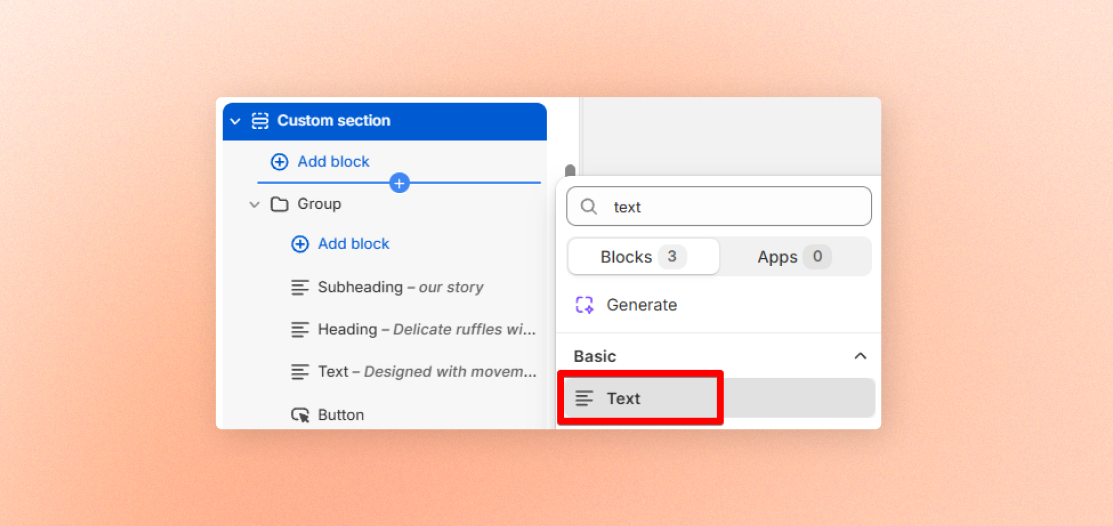
Add a rich text block for paragraphs, headings, taglines, or other formatted copy. Choose a preset for consistent styling, or customize the typeface, size, color, and alignment.
## Content
| Setting | Description | Options |
| -------------------------------- | --------------------------------------------------------------- | ---------- |
| **Text** | Add your text with formatting such as bold, links, and lists. | Enter text |
| **Disable line break on mobile** | Keep manual line breaks from creating separate lines on mobile. | On / Off |
## Typography
| Setting | Description | Options |
| -------------------- | ------------------------------------------------------------- | --------------------------------------------------------- |
| **Preset** | Choose a ready-made text style or create your own. | Default / Paragraph / Subheading / Heading 1–6 / Custom |
| **Font** | Choose the typeface when using a custom text style. | Body / Heading |
| **Font weight** | Set how bold the text appears when using a custom text style. | Select available font weights |
| **Font size** | Set the text size on desktop when using a custom text style. | 10px - 100px |
| **Font size mobile** | Set the text size on mobile when using a custom text style. | 10px - 100px |
| **Line height** | Set the spacing between lines when using a custom text style. | Tight / Normal / Loose |
| **Text transform** | Set the letter casing when using a custom text style. | Inherit / As typed / Title Case / UPPER CASE / lower case |
| **Color** | Choose the text color. | Text / Subtext / Gradient / Custom |
| **Gradient color** | Set the gradient when Color is set to Gradient. | Choose color |
| **Custom** | Choose an exact text color when Color is set to Custom. | Choose color |
## Layout
| Setting | Description | Options |
| -------------------- | -------------------------------------------------------------- | --------------------- |
| **Width** | Set how much space the text block uses. | Fit / Fill |
| **Alignment** | Align the text when Width is set to **Fill**. | Left / Center / Right |
| **Width mobile** | Set how much space the text block uses on mobile. | Fit / Fill |
| **Alignment mobile** | Align the text on mobile when Width mobile is set to **Fill**. | Left / Center / Right |
## Padding
| Setting | Description | Options |
| ---------------- | --------------------------------------------- | ----------- |
| **Top** | Add space above the text. | 0px - 100px |
| **Bottom** | Add space below the text. | 0px - 100px |
| **Left** | Add space to the left of the text. | 0px - 100px |
| **Right** | Add space to the right of the text. | 0px - 100px |
| **Mobile scale** | Scale down all four padding values on mobile. | 0px - 100px |
## Animation
This group appears only when you enable animations in your theme settings.
| Setting | Description | Options |
| -------------- | --------------------------------------------------- | ------------------------------------------------------------- |
| **Type** | Choose how the text enters when it comes into view. | None / Fade in / Fade up / Slide in (left) / Slide in (right) |
| **Delay (ms)** | Set how long to wait before the animation starts. | 0ms - 2000ms |
k work
k work
## Tips
* Use a preset for consistent styling across your store.
* Switch to Custom when you need a specific font, size, weight, or line height.
* Set Width to Fill to use left, center, or right alignment.
* Keep Disable line break on mobile turned off when manual line breaks are important to your layout.