# Specification card
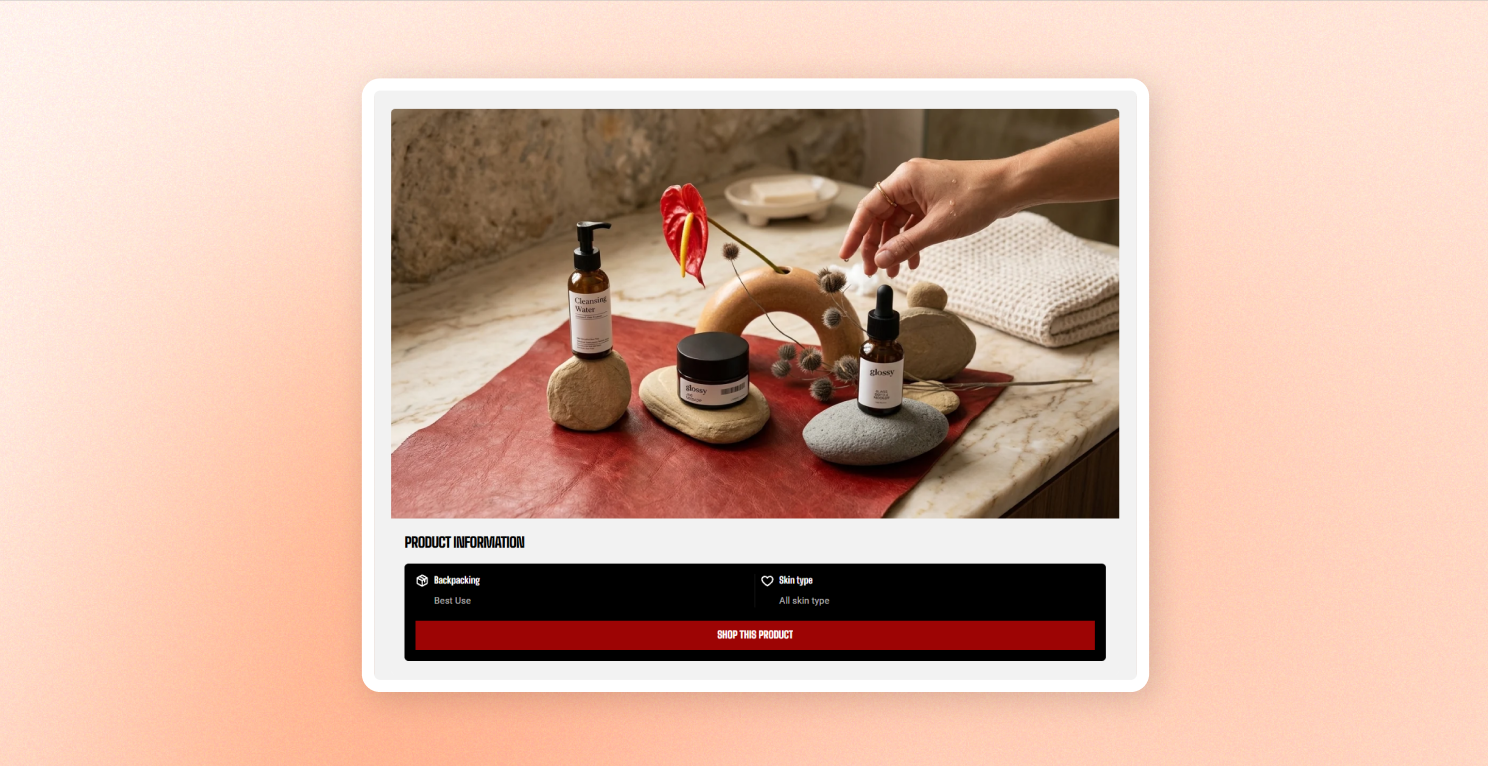
Highlight one product with an image, title, specification rows, and a full-width button.
Add this block to any section that accepts blocks, such as a **Custom section**, **Group**, or **Grid**. On a product page, leave **Product** empty to automatically use the product customers are viewing.
## General settings
### Content
| Settings | Description | Option |
| ------------- | :---------------------------------------------------------------------------------------------------------------------------------------------------------------------- | :------------- |
| **Product** | Select the product to feature.
Leave empty on a product page to use the product that customers are viewing. | Select product |
| **Title** | Sets the card heading.
Leave empty to use the product's title. | Enter Text |
| **Link text** | Sets the button text.
Clear it to hide the button. | Enter Text |
| **Link** | Sets where the card and button are linked.
Leave empty to link to the product page. Without a product or link, the card isn't clickable and the button is hidden. | Set link |
### Media
| Settings | Description | Option |
| ---------------- | --------------------------------------------------------------------------- | :------------------------------------------------------------------------------------------------------------------------------------------------------------------------------------------- |
| **Image** | Sets the card image.
Leave empty to use the product's featured image. | Select image |
| **Aspect ratio** | Controls the image shape. | **Use global settings** follows the product card settings in your theme.
**Auto** keeps the image's original proportions.
**Square/Potrait/Landscape** to cut image to your needs |
If your theme's product card displays a second image on hover, this card also uses it when the image comes from the selected product. It doesn't apply when you upload or select a custom image.
### Typography
Controls the card title.
| Settings | Description | Options |
| ------------------ | ------------------------------------------------------------------------------------- | :-------------------------------------------------------- |
| **Preset** | Applies a predefined heading style or choose **Custom** to adjust the title yourself. | Heading styles/Custom |
| **Font** | Appears when **Preset \= Custom**. Sets the title font and weight. | Body/Heading |
| **Font size** | Appears when **Preset \= Custom**. Sets the title size on desktop and mobile. | 10px - 100px |
| **Line height** | Appears when **Preset \= Custom**. Controls the spacing between title lines. | 10px - 100px |
| **Text transform** | Appears when **Preset \= Custom**. | Inherit, As typed, Title Case, UPPER CASE, or lower case. |
### Specification box
Controls the panel containing the specification rows and button.
| Settings | Description | Option |
| ------------------------ | ------------------------------------------------------------------------------------------------------------------------------------------------------- | :------------------ |
| **Inherit color scheme** | Uses the card's color scheme so the panel blends into the card without a separate box. | On/Off |
| **Color scheme** | Appears when **Inherit color scheme is off**.
Sets a separate background for the panel. Use the same scheme as the card to make the box blend in. | Select color scheme |
| **Corner radius** | Rounds the panel's corners. | 0px - 32px |
### Appearance
| Settings | Description | |
| ------------------------ | :-------------------------------------------------------------------------------------------------------------------- | :------------------ |
| **Color scheme** | Sets the colors for the entire card. | Select color scheme |
| **Corner radius** | Rounds the card and image corners. | 0px - 32px |
| **Enable preload image** | Loads the image earlier when the card is visible as the page opens.
Turn on for cards near the top of the page. | On/Off |
## Blocks - Spec item
Add **Spec item** blocks to build the specification list.
* **Spec item** — Displays one specification with an icon or custom image, a value, and a label.
* Add as many **Spec item** blocks as needed.
* Use **1–2 items** to display them side by side in two columns.
* With **3 or more items**, the specifications become a swipeable strip that shows two items at a time.
### Icon
| Setting | Description | Option |
| ---------------- | ------------------------------------------------- | -------------------------------------------------- |
| **Icon** | Choose an icon to display with the content. | Choose from the built-in selection |
| **Image icon** | Upload a custom image to use instead of the icon. | Select image |
| **Icon size** | Set the icon size. | From **Extra small to Extra Large**, or **Custom** |
| **Width** | Set the icon width. | 12px - 200px |
| **Width mobile** | Set the icon width on phones. | 12px - 200px |
### Content
| Setting | Description | Option |
| --------------- | -------------------------------------- | ---------- |
| **Heading** | Add the main heading for the content. | Enter Text |
| **Description** | Add supporting text below the heading. | Enter Text |
### Typography
| Settings | Description | Options |
| ------------------ | ------------------------------------------------------------------------------------- | :----------------------------------------------------------- |
| **Preset** | Applies a predefined heading style or choose **Custom** to adjust the title yourself. | Heading styles/Custom |
| **Font** | Appears when **Preset \= Custom**. Sets the title font and weight. | Body/Heading |
| **Font weight** | Set how bold the text appears. | Inherit/Light/Regular/Medium/Semi bold/Bold/Extra bold/Black |
| **Font size** | Appears when **Preset \= Custom**. Sets the title size on desktop and mobile. | 10px - 100px |
| **Line height** | Appears when **Preset \= Custom**. Controls the spacing between title lines. | Tight/Normal/Loose |
| **Text transform** | Appears when **Preset \= Custom**. | Inherit, As typed, Title Case, UPPER CASE, or lower case. |