# Product finder
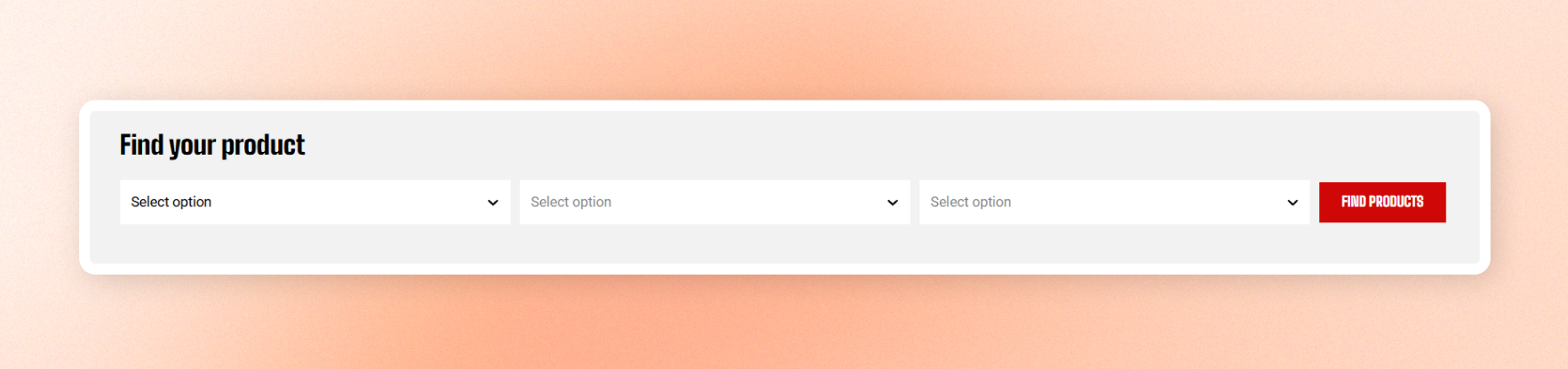
Help customers find the right product with step-by-step dropdowns, such as **Make → Model → Year**. The finder uses filters from a selected collection, then sends customers to that collection with matching products.
Add as many dropdown fields as needed, along with a heading and submit button.
## Before you start
Set up the filters in **Online Store >** [**Search & Discovery**](https://apps.shopify.com/search-and-discovery) app first.
Learn more: [Adding filters with Shopify Search & Discovery](https://help.shopify.com/en/manual/online-store/storefront-search/search-and-discovery-filters)
The Product finder pulls its dropdown options from these filters, so make sure the filters are created and configured before setting up the finder.
## Product finder - block settings
### General
| Setting | Description | Options |
| -------------------------------- | ------------------------------------------------------------------------------------------------------------------------------------------------- | ------------------- |
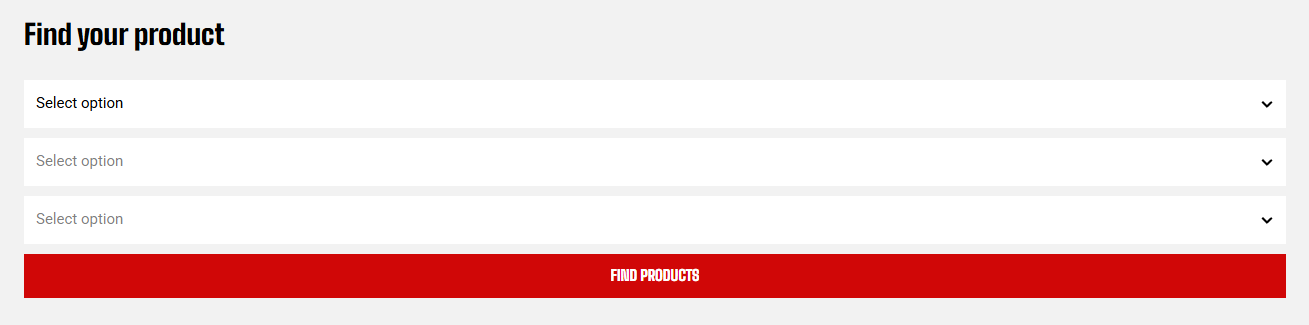
| **Layout** | Arranges the fields **Horizontal** (side by side) or **Vertical** (stacked). | Horizontal/Vertical |
| **Collection** | Selects the collection whose filters populate the dropdowns and where customers land after submitting. Leave empty to search across all products. | Select Collection |
| **Use as collapsible on mobile** | Collapses the finder behind a tap-to-open control on phones to save space. | On/Off |

### Appearance
| Settings | Description | Options |
| -------------------------- | ------------------------------------------------------------------------------------------------ | ---------------- |
| **Inherit color scheme** | Uses the colors of the section containing the finder. Turn off to apply a separate color scheme. | On/Off |
| **Color scheme** | Sets the finder's colors when **Inherit color scheme** is off. | |
| **Border** | Adds a solid outline around the finder, or removes it with None. | None/Solid |
| **Border color** | Sets the outline color when **Border** is set to **Solid**. | Select color |
| **Border width** | Sets the outline thickness when Border is set to **Solid**. | From 0px to 10px |
| **Border opacity** | Controls how visible the outline is when Border is set to **Solid**. | From 0% to 100% |
| **Corner radius** | Rounds the finder's corners. | From 0px to 32px |
| **Hide border on desktop** | Removes the outline on larger screens when **Border** is set to **Solid**. | On/Off |
| **Hide border on mobile** | Removes the outline on phones when **Border** is set to **Solid**. | On/Off |
### Size
| Settings | Description | Options |
| ---------------- | ---------------------------------- | ----------------- |
| **Width** | Controls the block width | Fit, Fill, Custom |
| **Width mobile** | Controls the block width on phones | Fit, Fill, Custom |
| **Custom width** | Sets the width as a percentage. | 0% - 100% |
### Padding
Add space around the outside of the finder.
Choose **Devices** (**Desktop** or **Mobile**), then set the **Top**, **Bottom**, **Left**, and **Right** padding for that device.
| Setting | Description | Options |
| ----------- | ----------------------------------------- | ---------------- |
| **Devices** | Choose which screen size to edit. | Desktop / Mobile |
| **Top** | Set the space above the finder. | 0px - 100px |
| **Bottom** | Set the space below the finder. | 0px - 100px |
| **Left** | Set the space on the left of the finder. | 0px - 100px |
| **Right** | Set the space on the right of the finder. | 0px - 100px |
### Content padding
Add space inside the finder, around the dropdown fields.
Choose **Devices** (**Desktop** or **Mobile**), then set the **Top** and **Bottom** padding for that device.
| Setting | Description | Options |
| ----------- | --------------------------------- | ---------------- |
| **Devices** | Choose which screen size to edit. | Desktop / Mobile |
| **Top** | Set the space above the content. | 0px - 100px |
| **Bottom** | Set the space below the content. | 0px - 100px |
## Product finder field - items
Add one dropdown for each step of the product search. Customers complete the fields in order, with each selection narrowing the available options in the next dropdown.
| Setting | Description | Option |
| --------------- | ----------------------------------------------------------------------------------------------------------------------------------------- | :--------- |
| **Label** | Sets the placeholder text shown before customers make a selection, such as Select option | Enter Text |
| **Filter name** | Connects the dropdown to a collection filter. Enter the filter name exactly as it appears on the collection page, such as Color or Brand. | Enter Text |
Learn more: [Adding filters with Shopify Search & Discovery](https://help.shopify.com/en/manual/online-store/storefront-search/search-and-discovery-filters)

## Product finder heading - the title
Add a title to the finder and optionally display an icon beside it.

### Content
| Settings | Description | Options |
| -------------------- | ------------------------------------------------------------------------------------------------ | ------------------------------------------------------------------ |
| **Heading** | Sets the title text displayed above the finder fields. | Enter Text |
| **Preset** | Applies a predefined text style | **Default**, **Paragraph**, **Heading 1–6**, or **Custom** |
| **Font** | Appears when **Preset \= Custom**. Sets the font used for the title. | Body/Heading |
| **Font weight** | Appears when **Preset \= Custom**. Controls how bold the title appears. | Inheri, Light, Regular, Medium, Semi bold, Bold, Extra bold, Black |
| **Font size** | Appears when **Preset \= Custom**. Sets the title size on desktop. | From 10px to 100px |
| **Font size mobile** | Appears when **Preset \= Custom**. Sets the title size on phones. | From 10px to 60px |
| **Line height** | Appears when **Preset \= Custom**. Controls the spacing between lines | **Tight**, **Normal**, or **Loose** |
| **Color** | Appears when **Preset \= Custom**. Sets the title color to **Text**, **Subtext**, or **Custom**. | **Text**, **Subtext**, or **Custom** |
| **Custom** | Appears when **Preset \= Custom** and **Color \= Custom**. Sets a custom title color. | Select color |
| **Text alignment** | Aligns the title to the **Left** or **Center**. | Left/Center |
### Icon
| Setting | Description | Options |
| ------------------------ | ---------------------------------------------------------------------------------------------- | -------------------------------------------------- |
| **Show icon on desktop** | Displays the selected icon beside the title on desktop. | On/Off |
| **Show icon on mobile** | Displays the selected icon beside the title on phones. | On/Off |
| **Icon** | Selects a built-in icon, such as a car, truck, tag, or funnel... Choose none to hide the icon. | Select from the built-in selection |
| **Image icon** | Uploads a custom image to use instead of a built-in icon. | Select image |
| **Color** | Sets the icon color. | Select color |
| **Icon size** | Sets the icon size | From Extra small to Extra large, or choose Custom. |
| **Width** | Appears when Icon size \= **Custom**. Sets the icon width on desktop. | 12px - 200px |
| **Width mobile** | Appears when Icon size \= **Custom**. Sets the icon width on phones. | 12px - 200px |
### Padding
Adds space above and below the heading. Set the value separately for **Desktop** and **Mobile**.
| Setting | Description | Options |
| ----------- | ------------------------------------------ | ---------------- |
| **Devices** | Choose which screen size to edit. | Desktop / Mobile |
| **Top** | Set the space above the content. | 0px - 100px |
| **Bottom** | Set the space below the content. | 0px - 100px |
| **Left** | Set the space on the left of the content. | 0px - 100px |
| **Right** | Set the space on the right of the content. | 0px - 100px |
## Product finder button - the submit button
Add a button that submits the selected filters and takes customers to matching products.

### Content
| Setting | Description | Option |
| ----------------- | -------------------------------------------------------------------------------------------------------- | -------------------------------------- |
| **Label** | Sets the button text. | |
| **Style** | Sets the button style | Primary, Secondary, Outline, or Plain. |
| **Size** | Sets the button size | From Extra small to Large. |
| **Icon** | Adds an optional icon to the button from built-in options. Choose None if you don't want to show an icon | Select from the built-in selection |
| **Trailing icon** | Appears when an Icon is selected. Places the icon after the label instead of before it. | On/Off |
### Margin
Adds space above and below the button. Set the value separately for **Desktop** and **Mobile**.