# Article card
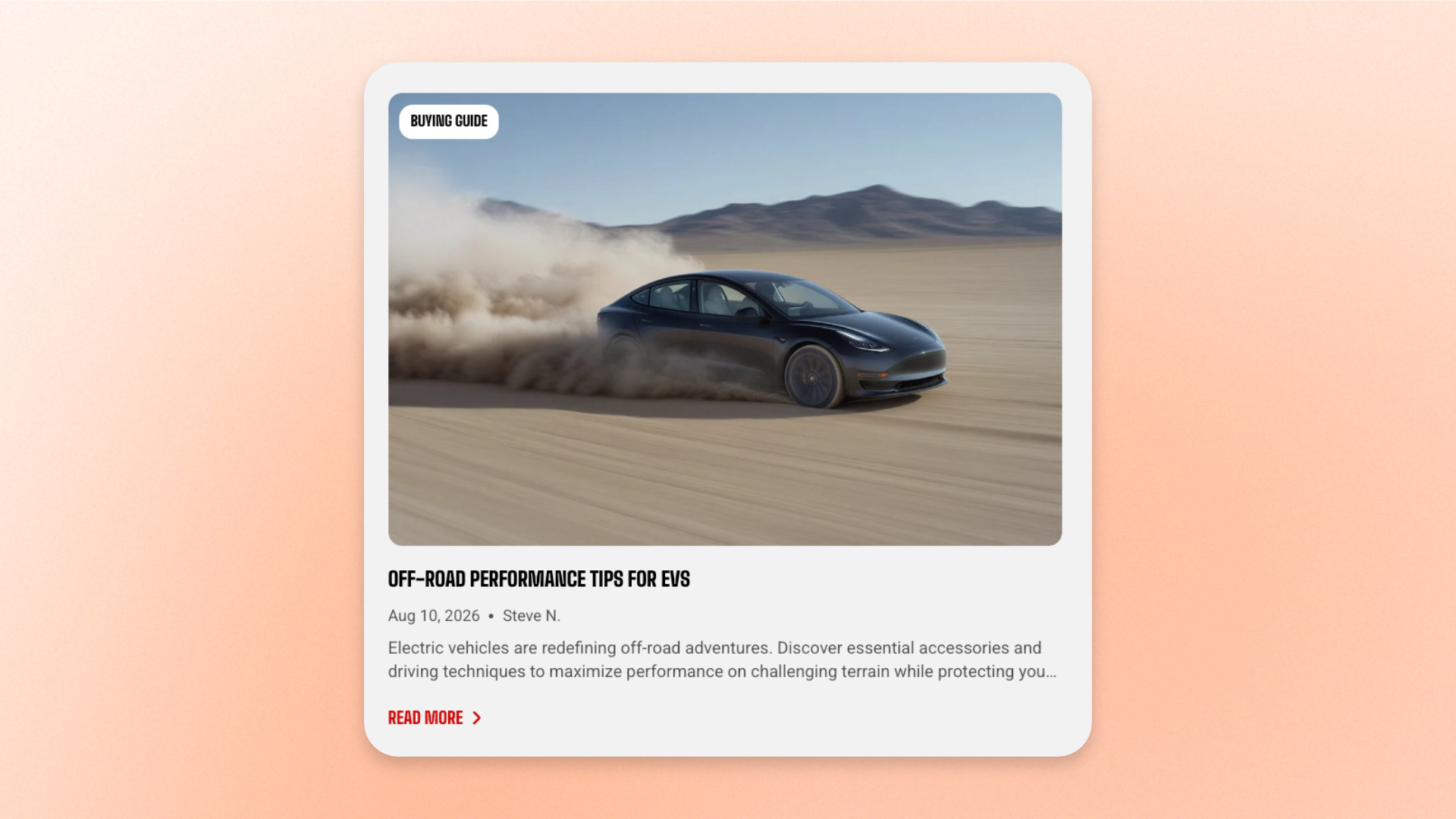
The **Article card** block displays a single blog article as a card using its featured image and content such as the tag, title, publication details, excerpt, and a button linking to the full post. Use it to highlight featured stories, latest articles, buying guides, tutorials, brand stories, and other editorial content on homepages, landing pages, or custom blog layouts.
Choose the article you want to feature, then customize the card layout, image ratio, content, and supporting items. You can also place multiple Article cards together to create a custom editorial or blog layout.
## Settings
### General
| Setting | Description | Options |
| ----------- | ------------------------------------------------ | ------------------------------------------------------------------------------------------------------------------ |
| **Article** | Selects the blog article displayed in the card. | Select an article. |
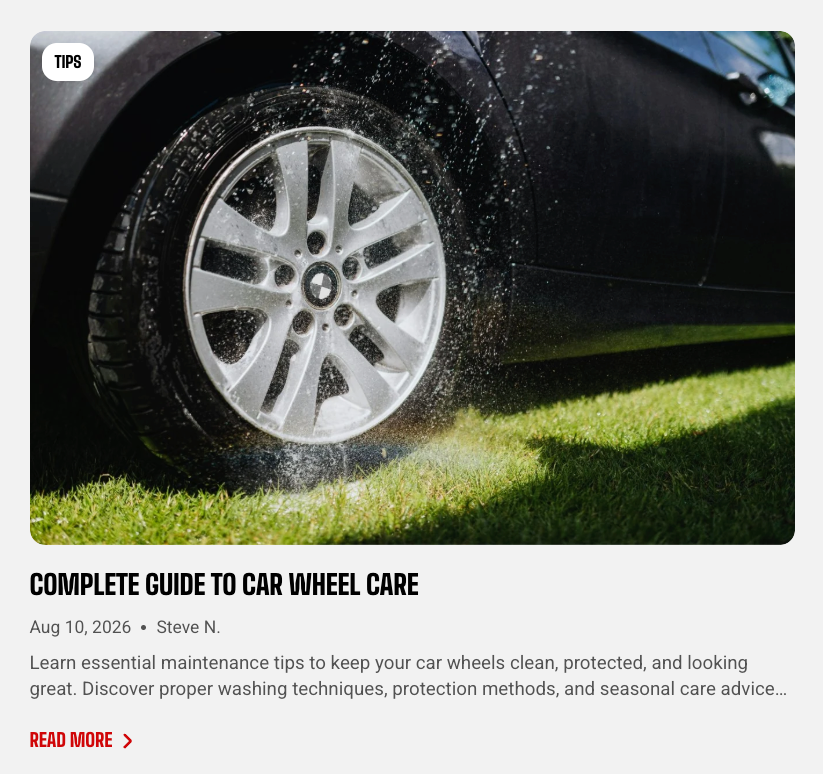
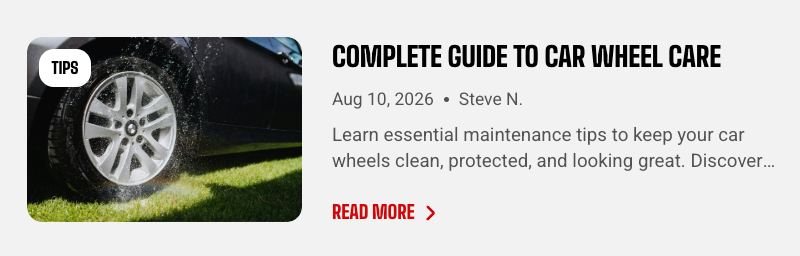
| **Type** | Controls the overall layout of the Article card. | **Vertical:** Places the image above the content.
**Horizontal:** Places the image beside the content. |
### Size
| Setting | Description | Options |
| ----------------------- | ---------------------------------------------------------- | --------------------------------------------------------------------------------------------------------------------------------------------------- |
| **Aspect ratio** | Controls the shape of the article image on desktop. | **Auto:** Uses the image’s original proportions.
**Square (1/1), Portrait (4/5), Portrait (3/4), Landscape (16/9), or Landscape (4/3)** |
| **Aspect ratio mobile** | Controls the shape of the article image on mobile devices. | **Auto, Square (1/1), Portrait (4/5), Portrait (3/4), Landscape (16/9), or Landscape (4/3)** |
### Card settings
| Setting | Description | Options |
| ------------------------- | ------------------------------------------------------------------- | ---------------------- |
| **Alignment** | Controls the alignment of the card content. | **Left** or **Center** |
| **Enable video lightbox** | Controls whether supported article video media opens in a lightbox. | **On** or **Off** |
## Article card — items
The Article card automatically includes the built-in static **Tag**, **Title**, and **Meta** child blocks, so you don’t need to add them manually. These are part of the card structure and can be configured individually.
You can also add supported dynamic child blocks, such as **Excerpt** and **Button**, when you want to display additional post content or a clearer call to action.
### Tag
Displays the selected article’s tag.
| Setting | Description | Options |
| ---------------- | --------------------------------------------------------------------------- | ---------------------------------------------------------------------------------------------------------------------------------------------------- |
| **Placement** | Controls where the article tag appears. | **On media:** Displays the tag over the article image.
**In content area:** Displays the tag with the article content. |
| **Top** | Controls the space above the tag. | **0–100px**
*Available when **Placement** is set to **In content area**.* |
| **Bottom** | Controls the space below the tag. | **0–100px**
*Available when **Placement** is set to **In content area**.* |
| **Mobile scale** | Scales the top and bottom margins on mobile relative to the desktop values. | **20–100%:** Select the percentage of the desktop margin to keep on mobile.
*Available when **Placement** is set to **In content area**.* |
### Title
Displays the selected article’s title.
| Setting | Description | Options |
| ------------------- | ------------------------------------------------------------------------------------ | ----------------------------------------------------------- |
| **Preset** | Controls the typography used for the article title. | **Heading 1–6** |
| **Text line limit** | Controls how many lines of the title are shown before the remaining text is cut off. | **No limit, 1 line, 2 lines, 3 lines, 4 lines, or 5 lines** |
### Meta
Displays publication information from the selected article.
| Setting | Description | Options |
| --------------- | ----------------------------------------------------------- | ----------------- |
| **Show date** | Controls whether the article publication date is displayed. | **On** or **Off** |
| **Show author** | Controls whether the article author is displayed. | **On** or **Off** |
### Nested blocks
Add optional nested blocks inside the Article card when you want to include more information or a call to action.
#### Excerpt
Add an **Excerpt** block to show a short preview of the article content.
| Setting | Description | Options |
| ------------------- | ------------------------------------------------------------------------------------------- | ----------------------------------------------------------- |
| **Text line limit** | Controls how many lines of excerpt text are displayed before the remaining text is cut off. | **No limit, 1 line, 2 lines, 3 lines, 4 lines, or 5 lines** |
#### Button
Add a **Button** block to give shoppers a clear way to open the full article. The destination is linked to the selected article automatically.
| Setting | Description | Options |
| ----------------- | ------------------------------------------------------------ | ------------------------------------------------------------------------------------------------------------------ |
| **Style** | Controls the visual style of the button. | **Primary, Secondary, White, Outline, or Plain** |
| **Size** | Controls the button size. | Extra small, Small, Medium, or Large |
| **Icon** | Adds an optional icon to the button. | Select an available icon or **None**. |
| **Icon size** | Controls the size of the button icon. | **Auto, Extra small, Small, Medium, Large, or Extra large**.
*Available when an **Icon** is selected.* |
| **Icon only** | Displays only the icon without the button label. | **On** or **Off**.
*Available when an **Icon** is selected.* |
| **Trailing icon** | Places the icon after the button label instead of before it. | **On** or **Off**.
*Available when an **Icon** is selected and **Icon only** is turned off.* |
| **Width** | Controls the button width on desktop. | **Fit** or **Fill**.
*Available when **Icon only** is turned off.* |
| **Width mobile** | Controls the button width on mobile devices. | **Fit** or **Fill**.
*Available when **Icon only** is turned off.* |
## Tips and best practices
* Keep the same **Type** and **Aspect ratio** when displaying multiple Article cards together so the cards align consistently.
* Use **Text line limit** for titles and excerpts to keep card heights balanced in multi-card layouts.
* Add **Excerpt** and **Button** nested blocks only when they add useful context or a clearer call to action.