
Announcement bar
Set up a flexible announcement message bar with targeting options
An announcement bar is where you can showcase a message on your site to visitors.
Using an announcement bar on your website is one of the easiest ways to draw customers' attention.
You might add an announcement bar to highlight the following information:
shipping information
new stock alerts
any promotions, such as sales or new gift cards, etc.

Steps
In the theme editor (Customize), click Add section
Locate Announcement Bar
Save.
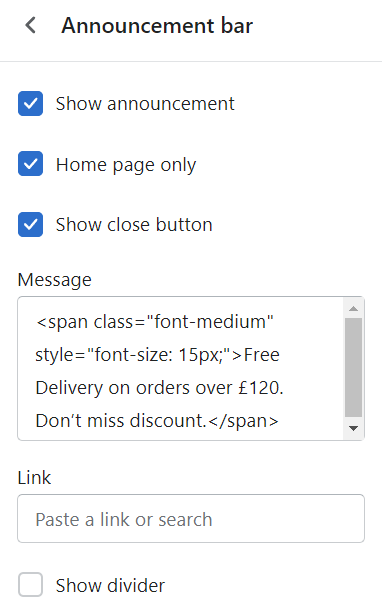
You can control how the bar displays by ticking/unticking the checkboxes.
Show announcement: Enable/disable the bar.
Home page only: Activate to display on the home page only or across all pages.
Show close button: Activate the X button on the right-hand side of the bar.
Message: Input the information needed.
Link: Direct customers to a specific page when clicking the bar.
Show divider: Differentiate the bar from the header section.
To edit all your theme's colors, go to Theme Settings> Colors. Text and background color for the announcement bar can be changed in the Announcement bar section setting > Color scheme


Last updated