# Video hero
The **Video hero** section displays a fullwidth auto-playing video (without sound) to add dynamism to your page.
## How to add a Video hero section to your Shopify store
Steps
1. In the theme editor **(Customize)**, click **Add section**
2. Locate **Hero video**
3. Make necessary changes
4. **Save.**
## How to edit a Video hero section
### Section settings
#### Video settings
* **Video**: Select a video that you've uploaded to Shopify Files or insert a YouTube or Vimeo video URL.
* **Video alt text**: Describe the video for customers using screen readers.
* **Video height:** Set the height of the video.
* **Overlay opacity**: The transparent overlay on the video makes text easier to see. It is best to keep it at 20-60% so that the video does not disappear and the text is not too hard to see.
* **Enable parallax effect**: Scroll the background and foreground layers at different speeds, creating vibrant animated scenes.
* **Parallax direction**: Vertical/ Horizontal/ Zoom.
You can use a video from an external source such as:
* Youtube
* Vimeo
* Shopify-hosted URL address
#### Content settings
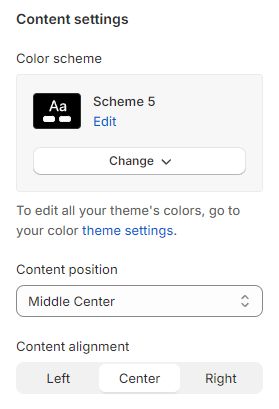
* **Content position**: Position of content in section.
* **Content alignment**: Center/Left/Right.
### Block settings
You are able to add the following to the video hero:
* Heading
* Subheading
* Text
* Button
Re-order the elements within the section if you want.