# Product page

A product page provides essential product information such as price, features, reviews, and product comparison.

<figure><img src="https://3026705042-files.gitbook.io/~/files/v0/b/gitbook-x-prod.appspot.com/o/spaces%2FAJrvmfqcj9TMoPkl3bNc%2Fuploads%2F674qJhYal7paZmbIlvei%2FHyper%20docs%20screenshot%20do%20not%20delete%20(73).jpg?alt=media&#x26;token=2cb385e4-0e05-415c-9cdb-c744fe1e2fb4" alt=""><figcaption></figcaption></figure>

{% hint style="success" %}
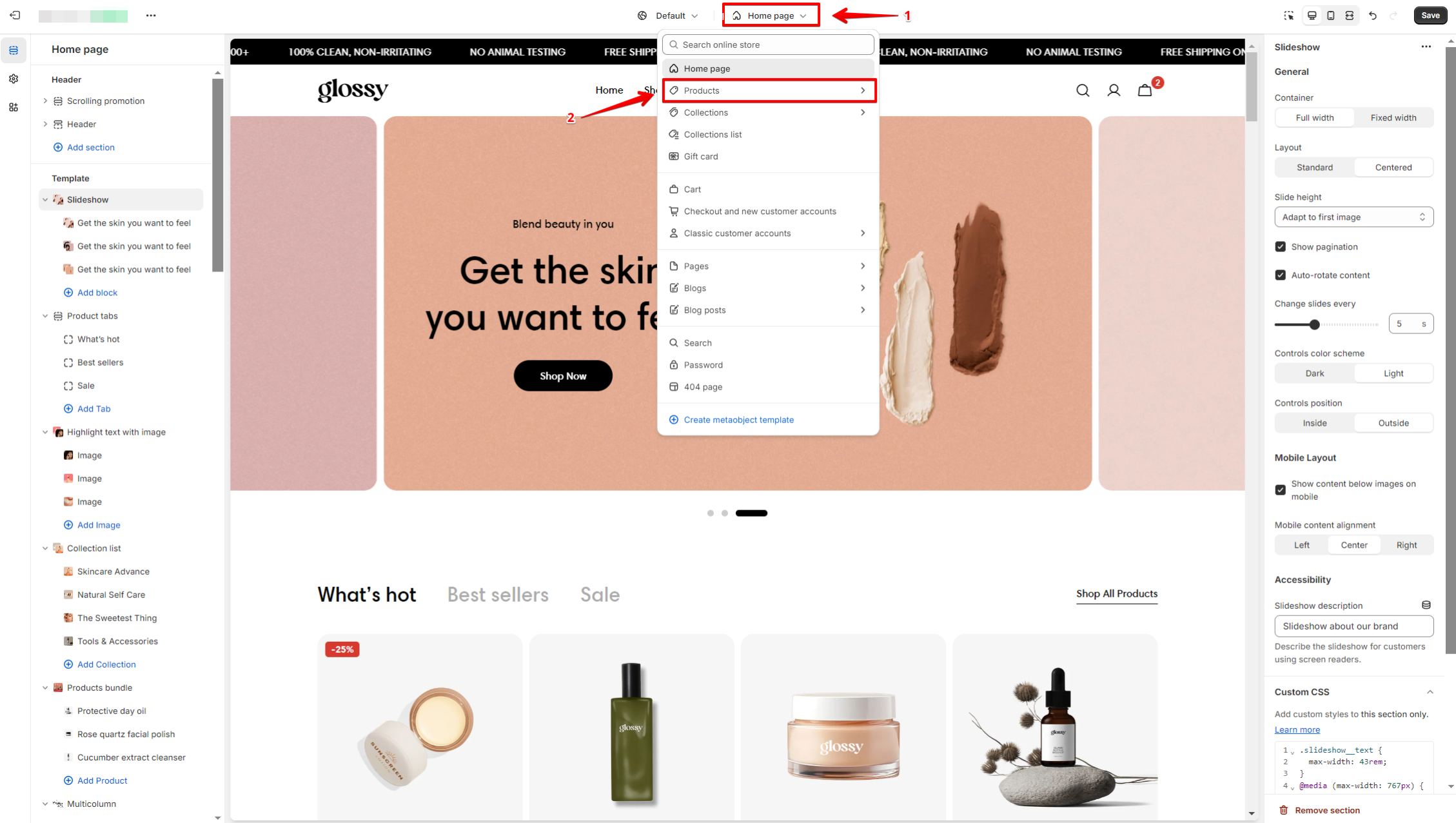
Steps:

1. In the theme editor (**Customize**), open the template selector.
2. Select **Products**, then **Default product.**
   {% endhint %}

<figure><img src="https://content.gitbook.com/content/AJrvmfqcj9TMoPkl3bNc/blobs/UoqKG5OgFnDNKhLcNkdn/image.png" alt=""><figcaption></figcaption></figure>

{% embed url="<https://youtu.be/265f0W3LQXY?si=NHu8ZV1XupMi26HV>" %}

***

<figure><img src="https://3026705042-files.gitbook.io/~/files/v0/b/gitbook-x-prod.appspot.com/o/spaces%2FAJrvmfqcj9TMoPkl3bNc%2Fuploads%2FkUIzEsJKOeRiz891zyf5%2Flivechat883x471%20(1).png?alt=media&#x26;token=90cbed2c-e791-49c8-9f43-49a08bed6f1f" alt=""><figcaption><p><a href="https://apps.shopify.com/xflow?utm_source=foxecom&#x26;utm_medium=help_center_hyper&#x26;utm_campaign=banner">Install XFlow Back In Stock Automation FREE</a></p></figcaption></figure>
