# Collection page

<figure><img src="https://3026705042-files.gitbook.io/~/files/v0/b/gitbook-x-prod.appspot.com/o/spaces%2FAJrvmfqcj9TMoPkl3bNc%2Fuploads%2FIBaol1oD6wFMLcxCPzf9%2FHyper%20docs%20screenshot%20do%20not%20delete%20(78).jpg?alt=media&#x26;token=88f9840e-0bb0-458e-be7f-d55a9d3deb69" alt=""><figcaption></figcaption></figure>

Grouping products into specific collections or categories makes shopping easier for customers and helps them navigate through the products more efficiently.

{% hint style="info" %}
See how to create Collections: [Tutorial video](https://youtu.be/M0DoTpdYPWU?si=eP1SYWXF7IbkUPX4)
{% endhint %}

{% hint style="success" %}
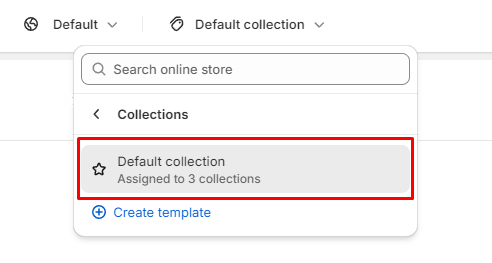
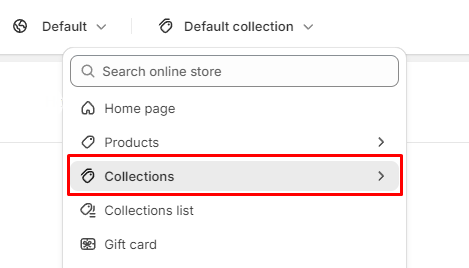
To locate collection template:

1. In the theme editor (**Customize**), open the template selector
2. Select **Collections**, then **Default collection.**
   {% endhint %}

<figure><img src="https://content.gitbook.com/content/AJrvmfqcj9TMoPkl3bNc/blobs/K1q2Jlk216YEZRaRfhzE/image.png" alt=""><figcaption></figcaption></figure>

<figure><img src="https://content.gitbook.com/content/AJrvmfqcj9TMoPkl3bNc/blobs/SepLARisa2KZHyUkDMJA/image.png" alt=""><figcaption></figcaption></figure>

***

<figure><img src="https://3026705042-files.gitbook.io/~/files/v0/b/gitbook-x-prod.appspot.com/o/spaces%2FAJrvmfqcj9TMoPkl3bNc%2Fuploads%2FkUIzEsJKOeRiz891zyf5%2Flivechat883x471%20(1).png?alt=media&#x26;token=90cbed2c-e791-49c8-9f43-49a08bed6f1f" alt=""><figcaption><p><a href="https://apps.shopify.com/xflow?utm_source=foxecom&#x26;utm_medium=help_center_hyper&#x26;utm_campaign=banner">Install XFlow Back In Stock Automation FREE</a></p></figcaption></figure>