# Migrate FoxKit back in stock to XFlow
FoxKit's Back in Stock feature is being retired. [Why we’re deactivating FoxKit Back in stock](#why-we-re-deactivating-foxkit-back-in-stock).
If you haven't moved to [XFlow](https://apps.shopify.com/xflow?utm_source=foxecom\&utm_medium=help_center_foxkit_back_in_stock_deactivation\&utm_campaign=anchor_text\&utm_term=xflow) yet, this page tells you exactly what's happening, why, what you need to do, and what our team will help you with.
## Timeline
| Date | What happens |
| --- | --- |
| Now – June 30, 2026 | • Current FoxKit BIS active users: the feature continues to work as usual. You can install and test XFlow in parallel.
• New FoxKit users & current FoxKit users not using BIS: the Back-in-stock feature is no longer included. |
| June 30, 2026 | **FoxKit BIS is fully deactivated.** Restock notifications stop sending. |
> Migrate before June 30 to avoid any disruption to your restock notifications.
## Want our help? We'll set up XFlow for you — at no cost.
**Free migration assistance is available for existing FoxKit Back-in-Stock users.** Our Customer Success team handles the full setup end-to-end. You review, approve, and run your campaign.
**What we do for you**
* [x] Migrate your pending FoxKit subscriber list to XFlow — no data lost
* [x] Activate XFlow Theme Helper on your storefront
* [x] Configure the Notify me form and messages
* [x] Customize your email template to match your store's branding
* [x] Set up your core workflows: subscription confirmation + 2-email restock sequence (notification + follow-up)
* [x] Send you a full setup summary with screenshots, links, and next steps
**What to expect**
You won't need to configure anything from scratch. Once we're done, you'll receive a handoff summary covering everything that was set up — so you know exactly what's running and how to manage it going forward. 🙌
**Advanced features**
For more advanced flows — targeted campaigns by collection, multi-step discount logic, etc. — our team will walk you through the setup step by step. The goal is for you to be able to manage and iterate on your campaigns independently after migration.
## Why we’re deactivating FoxKit Back in stock
FoxKit's Back in Stock was designed as a simple notification tool — one email when a product restocks. That was enough when it launched.
But based on real merchant feedback, that model has real limits:
* A single email gets missed or ignored, and customers who don't act immediately may find the product out of stock again by the time they return.
* There's no way to follow up with customers who didn't convert
* You can't offer a discount in the notification or at the moment someone subscribes
* There's no internal team alert, no push notification, no segmentation
Rather than patching a limited system, we built **XFlow** from the ground up — designed specifically to convert back-in-stock demand into actual sales, not just send a notification.
👉 Install XFlow free:
## XFlow vs. FoxKit — what's different
| Feature | FoxKit BIS | XFlow |
| --- | --- | --- |
| Notify button & waitlist capture | ✅ | ✅ |
| Automatic restock notifications | ✅ | ✅ |
| Subscription confirmation email | ❌ | ✅ |
| Visual workflow builder (triggers, conditions, actions) | ❌ | ✅ |
| Follow-up emails (if no purchase) | ❌ | ✅ |
| Target by product or collection | ❌ | ✅ |
| Internal team restock alert | ❌ | ✅ |
| Push notifications | ❌ | ✅ |
In short: FoxKit notifies. XFlow converts.
## What happens to your existing subscriber list
Your subscriber list is not lost. XFlow supports a one-click migration of all **pending subscriptions** (customers who haven't yet received a restock notification) directly from FoxKit.
Migration takes under a minute. Once migrated, your subscribers will automatically follow whichever XFlow campaign you've created.
## How to migrate — step by step
#### Install XFlow
Install **XFlow Back in Stock Automation** from the Shopify App Store.
Once installed, open the app to begin setup.
#### Complete your XFlow setup
Before migrating subscriptions, ensure XFlow is fully configured.
Use XFlow’s visual builder to set up your restock flows. You can start with a simple one-email flow or build advanced flows with timing, conditions, and follow-ups.
* For the basic flow, follow our [step-by-step tutorial](https://youtu.be/zyZZ5rRRHnI?utm_source=foxecom\&utm_medium=help_center_foxkit\&utm_campaign=backinstock_sunsetting)
* Or read the [full guidelines on how to create a campaign.](/xflow-app/getting-started/installation/onboarding-checklist?utm_source=foxecom\&utm_medium=help_center_foxify_back_in_stock_deactivation_plan\&utm_campaign=anchor_text\&utm_term=here)
#### Migrate subscriptions from FoxKit
XFlow supports migrating **pending Back in stock subscriptions** only (subscriptions that have not yet received a restock email).
To migrate your subscriptions:
Steps:
1. Open the **FoxKit** app in your Shopify admin
2. Go to **Settings > General > API Integration**
3. Copy your **API Key.** *Learn more* [How to get API key](page://ec87f4ce-97ab-4f55-81d7-179f66802ec7)
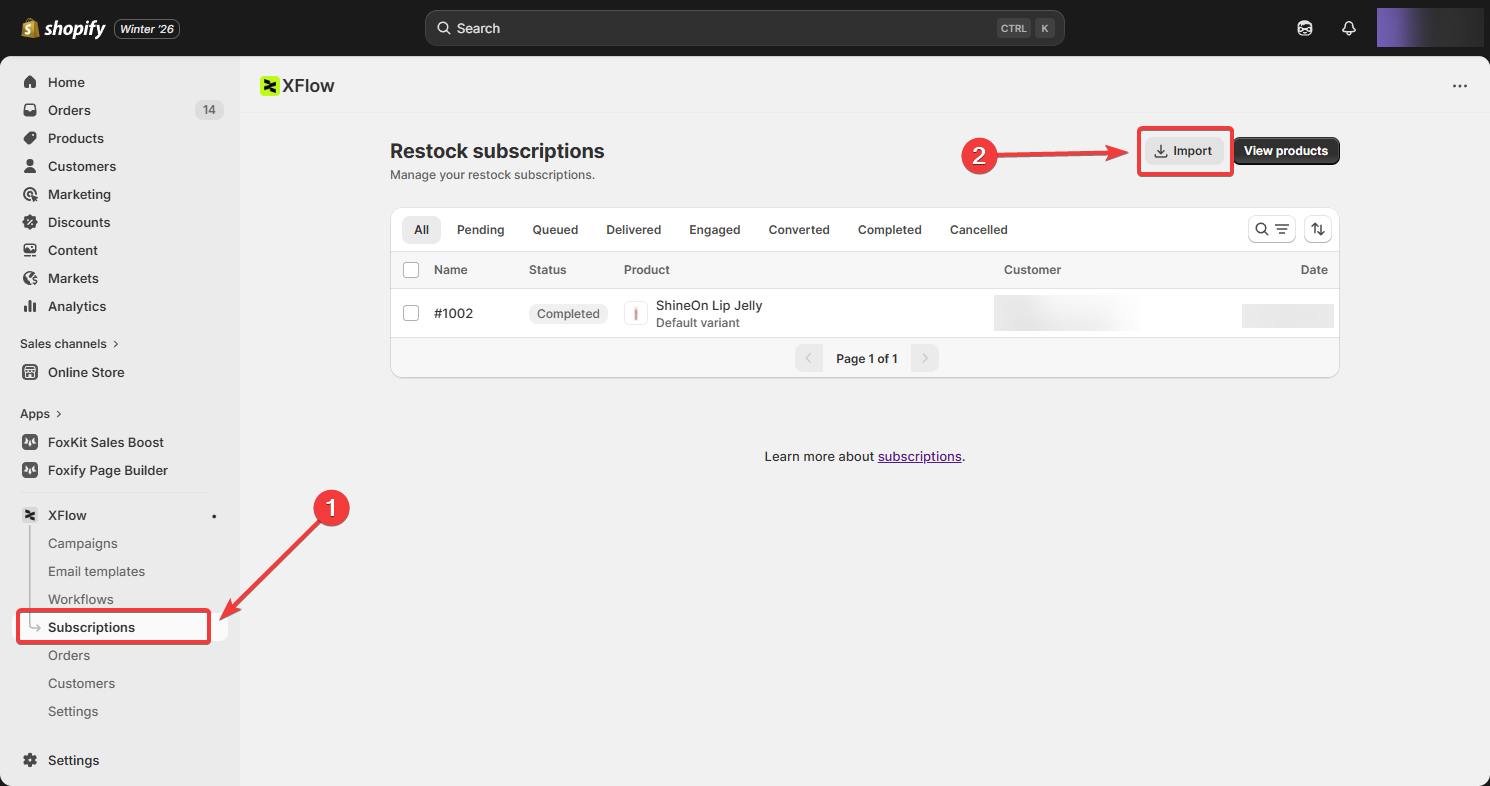
4. Open **XFlow** and navigate to **Subscriptions**
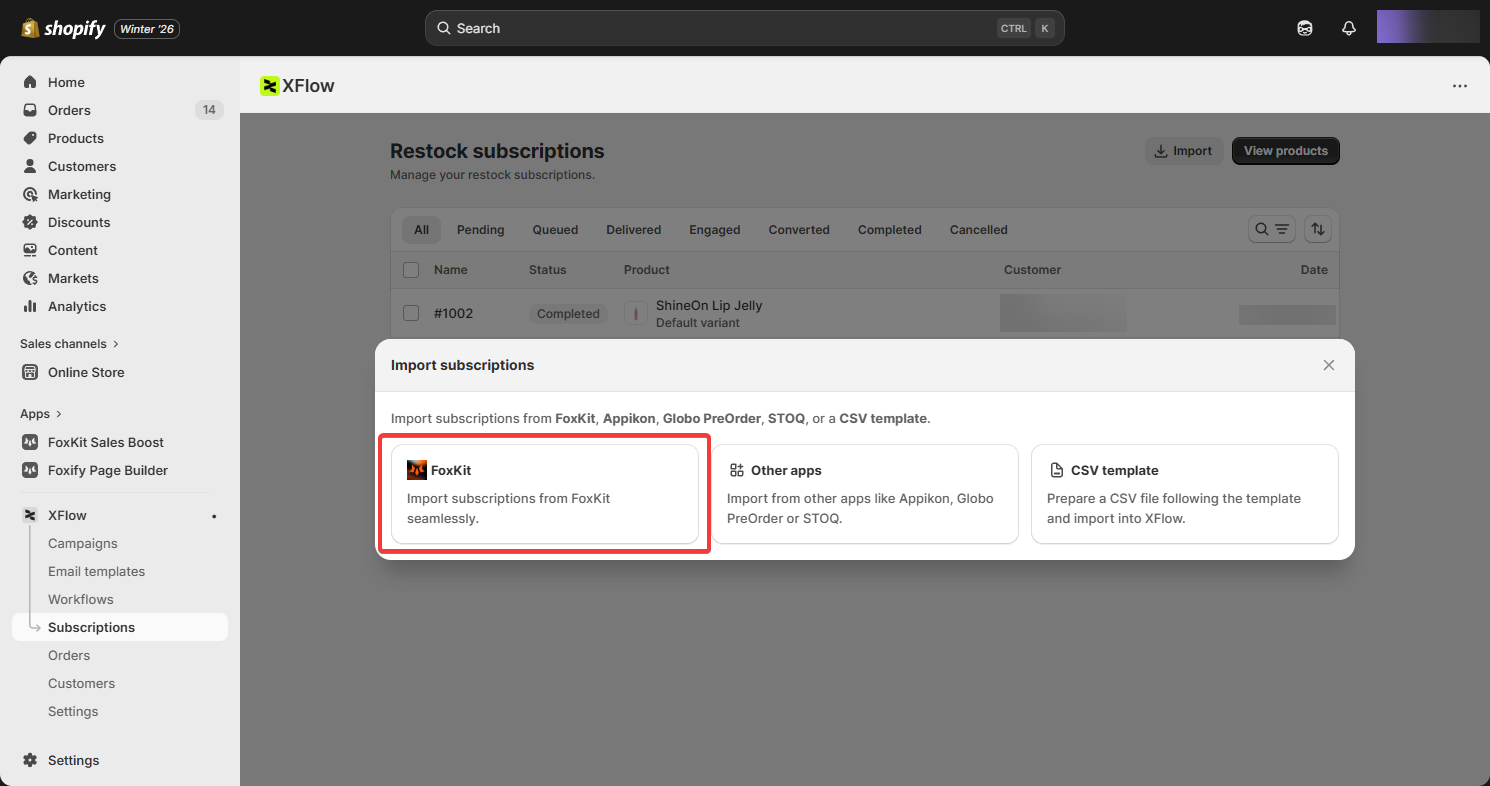
5. Select **Import**, then paste the API Key into the FoxKit migration section
6. Start the migration process.
Once the migration is complete, your subscriptions will automatically follow the XFlow campaign you’ve created. ✅
From this point on:
* Restock notifications are sent based on your XFlow workflow
* Timing, follow-ups, and conditions are handled automatically
* No further action is required
You’re now fully set up to manage Back in stock automation with XFlow. 🎉
## Common questions
#### **Will my current FoxKit subscriber list be lost?**
No. All pending subscriptions can be migrated to XFlow in one step before the deadline.
#### **Do I need to reconfigure everything from scratch?**
Not if you use our CS-assisted migration. We'll rebuild your setup in XFlow and match what you had in FoxKit, or assist you in improving on it.
#### **Is XFlow free?**
XFlow is currently free to install and use. Pricing will be introduced in the future — existing users will receive advance notice, preferential terms, and special discounts for early adopters.
#### **Who built XFlow?**
XFlow is built by the same FoxEcom team that built FoxKit. It's not a third-party app.
***
Have questions? Reach out via [contact form](https://foxecom.com/pages/contact-us?utm_source=foxecom\&utm_medium=help_center_foxkit_back_in_stock_deactivation\&utm_campaign=anchor_text) or [email our support team](mailto:happytohelp@foxecom.com). 🙋♀️