# Powerful Contact Form Builder
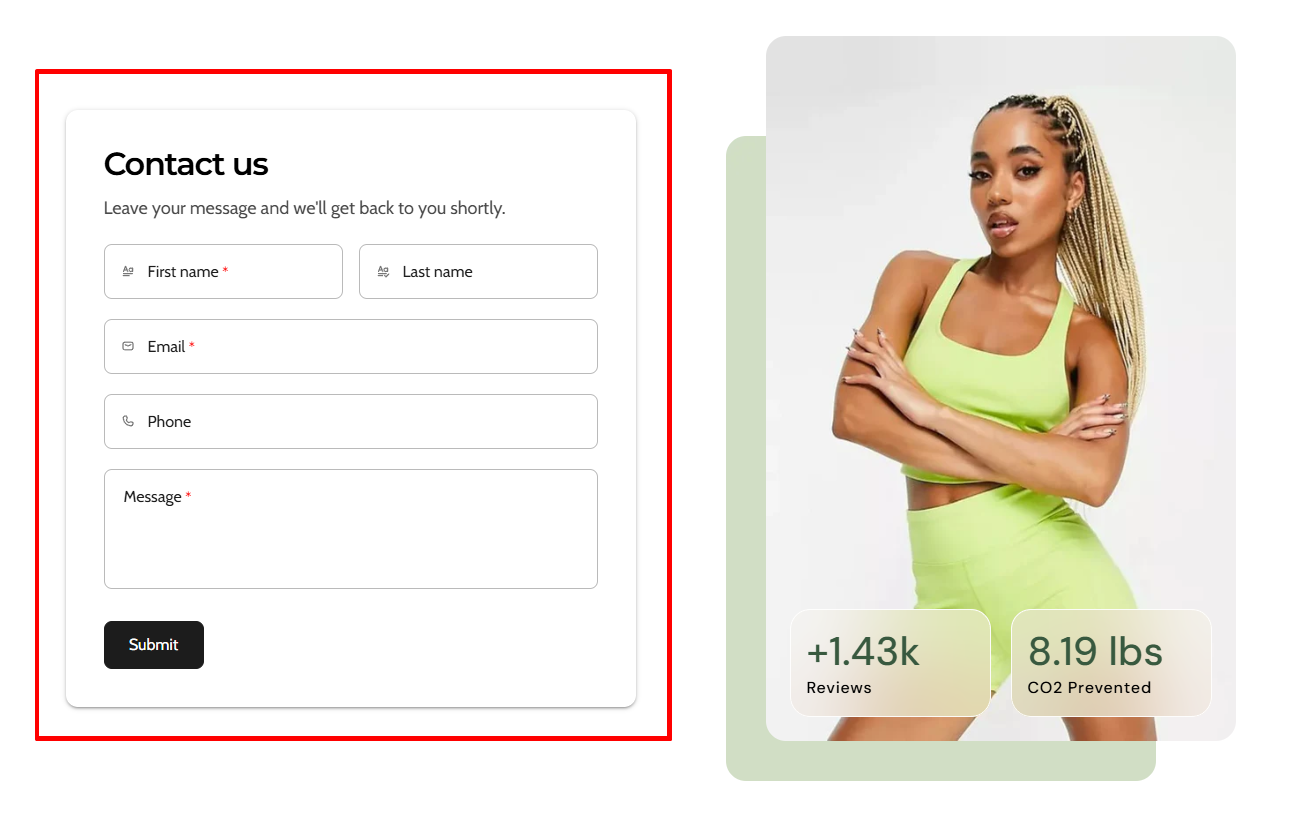
{% embed url="<https://youtu.be/QP50HOH9PkI/>" %}

<figure><img src="https://1749964694-files.gitbook.io/~/files/v0/b/gitbook-x-prod.appspot.com/o/spaces%2FfgpgvtRaQLc36GYyIktZ%2Fuploads%2FzcPVRzsp7zKoNpdFlQYm%2Fimage.png?alt=media&#x26;token=b434b12e-8de3-425a-aa34-c1ffe4af78e0" alt=""><figcaption></figcaption></figure>

**Powerful Contact Form Builder** is one of the most trusted form apps on Shopify, used by thousands of merchants to collect customer inquiries, feedback, wholesale requests, and subscriber data. This article will show you how to integrate and display Powerful Contact Form Builder forms on your Foxify-built pages.

## What is Powerful Contact Form Builder?

Powerful Contact Form Builder is a flexible form creation app that lets you build and customize forms without coding. From simple contact forms to advanced multi-step forms with conditional logic, file uploads, and integrations, it helps you capture and manage customer information effectively.

**What you can do with Powerful Contact Form Builder:**

* Create customer account registration forms with custom fields
* Build forms with file upload and image upload options
* Send autoresponder emails and integrate submissions with Klaviyo, Mailchimp, and more
* Design contact forms with captcha, conditional logic, and validation
* Build various form types including Feedback Forms, Popup Forms, Wholesale Order Forms, Wholesale Applications, and more

## How to use Powerful Contact Form Builder with Foxify Smart Page Builder

### Install Powerful Contact Form Builder from the Shopify App Store

{% hint style="info" %}
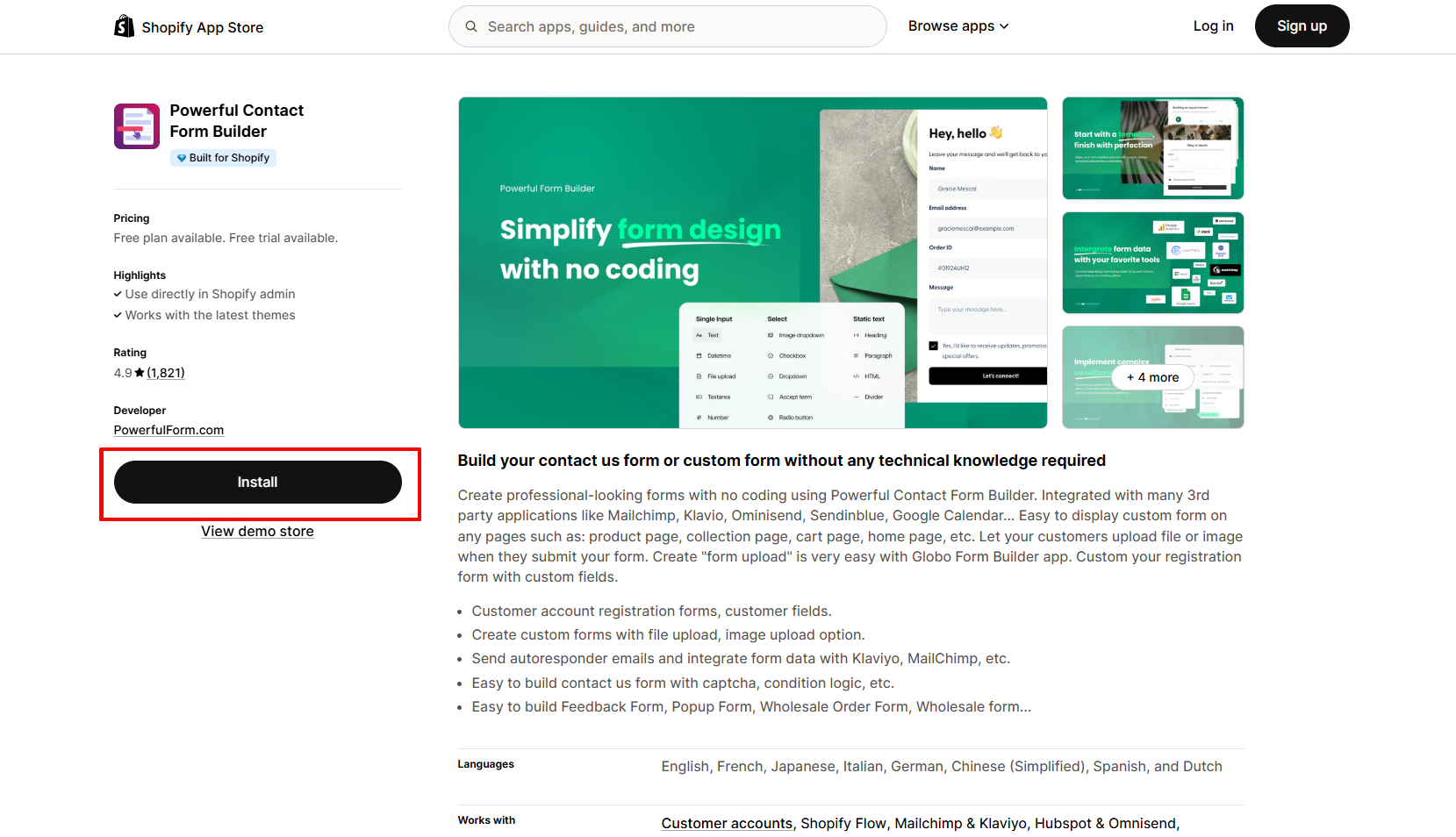
Before using the app widget in Foxify, you have to install it in your Shopify store and configure the app settings. If you’re new to this app, check [its documentation](https://globo.io/kbtopic/powerful-form-builder-version-2/) to understand how it works.
{% endhint %}

<figure><img src="https://1749964694-files.gitbook.io/~/files/v0/b/gitbook-x-prod.appspot.com/o/spaces%2FfgpgvtRaQLc36GYyIktZ%2Fuploads%2FsjZYho3thkJbS0nmdPI0%2Fimage.png?alt=media&#x26;token=cdb3abe3-168b-48c3-b082-f62cc1cc1d3f" alt=""><figcaption></figcaption></figure>

{% hint style="success" %}
Steps:

1. Log in to the Shopify App Store.
2. Find the **Powerful Contact Form Builder** app and click **Install**.
3. In your Shopify admin, to authorize the use of the app, click **Install.**

After the app is installed, you can view and use it from the **Apps** page in your Shopify admin.
{% endhint %}

### Set up Powerful Contact Form Builder with Foxify

Powerful Contact Form Builder has been integrated as a built-in extension in Foxify Page Builder, so all you need to do is:

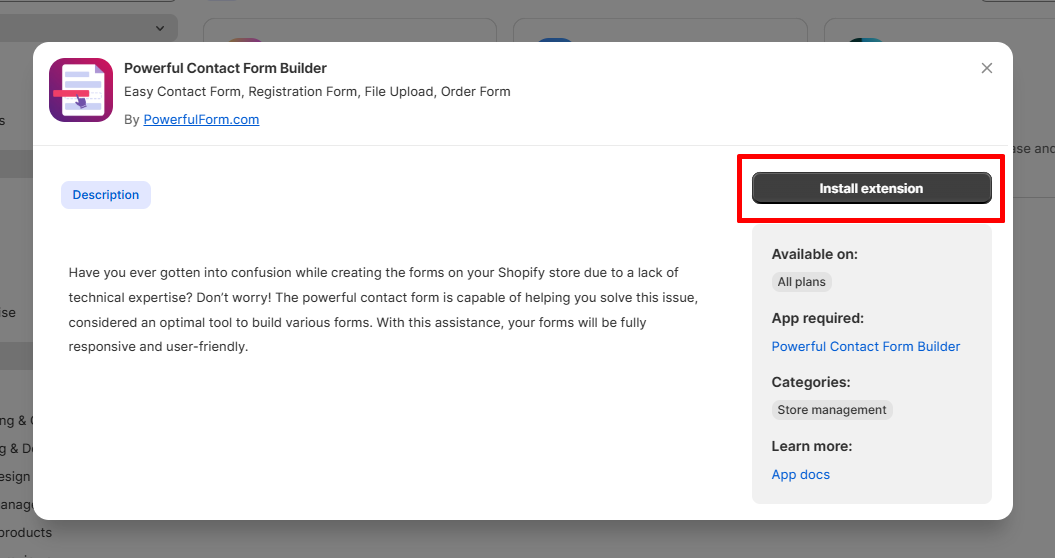
1. In your **Foxify dashboard**, select **App extensions.**
2. Look for **Powerful Contact Form Builder** and Choose **Install extension.**
<figure><img src="https://1749964694-files.gitbook.io/~/files/v0/b/gitbook-x-prod.appspot.com/o/spaces%2FfgpgvtRaQLc36GYyIktZ%2Fuploads%2FoGJn5snlFFCQ8yLmEjx8%2Fimage.png?alt=media&#x26;token=77bbbd60-aade-4245-b883-23168ccb1560" alt=""><figcaption></figcaption></figure>

{% hint style="info" %}
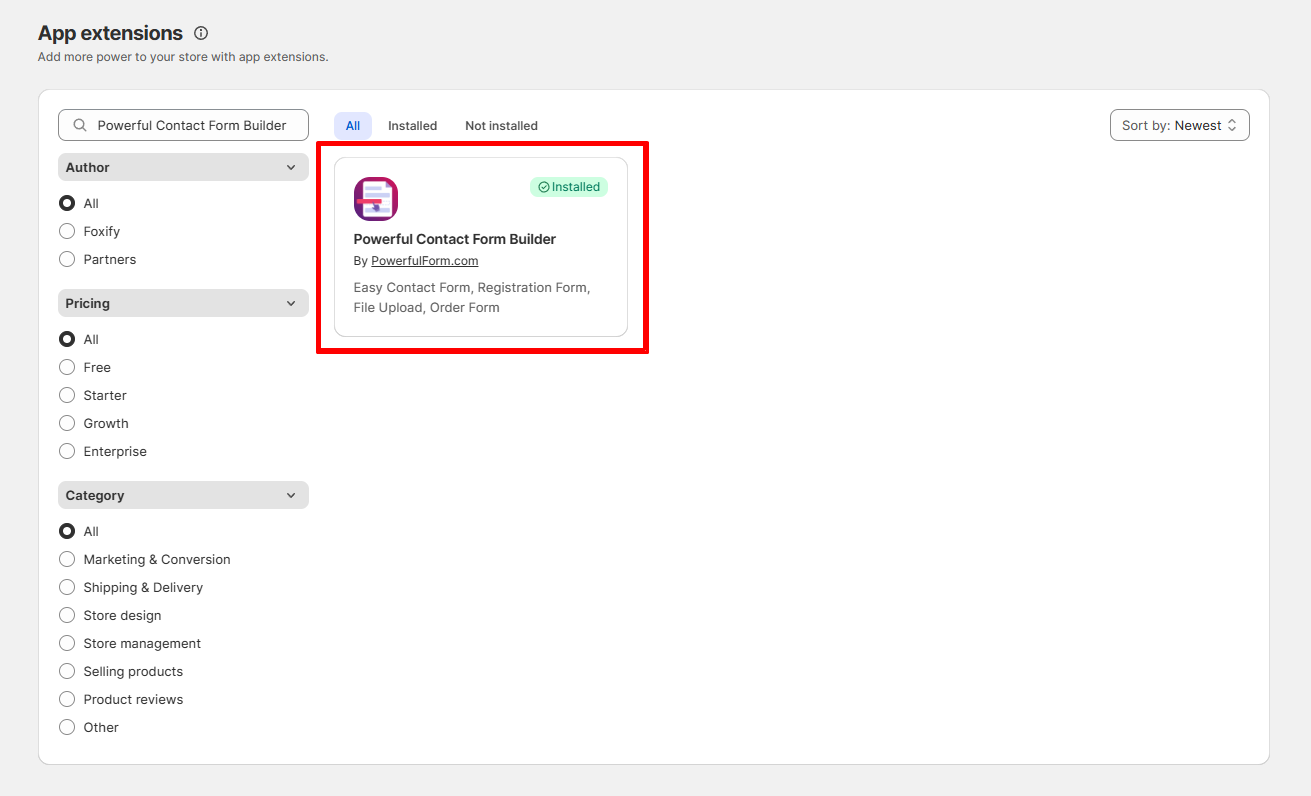
Once you see a green checkmark next to **Powerful Contact Form Builder** :white\_check\_mark:**,** it means the app has been activated and is now ready to be featured.
{% endhint %}

<figure><img src="https://1749964694-files.gitbook.io/~/files/v0/b/gitbook-x-prod.appspot.com/o/spaces%2FfgpgvtRaQLc36GYyIktZ%2Fuploads%2F1j4DVAyC4ZnxePYjz9GP%2Fimage.png?alt=media&#x26;token=f2b7d464-d787-402d-8d7e-d543534b6d0a" alt=""><figcaption></figcaption></figure>

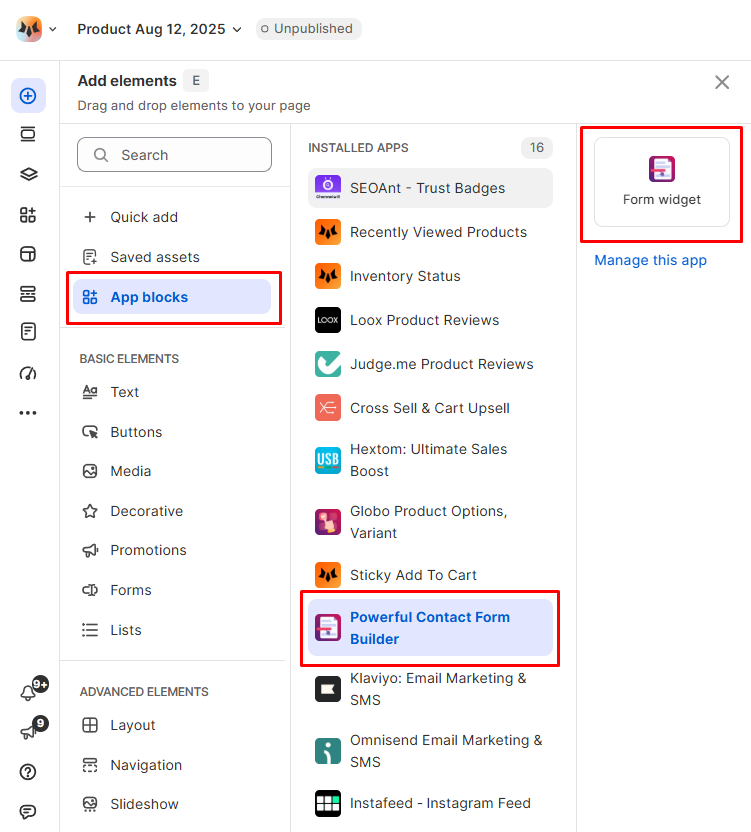
3. In **Pages manager**, open the page you want to add the app features to. Select **Add element > App blocks.**
<figure><img src="https://1749964694-files.gitbook.io/~/files/v0/b/gitbook-x-prod.appspot.com/o/spaces%2FfgpgvtRaQLc36GYyIktZ%2Fuploads%2FJfeo1mALwQgvkqgTZGwW%2Fimage.png?alt=media&#x26;token=95ad5ff9-310f-4223-97d3-fab282a88662" alt="" width="563"><figcaption></figcaption></figure>

Select **Powerful Contact Form Builder** from the **Installed apps** list, and drag the app widget you want to feature on your page.
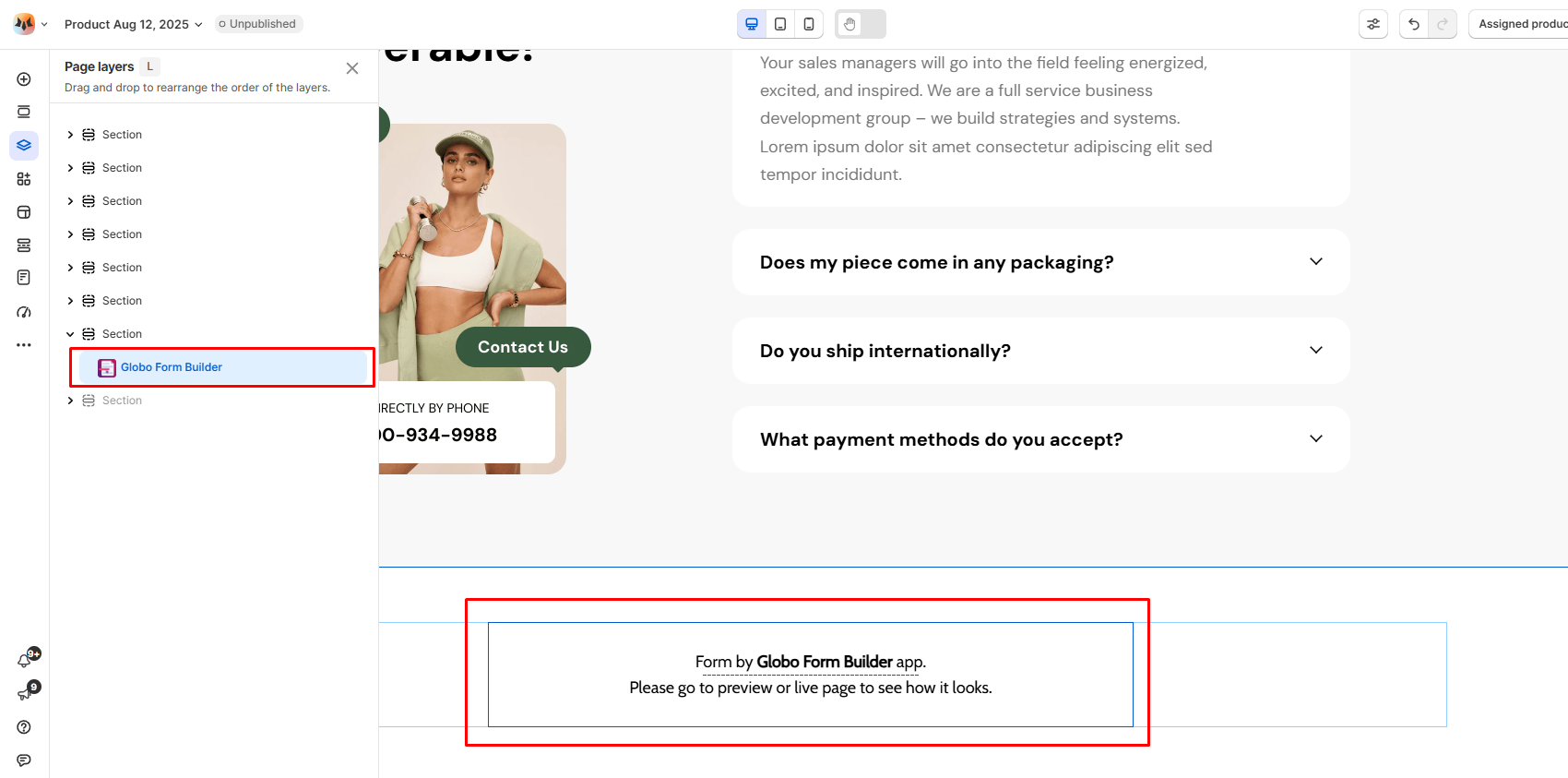
<figure><img src="https://1749964694-files.gitbook.io/~/files/v0/b/gitbook-x-prod.appspot.com/o/spaces%2FfgpgvtRaQLc36GYyIktZ%2Fuploads%2FxsqaRVjw5hAQvpJG9oyI%2Fimage.png?alt=media&#x26;token=7eb96510-59ce-419b-bff9-90db4bc5d5c8" alt=""><figcaption></figcaption></figure>

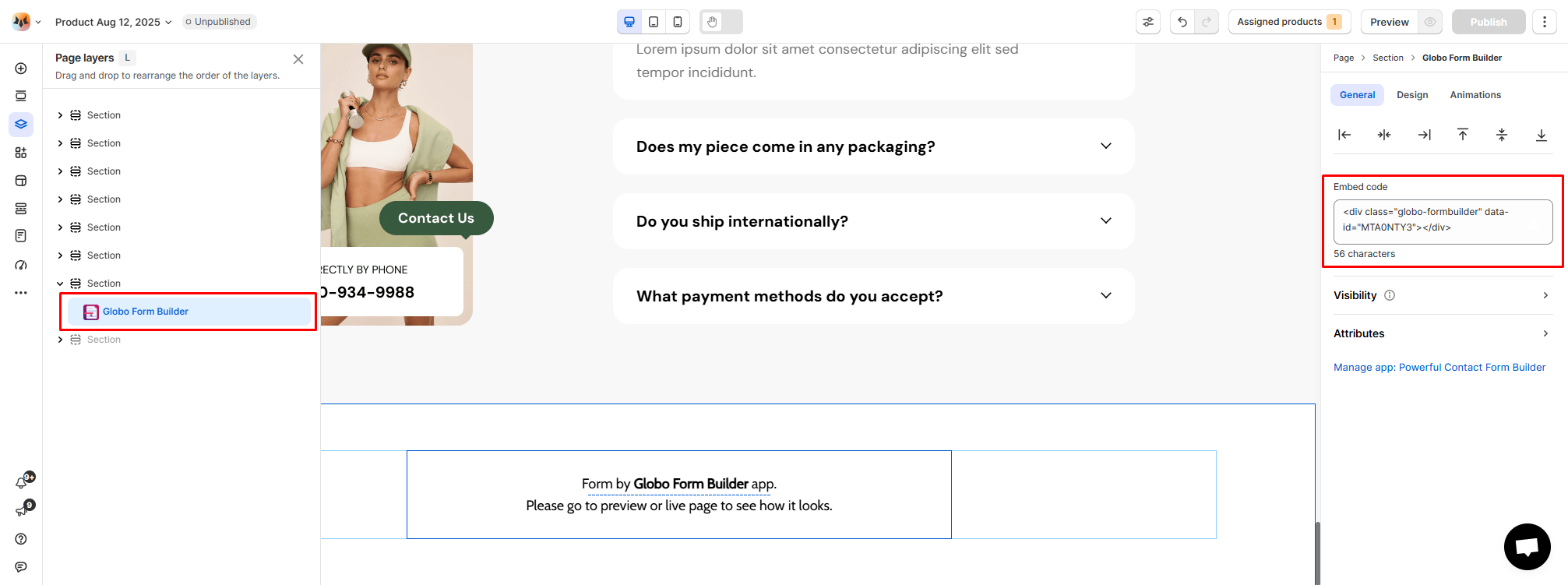
**For Embed code:**

* Go to the **General** tab in the editor.
* In the **Embed code** field, manually paste the embed code you received from Powerful Contact Form Builder, which should look like this:

```html
<div class="globo-formbuilder" data-id="xxxx"></div> (xxx is form ID)
```

{% hint style="info" %}
[How to find form embedded code in Powerful Contact Form Builder app?](https://globo.io/kb/how-to-get-embed-code/)
{% endhint %}

* This will embed the Powerful Contact Form Builder form directly onto your Foxify page.
<figure><img src="https://1749964694-files.gitbook.io/~/files/v0/b/gitbook-x-prod.appspot.com/o/spaces%2FfgpgvtRaQLc36GYyIktZ%2Fuploads%2FXKD7EPgydlcc1pRaJW3Q%2Fimage.png?alt=media&#x26;token=1e08d1f9-34ed-4c83-bb89-5783dd385f53" alt=""><figcaption></figcaption></figure>

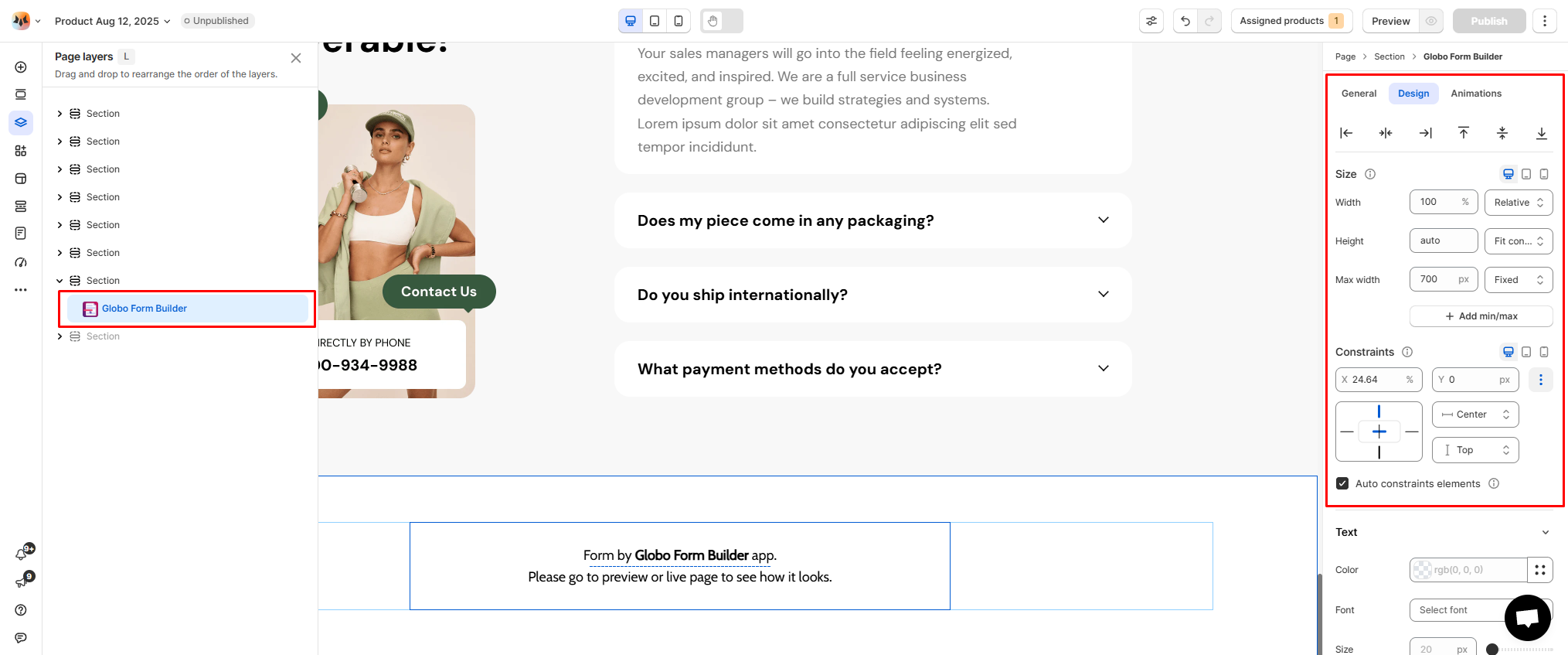
4. Adjust the element's sizing if needed.
<figure><img src="https://1749964694-files.gitbook.io/~/files/v0/b/gitbook-x-prod.appspot.com/o/spaces%2FfgpgvtRaQLc36GYyIktZ%2Fuploads%2FOEQy0i2y5Iakr2lORvBO%2Fimage.png?alt=media&#x26;token=f9e92932-452c-4a39-8a7d-1f7ea31f43e8" alt=""><figcaption></figcaption></figure>

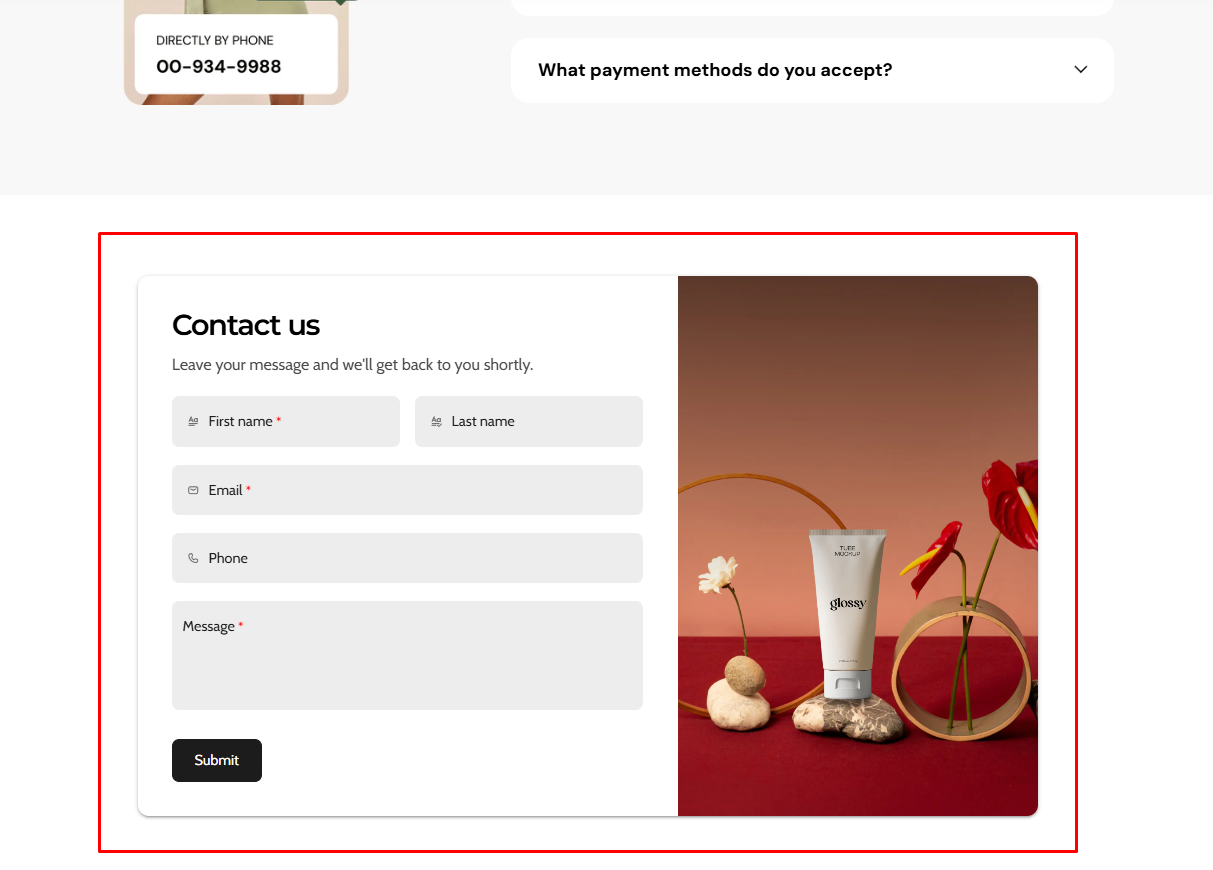
5. **Save** the changes and go to the preview page or live page to see the app widget.
<figure><img src="https://1749964694-files.gitbook.io/~/files/v0/b/gitbook-x-prod.appspot.com/o/spaces%2FfgpgvtRaQLc36GYyIktZ%2Fuploads%2FR0dE7kLOzO14fu7aht9k%2Fimage.png?alt=media&#x26;token=692a8a98-053d-445d-bd5d-542bcc8c6d71" alt=""><figcaption></figcaption></figure>

### App widgets available in Foxify

* **Form widget:** Add a customizable contact form to collect customer information (e.g., inquiries, support requests, surveys) directly on your Foxify-built pages.

## FAQs

### Is Powerful Contact Form Builder free to use?

Yes. The free plan includes 1 form, up to 12 fields, 40 submissions per month, and 200MB storage. Paid plans unlock more forms, fields, submissions, and integrations.

### Can I edit the form design inside Foxify?

In Foxify, you can control placement, container styling, and spacing. The form’s fields, logic, and design options are managed in the Powerful Contact Form Builder dashboard.

### Where can I find my file attachments?

Uploaded files are available in the **submission details** under the **Submissions** section of the app, as well as in the **admin notification emails** you receive.

Please note: if a submission is deleted, its attached files will also be permanently deleted.

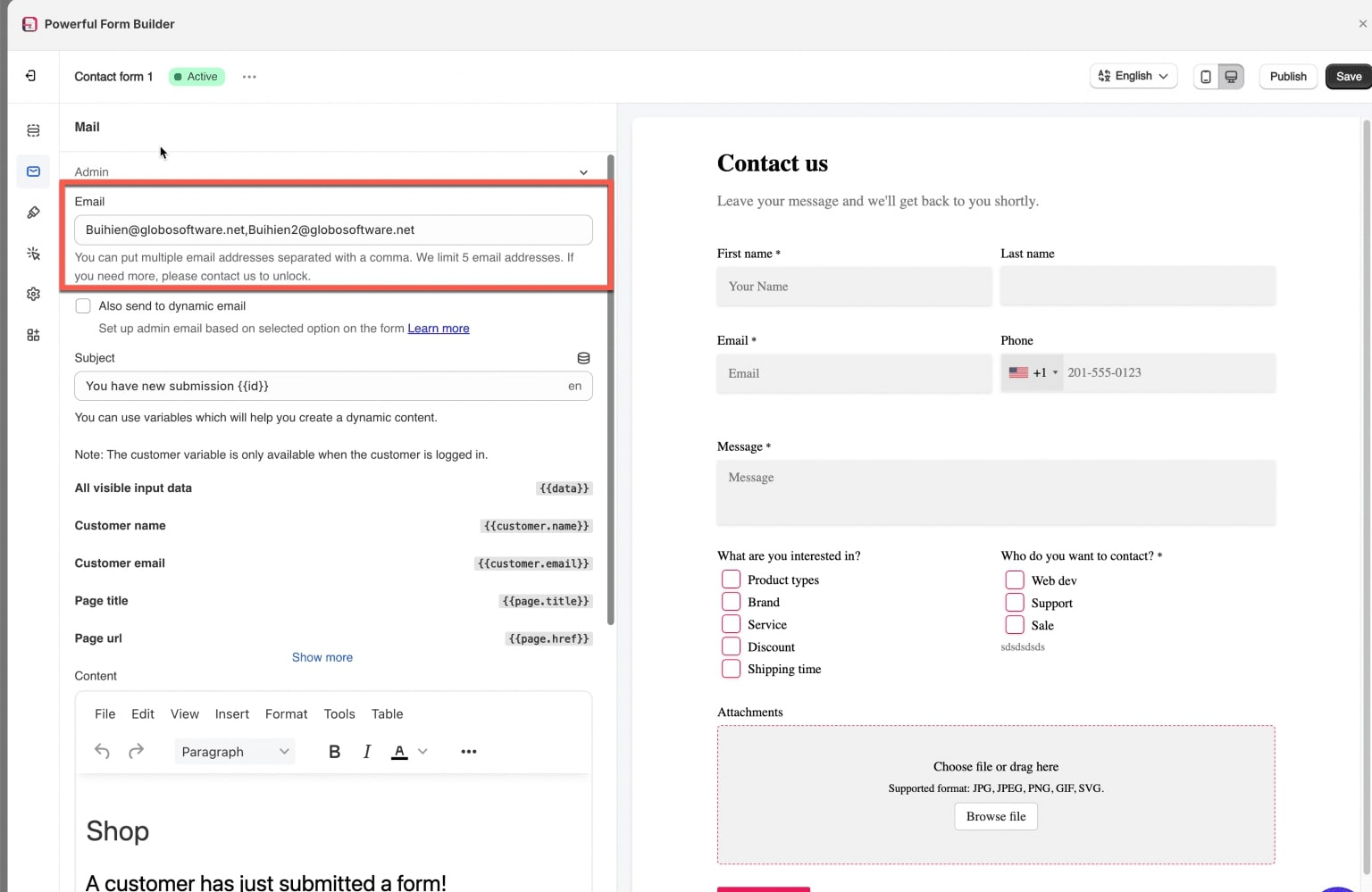
### Can I change the email address to receive form submission?

Yes. You can update the admin email address where form submissions are sent. Multiple email addresses can also be added, just separate each one with a comma.
<div align="left"><figure><img src="https://1749964694-files.gitbook.io/~/files/v0/b/gitbook-x-prod.appspot.com/o/spaces%2FfgpgvtRaQLc36GYyIktZ%2Fuploads%2FXy52vhlsFuI84YAOGDDB%2Fimage.png?alt=media&#x26;token=7310284e-9cf8-4d67-912b-59d121edddba" alt="" width="563"><figcaption></figcaption></figure></div>

***

<figure><img src="https://1749964694-files.gitbook.io/~/files/v0/b/gitbook-x-prod.appspot.com/o/spaces%2FfgpgvtRaQLc36GYyIktZ%2Fuploads%2Fu6oqi1DFmOTPfGiFCRx7%2FSleek%20-%20In-blog%20banner%201.jpg?alt=media&#x26;token=9df3ad8e-fe87-44c5-aced-86331e3bead0" alt=""><figcaption><p><a href="https://themes.shopify.com/themes/sleek/presets/sleek?utm_source=foxecom&#x26;utm_medium=help_center_foxify_powerful_contact&#x26;utm_campaign=anchor-text&#x26;utm_term=try_sleek_free_now">Try Sleek free now</a></p></figcaption></figure>


---

# Agent Instructions: Querying This Documentation

If you need additional information that is not directly available in this page, you can query the documentation dynamically by asking a question.

Perform an HTTP GET request on the current page URL with the `ask` query parameter:

```
GET https://docs.foxecom.com/foxify-app/shopify-apps-integrations/store-management/powerful-contact-form-builder.md?ask=<question>
```

The question should be specific, self-contained, and written in natural language.
The response will contain a direct answer to the question and relevant excerpts and sources from the documentation.

Use this mechanism when the answer is not explicitly present in the current page, you need clarification or additional context, or you want to retrieve related documentation sections.
