# Change your plan
Upgrade, downgrade, or cancel your Foxify plan anytime from the dashboard. Changes take effect immediately.
## How billing works when you change plans
When you change plans, Shopify cancels your current recurring charge and creates a new one. You'll need to approve the new charge on the Shopify subscription page before the change takes effect.
[Learn how Shopify prorates app charges](https://help.shopify.com/manual/your-account/manage-billing/billing-charges/types-of-charges/third-party-charges/app-charges)
## Upgrade or downgrade your plan
1. In the Foxify left sidebar, go to **Plans & Pricing**.
2. Select the plan you want to switch to.
3. If downgrading: Review the plan comparison — check the **Current usage** column to see if any of your current usage exceeds the new plan's limits. Click **Downgrade anyway** to proceed.
4. On the billing review screen:
* Choose **Monthly** or **Annually**
* Optional: add the **Unlimited blog posts** add-on. Learn more: [Add Unlimited blog posts](https://docs.foxecom.com/foxify-app/getting-started/account-and-billing/change-your-plan#add-unlimited-blog-posts)
* Optional: click **Add discount code** to apply a promo code. Learn more: [Use discount code](https://docs.foxecom.com/foxify-app/getting-started/account-and-billing/use-discount-code)
5. Click **Downgrade anyway** (or **Upgrade now**) to confirm.
6. On the Shopify subscription approval page, click **Approve**.
✅ Done when: Your Foxify dashboard and Shopify Billings show the new plan name.
**Unable to downgrade?** If your current usage exceeds the new plan's limits, Foxify will block the downgrade and show an "Unable to downgrade" message. To proceed:
1. Review the current usage to see which items exceed the limit — items shown in red need to be reduced.
2. Unpublish pages, remove saved templates, delete saved assets, or unpublish theme sections until your usage is within the new plan's limits.
3. Return to **Plans & Pricing** and try downgrading again.
## Add Unlimited blog posts
The **Unlimited blog posts** add-on removes the blog post limit on your current plan. You can add it when [switching plans](https://docs.foxecom.com/foxify-app/getting-started/account-and-billing/change-your-plan#while-switching-to-a-new-plan) or while [staying on your existing plan](https://docs.foxecom.com/foxify-app/getting-started/account-and-billing/change-your-plan#while-staying-on-your-current-plan).
### While switching to a new plan
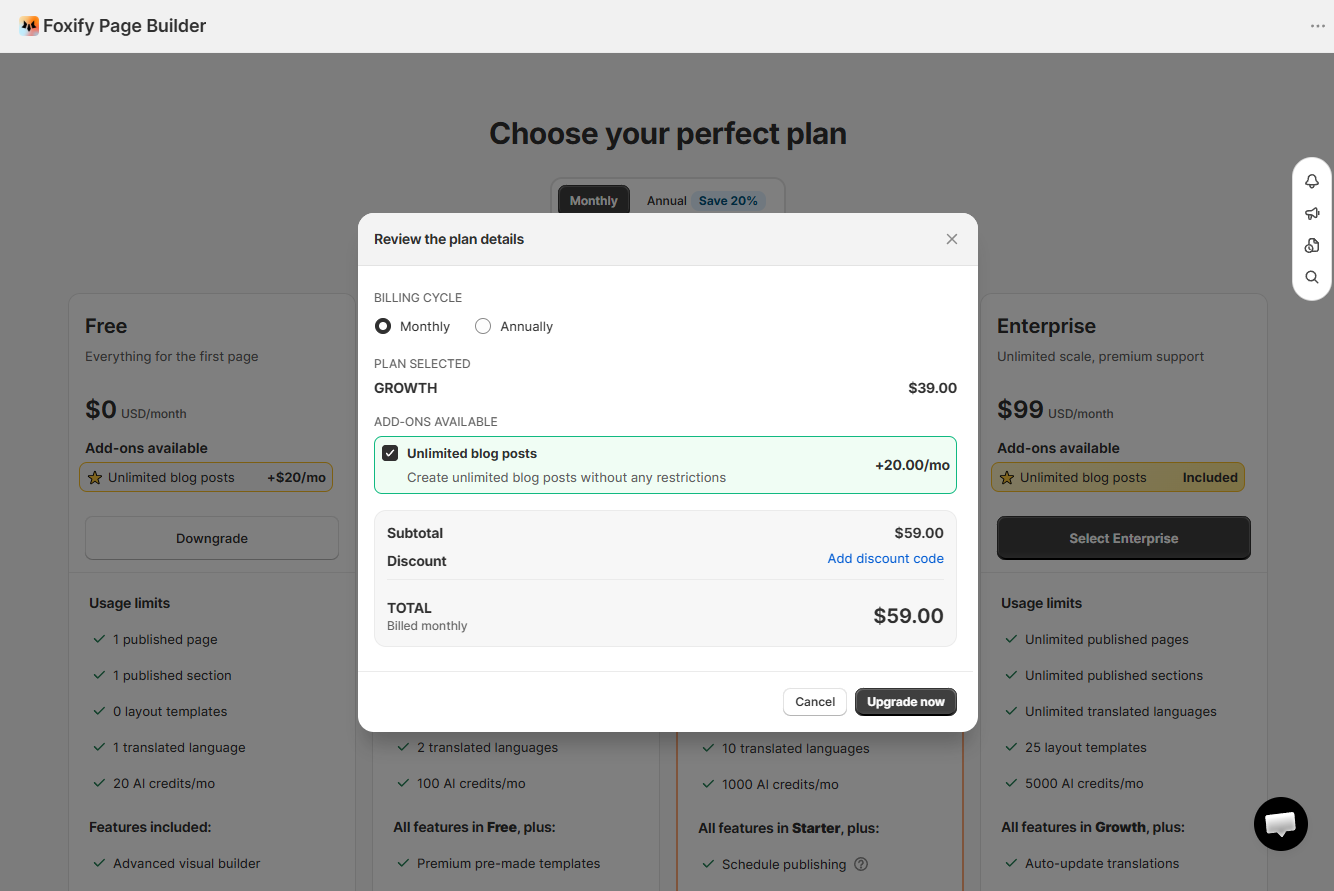
1. Go to **Plans & Pricing** and select a plan.
2. In the plan details pop-up, check **Unlimited blog posts**.
3. Click **Upgrade now** and approve the charge on Shopify.
### While staying on your current plan
1. Go to **Settings > Plan**.
2. Under **Add-ons**, check **Unlimited blog posts**.
3. Click **Update plan** and approve the charge on Shopify.
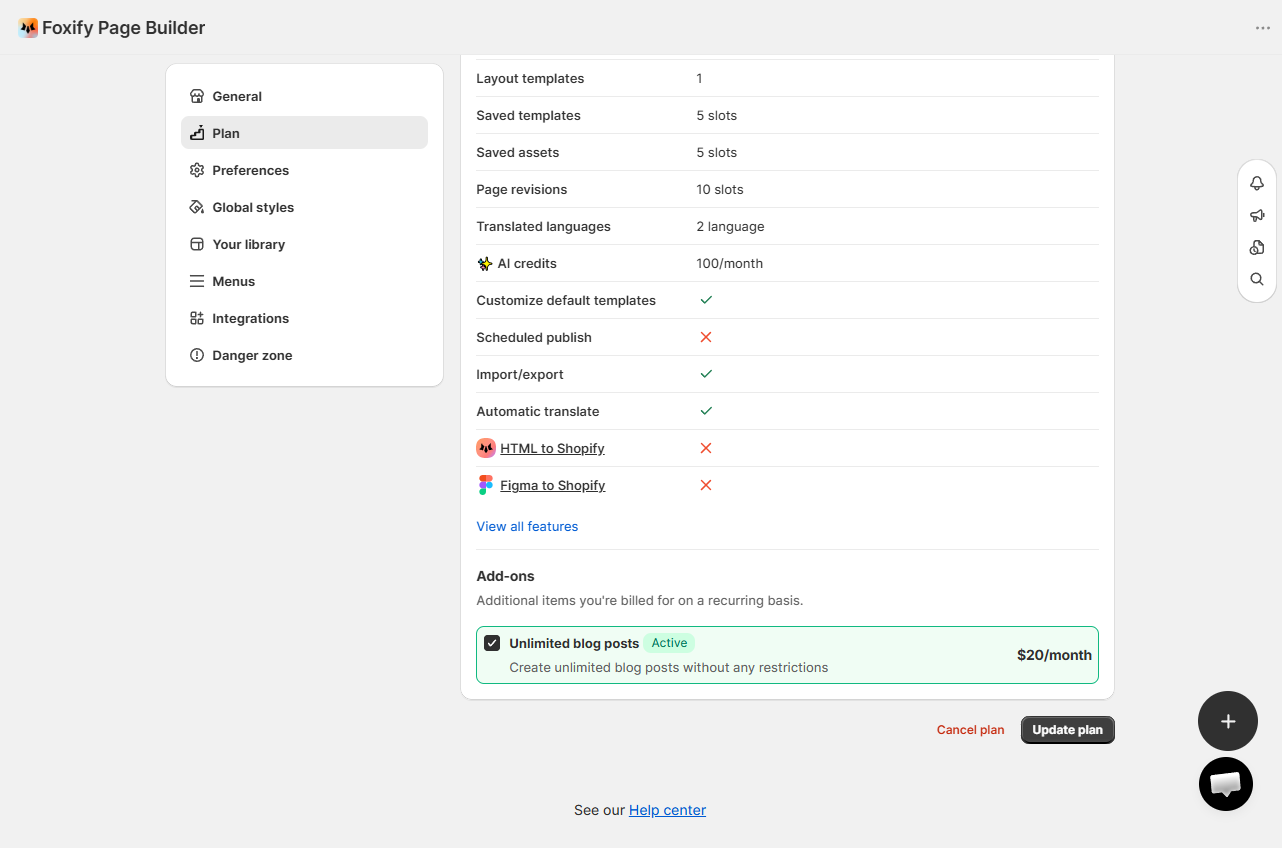
✅ Done when: The add-on shows as active under your current plan in **Settings > Plan**.
## Cancel your plan
1. Go to **Settings > Plan**.
2. Under **Plan details**, click **Cancel plan**.
3. Click **Proceed to downgrade** and select a reason to confirm.
You'll need to unpublish all pages and sections before the cancellation goes through. Your page data is preserved in the app.
✅ Done when: Your plan is downgraded to Free.
## FAQs
#### Can I change my plan during the free trial?
Yes — you can switch plans at any time during the trial. You won't be charged until the 7-day trial ends.
#### I downgraded but my pages are still published. What should I do?
Unpublish pages until your published count is within the new plan's limit. Go to **Pages** **manager** in the Foxify dashboard, open each page, and click **Unpublish** if needed.
#### How does Foxify billing appear in my Shopify account?
Foxify charges appear in your Shopify admin under **Settings > Billing**. Keep this in mind if you plan to cancel: uninstalling Foxify stops future billing cycles, but a charge that has already been generated for your upcoming invoice may still appear on your bill — even if you uninstall shortly after installing.
## Related articles
Change your plan
Use discount code
Free trial