# Frame elements
A Frame lets you group multiple elements into a single container that can be moved, resized, styled, and animated as one unit — without changing how each child element behaves individually.
**Best fits for:**
* Moving or animating a group of elements together, instead of adjusting each one repeatedly
* Applying a shared background, border, or effect to a group as a whole
* Keeping related elements visually together as you rearrange a page
## How to create a frame
1. Click the element you want to include first.
2. Hold **Shift** and click the other elements you want to add.
3. Click **Frame selection** on the toolbar that appears.
Shortcut: `Ctrl+Shift+F` (Windows) or `Cmd+Shift+F` (Mac) does the same thing once your elements are selected.
## Add an element to an existing frame
Drag the element directly into the Frame's container on the canvas, and drop it inside.
## Remove an element from a frame
1. Click the element you want to remove.
2. Drag it outside the Frame's container.
## Settings you'll find on a frame
Most settings on a Frame work the same as any other element — see [Edit elements with the Inspector panel](https://docs.foxecom.com/foxify-app/foxstudio/editor-tools/inspector-panel) for the full common list. A few are worth calling out specifically for Frames:
* **Link** *(General tab)* — turn the entire Frame into a clickable link by entering a URL. Useful for making a whole card or banner clickable, instead of relying on a button inside it.
Don't set a Link on both the Frame and an element inside it (e.g. a Button). A Frame with a Link renders as an `` tag, and nesting one `` inside another is invalid HTML — browsers handle this inconsistently, often breaking one of the two links.
Use a Link on the Frame *or* on the child element, not both.
* **Size** *(Design tab)* — Width and Height, Fixed or responsive. Frame sizes are set independently from their children — repositioning or resizing a child does **not** automatically resize the Frame itself.
## Nested frames
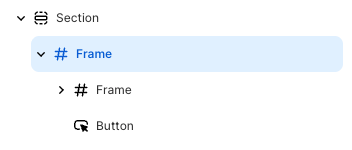
You can nest frames inside other frames, combining different frame settings to build more complex layouts.
### 
## Frame vs. Stack — which one to use
## FAQs
**If I resize a child element, does the Frame resize to fit it?**
No. The Frame's own bounds stay as set — resizing a child doesn't affect the Frame.
**If I resize the Frame, what happens to its children?**
Each child repositions according to its own Constraints to fit the new Frame size. The child's Size and Constraint settings don't change — only its computed position does.
**Do elements inside a Frame automatically move when I hide one of them?**
No — that's the key difference from a Stack, where children reflow automatically.
**Can I link both a Frame and a Button inside it?**
No — this creates nested `` tags, which is invalid HTML and behaves unpredictably across browsers. Link the Frame or the child element, not both.
## Related articles
Constraints
Stack elements
Edit elements with the Inspector panel