# Get to know the editor
FoxStudio is where you build and edit your Foxify pages. This guide walks you through each part of the editor, so you know where to find every tool.
The FoxStudio editor is divided into three main areas:
| Area | What you use it for |
| --------------------------------------- | ----------------------------------------------------------------------------------------- |
| [**Top bar**](#top-bar) | Control your editing view, page settings, preview on different devices, save and publish. |
| [**Left sidebar**](#left-sidebar) | Add elements, manage pages and templates, and open editor tools. |
| [**Canvas**](#canvas) | See and edit your page. |
| [**Inspector panel**](#inspector-panel) | Adjust settings for the page or the selected section/ element. |
## Top bar
The Top Bar menu in FoxStudio helps you manage the page and offers quick access to app settings.
| Tool | What it does |
| --------------------------------------------------------------------- | ---------------------------------------------------------------------------------------------------------- |
| **Menu** | Select the Foxify logo to go back to your dashboard or access other options. |
| [**Page settings**](https://docs.foxecom.com/foxify-app/foxstudio/page-customization/page-settings) | Configure how and where your page is published |
| **Device selector** | Switch between **desktop**, **tablet**, and **mobile** to see and edit how your page looks on each device. |
| [**Pan & zoom mode**](https://docs.foxecom.com/foxify-app/foxstudio/editor-tools/pan-and-zoom-mode) | Zoom in for precise editing or zoom out to see more of your page |
| **Preview** | Preview your page without leaving the editor |
| [**Editor preferences**](https://docs.foxecom.com/foxify-app/foxstudio/editor-tools/grids-guide-and-snap-lines) | Customize your editor experience and preferences |
| [**Undo/ Redo**](https://docs.foxecom.com/foxify-app/foxstudio/editor-tools/undo-and-redo) | Reverse or repeat your latest changes. |
| **View live** | Open the published version of your page in a new tab. |
| **Publish/ Save settings** | Save your changes or publish the page when you're ready to make them live |
When editing a product or collection template, you'll also see **Assigned products** or **Assigned collections**, which show which products or collections use this template.
## Left sidebar
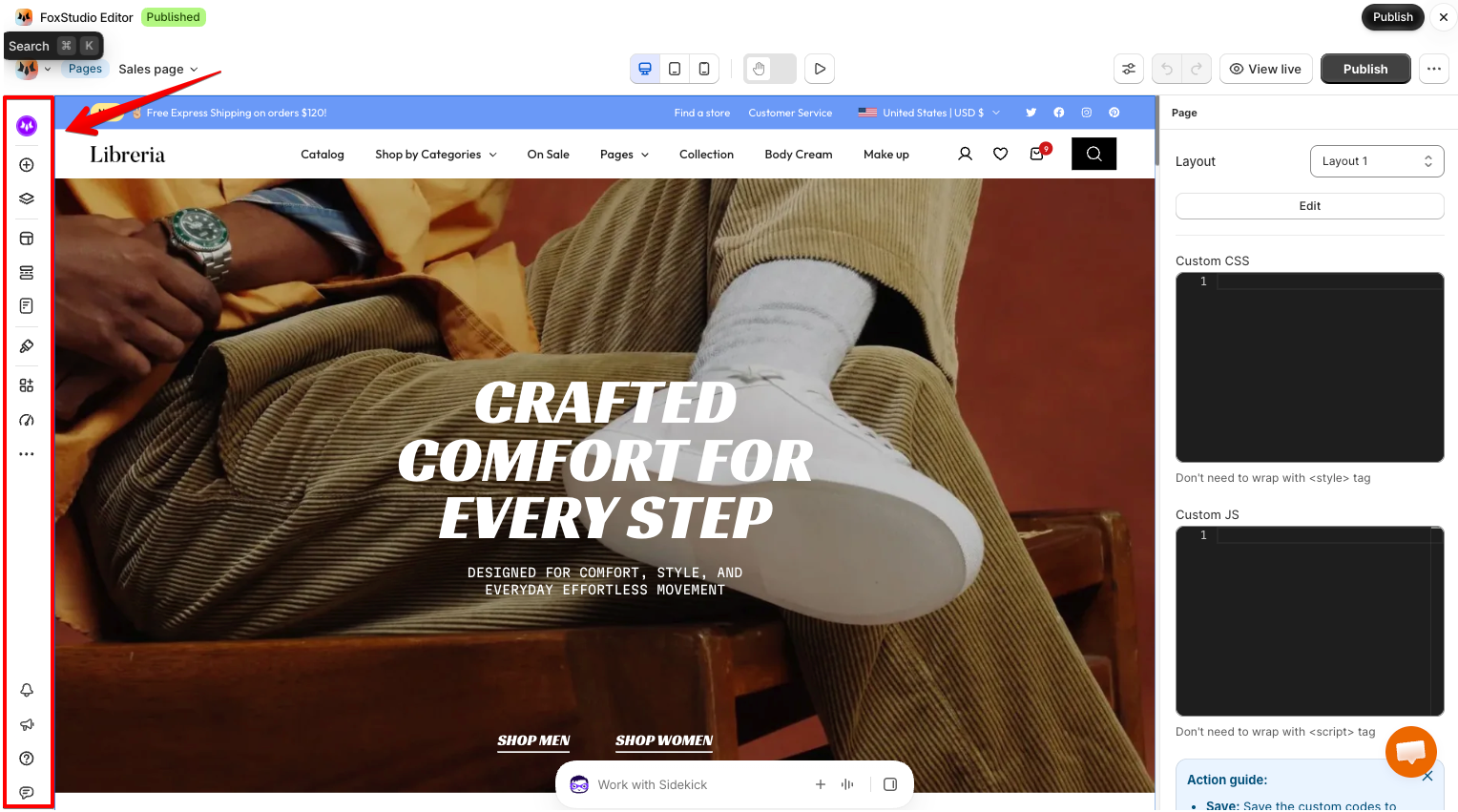
| Tool | What it does |
| ------------------------------------------------------------------------------------------------ | ----------------------------------------------------------------------- |
| [**Foxie AI**](https://docs.foxecom.com/foxify-app/foxify-ai/foxie-ai-agent-build-and-edit-pages-by-chatting) | Build and edit your page by chatting with AI. |
| **Add to page** | Add elements, sections, and app blocks to your page. |
| [**Page layers**](https://docs.foxecom.com/foxify-app/foxstudio/editor-tools/page-layers) | See your page structure, and drag and drop to reorder elements. |
| **Page templates** | Open the template library to start from a ready-made design. |
| [**Layout templates**](https://docs.foxecom.com/foxify-app/foxstudio/editor-tools/layout-template) | Create, organize, and access your saved layouts for reuse across pages. |
| **Manage pages** | See all your Foxify pages and switch to another page. |
| [**Global styles**](https://docs.foxecom.com/foxify-app/foxstudio/page-customization/global-styles) | Set fonts, colors, and button styles for your whole store. |
| [**Manage apps**](https://docs.foxecom.com/foxify-app/integrations/overview) | Install Foxify extensions and third-party app integrations. |
| [**SEO checker**](https://docs.foxecom.com/foxify-app/foxstudio/editor-tools/seo-checker) | Check your page for SEO issues and get tips to fix them. |
#### More tools
Select **More (…)** at the bottom of the tool list to open:
| Tool | What it does |
| ----------------------------------------------------------------- | --------------------------------------------------------- |
| [**Custom codes**](https://docs.foxecom.com/foxify-app/foxstudio/editor-tools/custom-codes) | Add custom CSS or JavaScript to your page. |
| [**Revisions**](https://docs.foxecom.com/foxify-app/foxstudio/editor-tools/page-revisions) | See past versions of your page and restore one if needed. |
| [**Theme settings**](https://docs.foxecom.com/foxify-app/foxstudio/page-customization/theme-settings) | Open your theme's settings. |
At the very bottom of the sidebar, you'll find notifications, what's new, help, and feedback.
## Canvas
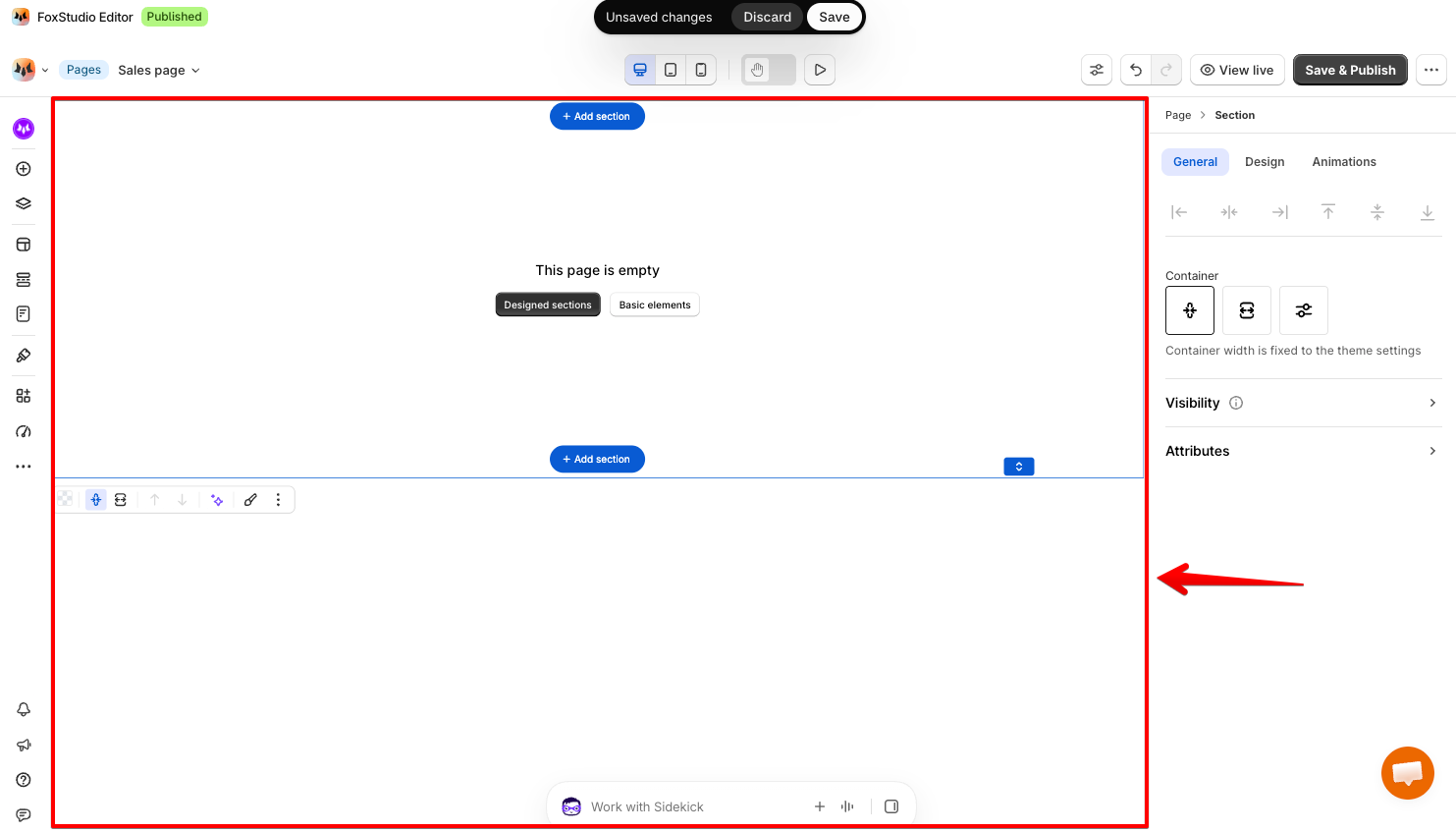
The canvas shows your page as it will look on your store.
* **Select an element:** Click any element to select it. A blue label, like **Section**, shows what type of element you've selected.
* **Element toolbar:** When you select an element, a toolbar appears with quick actions, such as duplicate and delete.
* **Add a section:** Hover between sections and select **+ Add section**.
Learn more in [Add and edit elements](https://docs.foxecom.com/foxify-app/foxstudio/add-and-edit-elements).
## Inspector panel
The Inspector on the right shows settings for whatever you've selected.
**When nothing is selected**, you'll see settings for the whole page:
* **Layout:** choose which [layout template](https://docs.foxecom.com/foxify-app/foxstudio/editor-tools/layout-template) this page uses, or select **Edit** to change it.
* **Custom CSS** and **Custom JS:** add code that applies only to this page. You don't need to wrap it in `