# Undo & Redo

Effortlessly navigate your design decisions and achieve the perfect layout using the Undo and Redo features.

* **Undo:** Revert to the previous state of your website editing session
* **Redo:** This function reverses an Undo action. Maybe you hit Undo too quickly and want to reinstate the change you just reverted. Click Redo to bring back the edit you had undone.

## How to use the Undo and Redo feature

{% hint style="success" %}

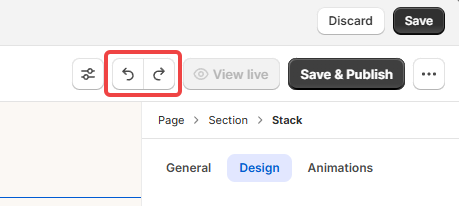
1. To **undo** a change, click on <img src="https://1749964694-files.gitbook.io/~/files/v0/b/gitbook-x-prod.appspot.com/o/spaces%2FfgpgvtRaQLc36GYyIktZ%2Fuploads%2FRblVy4Gq8rCMTeHUgK6r%2FUndoIcon.svg?alt=media&#x26;token=42bcd7e1-e599-4caa-9c46-0cd0c6fa0216" alt="" data-size="line"> next to **Preview**.
2. To **redo** a change, click on <img src="https://1749964694-files.gitbook.io/~/files/v0/b/gitbook-x-prod.appspot.com/o/spaces%2FfgpgvtRaQLc36GYyIktZ%2Fuploads%2FwdrKqH9KZfe3Ur7Gm0XD%2FRedoIcon.svg?alt=media&#x26;token=422bfa69-4371-47d1-b165-ecb5bcbef27c" alt="" data-size="line">.
   {% endhint %}

<figure><img src="https://1749964694-files.gitbook.io/~/files/v0/b/gitbook-x-prod.appspot.com/o/spaces%2FfgpgvtRaQLc36GYyIktZ%2Fuploads%2FPSZeCIRZikiN9koOXbJb%2Fimage.png?alt=media&#x26;token=5bfa30ce-b86c-463f-9c9b-6d0ad343cac1" alt=""><figcaption></figcaption></figure>

{% hint style="info" %}
You can also press CMD+Z (Mac) or CTRL+Z (Windows) on your keyboard to undo, and CMD + Shift + Z (Mac) or CTRL + Shift + Z (Windows) to redo.
{% endhint %}

## FAQs

### How many times can I use Undo and Redo?

Undo and redo actions are unlimited within a single editing session. This means you can freely experiment with your designs without fear of permanent changes. However, once you close the editor or sign out, your undo and redo history is cleared.

### Can I see all the edits and changes I have made in the Editor?

Want to revisit past versions of your website? The **Page revisions** feature is your time machine! Access a complete history of your site's changes, allowing you to compare different versions, restore previous layouts, or simply reminisce on your design journey.

Find the **Page revisions** section (or press **R**) to explore your website's evolution.

<figure><img src="https://1749964694-files.gitbook.io/~/files/v0/b/gitbook-x-prod.appspot.com/o/spaces%2FfgpgvtRaQLc36GYyIktZ%2Fuploads%2FbnKS4sf3cMzn3Bz3ywTm%2Fimage.png?alt=media&#x26;token=fe6ad17d-6f8e-4b0b-af44-6c56a18fd2ed" alt=""><figcaption></figcaption></figure>


---

# Agent Instructions: Querying This Documentation

If you need additional information that is not directly available in this page, you can query the documentation dynamically by asking a question.

Perform an HTTP GET request on the current page URL with the `ask` query parameter:

```
GET https://docs.foxecom.com/foxify-app/foxstudio/editor-tools/undo-and-redo.md?ask=<question>
```

The question should be specific, self-contained, and written in natural language.
The response will contain a direct answer to the question and relevant excerpts and sources from the documentation.

Use this mechanism when the answer is not explicitly present in the current page, you need clarification or additional context, or you want to retrieve related documentation sections.