# Page layers
***
## What is the Page layers panel?
The Page layers panel shows every section and element on your page in a hierarchy, from top to bottom. It mirrors exactly what's on your canvas — so when you move something in the Layers panel, it moves on the page too.
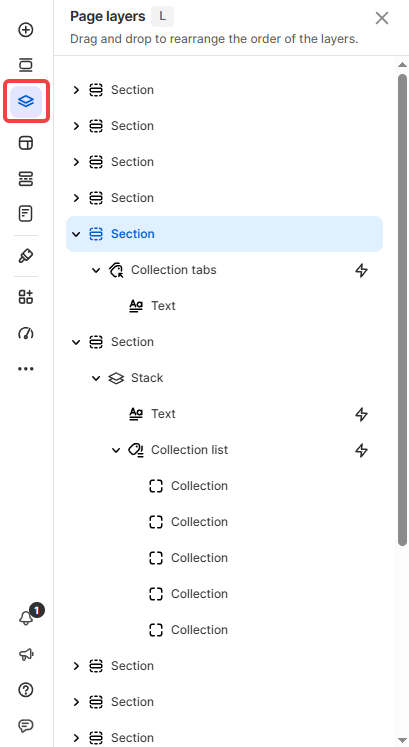
Use it when you need to select, reorder, or manage elements that are hard to click on directly — for example, elements stacked on top of each other, or elements nested deep inside a section.
To open: Click **Layers** in the left sidebar, or press **L**.
## What's inside
Each row in the Page layers panel is one element or section. Elements nested inside others show as children — click the parent to expand and see what's inside.
Two visual indicators to know:
* **⚡ icon** next to a layer name — that element has an animation enabled

* **Dimmed name** — that element is hidden on the current view (visibility off)

## Common tasks
* **Select an element that's hard to click on the canvas:** Open Layers → click the layer name directly. The element gets selected on the canvas instantly.
* **Reorder elements or sections:** Drag a layer up or down in the panel. The element moves to the new position on the page.
* **Rename, duplicate, or export an element:** Click the layer name → click the **More actions** icon (⋯) next to it → choose the action you need.
* **Check if an element is hidden or has an animation:** Look for the dimmed name (hidden) or ⚡ icon (animated) without opening the Inspector panel.
## Tips
* **Reordering in Layers = reordering on canvas:** Dragging a layer changes its actual position on the page — not just the panel view.
* **Use Layers to navigate complex pages:** On pages with many nested elements, the canvas gets hard to click accurately. Layers panel is faster for selecting exactly what you need.
## Related resources
Inspector panel
Animations