# Autosave
Building a website shouldn't be stressful. Autosave automatically saves your website as you work in FoxStu
Every change you make, from editing text to adjusting layouts, is continuously saved in the background. This eliminates the worry of losing your progress due to unexpected events like browser crashes or accidental window closures.
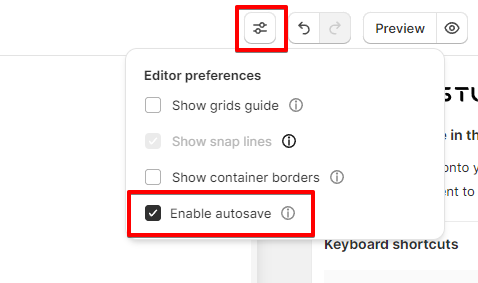
## To enable/ disable Autosave
{% hint style="success" %}
**Steps:**
1. In the Editor, open the **Editor preferences.**
2. Check/uncheck the option E**nable autosave** to enable/disable the feature.
{% endhint %}
{% hint style="info" %}
**Protip**:
Check Your Internet Connection: For optimal functionality, ensure a stable internet connection while working in the Editor. This guarantees smooth synchronization of your changes with Foxify's servers.
{% endhint %}
## FAQ
### **Does Autosave Work Offline?**
Unfortunately, Autosave only functions when you have an active internet connection. However, FoxStudio automatically saves your work when you close the browser window or tab.
### Autosave in Page revisions
Saved versions made via autosave won't be counted in the [Page revisions](/foxify-app/legacy-editor/advanced-features/page-revisions.md).
---
# Agent Instructions: Querying This Documentation
If you need additional information that is not directly available in this page, you can query the documentation dynamically by asking a question.
Perform an HTTP GET request on the current page URL with the `ask` query parameter:
```
GET https://docs.foxecom.com/foxify-app/foxstudio/editor-tools/autosave.md?ask=
```
The question should be specific, self-contained, and written in natural language.
The response will contain a direct answer to the question and relevant excerpts and sources from the documentation.
Use this mechanism when the answer is not explicitly present in the current page, you need clarification or additional context, or you want to retrieve related documentation sections.