# Published page is not visible on live store
If you've published a page using Foxify but it isn't appearing on your live store, here are some common solutions to help you resolve the issue:
## Check the assigned theme
Foxify can be set to work with any theme (live theme or draft theme).
If it’s not set to the published theme, the page won’t appear on the live store.
**🛠️** Steps to verify:
1. From Foxify dashboard, go to **Settings > General.**
2. Check the theme Foxify works with.
3. Ensure it matches the theme you’ve published in Shopify.
If the themes don’t match, update the assigned theme and republish the page!
Pick a theme to work with Foxify
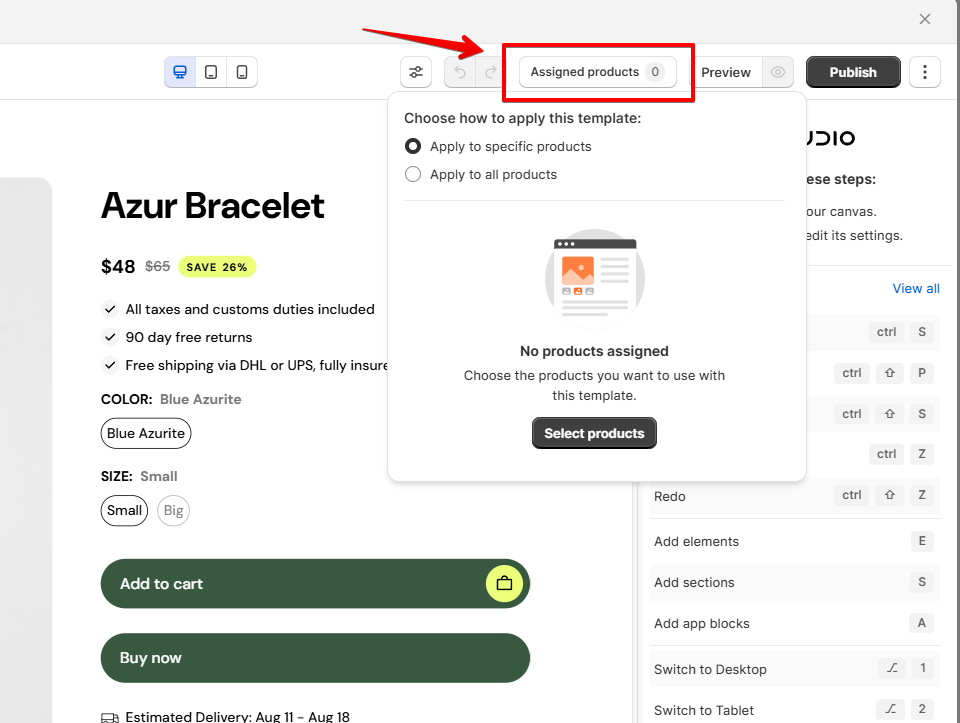
## **Assign products/ collections to templates**
For product or collection pages, templates need to be tied to specific items to display correctly.
**🛠️** Steps to verify:
1. Select the page you have created to open the editor.
2. In the top bar, select **Assigned products/collections** and select the products/collections you want to use in the template.
*See more:*
[Assign a product page to products](https://docs.foxecom.com/foxify-app/pages/page-creation/create-a-product-page#assign-a-product-page-to-products)\
[Assign a collection page to collections](https://docs.foxecom.com/foxify-app/pages/page-creation/create-a-collection-page#assign-a-collection-page-to-collections)
## **Clear cache and check store URL**
Browser caching or an incorrect URL might be hiding your updates.
**🛠️** Steps to verify:
1. Clear your browser’s cache and cookies.
2. Refresh the page.
3. Ensure you’re accessing the correct store URL.
**Pro tip:** Test your page on a different browser or device to confirm it’s live.